
IXI MEGA M6 Manual de usuario


目录
1.
Overview........................................................................................................................ 1
1.1.
Introduction.......................................................................................................... 1
1.2.
Product features.................................................................................................. 1
1.3.
Hardware overview ............................................................................................ 1
1.4.
Routing application Summary ....................................................................... 2
1.5.
Packing list ............................................................................................................ 3
2.
Control、interface、connection ......................................................................... 4
2.1.
Control introduced............................................................................................. 4
2.2.
Interface introduced .......................................................................................... 8
2.3.
Wiring diagram..................................................................................................11
3.
Connect to computer..............................................................................................12
3.1.
WINDOWS installation and setup...............................................................12
3.2.
MACOS installation ..........................................................................................20
3.3.
Mainstream audio application Settings....................................................20
4.
Connect IOS and Android system .....................................................................21
4.1.
On The Go connection...............................................................................21
4.2.
Working principle Block diagram ...............................................................21
4.3.
Analog connection mode ..............................................................................22
4.4.
Working principle Block diagram ...............................................................23
4.5.
Communication with mobile devices application example...............23
5.
Technical information specification...................................................................24
6.
Safety precautions....................................................................................................25
7.
Warranty information .............................................................................................26

IXIMEGAPteLtd
页
123
1. An overview of the
1.1 Introduction
Thank you for purchasing the IXI MEGA M6 audio interface. The USB series
audio interface, designed by IXI MEGA Pte. Ltd. of Singapore, innovating new
usage scenarios such as music performance, recording and creation.
1.2 Product features
Equipped with a 16 - core processor, audio processing at very low latency.
Unique touch control mode.
It can control voice amplifier gain of sound card, +48V phantom power supply
and output audio signal in the driver panel of Windows system.
Input level signal can be observed through LED level display.
The multi-functional Micro USB interface has two working modes, On The
Go and analog working modes. Users can communicate with IOS system and
Android system in digital and analog modes.
Optional wireless listening module, interface extension function.
1.3 Hardware overview
Support sampling rates of 24-bit/44.1kHz, 48kHz, 88.2khz, 96kHz,
176.4khz and 192 kHz Provide 8, 16, 32, 64, 128, 256, 512, 1024, 2048, ASIO
buffer Settings
High accuracy analog to digital converter (114 db dynamic range)
Channel VU displays - 1/2 input and 1/2 output level indicating LED
*20 status indicator LED*8
Channel select touch key*1

IXIMEGAPteLtd
页
124
Gain/volume plus touch*1
Gain/volume minus touch *1
+48V phantom power touch key *1
Fully balanced voice input/line input *1
XLR/TRS fully balanced voice player input/musical instrument input*1
XLR/TRS headphone output *1
LINE IN balance input *2
LINE OUT balance output *2
Stereo LINE OUT 3/4 output *1
XLR/TRS fully balanced voice player input/musical instrument input*1
Mobile phone interface Micro USB*1 (support digital OTG and analog
communication)
PC/DIRECT/MONITOR toggle switch *1 (PC mode/pass-through mode/pass-
through mode open monitoring) usb-b 2.0 data interface *1
power supply interface Micro USB*1 (connect to external power supply when
the USB power of the computer is insufficient)
1.4 Summary of routing application
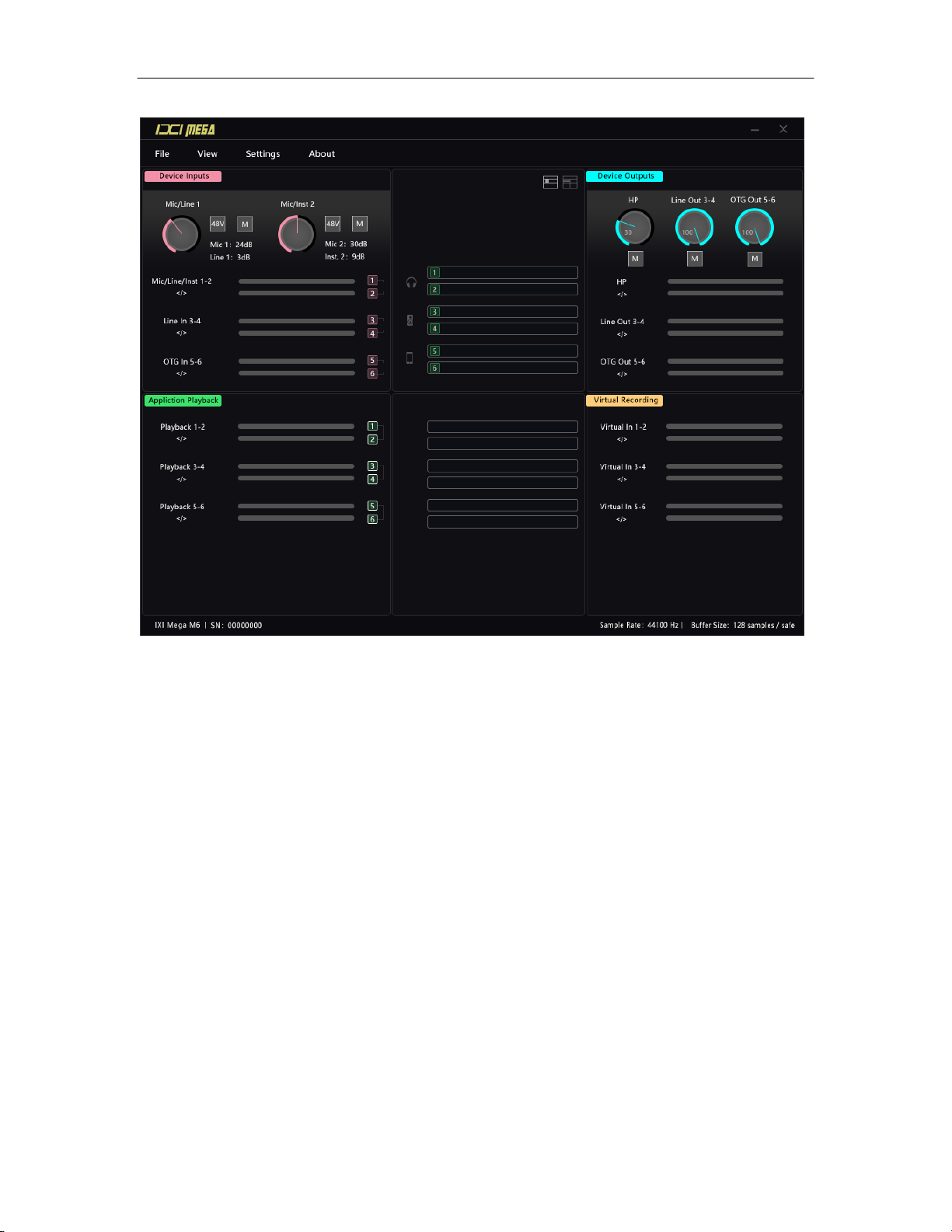
Provides 2 working modes, matrix mode and drag and drop mode. During use,
users can select the appropriate pattern according to the application scenario
and can import and export routing information. Please refer to: 3.1, WINDOWS
installation and setup.
Drag and drop routing interface
IXIMEGAPteLtd
页
125

IXIMEGAPteLtd
页
126
Matrix routing interface
1.5 Packaging List
One audio interface host, one usb-b data cable, one Micro USB power cable,
one Micro USB to 3.5mm audio cable, one dedicated adapter and one
instruction manual.

IXIMEGAPteLtd
页
127
2. Control、interface、connection
2.1. Control introduction

IXIMEGAPteLtd
页
128
Introduction to touch control mode and toggle switch.
SELECT
Channel SELECT touch key, touch SELECT SELECT channel, SELECT the
corresponding digital light on, at this time can be operated, no operation after
5 seconds back to the level volume indicator state.
+/-
When the channel is selected as IN1, the gain of voice amplifier or line input 1
can be adjusted by touching or pressing +/-.
When channel IN2 is selected, the gain of voice player or instrument input 2
can be adjusted by touching or pressing +/-. When the channel is selected as
out1-2, the volume of output can be adjusted by touching or pressing +/-. The
LED will change accordingly during adjustment, and return to the level volume
indicating state after 5 seconds of no operation.
+48V
When the channel is set as IN1, +48V can be touched to open or close the
+48V phantom power supply of MIC/LINE 1 channel XLR interface (excluding
6.35TRS). The same is true for IN2.
When +48V is turned on, the +48VLED light above the corresponding channel
will light up.
PC/DIRECT/MONITOR(PC Mode/pass-through mode/pass-through mode
enable listening)
Toggle the switch in the DIRECT position, the panel corresponding to the
DIRECT red light.
Toggle the switch in the MONITOR position, and the panel corresponding to
the DIRECT light.

IXIMEGAPteLtd
页
129
Panel LED lights
1. Level indicator or gain/volume indicator for selected channel
MIC/LINE 1 channel +48V switch indicator light
MIC/INST 2 channel +48V switch indicator light
DIRECT status indicator
5. Select the channel indicator light

IXIMEGAPteLtd
页
1210
Panel touch button
1. + 48 v switch
2. Channel selection
3. Gain/volume boost
4. Gain/volume reduction
DIRECT switcher
Tabla de contenidos
Otros manuales de Accesorios de IXI MEGA


