IONODES ION-E100 Manual de usuario

DOCUMENT APPROVED FOR GENERAL DISTRIBUTION
ION-E100
User Manual
Version 1.7
InterTest, Inc • 303 Route 94 • Columbia, NJ 07832 • 908-496-8008 • [email protected] • www.intertest.com

Table of Contents
1BEFORE YOU BEGIN....................................................................................................................4
1.1 ABOUT THE ION-E100...............................................................................................................4
1.2 PARTS LIST ...............................................................................................................................5
2HARDWARE INSTALLATION .......................................................................................................6
2.1 EQUIPMENT INSTALLATION .........................................................................................................6
3CONNECTIONS..............................................................................................................................7
3.1 FRONT PANEL............................................................................................................................7
3.2 REAR PANEL .............................................................................................................................8
4SERIAL PORT CONNECTIVITY..................................................................................................11
5UNDERSTANDING LED STATUS...............................................................................................13
Normal Operation:.........................................................................................................................13
Special Operations:.......................................................................................................................13
6INITIAL SYSTEM CONFIGURATION ..........................................................................................14
6.1 NETWORK CONFIGURATION......................................................................................................14
6.2 USING THE ION-E100 WEB APPLICATION .................................................................................18
Setting up the NTP server.............................................................................................................19
Configuring Video Parameters......................................................................................................19
7PERFORMING A FIRMWARE UPDATE .....................................................................................21
7.1 BATCH FIRMWARE UPDATE ......................................................................................................22
8RECORDING ON THE EDGE ......................................................................................................25
8.1 CONFIGURATION ......................................................................................................................25
8.2 AUDIO RECORDING ..................................................................................................................28
8.3 RETRIEVAL /MANAGEMENT OF VIDEO CLIPS .............................................................................28
8.3.1 Displaying Clips .................................................................................................................29
8.3.2 Downloading Clips.............................................................................................................29
8.3.3 Locking And Unlocking Clips.............................................................................................29
8.3.4 Deleting Clips.....................................................................................................................30
9POINT TO POINT CONNECTIONS .............................................................................................31
InterTest, Inc • 303 Route 94 • Columbia, NJ 07832 • 908-496-8008 • [email protected] • www.intertest.com

ION-E100 –User manual
Page 3 of 36
ANNEX A –CONFIGURATION PARAMETER REFERENCE............................................................32
ANNEX B –TROUBLESHOOTING GUIDE ........................................................................................35
ANNEX C –STATEMENT LIMITED WARRANTY..............................................................................36
InterTest, Inc • 303 Route 94 • Columbia, NJ 07832 • 908-496-8008 • [email protected] • www.intertest.com

ION-E100 –User manual
Page 4 of 36
1 Before you begin
1.1 About the ION-E100
The ION-E100 single port encoder delivers high quality H.264 video encoding to the video
surveillance market. It is an embedded, high-performance digital video encoder, capable of
encoding an analog camera input using multiple profiles at a combined 90 images per second
(NTSC/PAL) at 4CIF resolution.
Embedding support for networked API’s, the ION-E100 can be integrated into a networked video
management system allowing for centralized monitoring and management in a scalable and
expandable IP surveillance system. Contact IONODES for a list of supported VMS systems.
The high-performance encoding capability of the ION-E100 offers a cost-effective way to service
existing analog cameras while providing the benefits of video over IP networks.
The ION-E100 provides innovative configuration options and tools that can significantly
decrease the amount of time and effort required to deploy a unit. Using web-based configuration
tools, users can easily and remotely manage all aspects of the appliance.
To support high-performance encoding, while keeping the total cost of ownership within budget
constraints, the ION-E100 uses highly efficient dual stream H.264 compression and supports an
optional third MJPEG stream.
Advanced features, such as “edge-recording” and “video analytics” allow you to extend usage of
the ION-E100 well into the future.
InterTest, Inc • 303 Route 94 • Columbia, NJ 07832 • 908-496-8008 • [email protected] • www.intertest.com

ION-E100 –User manual
Page 5 of 36
1.2 Parts List
Qty Description
1 ION-E100 appliance
1 Terminal block socket (P/N Weidmuller 1727660000 or 1727580000)
Note: When unpacking, inspect the shipment box and appliance to identify any possible
damages due to shipping. Make sure all items have been delivered and that no
items are missing. Contact your Ionodes representative should you find any damag-
es or defects.
Note: The product serial number label helps the Ionodes product support team identify
your device and its factory configuration in the event that your ION-E100 or its com-
ponents require service. The label is attached on the underside of the enclosure.
.
InterTest, Inc • 303 Route 94 • Columbia, NJ 07832 • 908-496-8008 • [email protected] • www.intertest.com

ION-E100 –User manual
Page 6 of 36
2 Hardware Installation
2.1 Equipment Installation
The ION-E100 can be placed on a flat surface, such as a desktop, or mounted via the available
mounting holes.
When installing the ION-E100, position the unit to allow for cable clearance at the front and rear
of the unit. Make sure that minimal air flow is provided to the unit.
The ION-E100 can be mounted to various mounting structures via the available mounting holes.
Note that mounting screws are not shipped with the device.
Warning: Be careful not to damage the enclosure when using mounting screws.
InterTest, Inc • 303 Route 94 • Columbia, NJ 07832 • 908-496-8008 • [email protected] • www.intertest.com

ION-E100 –User manual
Page 7 of 36
3 Connections
Familiarize yourself with the ION-E100 front and rear panels before connecting any equipment to
the unit. The ION-E100 offers a single analog video input and associated I/Os and audio
connections.
3.1 Front Panel
VIDEO IN
BNC connector interface for video input source (NTSC / PAL).
MICRO SD (optional)
Micro SD connector available for edge recording capability. Please insert a formatted
(FAT) micro SD card to enable associated functionality.
Note: A micro SD card is not provided with the device.
InterTest, Inc • 303 Route 94 • Columbia, NJ 07832 • 908-496-8008 • [email protected] • www.intertest.com

ION-E100 –User manual
Page 8 of 36
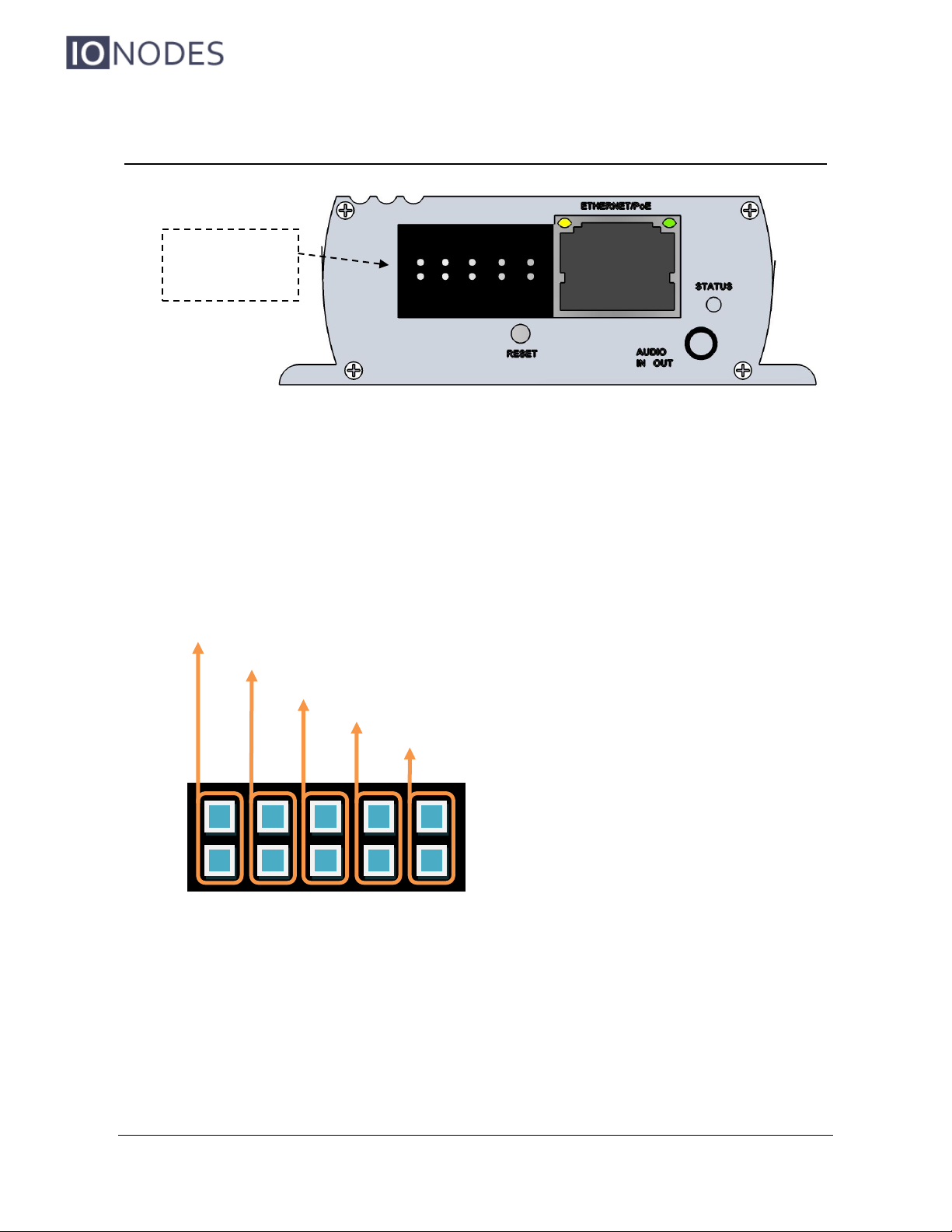
3.2 Rear Panel
Terminal Bloc Header
This header connector is used to connect the supplied Terminal Bloc Socket which
provides the interface to serial port, I/O and power connections.
Below is a detailed view of this Terminal Bloc Socket:
Terminal Bloc
Header
RL I1 Rx+ Tx+ 12v
RL I2 Rx- Tx- GND
Relay Output
Digital Input Pins #1 & #2
Receiver pair for serial communication (4 wire RS-422 or RS-485)
Transmitter pair for serial communication (4 wire RS-422 or RS-485)
12V power source
InterTest, Inc • 303 Route 94 • Columbia, NJ 07832 • 908-496-8008 • [email protected] • www.intertest.com

ION-E100 –User manual
Page 9 of 36
The pin out description of the Terminal Bloc Socket is as follows:
Number
Description
Direction
1
RL (Relay)
Out
2
RL (Relay)
Out
3
I1 (Digital Input 1)
In
4
I2 (Digital Input 2)
In
5
RX+
In
6
RX-
In
7
TX+
Out
8
TX-
Out
9
12V supply
In
10
Ground
-
AUDIO IN / OUT
3.5 mm jack which can be used to connect both an audio input and an audio output
source. The stereo channel provided by this connector exposes one channel for the
audio input and the other for the audio output.
STATUS
The system status LED is a bi-color (Yellow - Orange) LED providing detailed
InterTest, Inc • 303 Route 94 • Columbia, NJ 07832 • 908-496-8008 • [email protected] • www.intertest.com

ION-E100 –User manual
Page 10 of 36
information on the current state of the device.
ETHERNET / PoE
This is the ION-E100 network port. Please use a straight RJ45 (cat. 5 or 6) network
cable. The ION-E100 accepts a Power-Over-Ethernet (PoE) compliant power source if
needed.
RESET
The reset button can be used to perform a hardware reset, or to perform a complete
reset to default settings of the device’s configuration parameters.
InterTest, Inc • 303 Route 94 • Columbia, NJ 07832 • 908-496-8008 • [email protected] • www.intertest.com
Tabla de contenidos
Otros manuales de Convertidor de medios de IONODES

IONODES
IONODES ATOMAS-DUO-HDMI Manual de usuario

IONODES
IONODES ION-R100S Manual de usuario

IONODES
IONODES ATOMAS-MINI Manual de usuario

IONODES
IONODES ION-R100 Manual de usuario

IONODES
IONODES ION-R200 Manual de usuario

IONODES
IONODES ION-R100S Manual de usuario

IONODES
IONODES ATOMAS-IOT-DUAL Manual de usuario

IONODES
IONODES ION-R100S Manual de usuario

IONODES
IONODES ION-E100-HD Manual de usuario