Interlogix TVE-110 Manual de usuario

TVE-110/410/810/1610
H.264 IP Video Encoder
User Manual
P/N 1072899A • REV 1.0 • ISS 28JAN15

Copyright
©
2015United Technologies Corporation.
Interlogix is part of UTC Building & Industria
l Systems, a unit of
United Technologies Corporation.
All rights reserved.
Trademarks and
patents
Trade names used in this document may be trademarks or registered
trademarks of the manufacturers or vendors of the respective
products
.
Manufacturer
Interlogix
2955 Red Hill Avenue, Costa Mesa, CA 92626
-5923, USA
Authorized EU manufacturing representative:
UTC Fire & Security B.V.
Kelvinstraat 7, 6003 DH Weert, The Netherlands
Certification
N4131
FCC compliance
Class B:
This equipment has been tested and found to comply with
the limits for a Class B digital device, pursuant to part 15 of the FCC
Rules. These limits are designed to provide reasonable protection
against harmful interference in a residential installation. T
his
equipment generates, uses, and can radiate radio frequency energy
and, if not installed and used in accordance with the instructions,
may cause harmful interference to radio communications.
There is no guarantee that interference will not occur in a pa
rticular
installation. If this equipment does cause harmful interference to
radio or television reception, which can be determined by turning the
equipment off and on, the user is encouraged to try to correct the
interference by one or more of the followin
g measures:
•
Reorient or relocate the receiving antenna.
•
Increase the separation between the equipment and receiver.
•
Connect the equipment into an outlet on a circuit different from
that to which the receiver is connected.
•
Consult the dealer or an experienced radio/TV technician for
help.
European Union
directives
12004/108/EC (EMC directive):
Hereby, UTC Fire & Security
Americas Corporation, Inc
.,
declares that this device is in compliance
or with the essential requirements and other relevant provisions of
Directive 2004/108/EC
2012/19/EU
(WEEE directive): Products marked with this symbol
cannot be disposed of as unsorted municipal waste in th
e European
Union. For proper recycling, return this product to your local supplier
upon the purchase of equivalent new equipment, or dispose of it at
designated collection points. For more information see:
www.recyclethis.info.
Contact information
For
contact information, see www.utcfireandsecurity.com or
www.utcfssecurityproducts.eu.

TVE-110/410/810/1610 H.264 IP Video Encoder User Manual i
Content
Introduction 1
Package contents 1
Key features 1
Product description 2
Connections 3
Network Settings 5
TruVision Device Manager 5
Using a web browser 9
Before you start 9
Accessing the web browser 9
Menu tree 10
Live view 11
Description of live view 11
Capturing a snapshot 12
PTZ control 13
Video image settings 14
Configuration 15
Local configuration 15
Time settings 16
Network set up 17
Camera set up 29
Video streaming set up 31
Motion detection 33
Alarm settings 35
Video Loss 38
Tamper-proof alarm 39
Exception 39
Privacy masking 40
RS-485 settings 41
Scheduling record settings 42
Holiday settings 47
Managing user accounts 48
Playback 51
Encoder management 53
Searching system logs 53
Restoring default settings 53
Viewing device information 54
Restarting the device 54
Importing/exporting parameters 54

ii TVE-110/410/810/1610 H.264 IP Video Encoder User Manual
Upgrading the system 55
Specifications 56

TVE-110/410/810/1610 H.264 IP Video Encoder User Manual 1
Introduction
The TruVision TVE H.264 IP video encoder converts the analog camera streams
to compressed IP video streams. These streams are transited to network video
recorders (NVR) or video management systems (VMS) for remote storage, live-
view and playback purpose.
This user manual provides basic information on setting up and using the TVE-
110, TVE-410, TVE-810 and TVE-1610 models.
The encoder is shipped with web browser menus in seven languages: English,
Simplified Chinese, French, German, Portuguese, Russian, and Spanish.
Package contents
The TruVision TVE H.264 IP video encoder is shipped with the following items:
• TVE encoder
• Power adaptor
• Power cable
• Quick start guide
• CD (includes the user manual and TruVision Device Manager)
Key features
The following key features are supported by TVE encoders:
• 1/4/8/16-channel H.264 encoding with dual stream output
• Multiple resolution options: WD1, 4CIF, 2CIF, CIF and QCIF
• Support audio & video compounded stream
• Device configurable remote recording on Net HDD
• Flexible and powerful recording mechanism: Scheduled, event triggered,
alarm triggered, cycle recording, pre and post recording
• Bi-directional audio
• Local PTZ control via RS-485/422 port and burnt-in multiple PTZ protocols
• Alarm input and output
• Support ONVIF, PSIA and CGI communication
• Discoverable via the TruVision Device Manager Tool

2 TVE-110/410/810/1610 H.264 IP Video Encoder User Manual
Product description
Figure 1: Front panel
1-channel:
4-channel:
8-channel:
16-channel:
LED indicator
Description
POWER
/PWR The LED lights up RED when the device is working. It is not lit when
the device is powered down.
TX/RX
The LED is not lit when there is no network connection.
It lights up green and flashes when data is being transmitted/received.

TVE-110/410/810/1610 H.264 IP Video Encoder User Manual 3
Figure 2: Rear Panel
1-channel:
4-channel:
8-channel:
16-channel:
Connections
See Figure 2 on page 3 for information on connecting the power, camera, audio
and network cables.
Alarm connections
The TVE encoder supports the open/close relay input as the alarm input mode.
When the alarm input signal not in open/close relay signal mode, please follow
the connections shown below:

4 TVE-110/410/810/1610 H.264 IP Video Encoder User Manual
Figure 3: Alarm input connections
Alarm input connections for Emerson alarm:
Alarm input connections for normal alarm:
1
. Emerson alarm
2
. V output
3
. 10 V regulator
4. 4N35 optocoupler
5. Relay output
6. Normal alarm
7. JQC-3FG 24 V relay
The TVE encoder supports the open/close relay input as the alarm output mode.
The alarm input can be selected to NO or NC. Different alarm output connection
methods are applied to the AC or DC load. See Figure 3.
For TVE-110, you need to connect G and NO manually and then connect C and
NO to the alarm devices.

TVE-110/410/810/1610 H.264 IP Video Encoder User Manual 5
Network Settings
This chapter explains how to use TruVision Device Manager to find and configure
the IP address and other parameters of the device.
Note: The default user name of TVE is admin, and password is 1234. The default
IP address is 192.168.1.70
TruVision Device Manager
The TruVision Device Manager tool can be found on the CD shipped with that
product. This tool automatically identifies TruVision devices that support “auto-
discovery” in the same subnets. You can view and modify the IP address of any
discovered device.
To install the TruVision Device Manager:
1. Insert the CD in the computer’s CD/DVD drive.
2. Browse to the folder Tool and double-click the Setup file located in the folder.
3. Click Next.
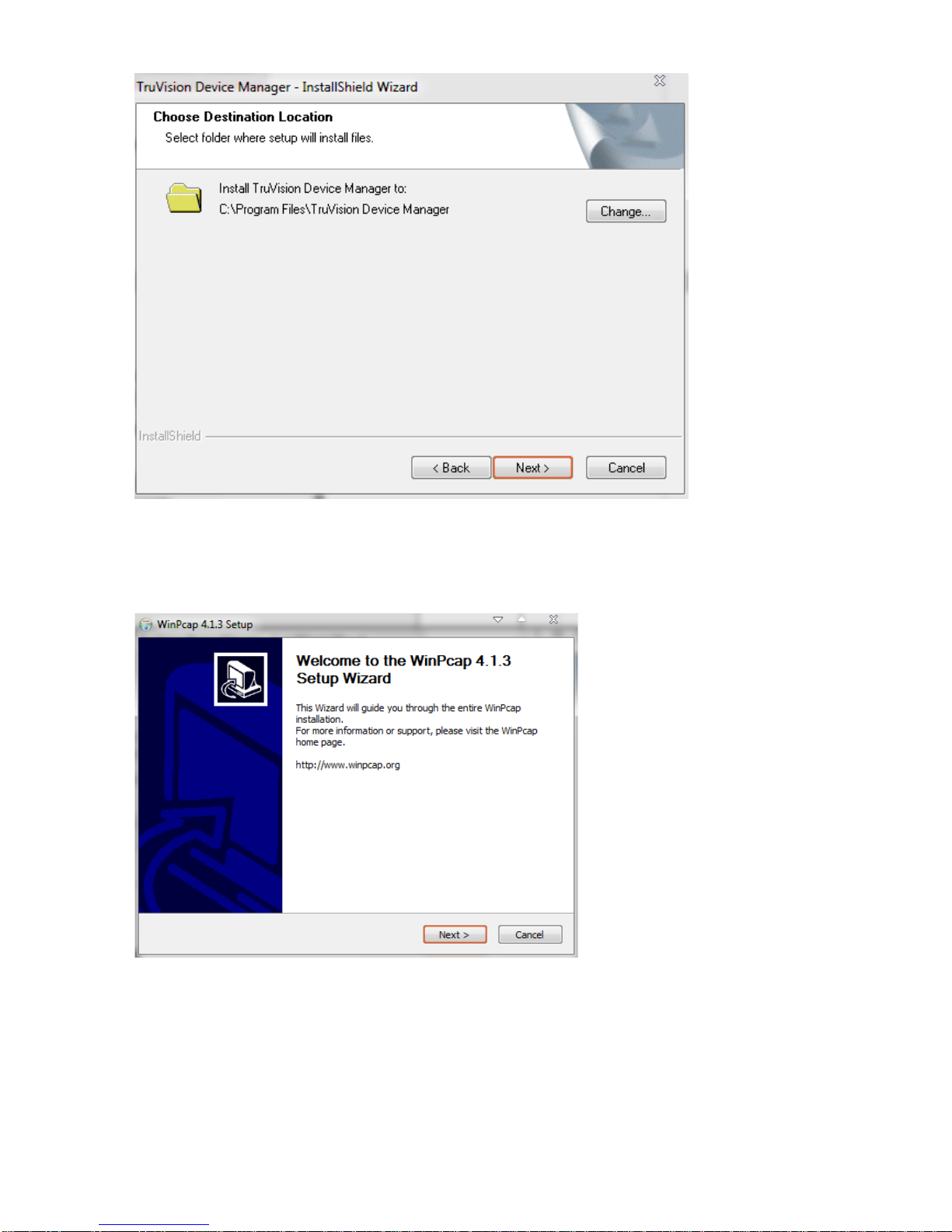
4. Select the folder where the setup will install the files then click Next.

6 TVE-110/410/810/1610 H.264 IP Video Encoder User Manual
5. The program requires a utility called WinPcap to be installed on the computer.
If it is already installed, go to step 6.
If the program is not installed, the WinPcap window appears. Follow the on-
screen instructions.
6. The TruVision Device Manager Wizard appears. Click Finish to complete its
installation.
Using the TruVision Device Manager
The setup will install the necessary files and place the following shortcut on your
desktop.
Otros manuales para TVE-110
1
Este manual sirve para los siguientes modelos
3
Tabla de contenidos