Instant AP100 Hoja de especificaciones

INSTANT®AIR PURIFIER AP100
150-0001-01_150-0001-01-0102_IB_AP100_US-EN_Retail_Manual_FINAL.indd 1150-0001-01_150-0001-01-0102_IB_AP100_US-EN_Retail_Manual_FINAL.indd 1 10/15/21 12:53 PM10/15/21 12:53 PM

Welcome
Breathe easier with cleaner air in an instant!
Instant Air Purifiers deliver peace of mind by cleaning the air in your
home in minutes. And because it’s from Instant Brands™— makers
of the world’s most loved multicooker — you can set it and forget it,
knowing it’ll do its job simply and easily. Welcome to cleaner air!
OM.
150-0001-01_150-0001-01-0102_IB_AP100_US-EN_Retail_Manual_FINAL.indd 2150-0001-01_150-0001-01-0102_IB_AP100_US-EN_Retail_Manual_FINAL.indd 2 10/15/21 12:53 PM10/15/21 12:53 PM

CONTENTS
Important Safeguards 2
Safety Warnings 2
What’s in the box? 4
What to expect 5
Control panel 6
Getting started 7
How to use your air purifier 8
How to care for your air purifier 12
If you have problems 13
Warranty 14
Learn more 16
Notes 17
This equipment has been tested and found to comply with the limits for a Class B digital
device, pursuant to part 15 of the FCC Rules. These limits are designed to provide reasonable
protection against harmful interference in a residential installation. This equipment
generates, uses and can radiate radio frequency energy and, if not installed and used in
accordance with the instructions, may cause harmful interference to radio communications.
However, there is no guarantee that interference will not occur in a particular installation.
If this equipment does cause harmful interference to radio or television reception, which can
be determined by turning the equipment off and on, the user is encouraged to try to correct
the interference by one or more of the following measures:
• Reorient or relocate the receiving antenna.
• Increase the separation between the equipment and receiver.
• Connect the equipment into an outlet on a circuit different from that to which the
receiver is connected.
• Consult the dealer or an experiences radio.TV technician for help (FCC).
150-0001-01_150-0001-01-0102_IB_AP100_US-EN_Retail_Manual_FINAL.indd 1150-0001-01_150-0001-01-0102_IB_AP100_US-EN_Retail_Manual_FINAL.indd 1 10/15/21 12:53 PM10/15/21 12:53 PM

2
Get started
3
Get started
Read all instructions before using and only use this air purifier
as described in this manual.
When using electrical appliances, basic safety precautions should
always be followed to reduce the risk of fire, electric shock, and injury
to persons.
Placement
• DO NOT use the air purifier in wet or humid environments, or outdoors.
This appliance is designed for indoor use only.
• DO NOT use the air purifier in an enclosed space where toxic vapors,
flammable dust, oxygen tanks, or flammable, combustible
or explosive gases are present.
• DO keep all objects away from the air intake grill. This air purifier
should only be used in rooms with temperatures between 50°F and
104°F (10°C to 40°C).
• DO allow 18 inches (457 mm) of clearance on all sides of the purifier
to allow adequate circulation of air around the product.
• DO NOT place the unit on soft surfaces such as a bed or sofa.
Always make sure to place the air purifier on a flat, level surface
before operation
• DO NOT sit on or place anything on top of the purifier.
• DO NOT place the purifier directly below an air conditioner to
prevent any moisture from getting into the purifier.
• DO NOT place the air purifier near or on top of sources of heat,
such as stove tops, ovens, radiators or computers.
• DO NOT place the air purifier directly in front of open flames,
including candles.
• DO NOT use this appliance with indoor smoke-type insect repellents
or in places with oily residues, burning incense, or chemical fumes.
Power
• DO make sure the plug fits properly into a polarized power outlet. To
reduce the risk of electric shock, this equipment has a polarized plug
(one blade is wider than the other). This plug will fit in a polarized
outlet only one way. If the plug does not fit fully in the outlet, reverse
the plug. If it still does not fit, contact qualified personnel to install
the proper outlet. Do not alter the plug in any way.
IMPORTANT SAFEGUARDS
SAFETY WARNINGS
150-0001-01_150-0001-01-0102_IB_AP100_US-EN_Retail_Manual_FINAL.indd 2150-0001-01_150-0001-01-0102_IB_AP100_US-EN_Retail_Manual_FINAL.indd 2 10/15/21 12:53 PM10/15/21 12:53 PM

3
Get started
• DO NOT operate the unit if cord or plug is damaged. Doing so may
result in injury or damage to the unit.
• DO NOT run the power cord under carpeting, rugs, furniture or
appliances. Place the power cord away from high-traffic areas.
• DO NOT use an extension cord with this unit.
• DO NOT use this appliance with any solid-state speed control device.
Cleaning and Repair
• DO unplug the appliance from the power supply before cleaning.
• DO inspect the unit frequently. Dirt that has collected should be
removed regularly to prevent excessive accumulation that may
result in flashover or fire.
• DO use appropriate personal protective equipment during cleaning
and filter removal.
• DO NOT insert fingers or objects into the air outlet.
• DO NOT handle the unit with wet hands. Thoroughly dry your hands
before handling any part of the air purifier.
• DO NOT immerse air purifier in water or liquids, or clean the
appliance with any liquid to avoid electric shock and/or electrical fires.
• DO NOT attempt to repair this device in any way or use any
replacement components or parts to modify the air purifier. Doing
so will void your warranty. Contact Customer Support (page 16)
immediately if your appliance is no longer working.
• If the unit is damaged, not functioning properly, produces a strange
noise, burning smell or smoke, discontinue use, unplug immediately
and contact Customer Support (page 16).
Filter
• DO only use Instant Air replacement filters for this unit, and in the
correct size designed for this unit. Do not attempt to use other filters
with this appliance.
• DO remove the plastic shipping bag from the Filter before use.
Other
• NOTE This appliance does not remove carbon monoxide (CO) or
radon (Rn). It cannot be used as a safety device to prevent or clean
up accidents with combustion processes and hazardous chemicals.
SAFETY WARNINGS
SAVE THESE INSTRUCTIONS
150-0001-01_150-0001-01-0102_IB_AP100_US-EN_Retail_Manual_FINAL.indd 3150-0001-01_150-0001-01-0102_IB_AP100_US-EN_Retail_Manual_FINAL.indd 3 10/15/21 12:53 PM10/15/21 12:53 PM

4
Get started
5
Get started
WHAT’S IN THE BOX?
Air Purifier*
Filter
Power cord included, not shown
*This product complies with the maximum allowable concentration of ozone of 0.050
parts per million by volume (ppmv) in a 24-h period
Control Panel
Air Intake Grill
Removable Base
To install filter
3-in-1 Filtration System
Exhaust Fan
150-0001-01_150-0001-01-0102_IB_AP100_US-EN_Retail_Manual_FINAL.indd 4150-0001-01_150-0001-01-0102_IB_AP100_US-EN_Retail_Manual_FINAL.indd 4 10/15/21 12:53 PM10/15/21 12:53 PM

5
Get started
WHAT TO EXPECT
Your new Instant Air Purifier uses advanced technology for cleaner air.
3-in-1 Filtration System
Uses 3 advanced technologies to keep your air clean, capturing 99.9%
of ultrafine airborne particles:
• HEPA-13 filter helps removes particles up to 0.3 microns in width.
• Activated carbon layer of the filter helps reduce odors.
• Antimicrobial filter coating to prevent microbial growth on the filter
and protect the filter from degradation
Plasma Ion Technology
Projects positive and negative ions into the air.
Cleaner Air in Minutes
Instant Air Purifier is verified to purify air of impurities 5x per hour.*
Works Automatically
Intelligent sensors constantly monitor air quality and environment
to automatically transition to Eco and Night modes.**
*Verified by AHAM, the Association of Home Appliance Manufacturers
**Sensors for air quality indicator have a margin of error of +/- 20 micrograms per cubic
meter in detecting changes in air quality
150-0001-01_150-0001-01-0102_IB_AP100_US-EN_Retail_Manual_FINAL.indd 5150-0001-01_150-0001-01-0102_IB_AP100_US-EN_Retail_Manual_FINAL.indd 5 10/15/21 12:53 PM10/15/21 12:53 PM

6
Get started
7
Get started
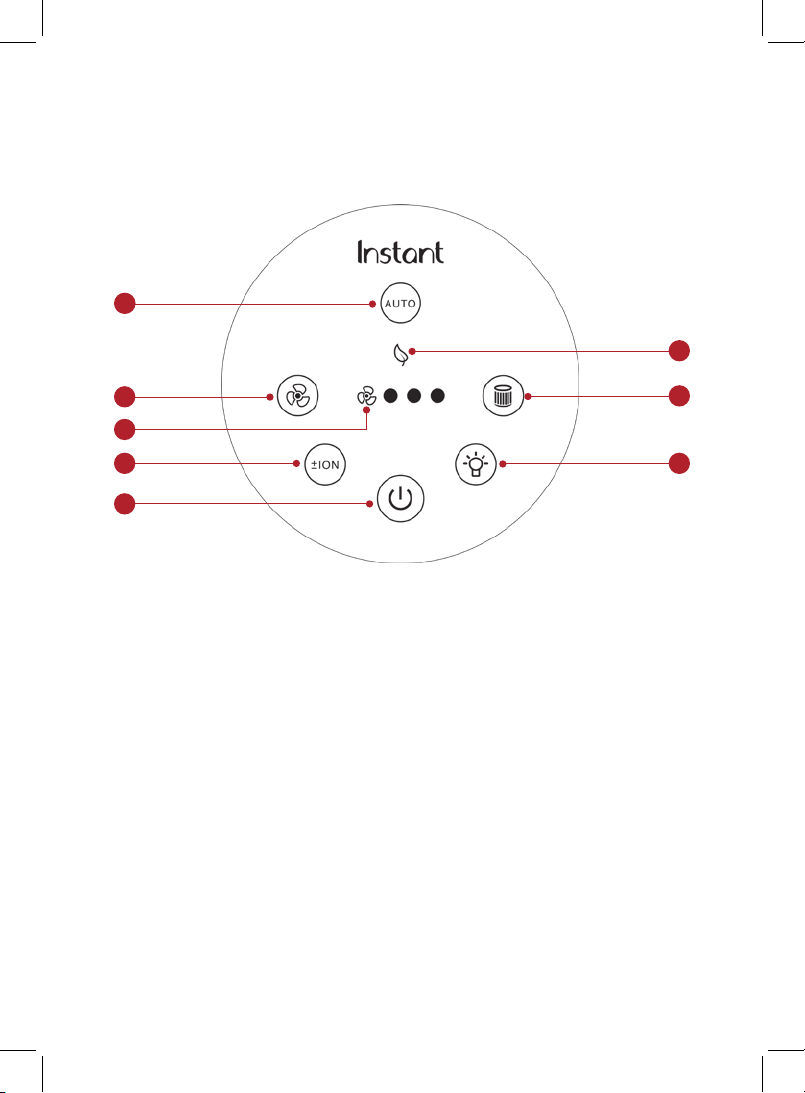
CONTROL PANEL
3
7
4
2
1. Power
• Touch to turn unit ON or OFF
2. Auto
• When lit, unit is in Auto operation
• Touch to turn Auto operation ON
and OFF
3. Eco
• When lit, unit is in energy-saving
Eco mode
4. Light
• Touch to switch between light levels
(0%, 20%, 60%, 100%)
5. Fan
• Touch to switch between fan levels —
overrides Auto operation
6. Fan Speed
• Indicates fan level (low,
medium, high)
7. Filter
• When the light blinks orange, filter
needs replacement
• Touch and hold for 3 seconds to
reset after you’ve replaced filter
8. Plasma Ion
• Touch to turn plasma ion operation
ON or OFF
1
8
6
5
150-0001-01_150-0001-01-0102_IB_AP100_US-EN_Retail_Manual_FINAL.indd 6150-0001-01_150-0001-01-0102_IB_AP100_US-EN_Retail_Manual_FINAL.indd 6 10/15/21 12:53 PM10/15/21 12:53 PM

7
Get started
GETTING STARTED
1. Remove the air purifier from the box and place on a flat,
sturdy surface.
2. Remove the packaging material.
3. Turn the air purifier on its side and twist the Removable Base
counter-clockwise to loosen and remove.
4. Remove the filter and remove the plastic bag. Reinsert the filter.
5. Replace the removable base, turning it clockwise to tighten.
6. Place unit on floor to ensure there’s clearance on all sides to allow
for proper circulation.
7. Plug the power cord into an electrical outlet. This unit uses a
polarized plug, with one wider prong. The unit will fit into the outlet
only one way.
8. Touch the power button to turn the unit on. The unit powers up,
measures the room’s air quality (this can take up to 30 seconds),
and begins cleaning the air.
9. The unit sets itself to Automatic operation.
150-0001-01_150-0001-01-0102_IB_AP100_US-EN_Retail_Manual_FINAL.indd 7150-0001-01_150-0001-01-0102_IB_AP100_US-EN_Retail_Manual_FINAL.indd 7 10/15/21 12:53 PM10/15/21 12:53 PM
8
Get started
9
Get started
HOW TO USE YOUR AIR PURIFIER
Turn on the unit
• If the unit is unplugged, plug the power cord into an
electrical outlet.
• If the unit is plugged in but turned off, press the Power button to
turn on the display.
Turn off the unit
• To stop the unit from operating, press the Power button until the
display turns off.
Automatic operation
Your air purifier is designed to monitor air quality and automatically
adjust the fan to increase filtration when the level of particles in the
air increases and automatically transitions to Eco Mode for energy
savings when the air quality is good for 30 minutes. There are 3 levels
of automatic operation:
Auto Mode
• Automatically adjusts fan speed based on the air quality
Air Quality Fan Level
Good 1 (whisper quiet)
Fair 2
Poor 3
150-0001-01_150-0001-01-0102_IB_AP100_US-EN_Retail_Manual_FINAL.indd 8150-0001-01_150-0001-01-0102_IB_AP100_US-EN_Retail_Manual_FINAL.indd 8 10/15/21 12:53 PM10/15/21 12:53 PM
Otros manuales para AP100
3
Tabla de contenidos
Otros manuales de Purificador de aire de Instant


