
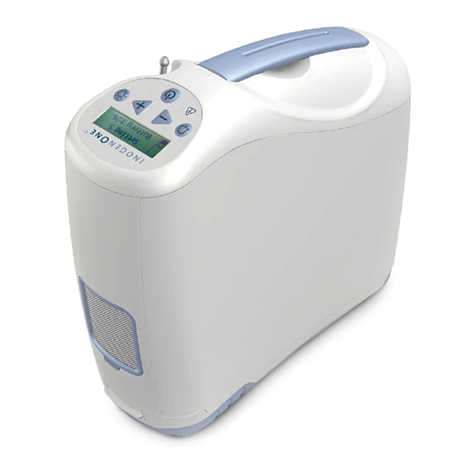
Inogen One G3 Manual de usuario

1
®
user manual

2

3
Contents
Chapter 1 1 Intended Use, Contraindications and General Precautions
Chapter 2 3 Description of the Inogen One® G3 Oxygen Concentrator
3 Important Parts of the Inogen One® G3 Oxygen Concentrator
4 User Interfaces
5 Input / Output Connections
6 Power Supply Options
8 Inogen One® G3 Accessories
Chapter 3 11 Operating Instructions
11 General Instructions
15 Additional Operating Instructions
18 Battery Operating Instructions
19 Battery Care and Maintenance
Chapter 4 21 Inogen One® G3 Oxygen Concentrator Audible and
Visible Signals (including Alarms)
Chapter 5 29 Troubleshooting
Chapter 6 31 Cleaning, Care and Maintenance
31 Cannula Replacement
31 Case Cleaning
32 Filter Cleaning and Replacement
33 Inogen One® G3 Column Change Procedure
36 Other Service and Maintenance
36 Disposal of Equipment and Accessories
Chapter 7 37 Symbols Used on Concentrator and Accessories
Chapter 8 39 Inogen One® G3 System Specifications
English

4

1
1Intended Use, Contraindications
and General Precautions
Intended Use, Contraindications and General Precautions Chapter 1
Intended Use
The Inogen One® G3 Oxygen Concentrator is used on a prescriptive basis by patients
requiring supplemental oxygen. It supplies a high concentration of oxygen and is used
with a nasal cannula to channel oxygen from the concentrator to the patient. The Inogen
One® G3 may be used in home, institution, vehicle, on an airplane and various mobile
environments.
The expected life for the Inogen One® G3 Oxygen System is 5 years, with the exception
of the sieve beds (metal columns) which have an expected life of 1 year and the batteries,
which have an expected life of 500 full charge/discharge cycles.
CAUTION USA Federal law restricts this device to sale by or on the order of a
physician. May also be applicable in other countries.
CAUTION Use of a cannula other than a high flow cannula (e.g. Salter 1600Q) may
restrict oxygen delivery and/or attachment to nozzle fittings.
WARNING Availability of an alternate source of oxygen is recommended in case of
power outage or mechanical failure. Consult your equipment provider for
type of back-up system recommended.
CAUTION It is the responsibility of the patient to make back-up arrangements for
alternative oxygen supply when traveling; Inogen assumes no liability for
persons choosing not to adhere to manufacturer recommendations.
!
C
English

2
Contraindications
WARNING This device is NOT INTENDED to be life sustaining or life supporting.
CAUTION Under certain circumstances, the use of non-prescribed oxygen therapy
can be hazardous. This device should be used only when prescribed
by a physician.
CAUTION Additional monitoring or attention may be required for patients using
this device who are unable to hear or see alarms or communicate
discomfort. If the patient shows any signs of discomfort, a physician
should be consulted immediately.
CAUTION The Inogen One® G3 is not designed or specified to be used in
conjunction with a humidifier, nebulizer or connected with any other
equipment. Use of this device with a humidifier, nebulizer or connected
with any other equipment may impair performance and/or damage
the equipment. Do not modify the Inogen One® G3 Concentrator. Any
modifications performed on the equipment may impair performance or
damage equipment and will void your warranty.
!
C
!
C
!
C
General Precautions
WARNING The device produces enriched oxygen gas which accelerates combustion.
Do NOT ALLOW SMOKING OR OPEN FLAMES within
10 feet of this device while in use.
WARNING Do not submerse the Inogen One® G3 or any of the accessories in liquid.
Do not expose to water or precipitation. Do not operate in exposed rain.
This could lead to electrical shock and/or damage.
CAUTION Do not use oil, grease, or petroleum-based products on or near the Inogen
One® G3.
CAUTION Never leave the Inogen One® G3 in an environment which can reach
high temperatures, such as an unoccupied car in high temperature
environments. This could damage the device.

3
Important Parts of the Inogen One® G3 Oxygen Concentrator
Description of the Inogen One® G3
Oxygen Concentrator
2
On/Off
Button
Display Back-
light Button
Breath
Detection Light
Display
Audible Alarm
Button
Alert/Alarm
Light
Flow Control
Description of the Inogen One® G3 Oxygen Concentrator Chapter 2
English
Description of the Inogen One® G3 Oxygen Concentrator Chapter 2

4
User Controls
ON / OFF Button
Press once to turn “ON”; Press and hold for one second to turn “OFF”.
Audible Alarm Button
Pressing this button will toggle the Inogen One® G3’s breath detection
audible alert on and off:
1. Default Mode. When the Inogen One® G3 is powered up, the breath
detection audible alert is disabled. The display’s mode indication area
will show a bell icon crossed out with an X in default mode.
2. Breath Detection Alert Mode. The Inogen One® G3 will alert with
audible and visual signals for “no breath detected” when this mode
is enabled and no breath has been detected for 60 seconds.
At 60 seconds, the device will enter into auto pulse mode and once
another breath is detected, the device will exit auto pulse mode and
deliver normally on inspiration. The display’s mode indication area will
show a bell icon, flashing red light and display message when the
alert is enabled.
3. If power is lost, breath detection alert mode resets to
default mode.
Flow Setting Control Buttons
Use the – or + flow setting control buttons to select the setting
as shown on the display. There are four settings, from 1 to 4.
Display Backlight Button
Push on; automatically turns off after 10 seconds.
User Interfaces
Display
This screen displays information regarding flow setting, power
status, battery life and errors. If you would like to change the
language on the Inogen LCD Screen contact Inogen Client Services.

5
Description of the Inogen One® G3 Oxygen Concentrator Chapter 2
User Interfaces (continued)
Indicator Lights
A red light indicates either a change in operating status or a
condition that may need response (alarm). A flashing light is
higher priority than non-flashing.
Audible Signals
An audible signal (beep) indicates either a change in operating
status or a condition that may need response (alarm). More
frequent beeps indicate higher priority conditions.
Input / Output Connections
Particle Filters
The filters must be in place at the intake end of the concentrator
during operation to keep input air clean.
Cannula Nozzle Fitting
The nasal cannula connects to this nozzle for Inogen One® G3
output of oxygenated air.
DC Power In
Connection for external power from the AC power supply or
DC power cable.
USB Port
Used for servicing only.
English

6
Power Supply Options
Single and Double Rechargeable Lithium Ion Batteries
The battery will power the Inogen One® G3 without
connection to an external power source. When fully
charged, a single battery will provide up to 4 hours of
operation; a double battery will provide up to 8 hours of
operation. The battery recharges when properly installed
in the Inogen One® G3 and the concentrator is connected
to AC or DC power. Recharging time is up to 4 hours for a single battery and 8 hours for a
double battery. See information in the “Battery Care and Maintenance” section.
Power Supply
Overview
The Inogen One® G3 AC power supply (BA-301) is used to power the Inogen One® G3
concentrator from an AC power source.
Description
The Inogen One® G3 AC power supply is specifically designed for use with the Inogen
One® G3 Oxygen Concentrator (IO-300). The AC power supply provides the precise
current and voltage required to safely power the Inogen One® G3 and is designed to
operate from specified AC power sources. When used with AC power sources, the power
supply automatically adapts to input voltages from 100V to 240V (50-60HZ) permitting
use with most power sources throughout the world.
The AC power supply will charge the Inogen One® G3 Batteries when used with AC input
power. Due to aircraft power limitations, the AC Power Supply cannot be used to charge
the Inogen One® G3 Battery when used on an aircraft.
The AC power supply is used with the following components:
• Power supply with attached power output cable to connect to the Inogen One® G3
• AC power input cable
The DC power cable (BA-306) is specifically designed for use with the Inogen One®
G3 Oxygen Concentrator (IO-300). The DC power input cable connects directly to
the automobile cigarette lighter or auxiliary DC power supply. Refer to Chapter 3 for
additional operating instructions for use with DC power source.
Otros manuales para One G3
12
Tabla de contenidos
Otros manuales de Equipo de oxígeno de Inogen


Manuales populares de Equipo de oxígeno de otras marcas


DeVilbiss
DeVilbiss iFILL PD1000A Series Manual

Inova Labs Inc.
Inova Labs Inc. LifeChoice Manual de usuario

Nidek Medical
Nidek Medical OCSI Manual de usuario

Point Four Systems
Point Four Systems MBD075 Manual de usuario

John Bunn
John Bunn Optium JB0180 Manual de usuario

Dräger
Dräger Oxy K 30 E/S Manual de usuario