的四颗定位螺丝,将在两端的⑭连接横杆 B适当抽出且注意两端伸出的长度基本相等,让两端的⑬连接套可靠地套在轮椅车轮的固定
螺丝上并刻意用⑬连接套顶紧,将⑮连接横杆 A上的四颗定位螺丝拧紧锁定。
2. 用手握起④手柄,使⑫连接器对准⑲连接孔,按下⑰锁扣按钮,连接器插入连接孔,松开⑰锁扣按钮,用力回拉主机体以检查连
接稳妥,若发现容易松脱,请重新以上安装步骤至连接稳妥为止。
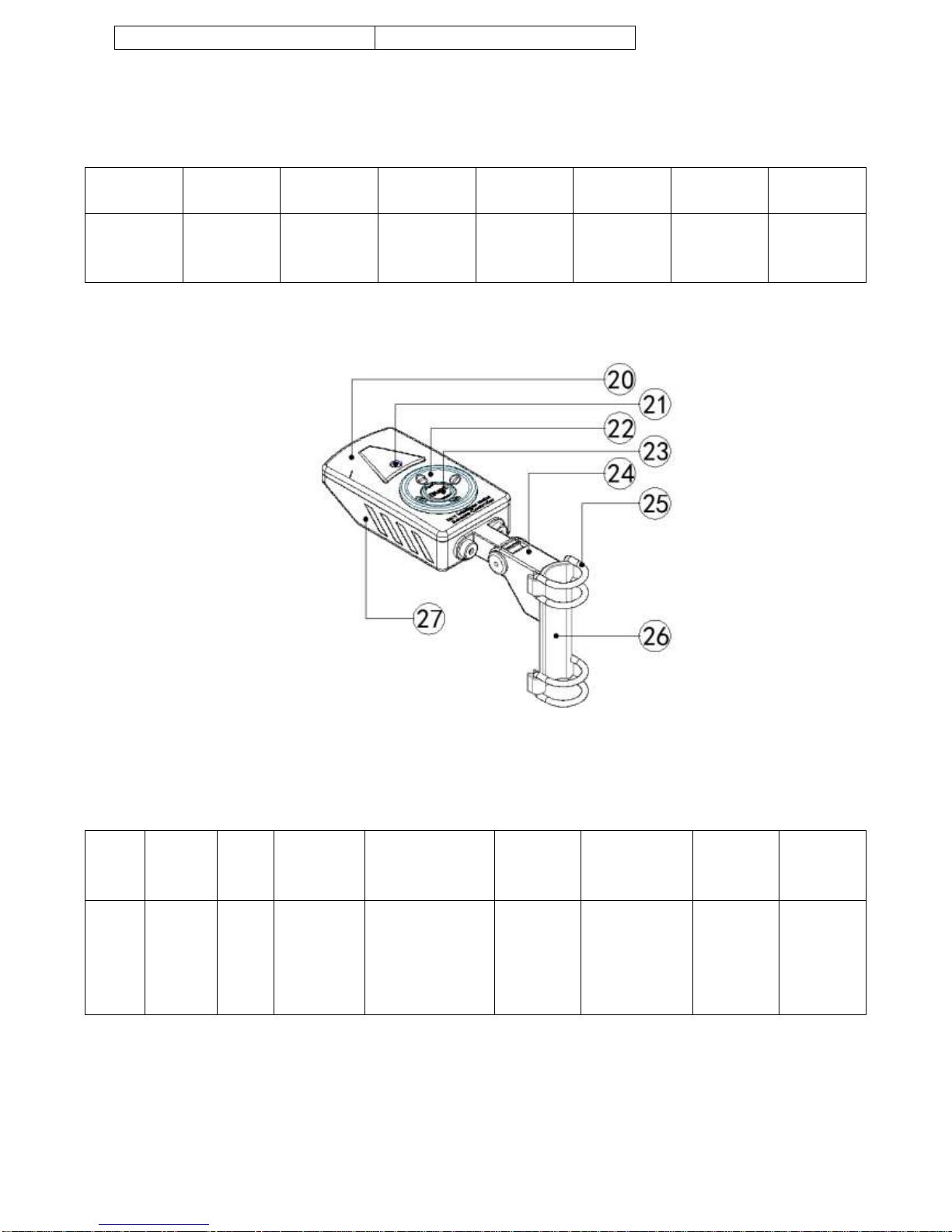
3. 将RF 遥控器+固定支架总成取出,按规定方向装入四颗”AAA”1.5V 电池(建议使用碱性高能电池)并把电池仓盖关闭,使两条
㉕硅胶固定圈绕过轮椅靠手下的金属管并回扣到固定支架的槽内,调整遥控器安装位置和摆动角度以使符合你的操作舒适感。
InMotor installation steps (taking rehabilitation wheelchair as loading platform as an example)
1. After unpacking, take out the combination of connecting buckles and connecting crossbars (already installed together at
the factory), ⑲the connecting holes are backwards, ⑰the latch button is upwards. Loosen ⑮the four set screws on the
connecting rod A, and properly pull out the ⑭connecting rods B at both ends and note that the lengths of both ends are
substantially equal, so that the ⑬connecting sleeves at both ends can reliably Put on the set screw of the wheelchair
wheel and carefully tighten the⑬connecting sleeve and tighten the four set screws on the ⑮connecting rod A.
2. Hold the ④handle with your hand, align the ⑫connector with the ⑲connection hole, press the ⑰lock button, insert
the connector into the connection hole, release the ⑰lock button, and use force Pull back the main body to check that the
connection is secure. If it is found to be easy to loosen, please repeat the above steps until the connection is safe.
3. Take out the RF remote control + fixing bracket assembly, and put four “AAA” 1.5V batteries in the specified direction
(alkaline high-energy battery is recommended) and close the battery compartment cover to make two ㉕silicone fixing
rings. Bypassing the metal tube under your wheelchair and retracting it into the groove of the fixing bracket, adjust the
installation position and swing angle of the remote control so as to meet your operating comfort.
InMotor 启动操作步骤
1. 打开⑩电源开关,检查⑧电量显示器指示的当前电量,建议保持电量在 80%以上,若低于这个数值,请你在出发前将电池充电。
养成使用后补充电量的习惯,使 InMotor 时刻为你准备着。
2. 将⑪转换开关切换到你所需的零启动或非零启动状态(IM-2 专配),安全、稳妥地坐上轮椅并检查没有影响行驶的情况发生方可
准备启动 InMotor。
3. 启动 InMotor 有两种方式:
A-当⑪转换开关设置是零启动状态时,点按㉓启动/调速按钮一次,有间歇鸣响警示,InMotor 马上启动,以低速 0.85M/S(约 3km/h)
的速度行进,如果想提高行进速度,再点按㉓启动/调速按钮一次,InMotor 立即以高速 1.7M/S(约 6km/h)的速度行进,这按钮可
以由低速到高速循环调节。
B-当⑪转换开关设置是非零启动状态时,点按㉓启动/调速按钮一次,有间歇鸣响警示,用手一起稍微转动一下轮椅的车轮,InMotor
马上启动,以低速 0.85M/S(约 3km/h)的速度行进,如果想提高行进速度,再点按 ㉓启动/调速按钮一次,InMotor 立即以高速
1.7M/S(约 6km/h)的速度行进,这按钮可以由低速到高速循环调节。
4. 在行进间若要停止前进,可点按㉒停止按钮圆圈任意位置一次,InMotor 和间歇鸣响警示立即一并停止,若由于惯性作用而未能
使轮椅完全停驻,可采取使用轮椅自带的机械辅助刹车完成。
InMotor startup procedure
1. Turn on the ⑩power switch and check the current power level indicated by the ⑧power indicator. It is recommended
to keep the power level above 80%. If it is lower than this value, please charge the battery before starting. Get into the
habit of recharging after use, and make InMotor ready for you.
2. Switch the ⑪switch to your desired zero-start or non-zero start (IM-2 specific), sit safely in the wheelchair and check
that there is no impact on the situation before you are ready to start InMotor.
There are two ways to start InMotor:
A - When the ⑪changeover switch is set to the zero start state, tap the ㉓Start/Speed button once and an intermittent
alarm sounds. InMotor activates immediately, at a low speed of 0.85M/S (approx. 3km/h). If you want to increase the speed,
if you want to increase the speed, press the ㉓Start/Speed button once. The InMotor immediately travels at a high speed
of 1.7 M/S (about 6 km/h). This button can be adjusted from low speed to high speed.
B-When the ⑪switch setting is non-zero start state, click ㉓Start/Speed button once, there is an intermittent ringing