Inaxsys VUPRO VUO9231D Manual de usuario

V1.0.1
Video Intercom | User Manual - VUO9231D

2
Table of Contents
Table of Contents......................................................................................................2
1 Product Overview ........................................................................................6
1.1 Introduction to Product....................................................................................6
1.2 Features.......................................................................................................... 6
2 Structure...................................................................................................... 7
2.1 Front Panel .....................................................................................................7
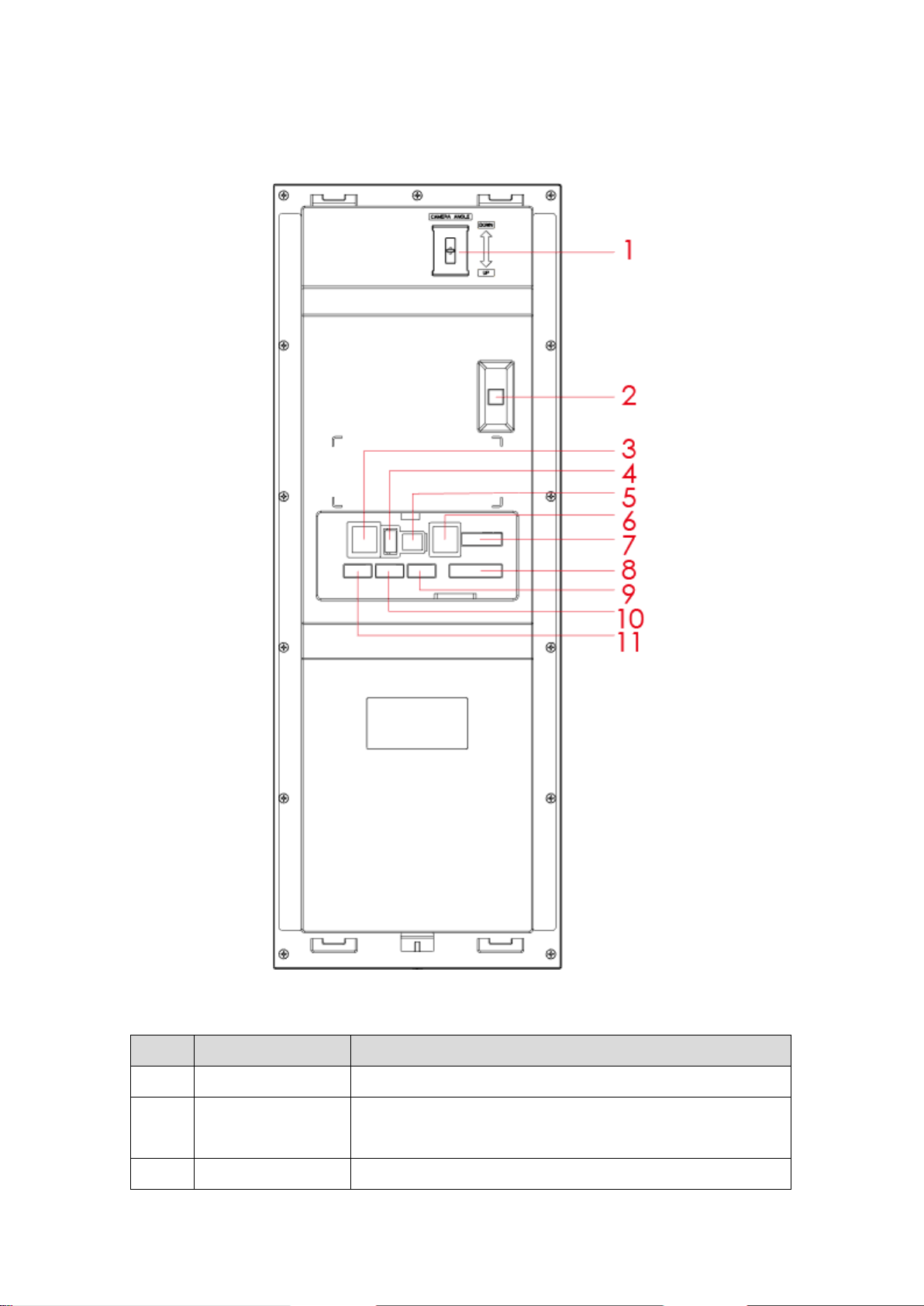
2.2 Rear Panel......................................................................................................9
3 Networking................................................................................................. 11
4 Installation and Debug............................................................................... 12
4.1 Device Wiring................................................................................................ 12
4.2 Installation.....................................................................................................12
4.2.1 Screw.................................................................................................. 12
4.2.2 Installation Step .................................................................................. 13
4.3 Device Debug ............................................................................................... 13
4.3.1 Before Debugging............................................................................... 13
4.3.2 Debug Device (VT System)................................................................. 14
4.3.3 Successfully Debug............................................................................. 18
5 WEB Config....................................................................................................21
5.1 WEB Login and Logout ................................................................................. 21
5.1.1 Login................................................................................................... 21
5.1.2 Logout................................................................................................. 21
5.2 System Config ...................................................................................................22
5.2.1 Local Config........................................................................................ 22
5.2.2 LAN Config ......................................................................................... 27
5.2.3 Device Manager.................................................................................. 28
5.2.4 Network Config ................................................................................... 33
5.2.5 Video Set............................................................................................ 38
5.2.6 User Manage ...................................................................................... 39

3
5.2.7 IPC Information................................................................................... 41
5.2.8 Publish Information ............................................................................. 42
5.2.9 UPnP Setup........................................................................................ 43
5.2.10 Fingerprint Info.................................................................................... 44
5.3 Info Search.................................................................................................... 46
5.3.1 Call Record......................................................................................... 46
5.3.2 Alarm Record...................................................................................... 46
5.3.3 Unlock Record .................................................................................... 47
5.4 Status Statistics............................................................................................. 47
6 Functional Operation ................................................................................. 48
6.1 Project Setting............................................................................................... 48
6.1.1 IP Config............................................................................................. 48
6.1.2 Volume Config .................................................................................... 49
6.1.3 Issue Card .......................................................................................... 49
6.1.4 Info...................................................................................................... 51
6.2 Unlock...........................................................................................................52
6.2.1 Unlock via Fingerprint ......................................................................... 52
6.2.2 Unlock via Password........................................................................... 52
6.2.3 Unlock via Card................................................................................... 52
6.2.4 Unlock via QR Code............................................................................ 52
6.2.5 Unlock via VUH................................................................................... 53
6.3 Call Function................................................................................................. 53
6.3.1 Call MGT Center................................................................................. 53
6.3.2 Call VUH............................................................................................. 54
6.4 Default .......................................................................................................... 55
Appendix 1 Technical Specifications ....................................................................... 56

4
Important Safeguards and Warnings
Please read the following safeguards and warnings carefully before using the product in
order to avoid damages and losses.
Note:
Do not expose the device to lampblack, steam or dust. Otherwise it may cause fire or
electric shock.
Do not install the device at position exposed to sunlight or in high temperature.
Temperature rise in device may cause fire.
Do not expose the device to humid environment. Otherwise it may causefire.
The device must be installed on solid and flat surface in order to guarantee safety
under load and earthquake. Otherwise, it may cause device to fall off orturnover.
Do not place the device on carpet orquilt.
Do not block air vent of the device or ventilation around the device. Otherwise,
temperature in device will rise and may causefire.
Do not place any object on thedevice.
Do not disassemble the device without professional instruction.
Warning:
Please use battery properly to avoid fire, explosion and otherdangers.
Please replace used battery with battery of the sametype.
Do not use power line other than the one specified. Please use itproperly. Otherwise,
it may cause fire or electricshock.
Privacy Protection Notice
As the device user or data controller, you might collect personal data of others'
such as face, fingerprints, car plate number, Email address, phone number, GPS
and so on. You need to be in compliance with the local privacy protection laws
and regulations to protect the legitimate rights and interests of other people by
implementing measures include but not limited to: providing clear and visible
identification to inform data subject the existence of surveillance area and
providing related contact.
About the Manual
The Manual is for reference only. If there is inconsistency between the
Manual and the actual product, the actual product shallprevail.
We are not liable for any loss caused by the operations that do not comply
with the Manual.
The Manual would be updated according to the latest laws and regulations
of related regions. For detailed information, see the paper User's Manual,

5
CD-ROM, QR code or our official website. If there is inconsistency between
paper User's Manual and the electronic version, the electronic version shall
prevail.
All the designs and software are subject to change without prior written
notice. The product updates might cause some differences between the
actual product and the Manual. Please contact the customer service for the
latest program and supplementary documentation.
There still might be deviation in technical data, functions and operations
description, or errors in print. If there is any doubt or dispute, please refer to
our final explanation.
Upgrade the reader software or try other mainstream reader software if the
Guide (in PDF format) cannot beopened.
All trademarks, registered trademarks and the company names in the
Manual are the properties of their respective owners.
Please visit our website, contact the supplier or customer service if there is
any problem occurred when using the device.
If there is any uncertainty or controversy, please refer to our final
explanation.

6
1
Product Overview
1.1 Introduction to Product
10-inch touch screen VUO can connect to VUH, VUS and etc., providing bidirectional
video intercom for visitor and resident, plus password unlock card unlock fingerprint
unlock, QR code unlock and face recognition (expansible).
1.2 Features
10-inch IPS screen
Night vision
Aluminium alloy plate
HD touch screen
Unlock via password, IC card, and remotelyunlock
2.0 MP camera, auto BLC, adjustable up/down, wide viewingangle
IP54
Proximity sensor at card area/button area/screen.
Heating inside, allow work environment down to-40℃
Unlock via fingerprint
Expand face recognition.

7
2
Structure
2.1 Front Panel
Figure 2-1 Front Panel
No. Component
Name
Description

8
No. Component
Name
Description
1 Camera Monitor VUO video.
2 Speaker Sound output.
3 Backlight Backlight of camera.
4 Screen 10 inch IPS HD screen
5 Proximity
Sensor
When body or object approaches, the sensor
light is ON.
6 MIC Sound input.
7 Card Area Authorize IC card unlock right (issue card),
card unlock
8 Fingerprint
Module
Recorded fingerprint can unlock door.
Chart 2-1

9
2.2 Rear Panel
Figure 2-2
No. Component Name Description
1 Camera Adjust Adjust camera.
2 Vandal-proof When VUO is forced to leave wall, it will alarm and send
alarm to MGT center.
3 Network Standard RJ45 Ethernet cable.

10
No. Component Name Description
4 USB Device debugging.
5 Power Input DC 12V power input
6 Analog Signal Analog signal connect to distributor
7 Lock Connect to unlock button and door sensor, control NO/NC
lock ON/OFF, see device rear label for details.
8 Wiegand Port Connect to wiegand device, see device rear label for
details.
9 Alarm Out Include 2-ch alarm output and 2-ch alarm input, see device
rear label for details.
10 Alarm In
11 RS485 Connect to RS485 device, see device rear label for details.
Chart 2-2
Tabla de contenidos
Otros manuales de Sistema de intercomunicación de Inaxsys