
Impex GLORIA 65 SMART Manual de usuario
70g
A5
CPU
:
DQA
TWBZ-01-2010-0293
P17
6
708-YB(RW)
65-

Please read these instructions before operating
your set and retain them for future reference.
Model:
Operating Instruction
LED COLOR TV
RWY600-H083
GLORIA 65 SMART

PRECAUTION

WARNING
Using cabinets orstands recommended bythe manufacturer ofthe television set.
Only using furniturethat can safelysupport the televisionset.
Ensuring the televisionset is notoverhanging the edgeof the supporting
furniture.
Not placing thetelevision set ontall furniture (forexample, cupboards or
bookcases)without anchoring both the furniture and the television setto a
suitable support.
Not placing thetelevisions set oncloth or othermaterials that maybe located
between the televisionset and supportingfurniture.
Educating children aboutthe dangers ofclimbing on furnitureto reach the
Televisionset or itscontrols.
Never place atelevision set inan unstable location.Atelevision set mayfall,
causing serious personalinjury or death.Many injuries,particularly tochildren,
can be avoidedby taking simpleprecautions such as:
If your existingtelevision set isbeing retained andrelocated,the same
considerations as aboveshould be applied.
IMPORTANT INFORMATION
Using cabinets orstands recommended bythe manufacturer ofthe television.
Only using furniturethat can safelysupport the television.
Ensuring the televisionis not overhangingthe edge ofthe supporting furniture.
Not placing thetelevision on tallfurniture (for example, cupboards or
Bookcases)without anchoring boththe furniture andthe television toa Suitable
Support.
Not standing thetelevisions on clothor other materialsplaced between the
television and supportingfurniture.
Educating children aboutthe dangers ofclimbing on furnitureto reach the
television or itscontrols.
If a televisionis not positionedin a sufficiently stable location,itcan be potentially
hazardous due tofalling.Many injuries,particularly tochildren, can beavoided
by taking simpleprecautions such as:

CAUTION
Danger of explosionif battery isincorrectly replaced.
Replace only withthe same orequivalent type.
Batteries shall notbe exposed toexcessive heat suchas sunshine, fireor the
like.
Used batteries shouldnot be throwninto the garbagecan, please leave them
at an appropriatedepot.
CAUTION
Where the MAINS plug or an appliance coupler is used as the disconnect
device, the disconnect device shall remain readily operable.
CAUTION
These servicing instructions are for use by qualified service personnel only.
To reduce the risk of electric shock, do not perform any servicing other than
that contained in the operating instructions unless you are qualified to do so.
Attention:
Motionless picture might cause permanent destruction to the display.
Be sure not to display motionless picture on the LED TV for more than
2 hours, because it would cause picture remnants to appear, which is
called "screen burns". To avoid suchpicture remnants, please decrease
the "contrast" and "brightness" of the display when displayingmotionless
picture.
While watching TV program in 4:3 size mode for a long time, there would .
be traces on the edge of the screen's left, right and center parts because
of different transmition of the light on the screen.Similar impact on the
screen will occurwhen playing DVDor connecting gamescontrol. Products
destroyed by these reasons can't be guaranteed for maintenance.
It might cause picture remnants to display electronic gamesand motionless .
picture of PC more than a period of time.To avoid sucheffect, please
decrease the "contrast" and "brightness" when displaying motionless
picture.

Place the TV on a firm and flat surface,leaving a space of at lease 10cm around
the set and30cm from thetop of theset to the wall or cabinet.Ensure the TV is
positioned close to the wall to avoid it falling when pushed.
10cm 30cm 10cm 10cm
When you turning the TV set,do not hold the top side of the TV set ,you should
hold the bottom side .
When you lifting the TV set,do not use one hand to handle it,you should lift the
TV set by two hands.

2.4 Home page
1.3 Keys
1
CONTENTS
LED COLOR TV
1. Connection and Preparation of TV..................................................
1.1 Accessories ...........................................................................
1.2 Installation of Stand................................................................
and Interfaces................................................................
1.4 Remote Control.......................................................................
1.5 Installation of Batteries...........................................................
2. Basic Operation...........................................................................
2.2 Setting of Standby Mode..........................................................
2.3 Input Source
3. Technical Specification................................................................
4. Supported Signal Modes..............................................................
5. Simple Troubleshooting ...............................................................
2
2
2
3
4
5
5
5
6
15
16
17
.........................................................................
............................................................................
2.1 Power ON/OFF(Optional)..........................................................5
6
2.5 TV Setting ............................................................................ 8
2.6 Media ...................................................................................13
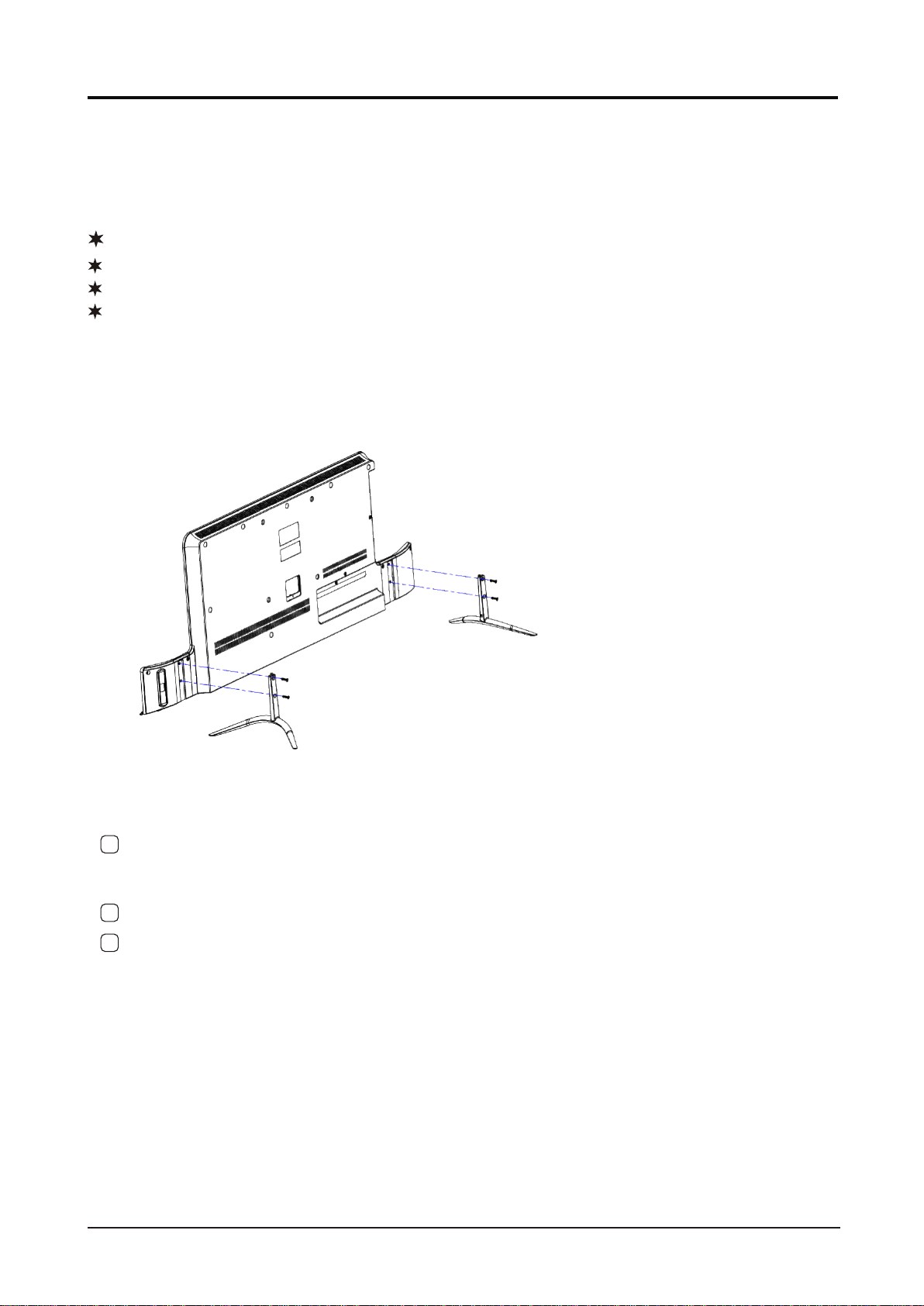
2 Insert thestand into thebottom socket ofthe TV.
1.Connection and Preparation of TV
1.1 Accessories
User Manual
Remote Control
Battery(UM-4/R03P/AAA)
Wall Mount Kit (Pre-assembled)(Optional)
1.2 Installation of Stand
1 Place theTV with the front panel facing downwards on the soft cloth or soft
pads on adesk.
3 Insert the screws into the sockets and tighten them.
2
LED COLOR TV
(For the physical structure, please refer to the real object)
3
RJ45 VIDEO LR
AV1 IN
USB1 USB2
5V---500mA 5V---500mA
The design and specification takes actual
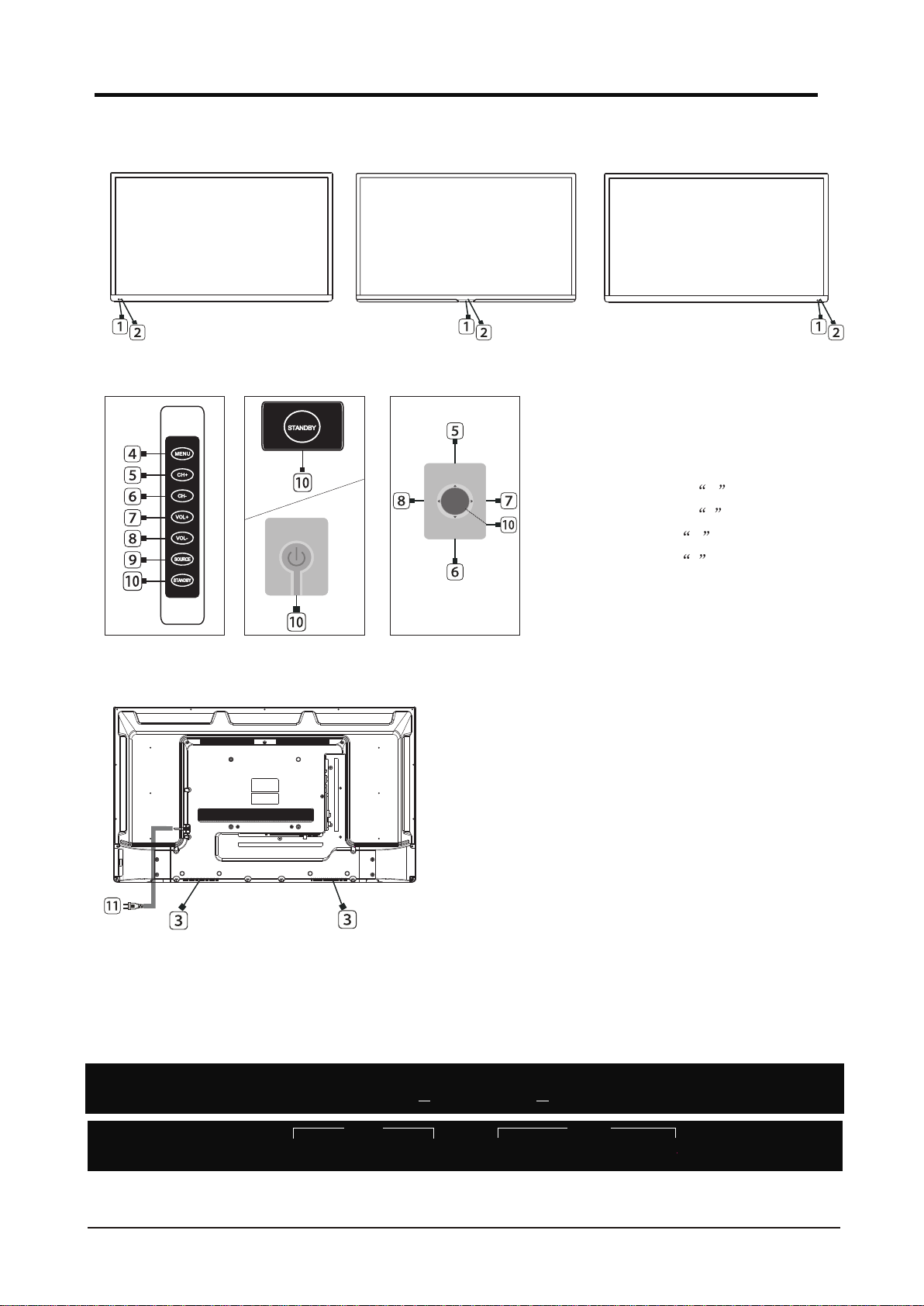
1.3 Keys and Interfaces
LED COLOR TV
HDMI1 HDMI2
RF IN
COAXIAL VIDEO LR
AV2 IN MINI
LINE OUT
HDMI3
(ARC)
or or
or
1. REMOTE SENSOR WINDOW
2. POWER INDICATOR
3. SPEAKER
4. MENU KEY
5. PROGRAM + KEY
6. PROGRAM - KEY
7. VOLUME + KEY
8. VOLUME - KEY
9. SOURCE KEY
10. STANDBYKEY
11. POWERPLUG INPUT
ok
or
(7keys) (1key) (5keys)

LED COLOR TV
(Here isonly the sketch, please in kind prevail)
4
25. MOUSE:Turn on the remote control mouse or turn it off.
STANDBYSTANDBY SOURCESOURCE
13
2
6
45
9
78
0
DISPLAYDISPLAY RECALLRECALL
MENUMENU EXITEXIT
ENTER
MUTEMUTE
AUDIOAUDIO
SUBTITLESUBTITLE
STOPSTOP
PLAY/PAUSEPLAY/PAUSE
HOMEHOME
S.MODES.MODE
P.MODEP.MODE
FBFB FFFF PREV.PREV. NEXTNEXT
SUBTITLE:USB convert videosubtitles.
AUDIO:Select TV audio mode.
HOME:Enter to homepage.
P.MODE:Select the picture mode.
S.MODE:Select the soundmode.
NFX
ITL
YTB
NFX: Netflix
YTB: Youtube
Tabla de contenidos


