
IMG STAGE LINE DMR-504 Manual de usuario

Make Sure Your Package Contains :
Make Sure Your Package Contains :
1
1
16 / 8 / 4 CH Real Time MPEG-4 Network DVR
151
DMR - 508 / 516
DMR - 504
16CH / 8CH / 4CH Built
16CH / 8CH / 4CH Built-
-in DVD
in DVD-
-RW Writer or CD
RW Writer or CD-
-RW Writer
RW Writer
MPEG4 DVR SERIES_V0.989
Please read instructions thoroughly before operation and retain it for future reference.
ˇˇˇˇ
Digital Video Recorder
ˇˇˇˇ
Screws
ˇˇˇˇ
DSUB PIN Connector
ˇˇˇˇ
Power and Data Bus
ˇ
Optional
ˇˇ
IR Transmitter and IR Receiver
ˇˇˇˇ
Licensed Software AP
ˇˇˇˇ
Adapter
16CH / 8CH / 4CH
DVD-RW / CD-RW
504508516MODEL
1
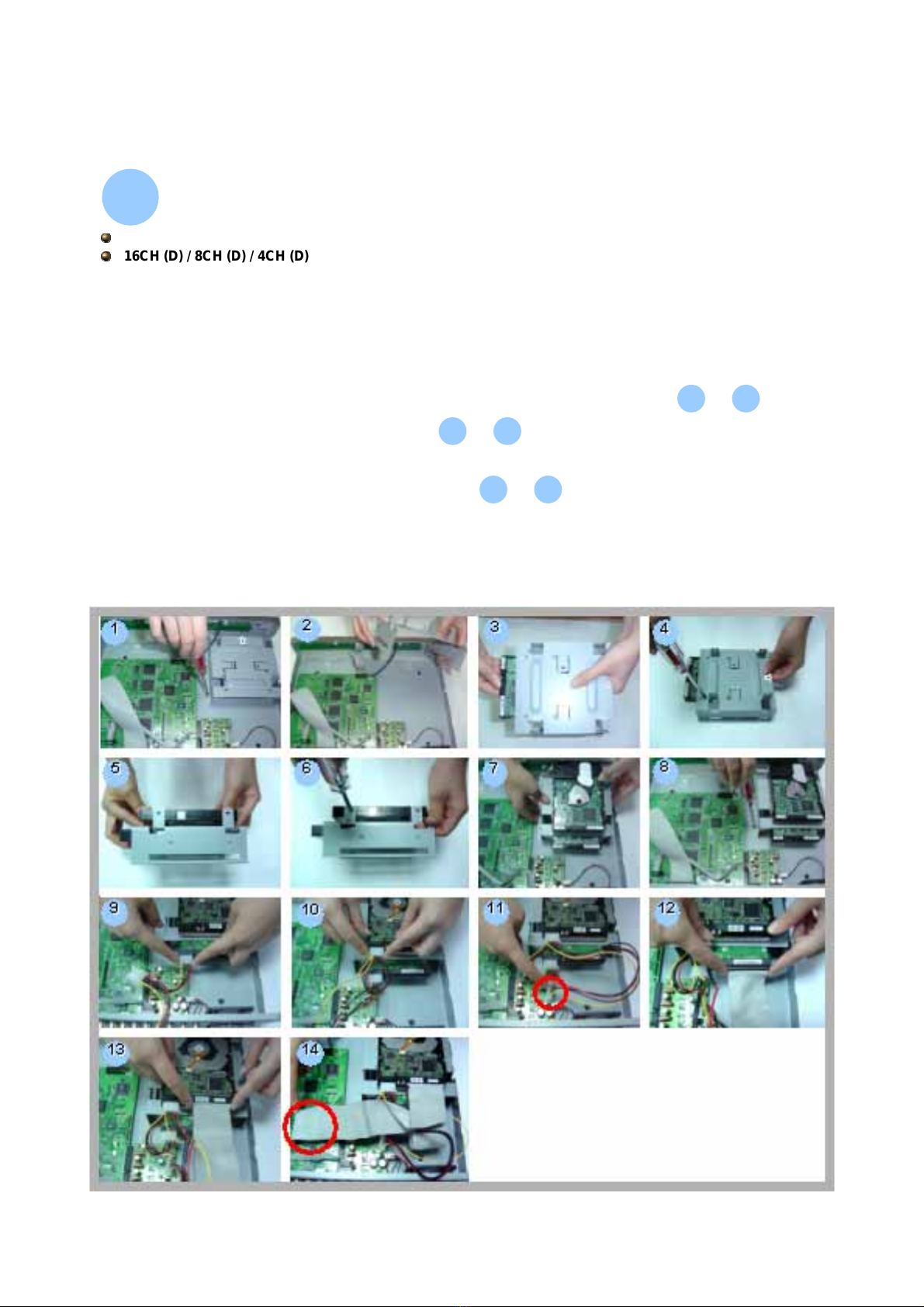
Install HDD :
Install HDD :
2
2
1) Open the upper cover of the DVR and screw out the bracket.
2) Screw HDD to the HDD bracket.
3) Connect the HDD to power connector and IDE BUS (make sure to align the
HDD precisely to the pin connection).
4) Close the upper cover of the DVR.
3
38
8
~
1
12
2
~
9
914
14
~
DMR - 516 / 508
16CH (D) / 8CH (D) / 4CH (D)
Carefully following the steps to ensure correct installation.
*** Note: If you want to install two HDDs, please set one HDD to “Master Mode” or “Single
Mode”, and the other one to “Slave Mode”. ***
2
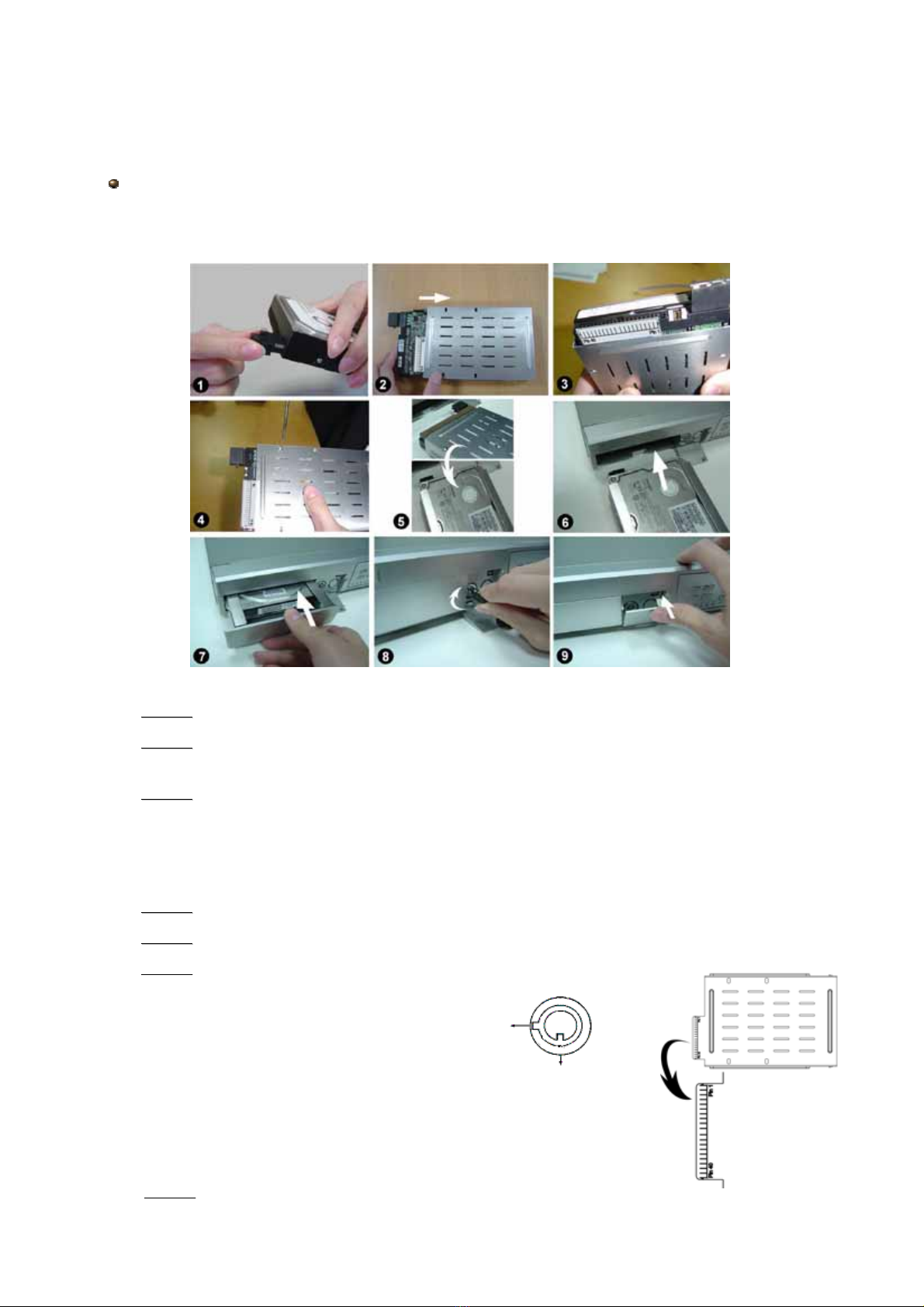
•
•Step 1
Step 1 Connect the connector with the HDD (refer to Picture 1).
•
•Step 2
Step 2 Put HDD into the HDD cartridge. Please notice the bottom side is power side
as chart shows (refer to Picture 2).
•
•Step 3
Step 3 Screw the HDD to the cartridge. Before you screw the HDD, please be aware
that you must to level pin 1 of the HDD at pin 1 mark, because the screw hole is
different from different HDD brands. Then screw the HDD correctly (refer to Picture 3
and 4). You must precisely align the hard disk to the pin connection to ensure correct
installation.
•
•Step 4
Step 4 Reverse the HDD and put it into DVR (refer to Picture 5 and 6).
•
•Step 5
Step 5 Connect the HDD with DVR (refer to Picture 7).
•
•Step 6
Step 6 Lock the cabinet by turning the key clockwise (refer to Picture 8).
A ( locked )
B ( unlocked )
Note : If you do not lock the cabinet, the DVR system will not function properly.
•
•Step 7
Step 7 Close the cap (refer to Picture 9).
Carefully following the steps to ensure correct installation.
*** Note: Please set one HDD to “Master Mode” or “Single Mode” ***
DMR - 504
3
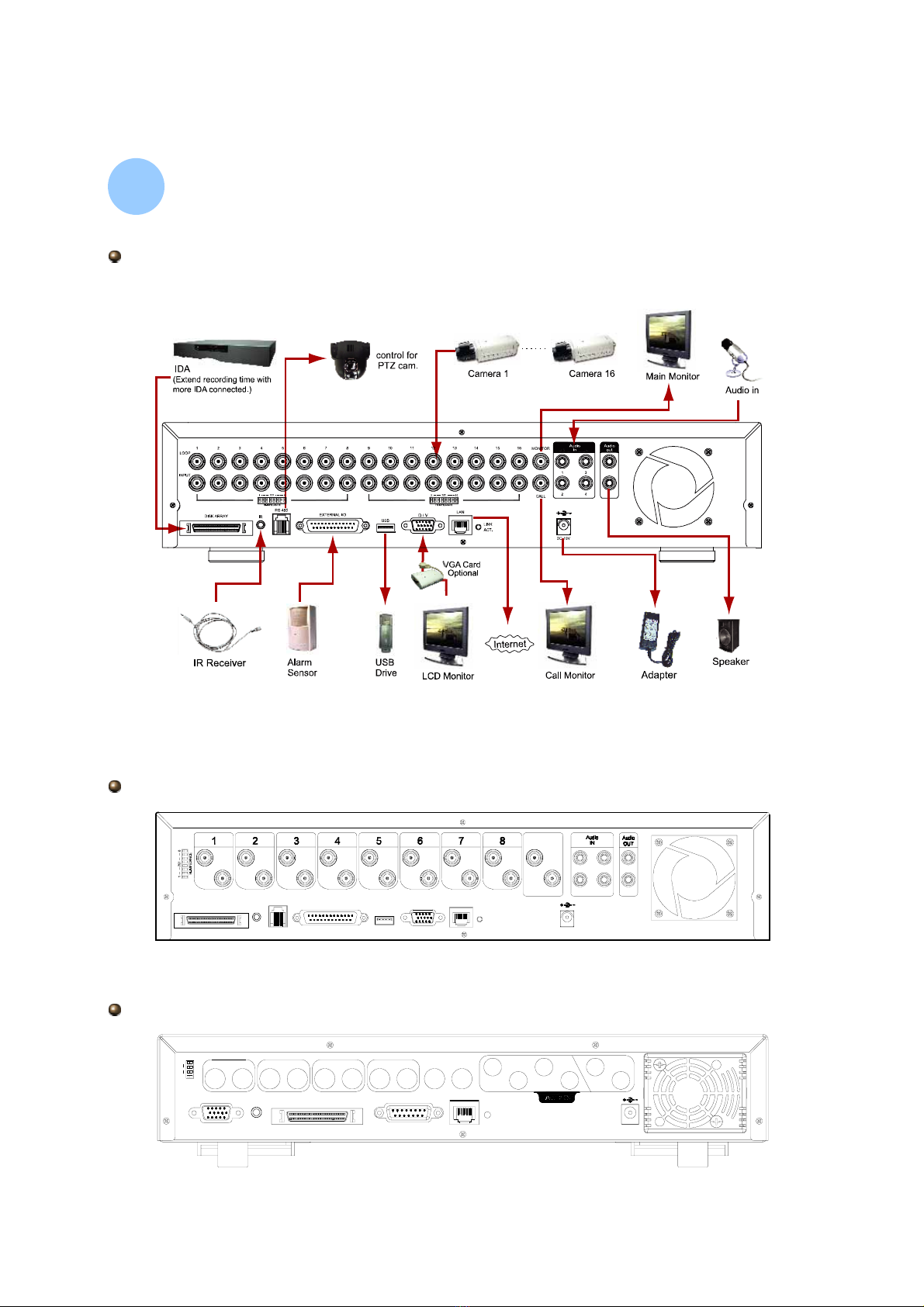
Physical Connections :
Physical Connections :
3
3
DC 19V
INPUT
DISK ARRAY
LOOP
RS 485
INPUT
IR
INPUT INPUT
EXTERNAL I/O USB
INPUT
LOOP
3
LOOP LOOP LOOP
INPUT
D/V LAN
INPUT
ACT.
LINK
INPUT
CALL
LOOP LOOP LOOP
MONITOR
31
24
DMR - 508
INPUT
2
LOOP
DC 19V
LOOP LOOP
3
INPUT
4
INPUT
ACT.
LAN
2
LINK
CALLMONITOR
IN
1
4
3OUT
INPUT
D/V
1
HI-IMPEDANCE
4
75?
1
LOOP
EXTERNAL I/O
DISK ARRAY
IR
DMR - 504
Take DMR - 516 as an example
4
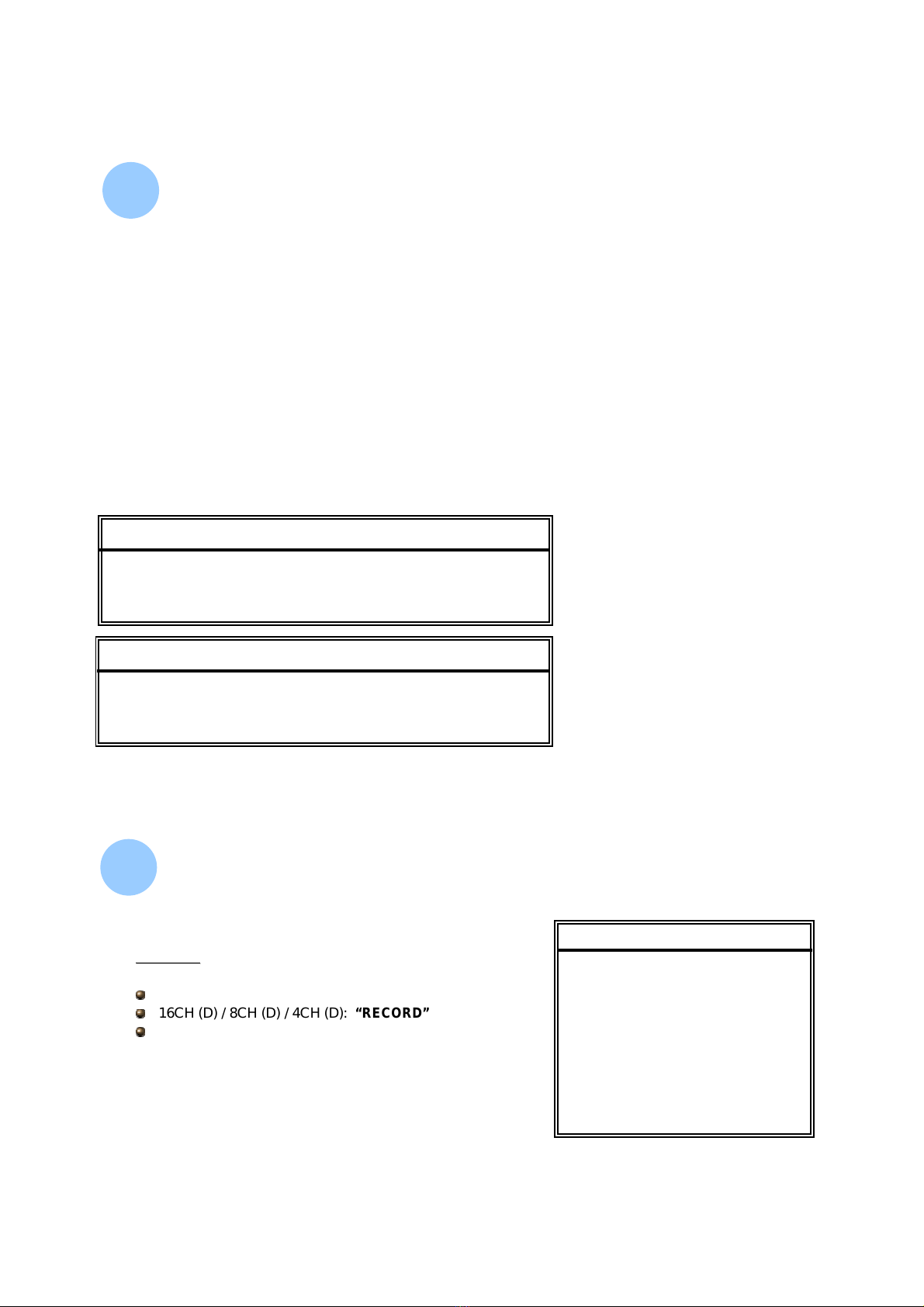
Before using this unit, please set up the system time first in order to process the
functions correctly.
ÆPress “MENU” button to enter menu list
ÆEnter the default password “0000” to access in
ÆGo to “DATE” menu and set the date
ÆPress “+”or“-” button to set the correct time of the DVR
ÆIf users would like to activate the daylight saving function, please turn the
daylight saving function “ON” and press “ENTER” button to enter the daylight
saving setting page.
ÆAfter setting, please press ” MENU ” to exit
System Time Setup :
System Time Setup :
4
4
DATE
DATE
DATE 2005-NOV-08 13:55:22
FORMAT Y-M-D
DAYLIGHT SAVING ON
DAYLIGHT SAVING
DAYLIGHT SAVING
ON 4TH-SUN-MAR 01: 00: 00
OFF 4TH-SUN-OCT 01: 00: 00
ADJUST 01 : 00
NOTE: The illustrated setting means:
During the daylight saving time period
(start from the 4th Sunday of March, end
on the 4th Sunday of October), the DVR
system time will plus one hour.
Record & Playback :
Record & Playback :
5
5
RECORD
RECORD
MANUAL RECORD ENABLE
EVENT RECORD ENABLE
TIMER RECORD ENABLE
OVERWRITE
RECORD IMG SIZE
RECORD QUALITY
MANUAL RECORD IPS
EVENT RECORD IPS
TIMER RECORD IPS
TOTAL IPS SHARE
Record:
Record:
DMR - 516 / 508:“RECORD”
16CH (D) / 8CH (D) / 4CH (D): “RECORD”
DMR - 504:“REC”
5
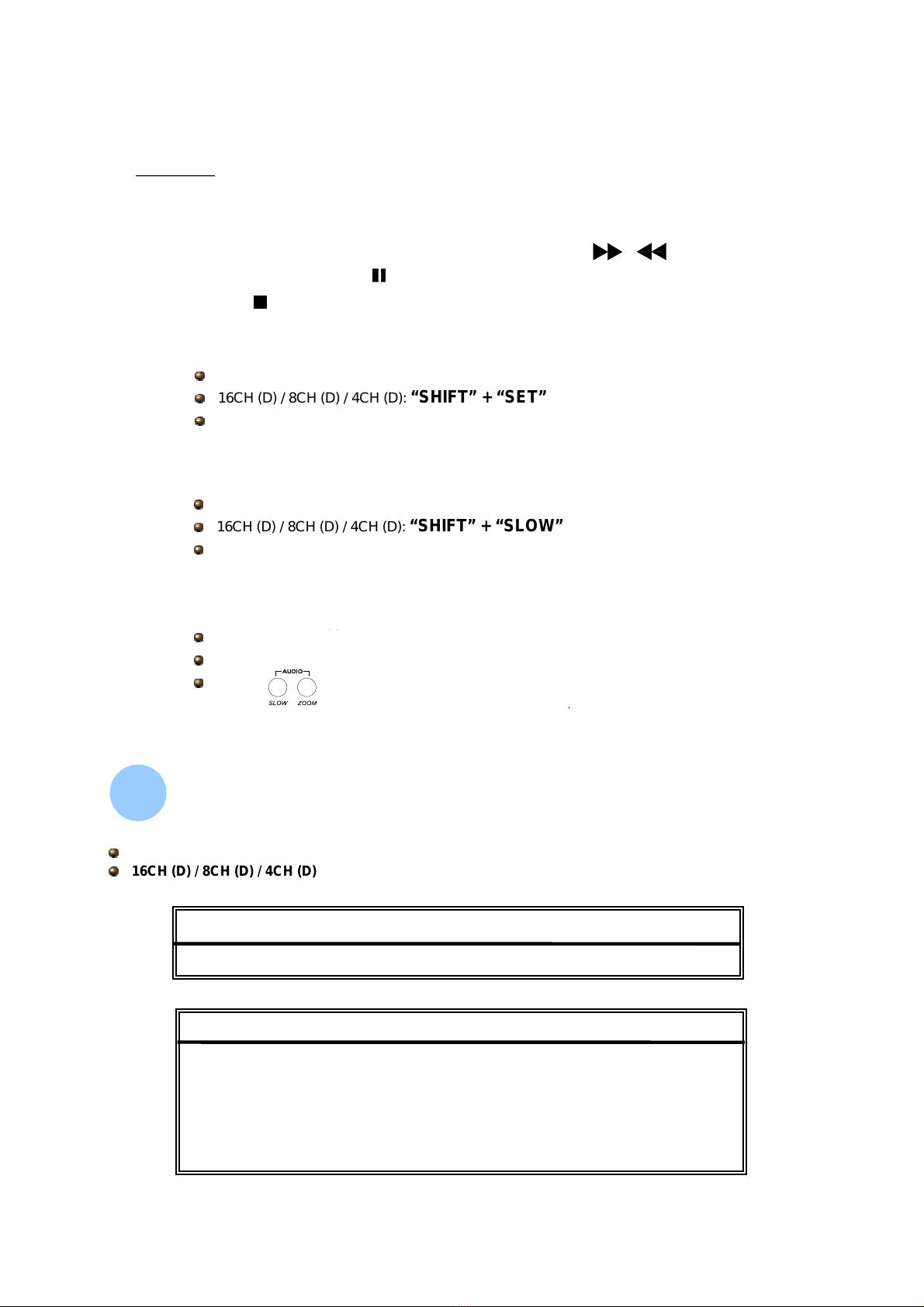
Playback:
Playback:
Press “ PLAY ” button,
the DVR will playback the last recorded video.
• FAST FORWARD (F.F. ) & FAST REWIND (REW) :
• PAUSE / IMAGE JOG:
•STOP:
• CHANNEL SHIFT
(Display Mode, Full Screen Switch, and Channel Display Switch)
• SLOW PLAYBACK
•AUDIO
DMR - 516 / 508 : “SHIFT” + “SET”
16CH (D) / 8CH (D) / 4CH (D): “SHIFT” + “SET”
DMR - 504 : “SET”
DMR - 516 / 508 : “SHIFT” + “SLOW”
16CH (D) / 8CH (D) / 4CH (D): “SHIFT” + “SLOW”
DMR - 504 : “SLOW”
DMR - 516 / 508 : “SHIFT” + “AUDIO”
DMR - 504: “”
Backup :
Backup :
6
6
USB BACKUP
USB BACKUP
START TIME 2005-12-27 11 : 25 : 46
END TIME 2005-12-27 11 : 50 : 58
AVAILABLE SIZE 0512 MB
CHANNEL 01
HDD NUM MASTER
BACKUP TO USB START
BACKUP
BACKUP
USB BACKUP
DMR - 516 / 508 / 504
16CH (D) / 8CH (D) / 4CH (D)
6
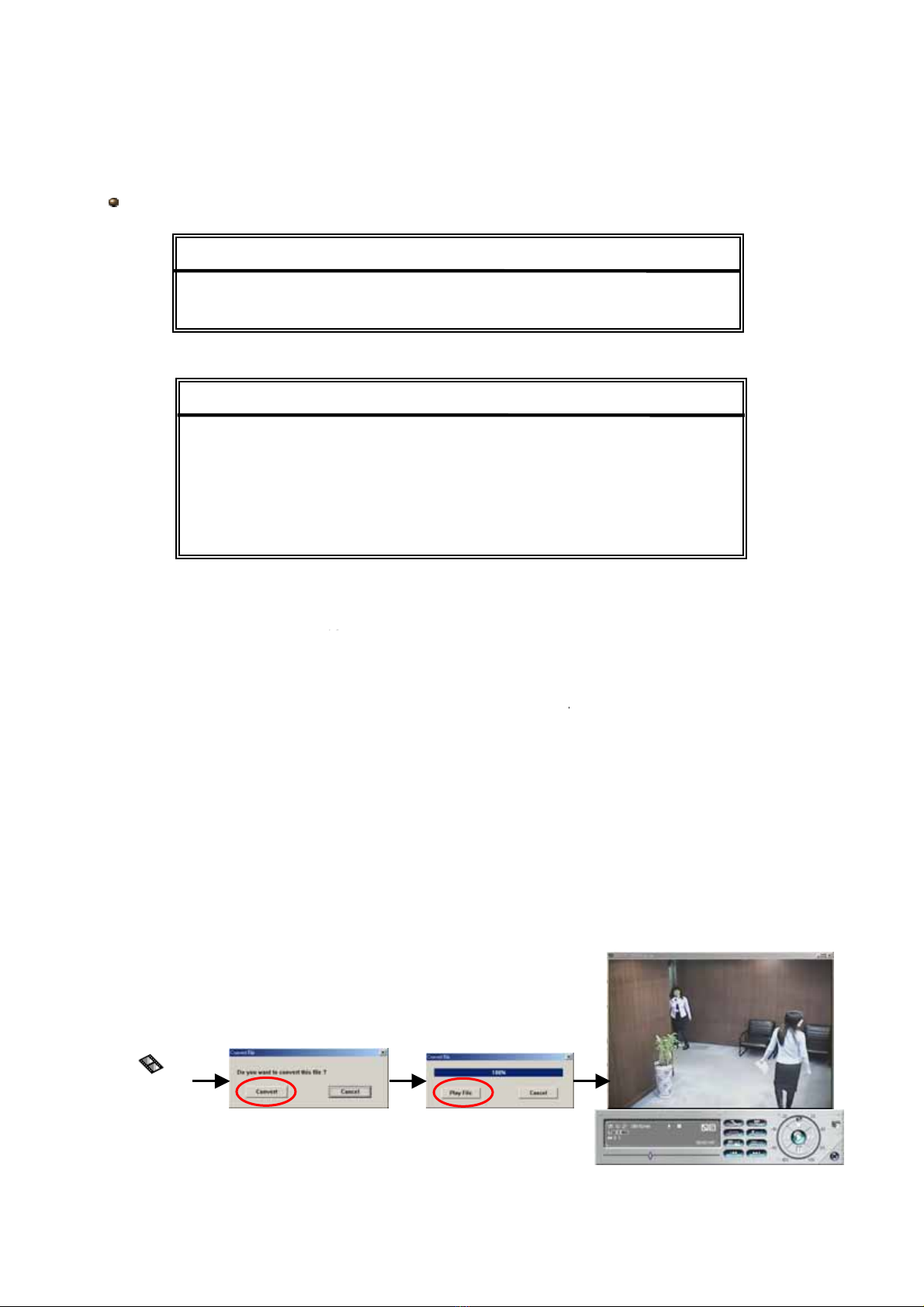
1) Press “+” and “-” buttons to open the DVD / CD WRITER.
Put the DISK into DVD / CD WRITER, and press “+” and “-” buttons again to close.
(NOTE: Use DVD
(NOTE: Use DVD-
-R DISK only)
R DISK only)
2) Go to “DISK BACKUP” menu and set the start time, end time, channel and HDD number.
3) After setting up the backup information,
move the cursor to “START”, and press “ENTER”.
While the files are backup to DISK, users will see the backup completed percentage
shown on the screen.
4) After backup files to DISK, “DISK BURN FINISH” will shown on the screen.
Press “+” and “-” to take out the DISK from DVD / CD WRITER.
5) Put DISK into the DVD / CD -ROM of PC.
(O/S system: Windows XP, and Windows2000).
And then double click the file ÆConvert the file
ÆPlay the backup file at PC Side.
DVD_R_01
This function is not included in DMR - 504 / 508 / 516
DISK BACKUP
DISK BACKUP
START TIME 2005-11-30 15 : 30 : 00
END TIME 2005-12-01 16 : 00 : 00
AVAILABLE SIZE 4083 MB
CHANNEL 01
HDD NUM MASTER
BACKUP TO DISK START
BACKUP
BACKUP
USB BACKUP
DISK BACKUP
For detailed instructions, please refer to the user’s manual.
7
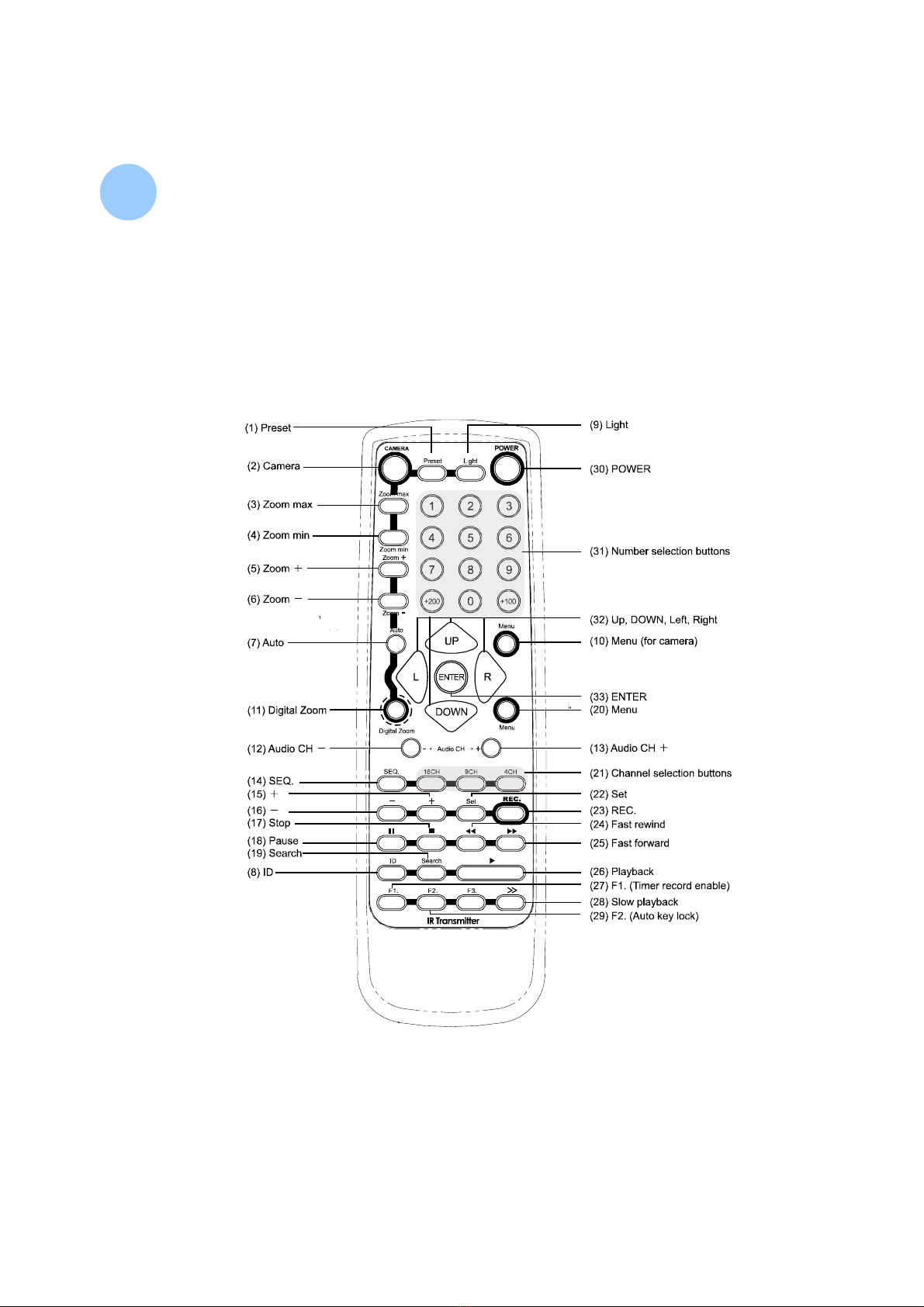
IR Transmitter :
IR Transmitter :
7
7
*CAMERA control buttons: Button (1) to (10). (button (9) is used for control the switch)
*DVR control buttons: Button (11) to (29).
*OTHER control buttons – Support controlling both CAMERA & DVR. Button (30) to (33).
*F3 is dummy button.
*IR control for PTZ, DVR, and remote switch
*IR emission distance: straight line is 10m; transmit at left and right 22.5°is 8m
*Control up to 255 PTZ and remote switch / Control up to 255 DVR
*Enabling different ID
*Current consumption: AAA size battery ×2
8
Este manual sirve para los siguientes modelos
2
Tabla de contenidos


