
ievo ultimate Manual de usuario

Reference Guide - REV3
www.ievoreader.com
®
RELIABLE. BIOMETRIC. SOLUTIONS.


CONTENTS:
Welcome Page 4
Using ievo desktop readers Page 6
Registration: using ievo Standalone Software Page 10
Using the ievo ultimate reader Page 14
Using the ievo micro reader Page 16
Administration guide Page 18
Troubleshooting Page 20
Problem ngerprints Page 22
Data protection Page 24
Further reading Page 26
Product technical details Page 28
Before using your ievo system, please ensure that all required
software and drivers have been correctly installed and set up by
your installation provider.
Should you have any technical issues or concerns please speak
to your supplier or installation provider as the rst line of contact.
Reference Guide

4
A LITTLE BIT ABOUT US
ievo Ltd design and manufacture a range of industry leading
biometric ngerprint readers. Having spoken to professionals
such as architects, facility managers, contractors, security
installers and end users, our experienced team pride
themselves on understanding what requirements are needed
to integrate with a secure access control system. The ievo
biometric ngerprint range has been developed with the aim of
being the most technologically advanced, reliable and secure
ngerprint reader on the market.
Welcome to Biometrics
www.ievoreader.com
Thank you for choosing ievo Ltd as your provider of biometric
security solutions. Your new ngerprint reader(s) will offer a safe,
reliable system to assist with your access control and /or time
and attendance system. Although very simple to use, this guide
will ensure you obtain the maximum benets of your products.
The guide will cover registration, usage, data protection and
troubleshooting. Should you encounter any issues not covered
in this reference guide please contact your provider for further
support.

5
WHY BIOMETRICS?
Fingerprint biometric systems are considered to be the most
reliable and trustworthy form of security due to the very nature of
biometric data being unique to a sole individual. The advantage of
using an ievo ngerprint biometric system is that common faults
like; lost, stolen or copied cards/fobs; forgotten pin numbers/or
access codes; hacking threats or any other form of unnecessary
user interaction are all resolved. This saves time and resources
while enhancing your systems.
HOW DO IEVO FINGERPRINT READERS WORK?
Simply put, by using advanced image reading sensors ievo
readers take a highly detailed scan of your nger, from
the surface and subsurface levels of the skin, to capture a
highly accurate digital image. Specic data from the image
is converted into a digital template used for ngerprint
identication. Providing a user presents a nger that matches
a stored user template, then access and/or time & attendance,
will be granted and/or recorded.
The methods that ievo readers use to capture ngerprint
data cannot be reverse engineered to replicate your actual
ngerprint, nor is the data stored on the ngerprint reader
head themselves, adding an additional layer of security and
protection. As such we do not contravene any data protection
or Human Rights laws.
Reference Guide

6
The ievo desktop reader -
ievo offers two variants of registration
units;
The ievo ultimate desktop reader -
The ievo ultimate desktop reader is
designed for use with installations
using either only ievo ultimate
readers, or a mixed system of both
ultimate and ievo micro ngerprint
readers.
The ievo micro desktop reader -
The micro desktop reader has been
design specically to work alongside
installations only using
ievo micro readers.
USING: ievo desktop registration readers
The difference is due to the size of the sensor’s scanning areas on
the two devices.
www.ievoreader.com

7
The ievo desktop reader -
Reference Guide
Once you have installed the ievo registration software* and are
ready to register new users, make sure you follow these steps to
ensure effective registration using either the ievo ultimate desktop
reader or the ievo micro desktop reader.
Please ensure when using either reader that the device is on a desk
and the user is standing up when registering ngerprints. This is due
to the sensor’s angle being optimised for an elevated approach,
replicating how a user will physically use the unit for authentication.
Approaching the device from a ‘sitting’ position during registration
will provide a different reading from that of an elevated position
which may cause identication errors.
For further instructions on how to enrol a user using the ievo
registration software please see page 10.
* If using an alternative registration software package refer to documentation supplied
by your provider for further assistance.
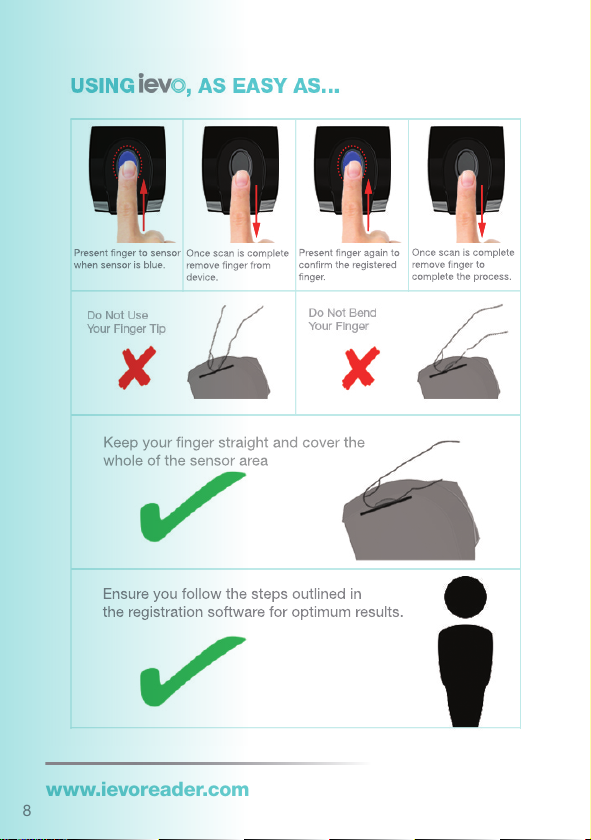
8
Once scan is complete
remove finger to
complete the process.
Present finger again to
confirm the registered
finger.
Once scan is complete
remove finger from
device.
Present finger to sensor
when sensor is blue.
Keep your finger straight and cover the
whole of the sensor area
Ensure you follow the steps outlined in
the registration software for optimum results.
ievo ultimate desktop reader:
www.ievoreader.com

9
Present finger to sensor
when sensor is blue.
Once scan is complete
remove finger from
device.
Present finger again to
confrim the registrated
finger.
Once scan is complete
remove finger to
complete the process.
Keep your finger straight and
cover the whole of the sensor area
Ensure you follow the steps outlined in
the registration software for optimum results.
Reference Guide
ievo micro desktop reader:

10
Standalone Software
(If using alternative registration software, please refer to documentation provided by your provider)
Using
3) You will now see a list of registered users alongside their User ID number on the
user list screen.
2) Enter the user’s details in the fields provided and press ‘Save’.
1) Once installed launch the ievo Ltd registration software to open the user list
screen and click ‘Add User’.
www.ievoreader.com
Otros manuales para ultimate
2
Este manual sirve para los siguientes modelos
1
Tabla de contenidos


