
IC nexus SBC21 Series Manual de usuario

Quick Start Guide SBC21/NSD21/EC 21
iMX.6 Processor Series
SBC21 / EC21 / NSD21
Quick Start Guide
Copyright 2000 –2014 IC Nexus Corporation. All rights reserved

Quick Start Guide SBC21/NSD21/EC 21
Page 2
Release Notes
Version
Release Date
Notes
1.0
June 2013
Initial release
2.0
October 2013
Correct some typo errors
3.1
October 2013
Modify some error
4.0
November 2013
Add console connection setting
Add Ubuntu root password
5.0
December 2013
Modify u-boot arguments
6.0
January 2014
Add NSD2105
7.0
February 2014
Add the procedure of updating firmware
via USB dongle or MicroSD
7.1
February 2014
Remove WiFi Manager
8.0
March 2014
Add null modem adapter
9.0
April 2014
Modify Ubuntu touch re-calibration
guideline
9.1
May 2014
Modify P.12
Remove null modem adapter in package
9.2
July 2014
Add SBC2000 (P.4, 7, 9, 12)
9.3
August 2014
Sleep mode on Android & Ubuntu
9.4
October 2014
Separately list D200 product (P.4)
Disclaimer
This documentation is provided for use with IC Nexus products. No license to IC
Nexus property right is granted. IC Nexus assumes no liability, provides no warranty
either expressed or implied relating to the usage, or intellectual property right
infringement that may result from its use.
IC Nexus provides this document without any warranty of any kind, expressed or
implied, including, but not limited to, its particular purpose. IC Nexus may make
changes to this document without notice.

Quick Start Guide SBC21/NSD21/EC 21
Page 3
Table of Contents
TABLE OF CONTENTS.................................................................................... 3
1. PACKAGE CONTENTS......................................................................... 4
1.1 Single Board Computer........................................................................... 4
1.2 NSD Smart Display.................................................................................4
1.3 All-in-One Embedded Computer.............................................................. 4
1.4 Other specially: SBC2000 / NSD2105...................................................... 4
2. OVERVIEW.......................................................................................... 5
2.1 SBC21 Single Board Computer ............................................................... 5
2.2 NSD21 Smart Display............................................................................. 6
2.3NSD2105 Smart Display ......................................................................... 7
2.4EC21 All-in-One Embedded Computer..................................................... 8
3. SETUP................................................................................................. 9
3.1 Connecting the Debug Port to PC............................................................ 9
3.2 Start Running ....................................................................................... 14
3.3 Connecting to the PC (for Android 4.2)................................................... 16
3.4Update firmware via USB dongle (for Android 4.2) .................................. 26
4. RUNNING SOFTWARE ........................................................................ 28
4.1 Android................................................................................................ 28
4.2 Ubuntu Linux........................................................................................ 33
5. TOUCH PANEL CALIBRATION............................................................. 38
5.1 Android RTP re-calibrate procedure....................................................... 38
5.2 Ubuntu RTP re-calibrate procedure........................................................ 40

Quick Start Guide SBC21/NSD21/EC 21
Page 4
1. Package Contents
1.1 Single Board Computer
Single board computer include SBC2100.
Item
Notes
SBC2100 Board
Power Adapter
RS232 IDC cable
Pin header for DB9
CD
Software and User's Manual
1.2 NSD Smart Display
NSD smart display products include NSD2107, NSD2110, NSD2115, and NSD2122.
Item
Notes
NSD21xx
Power Adapter
RS232 IDC cable
Pin header for DB9
CD
Software and User's Manual
1.3 All-in-One Embedded Computer
All-in-One embedded computer products include EC2107 and EC2110.
Item
Notes
EC21xx
Power Adapter
RS232 IDC Cable
Pin Header for DB9
CD
Software and User's Manual
1.4 Other specially: SBC2000 / NSD2105
This kind of products is only include SBC2000 and NSD2105.
Item
Notes
NSD21xx
Power Adapter
RS232 IDC cable
Pin header for DB9
C220 Debug Board
SBC2000 and NSD2105 only
CD
Software and User's Manual

Quick Start Guide SBC21/NSD21/EC 21
Page 5
2. Overview
2.1 SBC21 Single Board Computer
Top View
Bottom View

Quick Start Guide SBC21/NSD21/EC 21
Page 6
2.2 NSD21 Smart Display
Android Enabled Device
Ubuntu Enabled Device

Quick Start Guide SBC21/NSD21/EC 21
Page 7
2.3 NSD2105 Smart Display
Android Enabled Device
Ubuntu Enabled Device
Bottom View
(The based board is SBC2000)

Quick Start Guide SBC21/NSD21/EC 21
Page 8
2.4 EC21 All-in-One Embedded Computer
Ubuntu enabled device showing ports on each side
Android enabled device with wireless antennas attached
Quick Start Guide SBC21/NSD21/EC 21
Page 9
3. Setup
3.1 Connecting the Debug Port to PC
During development, it is a good idea to connect using the debug port.
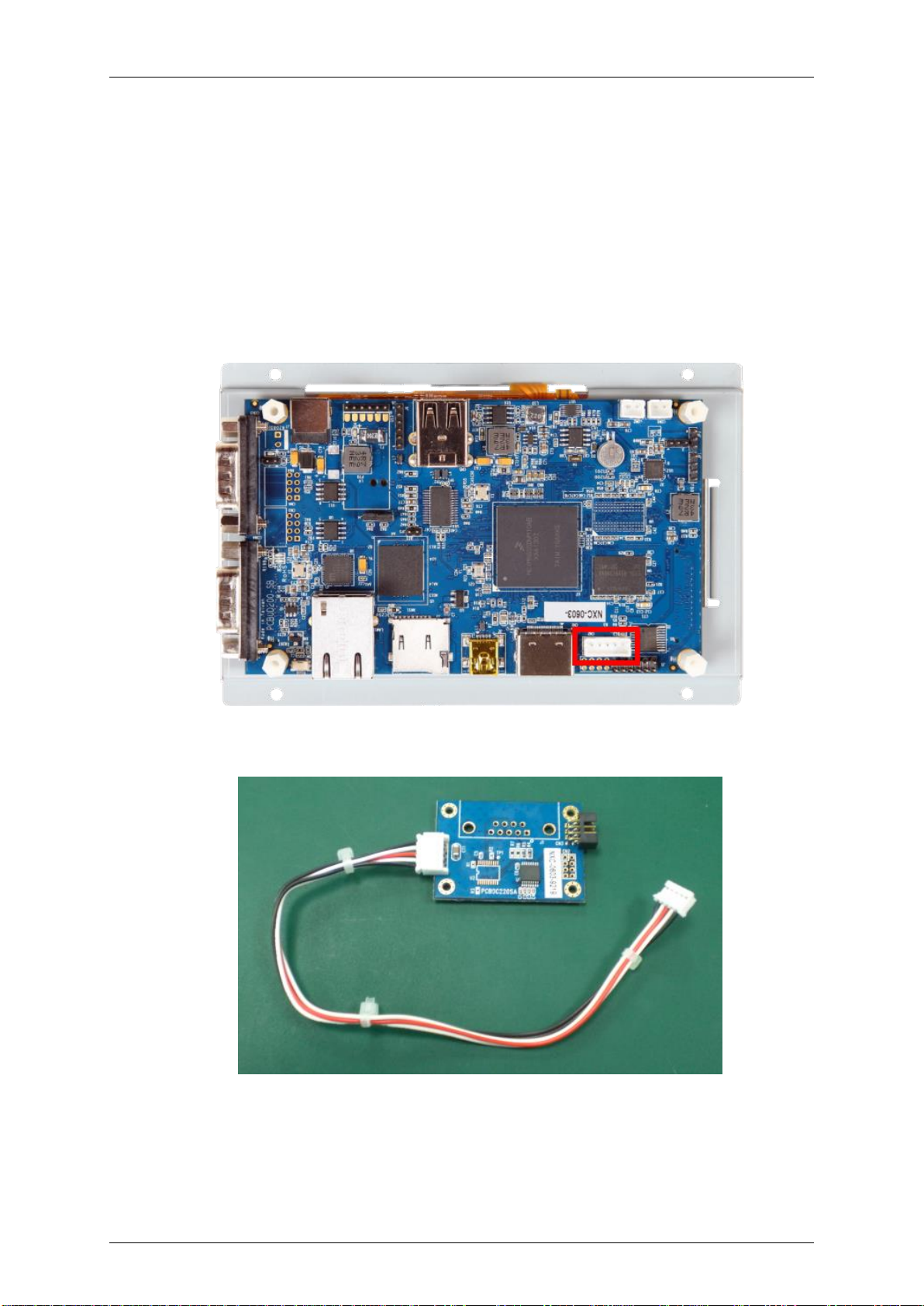
There are different port location between SBC2000/NSD2105 and other 2100 series.
SBC2000/NSD2105
Find the debug port on SBC2000/NSD2105
C220 debug board and the cable on it:

Quick Start Guide SBC21/NSD21/EC 21
Page 10
Connect the cable on C220 debug board to the debug port of SBC2000/NSD2105
Connect a RS232 IDC cable to C220 debug board
Este manual sirve para los siguientes modelos
11
Tabla de contenidos
Otros manuales de De oficina de IC nexus


