
HX E-33A-100701 Manual de usuario

USER GUIDE
HX E-33A-100701

CONTENTS
Introduction ................................................................................................................................................................... 3
Warranty ........................................................................................................................................................................ 3
Warnings........................................................................................................................................................................ 3
Loudspeaker Face Information ...................................................................................................................................... 4
Loudspeaker Sound Dispersion ..................................................................................................................................... 4
Room Preparation .......................................................................................................................................................... 5
Loudspeaker Cabling ..................................................................................................................................................... 9
Input and Control ......................................................................................................................................................... 12
Maximum Output and Listening Distance ................................................................................................................... 13
Quick Digital Output Adjustment ............................................................................................................................ 13
Surface Cleaning ......................................................................................................................................................... 13
Third Party Accessories ............................................................................................................................................... 14
Unpacking and Packing ............................................................................................................................................... 14

INTRODUCTION
Thank you for your purchase of HX studio monitor E-33A-100701. HX E series loudspeakers provide high end audio
reproduction, maximum transparency and low distortion output.
WARRANTY
Warranty covers all defects in material and workmanship. No user maintenance is necessary. All equipment has been
tested with care and precision. It is finely hand-crafted to give first class performance, carries a 3 year warranty for
the loudspeaker and 1 year warranty for the amplifier.
The following are not covered: damage caused by accident, misuse, abuse, unauthorized modification, fair wear and
tear, neglect, damage during shipment.
If you suspect a problem on the first time use, please contact us directly.
WARNINGS
Please read and follow the safety information below:
Connect the amplifier to 115V/60Hz AC power line. The amplifier does not have a user selectable switch for
different voltage line.
Do not remove loudspeaker’s component and amplifier from the box. No user serviceable parts are inside.
Do not operate the amplifier with an ungrounded mains power cable.
Due to magnetic field, do not place within 1m (3 ft) of a cathode ray tube (CRT) television or monitor. There
is no issue with close proximity to plasma/LCD/LED devices.
Loudspeakers are capable of generating high sound pressure levels over a sustained period of time. Due to
the low level of distortion, it is not always obvious working with high sound level. Please be aware of
excessive sound level exposure over a sustained period of time can lead to permanent hearing damage.
Do not turn on the amp while sending input signal.
Start with low level input signal to the amp to ensure safety of the loudspeaker. The amplifier has a fixed
gain.
Do not block all perforated surface on the amplifier box. Please allow at least one perforated surface facing
up and/or unblocked.
Do not stack amplifier boxes.
Do not place the amplifier box close to loudspeaker face to avoid temperature gradient due to amplifier heat.
Optimum operating ambient temperature for the devices is 0°C (32°F) – 30°C (85°F)
More detailed information about the amplifier can be found in the separate amplifier manuals from Digmoda.
Make sure all loudspeaker cables (from amp to loudspeaker terminals) are connected properly before turning
on the amplifier. Make sure the cables are securely attached to loudspeaker’s input terminal. Permanent
damage to the amplifier may occur if the leads are touching each other while the amplifier is turned on.
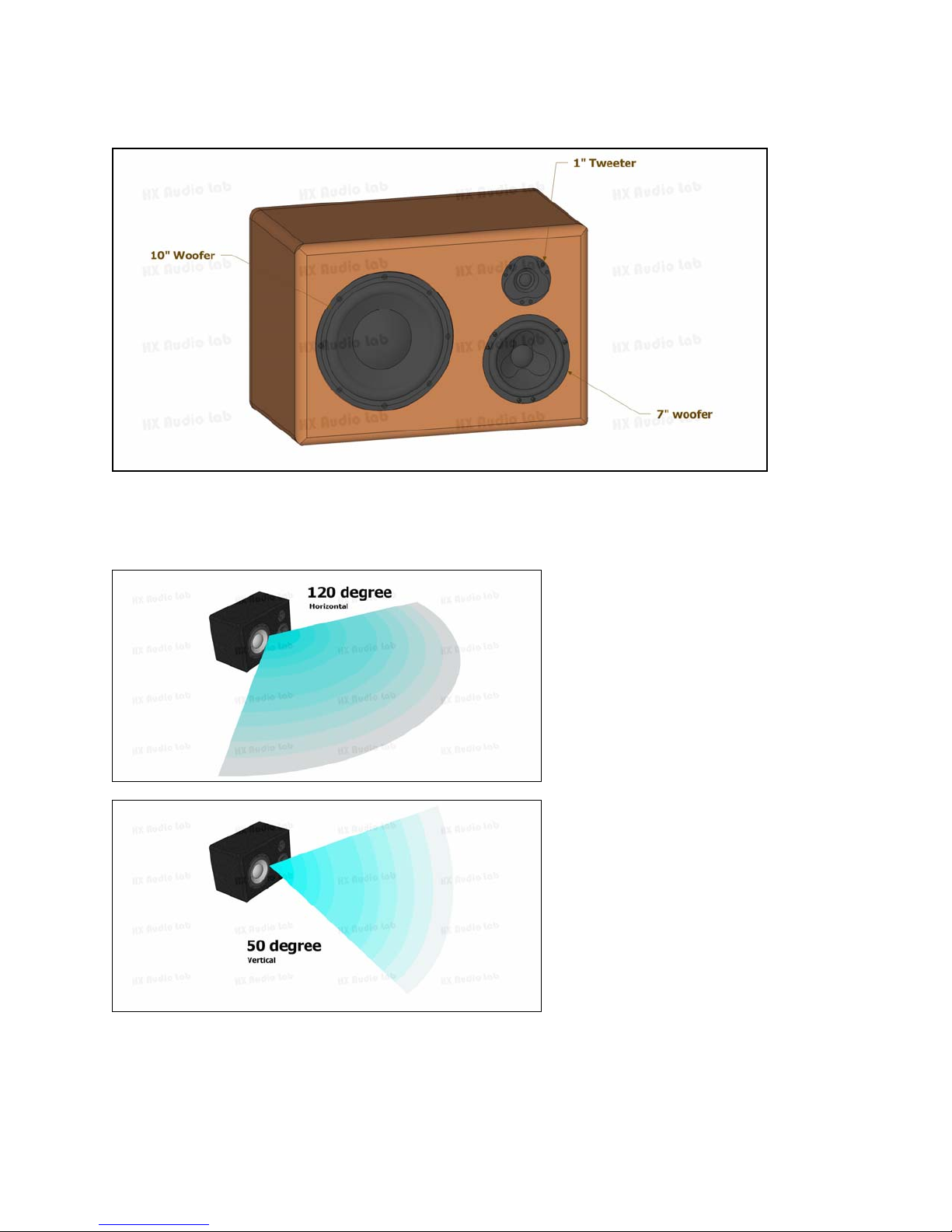
LOUDSPEAKER FACE INFORMATION
LOUDSPEAKER SOUND DISPERSION
The optimum sound coverage for the device is shown in the pictures below.

ROOM PREPARATION
Loudspeaker and amplifier box dimensions can be seen below:
Add an extra 1.5in (38.1mm) extrusion to the box depth for the amplifier heat sink.

Please provide an appropriate size of a loudspeaker stand/base for the loudspeaker. Due to the low frequency
reproduction capability, vibration isolator/pad is recommended to be placed below the each loudspeaker box (between
the box and the stand).
Loudspeaker can be positioned in different setup. Please see description for different position in the following page.

Above picture shows the preferred setup. Woofers are located “inside” and loudspeaker is mounted horizontally. This
box position is the default position for E-33A-100701.
Above picture shows another variation of the horizontal position. Placing woofer “outside” may result in slightly
narrower stereo image.
This page shows two preferred setup. Please note that the tweeter is located on the top to avoid reflections from the
desk. If the loudspeaker is going to be mounted near the ceiling (close proximity to the ceiling wall), rotating the
loudspeaker so the tweeter located in the bottom is strongly recommended. Tweeter should be located as far as possible
from any boundaries.

As previously discussed, locating the tweeter near a boundary is not a good idea. We do not recommend this position.
Above picture shows the preferred position if the loudspeaker needs to be mounted vertically. Tweeter should be
placed “outside” and far from boundaries. If the tweeter is too high relative to the listening plane, please provide
down-tilt.
Placing the loudspeaker vertically will narrow the sound coverage (50° only).

LOUDSPEAKER CABLING
The correct connection of the cables to loudspeaker’s terminal is shown below:
Each cable is marked by dot (one, two or three) and each pair has one end that is marked by a black marker. The dot
on the cable corresponds to the dot on the sticker near the terminal. The black marker at the end of the cable
corresponds to the negative (black terminal) input.
Important Notice:
Please make sure the loudspeaker cable to each terminal does not have a tension at all time.
Make sure the copper for each cable is securely inserted to the terminal and tightly clamped.

Please see the picture below, showing the dot marker and connection detail:
Another closer look at the terminal cable is shown below:
Tabla de contenidos


