Huawei EVI-CG010 Manual de usuario

Quick Start Guide
Schnellstartanleitung
Guide de démarrage rapide
Guía de inicio rápido
Guia de Início Rápido
Guida di avvio rapido
Instrukcja obsługi
Hızlı Başlangıç Kılavuzu
Ghid de pornire rapidă
Stručný návod kobsluze
Panduan Mula Pantas
クイックスタートガイド
EVI-CG010
Eyewear
ﻊﯾرﺳﻟا لﯾﻐﺷﺗﻟا لﯾﻟد

Charging
Do not charge the glasses when you are wearing them.
Do not overbend the charging converter.
The glasses will enter low power mode if left unused and
uncharged for more than 3 minutes. When you wear or
charge the glasses again, the glasses will automatically exit
low power mode.
1
2
Charging: Indicator turns yellow
Fully charged: Indicator turns green
Connect one end of the charging converter with the
charging port to a USB-C charging cable.
Connect the other end of the charging converter to the
two arms to charge the glasses. Make sure that the
indicator on the charging converter is on. (The glasses
cannot be charged if only one arm is connected.)
1.
2.
1
Quick Start Guide

2
Use method 1 for pairing for the first time.
Method 1: When the glasses are being charged
Pairing
2
HUAWEI Eyewear
1
Make sure that the glasses are being charged. Press and hold the
Function button for 10 seconds and then release. Wait for the
indicator to flash white, which indicates that the glasses have been
restored to their factory settings. The glasses will then enter Pairing
mode again.
Factory reset
Press and hold the Function button for 3 seconds and then
release. Wait for the indicator to flash white, which indicates
that the glasses has entered Pairing mode.
Go to your phone's Bluetooth settings, search for the glasses,
and connect to them.
1.
2.

3
Method 2: When the glasses are not being charged
Make sure that a prompt sound is played when you take on
the glasses, and that the glasses are not connected to other
devices.
Charge the glasses in a timely manner if no prompt sound was
played.
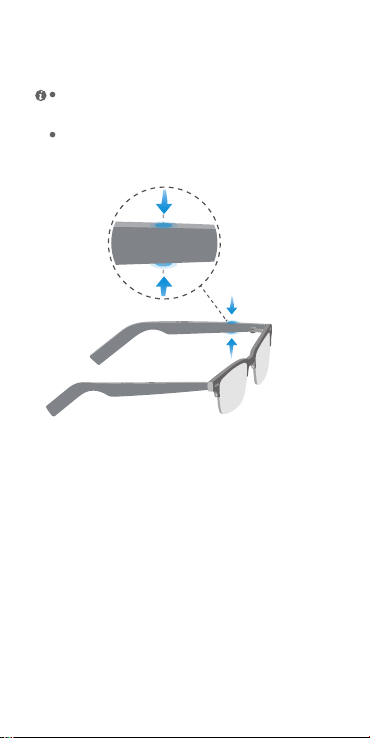
When wearing the glasses, pinch the left arm for 5 seconds.
The glasses will then enter Pairing mode upon a prompt sound.
Go to your phone's Bluetooth settings, search for the glasses,
and connect to them.
1.
2.

4
When wearing the glasses, pinch the left arm for 5 seconds.
The glasses will then enter Pairing mode upon a prompt sound.
Gesture control
Volume up/down: Swipe along either arm.
Swipe
Double-tap
Play/Pause: Double-tap either arm.
Answer/End a call: Double-tap either arm.
Reject a call: Press and hold either arm for at least 2
seconds.
Press & hold
You can customize the double-tap and swipe gestures in the
HUAWEI AI Life app, such as for waking up the voice assistant or
switching to the previous or next song.

5
Scan the QR code to download the HUAWEI AI Life app to try
more features and customize your device's settings.
Download app
Remove and reinstall the front frame
Buckle Metal nail
1 3 42
3
4
1 2
Arm Front frame
The front frame of the glasses is removable. You can remove and
reinstall it by following the steps below.
Removal:
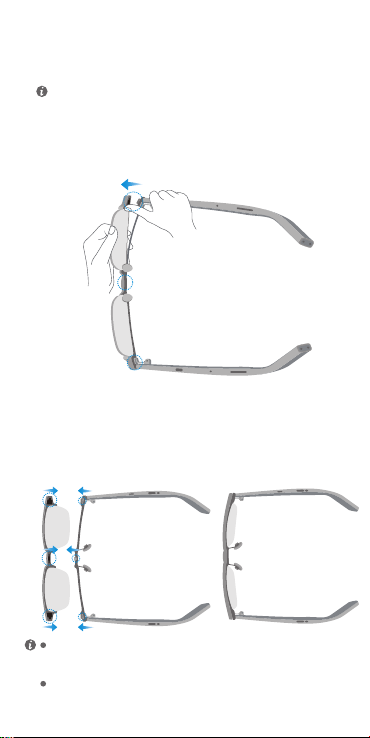
1. Unfold the arms and place the glasses upside down.
The front frame and arms are fastened using buckles and metal
nails.

6
Follow step 2 to separate the metal nail from the buckle on
the other side of the front frame.
Pull out either side of the front frame to separate the middle
metal nail from the middle buckle on the front frame.
Hold the front frame with one hand, and hold the front end of
an arm with another hand. Press the thumb against the front
frame and push it out to separate the metal nail from the
buckle on the arm.
To prevent the lens from falling out due to excessive force, avoid
pressing against the lens with your thumb.
2.
3.
4.
Reinstallation:
1.
2.
3.
The glasses are sold with decorative glass lenses, which are not
recommended to be used for an extended period of time (not
applicable for sunglasses).
For more information about using the product safely, please see
the product's safety information.
Hold the front frame with one hand, and hold the front end
of an arm with another hand.
Align the middle metal nail with the buckle in the middle of
the front frame and press the nail into the buckle.
Press the metal nails on both sides into the buckles in
sequence to complete the reinstallation.

7
Aufladen
1
2
Schnellstartanleitung
Verbinde ein Ende des Ladekonverters mit dem
Ladeanschluss eines USB-C-Ladekabels.
Verbinde das andere Ende des Ladekonverters mit den
beiden Bügeln, um die Brille aufzuladen. Vergewissere
dich, dass die Anzeigeleuchte am Ladekonverter leuchtet.
(Die Brille kann nicht aufgeladen werden, wenn nur ein
Bügel verbunden ist.)
Lade die Brille nicht auf, wenn du sie trägst.
Biege den Ladekonverter nicht zu stark.
Die Brille wechselt in den Energiesparmodus, wenn sie
länger als 3 Minuten nicht verwendet und nicht aufgeladen
wird. Wenn du die Brille wieder trägst oder auflädst,
beendet sie den Energiesparmodus automatisch.
Aufladen: Anzeigeleuchte leuchtet gelb
Voll aufgeladen: Anzeigeleuchte leuchtet grün
1.
2.

8
Koppeln
2
HUAWEI Eyewear
1
Verwende Methode 1, um die Brille zum ersten Mal
zu koppeln.
Methode 1: Wenn die Brille aufgeladen wird
Vergewissere dich, dass die Brille aufgeladen wird. Halte die
Funktionstaste 10 Sekunden lang gedrückt und lass sie dann
los. Warte, bis die Anzeigeleuchte weiß blinkt. Dies zeigt an,
dass die Brille auf ihre Werkseinstellungen zurückgesetzt
wurde. Die Brille wechselt dann wieder in den
Kopplungsmodus.
Zurücksetzung auf Werkseinstellungen
Halte die Funktionstaste 3 Sekunden lang gedrückt und
lass sie dann los. Warte, bis die Anzeigeleuchte weiß
blinkt. Dies zeigt an, dass die Brille in den Kopplungsmo-
dus gewechselt hat.
Navigiere zu den Bluetooth-Einstellungen deines Telefons,
suche nach der Brille und verbinde sie.
1.
2.

9
Methode 2: Wenn die Brille nicht aufgeladen wird
Vergewissere dich, dass ein Signalton ertönt, wenn du
die Brille aufsetzt, und dass diese nicht mit anderen
Geräten verbunden ist.
Lade die Brille rechtzeitig auf, wenn kein Signalton
ertönt ist.
Wenn du die Brille trägst, drücke den linken Bügel 5
Sekunden lang zusammen. Die Brille wechselt dann nach
einem Signalton in den Kopplungsmodus.
Navigiere zu den Bluetooth-Einstellungen deines Telefons,
suche nach der Brille und verbinde sie.
1.
2.
Tabla de contenidos
Manuales populares de Gafas 3D de otras marcas

Silhouette
Silhouette TITAN DESIGN Instrucciones de montaje

Soundcore
Soundcore Frames Manual de usuario

Wiseup
Wiseup GL2000 Manual de usuario

Eschenbach
Eschenbach MaxTV Manual de usuario

Mini Gadgets
Mini Gadgets GLSun720 Manual de usuario

Happy Electronics
Happy Electronics Mindroid Glasses Manual de usuario