
HTC 2Q6P100 Manual de usuario

2Q6P100
HTC CONFIDENTIAL
For Certificatoin reference only
HTC CONFIDENTIAL
For Certificatoin reference only
HTC CONFIDENTIAL
For Certificatoin reference only
HTC CONFIDENTIAL
For Certificatoin reference only
HTC CONFIDENTIAL
For Certificatoin reference only
HTC CONFIDENTIAL
For Certificatoin reference only
HTC CONFIDENTIAL
For Certificatoin reference only
HTC CONFIDENTIAL
For Certificatoin reference only
HTC CONFIDENTIAL
For Certificatoin reference only
English
2
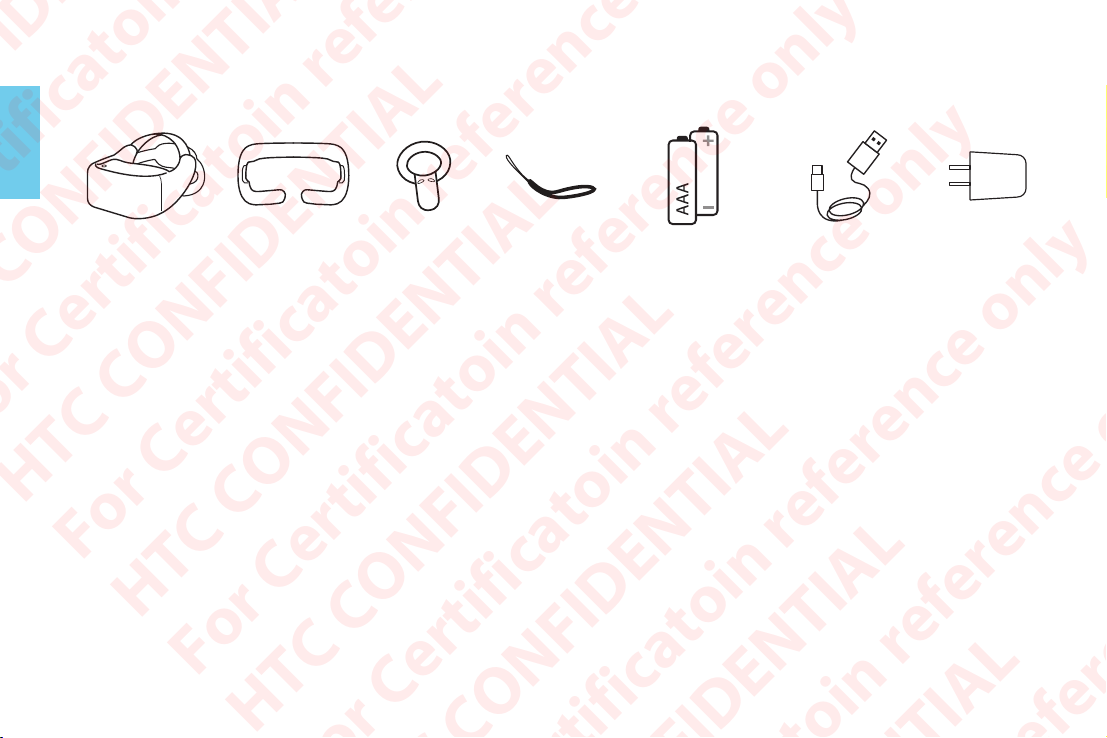
Check what’s inside the box
You will see:
2Q6P100
headset Face cushion 2Q6M200
(x2)
Wrist strap
(x2)
AAA Battery (x4)
for 2Q6M200s
USB Type-C
cable
HTC Rapid
Charger 3.0
Safety comes first
•Use the 2Q6P100 in a clear and safe area (at least 2m x 2m) that is indoors.
•Take a break if you experience discomfort or if the headset gets too hot.
•Attach a wrist strap to each 2Q6M200 and wear the wrist strap when using the 2Q6M200. Using the wrist
strap may help prevent the 2Q6M200 from accidentally being dropped; however, please do not fling or
violently throw the 2Q6M200 because the wrist strap may break.
•Check the Safety Guide for other warnings and instructions.
HTC CONFIDENTIAL
For Certificatoin reference only
HTC CONFIDENTIAL
For Certificatoin reference only
HTC CONFIDENTIAL
For Certificatoin reference only
HTC CONFIDENTIAL
For Certificatoin reference only
HTC CONFIDENTIAL
For Certificatoin reference only
HTC CONFIDENTIAL
For Certificatoin reference only
HTC CONFIDENTIAL
For Certificatoin reference only
HTC CONFIDENTIAL
For Certificatoin reference only
HTC CONFIDENTIAL
For Certificatoin reference only

English
3
Headset
Power button
LED (status light)
USB Type-C connector
Tracking sensors
Back head support
Adjustment dial
Adjustable head strap
HTC CONFIDENTIAL
For Certificatoin reference only
HTC CONFIDENTIAL
For Certificatoin reference only
HTC CONFIDENTIAL
For Certificatoin reference only
HTC CONFIDENTIAL
For Certificatoin reference only
HTC CONFIDENTIAL
For Certificatoin reference only
HTC CONFIDENTIAL
For Certificatoin reference only
HTC CONFIDENTIAL
For Certificatoin reference only
HTC CONFIDENTIAL
For Certificatoin reference only
HTC CONFIDENTIAL
For Certificatoin reference only

English
4
Speakers
3.5mm headset jack
Volume buttons
Face cushion (replaceable)
Microphone
Storage card slot
IPD adjustment slider
(Adjust the IPD to get a clear
and sharp view. See page 9
for details.)
Proximity sensor
HTC CONFIDENTIAL
For Certificatoin reference only
HTC CONFIDENTIAL
For Certificatoin reference only
HTC CONFIDENTIAL
For Certificatoin reference only
HTC CONFIDENTIAL
For Certificatoin reference only
HTC CONFIDENTIAL
For Certificatoin reference only
HTC CONFIDENTIAL
For Certificatoin reference only
HTC CONFIDENTIAL
For Certificatoin reference only
HTC CONFIDENTIAL
For Certificatoin reference only
HTC CONFIDENTIAL
For Certificatoin reference only

English
5
2Q6M200
Use the 2Q6M200s to interact with objects inside VR.
Trackpad
Menu button
Status light
VIVE button
Trigger
Grip button
Battery compartment
Wrist strap hole
Remember to put two AAA batteries (included in the box) inside each 2Q6M200’s battery compartment.
HTC CONFIDENTIAL
For Certificatoin reference only
HTC CONFIDENTIAL
For Certificatoin reference only
HTC CONFIDENTIAL
For Certificatoin reference only
HTC CONFIDENTIAL
For Certificatoin reference only
HTC CONFIDENTIAL
For Certificatoin reference only
HTC CONFIDENTIAL
For Certificatoin reference only
HTC CONFIDENTIAL
For Certificatoin reference only
HTC CONFIDENTIAL
For Certificatoin reference only
HTC CONFIDENTIAL
For Certificatoin reference only

English
6
Attaching the face cushion to the headset
Before using the 2Q6P100 headset, attach the face cushion to it first.
Insert the central tab on the face
cushion into the slot on the headset,
and then align the other face cushion
tabs to the remaining slots on the
headset frame.
With your thumbs, press these
areas on the face cushion.
Hold the headset, similar to the
illustration, and then press down
on the marked areas on the face
cushion until you hear a soft click
to lock the face cushion to the
headset.
HTC CONFIDENTIAL
For Certificatoin reference only
HTC CONFIDENTIAL
For Certificatoin reference only
HTC CONFIDENTIAL
For Certificatoin reference only
HTC CONFIDENTIAL
For Certificatoin reference only
HTC CONFIDENTIAL
For Certificatoin reference only
HTC CONFIDENTIAL
For Certificatoin reference only
HTC CONFIDENTIAL
For Certificatoin reference only
HTC CONFIDENTIAL
For Certificatoin reference only
HTC CONFIDENTIAL
For Certificatoin reference only

English
7
Sign up for a VIVEPORT account
You will need a VIVEPORT account to log in to VIVEPORT. On your computer’s web browser, go to
focus.viveport.com and sign up for one using your email address or mobile phone number.
Turn on the headset
Charge the headset for around 2.5 hours (or until the LED turns white)
using the USB Type-C cable and power adapter included in the box.
After charging, press and hold the Power button for a few seconds to
turn the headset on.
Before putting on the headset, some things to take note:
Remove the protective films that are covering the tracking sensors and
headset lenses.
You can connect the headset to the Internet to access apps from
VIVEPORT so remember the wireless network name you want to
connect to and the information needed to connect to it.
Make sure to have the 2Q6M200 nearby (with batteries inserted)
where you can easily pick it up.
HTC CONFIDENTIAL
For Certificatoin reference only
HTC CONFIDENTIAL
For Certificatoin reference only
HTC CONFIDENTIAL
For Certificatoin reference only
HTC CONFIDENTIAL
For Certificatoin reference only
HTC CONFIDENTIAL
For Certificatoin reference only
HTC CONFIDENTIAL
For Certificatoin reference only
HTC CONFIDENTIAL
For Certificatoin reference only
HTC CONFIDENTIAL
For Certificatoin reference only
HTC CONFIDENTIAL
For Certificatoin reference only

English
8
Wear the headset
• Make sure to loosen the velcro
straps on top.
• Make sure to loosen the
back head support using the
Adjustment dial. Do not loosen
the support by just pulling it.
Note: If you have long hair or a
ponytail, loosen the back head
support all the way.
• Tighten the velcro straps
on top and the back head
support. Use the adjustment
dial when tightening the back
head support. Do not push
it in.
• The fit should be snugged.
• Wear the headset and then pull
down the back head support
and position it at the base of
your skull.
Note: If you have long hair, position
the back head support above the
base of your skull (see illustration).
HTC CONFIDENTIAL
For Certificatoin reference only
HTC CONFIDENTIAL
For Certificatoin reference only
HTC CONFIDENTIAL
For Certificatoin reference only
HTC CONFIDENTIAL
For Certificatoin reference only
HTC CONFIDENTIAL
For Certificatoin reference only
HTC CONFIDENTIAL
For Certificatoin reference only
HTC CONFIDENTIAL
For Certificatoin reference only
HTC CONFIDENTIAL
For Certificatoin reference only
HTC CONFIDENTIAL
For Certificatoin reference only

English
9
Set up the headset
Just follow the instructions shown in the headset and you’ll be immersed in VR in no time. Some of the things
you’ll learn and do when setting up 2Q6P100:
A. Pair the 2Q6M200s with the headset
Press and hold the VIVE button on both 2Q6M200s for a few seconds to turn them on and start the pairing
process. The pairing is successful when the 2Q6M200s vibrate for a few seconds. After pairing, follow the
onscreen instructions to finish setting up 2Q6P100.
B. Adjust the IPD
Interpupillary distance (IPD) is the distance between the center of the pupils in
your eyes. Setting it to the correct distance is one of the keys to having a great
viewing experience in VR.
Follow the guide to learn how to set the IPD properly and position the headset
correctly on your face. If you need to adjust the IPD in the future, just move the
adjustment slider below the headset.
C. Learn about the 2Q6M200s
Follow a simple tutorial to familiarize yourself with the 2Q6M200s. We’ll walk you through the uses of the
buttons on the 2Q6M200s.
HTC CONFIDENTIAL
For Certificatoin reference only
HTC CONFIDENTIAL
For Certificatoin reference only
HTC CONFIDENTIAL
For Certificatoin reference only
HTC CONFIDENTIAL
For Certificatoin reference only
HTC CONFIDENTIAL
For Certificatoin reference only
HTC CONFIDENTIAL
For Certificatoin reference only
HTC CONFIDENTIAL
For Certificatoin reference only
HTC CONFIDENTIAL
For Certificatoin reference only
HTC CONFIDENTIAL
For Certificatoin reference only

English
10
D. Connect the headset to a wireless network
Scroll through the list of available wireless networks by swiping up or
down on the 2Q6M200 Trackpad. Select the wireless network by pointing
the 2Q6M200 at the wireless network name and then pressing the
Trackpad. Select More if you don’t see your wireless network in the list.
Wi-Fi
Not connected
O
More
If you cannot nd your Wi-Fi from the list, select “More”.
Wi-Fi 1
Wi-Fi 2
Wi-Fi 3
Wi-Fi 4
E. Sign in to VIVEPORT
By signing in to VIVEPORT, you get access to a library of apps that you can download for free or purchase.
HTC CONFIDENTIAL
For Certificatoin reference only
HTC CONFIDENTIAL
For Certificatoin reference only
HTC CONFIDENTIAL
For Certificatoin reference only
HTC CONFIDENTIAL
For Certificatoin reference only
HTC CONFIDENTIAL
For Certificatoin reference only
HTC CONFIDENTIAL
For Certificatoin reference only
HTC CONFIDENTIAL
For Certificatoin reference only
HTC CONFIDENTIAL
For Certificatoin reference only
HTC CONFIDENTIAL
For Certificatoin reference only
Este manual sirve para los siguientes modelos
1
Tabla de contenidos
Otros manuales de Auriculares de HTC


