HP PROTECTOR 200 Guía de instalación

HP SURGE PROTECTOR 200
Instructions and Warranty Information
Instructions et informations relatives
à la garantie
Instrucciones e información de garantía

ENGLISH
ENGLISH
STEP 1: Set the Power Switch to Off
Make sure the power is switched off on the HP
Surge Protector.
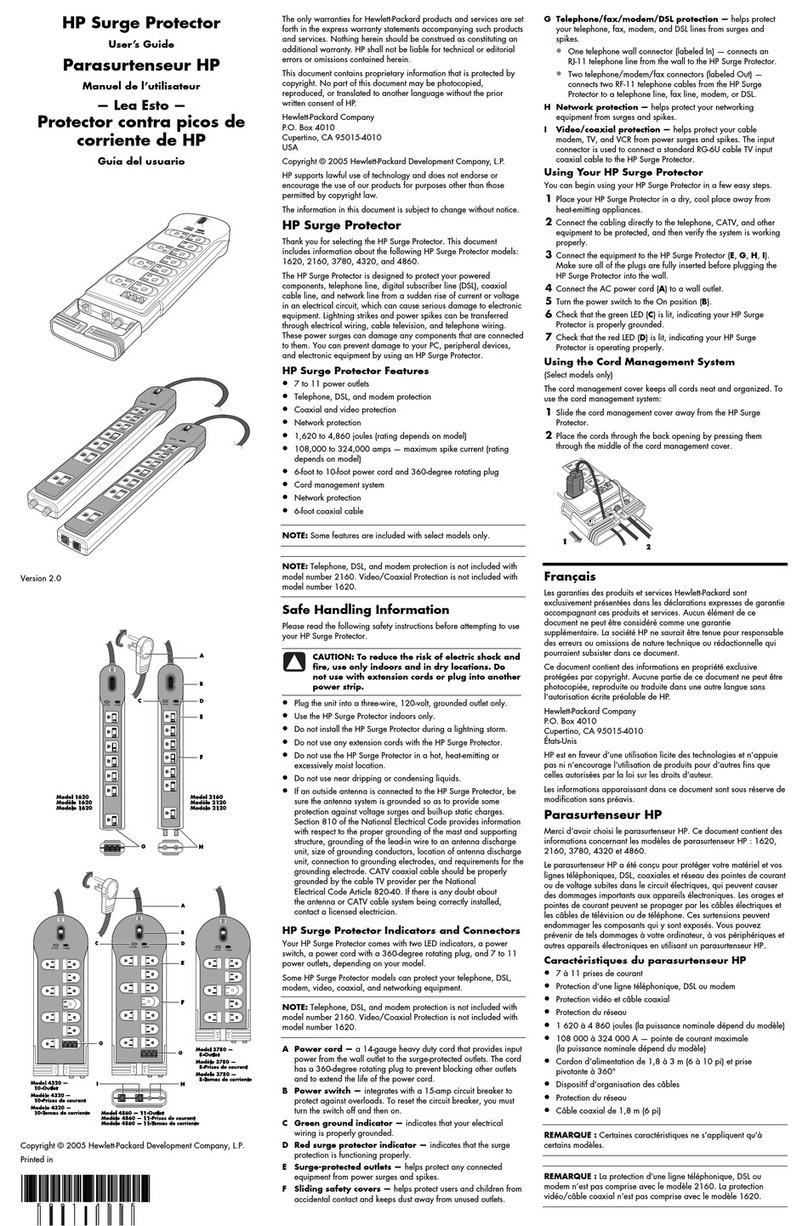
STEP 2: Testing the HP Surge Protector
Plug your HP Surge Protector directly into a properly
grounded 3-wire AC outlet. Turn the switch on to test
the unit. If the green “PROTECTION ON” light is
illuminated, then the surge protector is on. Switch off
the surge protector before proceeding to Step 3.
NOTE: If the “GROUND OK” light does not illuminate,
contact a qualified electrician.
STEP 3: Plugging in Your Components
•VerifythesurgeprotectorisswitchedtotheOFF
position before proceeding.

ENGLISH
ENGLISH
•Plugoneofthepiecesofequipmentyouwantto
protect into the surge protector.
•SwitchthesurgeprotectortoON.
•Turnonthepoweroftheequipmentpluggedinto
the surge protector.
•Iftheequipmentisworkingcorrectly,continueto
plug in and turn on additional equipment.
In the extremely unlikely event that one or all the
connected equipment does not work properly, stop
and read the troubleshooting section of this manual
STEP 4: Phone Line Hookup
To protect from surges on your phone line, the surge
protector has RJ11 phone connections with a splitter.
•ConnectanRJ11phonecableFROMthewall
jack to the phone connection labeled “IN” on
your surge protector.

ENGLISH
ENGLISH
•Connectasecondphonecablefromthephone
connection labeled “OUT” on your surge protector
to the phone “IN” jack on your modem or satellite
receiver.
Phone cables are not included with the surge
protector and must be purchased separately.
TROUBLESHOOTING
Problem: Equipment connected to surge protector
does not turn on.
Solution:
•Makesurethesurgeprotectorispluggedinto
a working AC outlet. Check all AC power
connections.
•Makesurethesurgeprotectorandconnected
equipment are turned on.

ENGLISH
ENGLISH
•Insomesituations,awallswitchmyneedtobe
turned on to send electricity to the wall outlet. Try
turning on the light switches located near wall
outlet powering the surge protector.
Problem: Components have AC power but still
don’t work.
Solution:
•ChecktoseeifACpowercablesarecorrectly
connected.

ENGLISHENGLISH
LIMITED WARRANTY FOR CONSUMERS
Monster,LLC,7251LakeMeadBlvdWest,LasVegas,
NV89128,USA(“Monster”)extendstoYouthisLimited
Warranty.StatutoryorcommonlawmayprovideYouwith
additional rights or remedies, which shall not be affected by
this Limited Warranty. Hewlett-Packard Company does not
extend any warranty to you and is not responsible or liable
for the implementation of the warranty below.
DEFINITIONS
“Adequate Use” means use of the Product and
ConnectedEquipment(i)withinahomeordwelling,(ii)
forprivate(asopposedtocommercial)purposes,(iii)in
conformance with all applicable local, state or federal
law,codeorregulations(includingwithoutlimitation
buildingand/orelectricalcodes),(iv)inaccordancewith
manufacturer recommendations and/or instructions in the
materials and documentation that accompany the Product
andanyConnectedEquipment,(v)withproperelectrical
grounding,(vi)withproperanddirectconnectionbetween
the Product and an AC power source that has protective
grounding(excludinggasordieselpoweredgenerators),

(vii)withcableortelephonelinestoanyConnected
EquipmentproperlyconnectedtotheProduct,and(viii)
without a connection in a “daisy-chain” fashion to or
with any extension cord, surge suppressor, power strip,
uninterruptiblepowersupply(“UPS”)orotherequipment.
“Authorized Dealer” means any distributor, reseller
orretailerthat(i)wasdulyauthorizedtodobusinessin
thejurisdictionwhereitsoldtheProducttoYou,(ii)was
permittedtosellYoutheProductunderthelawsofthe
jurisdictionwhereYouboughttheProduct,and(iii)sold
YoutheProductnewandinitsoriginalpackaging.
“Connected Equipment”meansanydevicethatis(i)
generally suited to be used with the Product or products
ofthesamekind,(ii)meetstherequirementsofall
applicablelawsandsafetystandards,(iii)containsonly
parts manufactured, sold or recommended by the original
manufactureroftheConnectedEquipment,and(iv)has
not been altered, tampered with or modified by any person
otherthanitsmanufacturerorservicepersonnelauthorized
or recommended by the manufacturer of the Connected
Equipment.

ENGLISHENGLISH
“Connected Equipment Damage” means physical
damage to Connected Equipment caused by a Product
Defect by a transient AC power, cable, telephone, or
lightning surge while connected to a properly installed
Product.ConnectedEquipmentDamage(i)maynot
be caused by a defect or unrelated damaging of the
Connected Equipment or a surge/spike or lightning
strike through a source, medium or connection other
thanthroughtheProduct,and(ii)doesnotextendtoloss
of data, or consequential, indirect or special damages
resulting from the Connected Equipment Damage.
“Fair Market Value”(“FMV”)meansthefairmarket
value of the Connected Equipment at the time Connected
Equipment Damage occurs.
“Formal Warranty Claim” means a claim made
inaccordancewiththesection“FormalWarranty
Claims” herein.
“Maximum Coverage Amount” means the maximum
amountthatMonsterwillpaytoYouunderthisLimited
Warranty for Connected Equipment Damages and is
defined in relation to each Product in the Specifications
Table below.

“Product”meansaProduct(i)thatislistedinthe
SpecificationsTablebelow,(ii)thatYouboughtfroman
AuthorizedDealernewandinitsoriginalpackaging,and
(iii)whoseserialnumber,ifany,hasnotbeenremoved,
altered, or defaced.
“Product Defect” means a defect, malfunction, non-
conformance to this Limited Warranty or other inadequacy
oftheProductthatexistedatthetimewhenYoureceived
theProductfromanAuthorizedDealerandthatcauses
a failure of the Product to perform in accordance with
Monster’s documentation accompanying the Product,
unless such failure has been caused completely or partly
by(a)anyuseotherthanAdequateUse,(b)transportation,
neglect, misuse or abuse by anyone other than Monster’s
employees;(c)alteration,tamperingormodificationofthe
productbyanyoneotherthanaMonsteremployee;(d)
accident(otherthanamalfunctionthatwouldotherwise
qualifyasaProductDefect);(e)maintenanceorserviceof
theProductbyanyoneotherthanaMonsteremployee;(f)
exposure of the Product to heat, bright light, sun, liquids,
sandorothercontaminants;or(g)actsoutsidethecontrol
of Monster, including without limitation acts of God, fire,
storms(excludinglightningsurges),earthquakeorflood.

ENGLISHENGLISH
“Warranty Period” means the time period during
whichMonstermusthavereceivedYourFormalWarranty
Claim. The different Warranty Periods related to Product
Defects and Connected Equipment Damage are defined
in the Specifications Table below. The Warranty Period
commencesonthedatewhenYoupurchasedorreceived
(whicheveroccurslater)theProductfromanAuthorized
DealerasevidencedbytheAuthorizedDealer’sinvoice,
salesreceiptorpackingslip.IfYoudonothavewritten
proof of the date of purchase or receipt, then the Warranty
Periodcommencesthree(3)monthsafterthedatewhenthe
Product left Monster’s factory as evidenced by Monster’s
records. The Warranty Period ends after the time defined
intheSpecificationsTablehasexpired,orafterYouhave
transferred ownership of the Product, whichever occurs
earlier.Also,YoumustcallMonsterandobtainaReturn
AuthorizationNumber(asdescribedunder“Howto
MakeaClaim”)withintwo(2)monthsafterYoudiscover
aProductDefect(orshouldhavediscoveredit,ifsuch
ProductDefectwasobvious).
“You” means the first individual person that purchased
theProductinitsoriginalpackagingfromanAuthorized
Dealer. This Limited Warranty does not apply to persons
Este manual sirve para los siguientes modelos
1
Tabla de contenidos
Idiomas:
Otros manuales de Protector contra sobretensiones de HP