
HMS Anybus Manual de usuario

HMS Industrial Networks AB
Germany
Japan
Sweden
U.S.A
+ 49 - 721 - 96472 - 0
+ 81 - 45 - 478 -5340
+ 46 - 35 - 17 29 20
+ 1 - 773 - 404 - 3486
sales@hms-networks.com
us-sales@hms-networks.com
User Manual
Anybus®Serial Server
Rev. 1.40:1


Preface About This Document
How To Use This Document ............................................................................................................ P-1
Important User Information .............................................................................................................. P-1
Related Documents.............................................................................................................................. P-2
Document History ............................................................................................................................... P-2
Conventions & Terminology.............................................................................................................. P-3
Support .................................................................................................................................................. P-3
Chapter 1 About the Anybus Serial Server
General....................................................................................................................................................1-1
Mounting ................................................................................................................................................1-2
Mac ID & Default IP Address............................................................................................................1-2
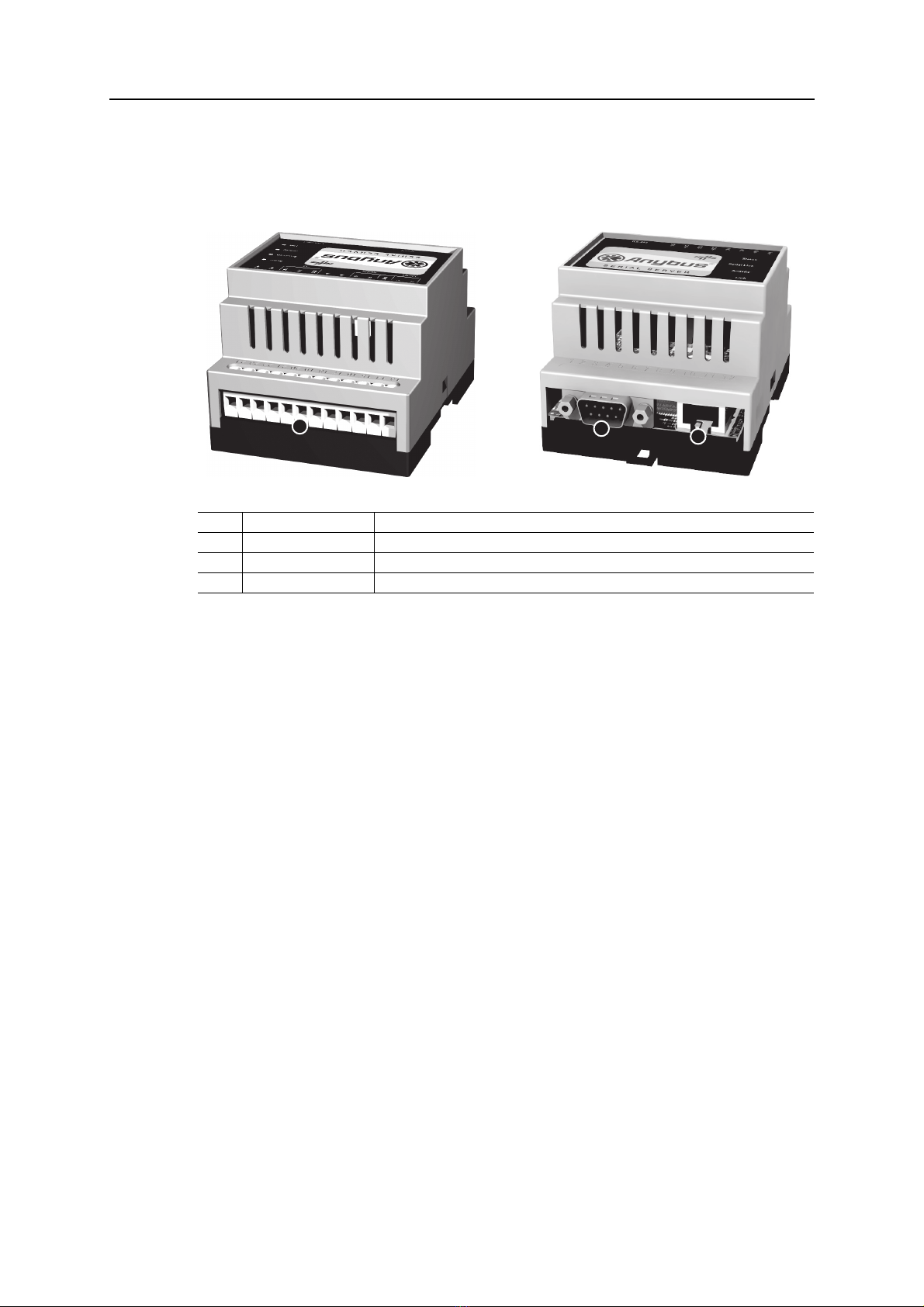
Connectors .............................................................................................................................................1-3
Overview .......................................................................................................................................1-3
I/O & Power Interface.................................................................................................................1-4
EIA-232 Interface .......................................................................................................................1-4
Ethernet Interface..........................................................................................................................1-4
Indicators................................................................................................................................................1-5
Chapter 2 Configuration
IP Address ..............................................................................................................................................2-1
About the Anybus IPconfig Utility ...............................................................................................2-1
Scanning for Connected Devices .....................................................................................................2-1
Changing the IP Settings...............................................................................................................2-2
Installing the Windows Driver (Serial/IP) ........................................................................................2-3
General Information......................................................................................................................2-3
Log In ..........................................................................................................................................2-3
Welcome Page ...............................................................................................................................2-3
Network Settings ..........................................................................................................................2-4
Serial Port Settings (Configuration)...............................................................................................2-5
Password Settings..........................................................................................................................2-6
Appendix 3 Technical Specification
Table of Contents
Table of Contents

Preface
About This Document
How To Use This Document
This document contains a general introduction as well as a description of the technical features pro-
vided by the Anybus Serial Server, including the PC-based configuration software.
The reader of this document is expected to be familiar with communication systems in general and the
Microsoft Windows operating system.
Important User Information
The data and illustrations found in this document are not binding. We, HMS Industrial Networks AB,
reserve the right to modify our products in line with our policy of continuous product development. The
information in this document is subject to change without notice and should not be considered as a com-
mitment by HMS Industrial Networks AB. HMS Industrial Networks AB assumes no responsibility for
any errors that may appear in this document.
There are many applications of this product. Those responsible for the use of this device must ensure
that all the necessary steps have been taken to verify that the application meets all performance and safe-
ty requirements including any applicable laws, regulations, codes, and standards.
Anybus® is a registered trademark of HMS Industrial Networks AB. All other trademarks are the prop-
erty of their respective holders.
The examples and illustrations in this document are included solely for illustrative purposes. Because of
the many variables and requirements associated with any particular implementation, HMS Industrial
Networks cannot assume responsibility or liability for actual use based on these examples and illustra-
tions.
Warning: This is a class A product. In a domestic environment this product may cause radio interfer-
ence in which case the user may be required to take adequate measures.
ESD Note: This product contains ESD (Electrostatic Discharge) sensitive parts that may be damaged
if ESD control procedures are not followed. Static control precautions are required when
handling the product. Failure to observe this may cause damage to the product.

About This Document P-2
Related Documents
Document History
Summary of Recent Changes (v1.20:1... v1.40:1)
Revision List
Document name Author
--
Change Page(s)
Updated figures etc. to reflect changes in product 1-3... 1-5
Added information about modem control lines 2-5
--
Revision Date Author(s) Chapter(s) Description
1.00 03-03-02 JOAK - First released version
1.10 05-11-01 HACA - Update for Modbus support etc.
1.20 06-06-30 MASA - Update to new design structure
1.20:1 06-11-17 PeP - Updated layout + misc. minor changes
1.40:1 08-04-03 PeP - Updated to match new version of product
-----

About This Document P-3
Conventions & Terminology
The following conventions are used throughout this document:
• Numbered lists provide sequential steps
• Bulleted lists provide information, not procedural steps
• The term ‘Serial Server’ is refers to the Anybus Serial Server
• EIA-485 is also commonly referred to as RS-485
• EIA-232 is also commonly referred to as RS-232
Support
HMS Sweden (Head Office)
E-mail: [email protected]
Phone: +46 (0) 35 - 17 29 20
Fax: +46 (0) 35 - 17 29 09
Online: www.anybus.com
HMS America
E-mail: [email protected]
Phone: +1-773-404-2271
Toll Free: 888-8-Anybus
Fax: +1-773-404-1797
Online: www.anybus.com
HMS Germany
E-mail: [email protected]
Phone: +49-721-96472-0
Fax: +49-721-964-7210
Online: www.anybus.com
HMS Japan
E-mail: [email protected]
Phone: +81-45-478-5340
Fax: +81-45-476-0315
Online: www.anybus.com

Chapter 1
About the Anybus Serial Server
General
A serial server is a device that forwards data between a serial port and an Ethernet network. It can be
used to connect your serial devices to a LAN or Internet without any hardware modifications. Together
with a special software driver in a PC, it can be used as a remote serial port.
PC applications designed to access devices on a normal serial port, can access the remote serial server
without any software modifications. The LAN/Internet network together with the serial server and driv-
er can be viewed as a long “virtual” serial cable
The Anybus Serial Server connects serial devices to Ethernet networks using the IP protocol family.
Some different types of serial devices supported are listed below:
• Scanners
•Printers
•PLC’s
• Data Collection Devices
• Telecommunications Equipment
• Data Display Devices
• Security Alarms and Access Control Devices
• Hand-held Instruments
•Modems
EIA-485
EIA-232
(Anybus Serial Server) (Computer with Serial/IP software)
(Serial Device)
(Serial Device)
(Serial Device)
(Serial Device) (Serial Device)
Ethernet

About the Anybus Serial Server 1-2
Mounting
Procedure
1. Snap the Serial Server on to the DIN-rail (as described on pictures above).
2. Connect the Ethernet cable to the RJ45 connector.
3. Connect the serial device to the 9-pole DSUB connector.
4. Connect the Power Supply and apply power.
5. Now you can start using the Serial Server.
(use the Anybus IPconfig Utility to configure the IP address and other network settings).
See also...
•2-1“IPAddress”
Mac ID & Default IP Address
The default IP address of the Serial Server is 10.200.1.X, where X is the last number of the MAC ID
(Can be found on the label on the device, displayed in HEX format).
See also...
•2-1“IPAddress”
A: Snap On B: Snap Off
Mac ID

About the Anybus Serial Server 1-4
I/O & Power Interface
See also...
• 3-1 “Technical Specification” (Power Supply Requirements)
EIA-232 Interface
The 9-pole DSUB, male connector on the Serial Server features a fully equipped EIA-232 interface. This
port can be used to connect to any equipment with an EIA-232 interface. The Serial Server is configured
as a DTE device.
The following signals are available:
Ethernet Interface
The Ethernet interface supports 10/100Mbps, using a standard RJ45 connector.
# Signal Comments
24 Vin+ Voltage Range: 9... 32VAC/DC
23 Vin- (Ground connection)
22 Digital in 1+ -
21 Digital in 2-
20 Digital Input Common
19 (not connected) -
18
17 EIA-232 Receive (Not used)
16 EIA-232 Transmit
15 EIA-485 Common This port can be used to connect to any equipment with an EIA-485 interface.
14 EIA-485 Line A
13 EIA-485 Line B
# Signal Comments
1 CD Carrier Detect
2Rx Receive
3Tx Transmit
4 DTR DTE Ready
5 GND Signal ground
6 DSR DCE Ready
7 RTS Request To Send
8 CTS Clear To Send
9 RI Ring Indicator
69
51 (male)
Otros manuales para Anybus
8
Tabla de contenidos
Otros manuales de Servidor de HMS


