
HEDD 05 MK2 Manual de usuario

© 2021 HEDD Audio GmbH | Heinz Electrodynamic Designs | www.hedd.audio
OPERATION MANUAL
HEDD Type 05 MK2 HEDD Type 07 MK2
Heinz Electrodynamic Designs
last updated: 2021-04-07

-2-
Table of Contents
Product Overview
Box Contents
Getting Started
Status LED
Speaker Setup
CoP: Closed or Ported
HEDD Lineariser®
Control Settings
Safety Instructions
Warranty
Troubleshooting
Technical Specications
3
5
6
6
7
10
12
13
17
19
20
22

© 2021 HEDD Audio GmbH | Heinz Electrodynamic Designs | www.hedd.audio
Product Overview
Congratulations on purchasing the HEDD Type 05 MK2 or HEDD Type 07 MK2. You have
acquired very precise monitors with a rich feature set. The main features are exchangable
use as a Closed or Ported system, as well as the integration of the on-board HEDD
Lineariser®. Please head to the specic section to nd out more.
As active speakers, the MK2 monitors have an integrated amplier. You can connect them
with a digital interface or analog pre-amplier. Please refer to the section Getting Started
or Speaker Setup to nd out more.
Due to their similar nature, this operation manual equally covers the HEDD Type 05 MK2
and HEDD Type 07 MK2 monitors. This manual uses illustrations of the dierent variants,
which thus might not match your exact version in terms of colour or size.
HEDD Air Motion Transformer (AMT)
used for higher frequencies
Front View
HEDD Honeycomb Woofer
used for lower frequencies
size either 5’’ or 7’’ depending on the model
Front-facing Bass Reex Ports
can be used ported or closed with included plugs
please refer to section Closed or Ported
Status LED
please refer to section Status LED to correctly read the signal

-4-
VOL. [dB] LINE RISER®CoP
-2
-4 +4
+2
0
LOW
-2
-4 +4
+2
0
HIGH
EXTEND.
(less SPL)
NORMAL
for SUB (80 Hz)
MONO LEFT
ANALOG
RIGHT
-4 +4
0
-10
SMALLLARGE
OFF
MED.
-6
-12 +12
+6
0 ON
OFF
(*)
Ported
Closed
SHELVING FILTER[dB] LF R NGE
N LOG/ ES INP. SENS. [dB] DESK FILTER
ALL "0" and "↑" POSITION = FACTORYSETTING
!
RISK OF
ELECTRIC SHOCK
DO NOT OPEN
M DE IN GERM NY - www.hedd.audio
TYPE 05 MK2
This loudspeaker is capable of deliveringsound
pressure levels in escess of 85 dB(A), which may
cause permanent hearing damage.
Do not expose this appliance to moisture orrain.
Referto qualied personnel for servicing.
CAUTION
I
O
ANALOG IN AES IN AES THROUGH
1
3
2
PUSH
1
3
2
PUSH
85V - 264V 50Hz/60Hz
factory
use only
MK2 Control Board
used for adjusting the various settings
please see section Control Settings
Rear View
M6 Screw Mount
available with Type 05 MK2 only
In- & Output Connections
XLR analog & AES digital input
AES passthrough
Power Switch
integrated universal mains, compatible with 85V - 264V at 50/60 Hz
appropriate power cable supplied

© 2021 HEDD Audio GmbH | Heinz Electrodynamic Designs | www.hedd.audio
Box Contents
The complete set includes:
• one active monitor Type 05 MK2 or Type 07 MK2
• one power cable compatible with the region from where it was sold
• quickstart guide
• «CoP» leaet explaining the proper switch from Ported to Closed Mode
• «CoP» screw and plugs to seal the bass reex ports.
Please make sure your box contents match our listing.
QUICKSTART
MK2 Professional Studio Monitors
How to switch between Closed and Ported

-6-
Getting Started
Make sure the main power switch is in the "0" position, then connect the power cord to the
power socket.
Set the power switch to "1". Please note that the LED becomes green immediately but it
may take up to 15 sec to power up and play music. Warning: High volume may damage your
hearing! Consider lowering the volume rst.
Connect your audio source via the balanced XLR socket, then select the desired input with
the ANALOG / AES rotary switch on the back plate (bottom left). For digital AES input,
please choose the signal (left, right, mono).
As there are quite a number of control knobs on the backplate we recommend to start
playing music with all the markers in the "Up" position:
ALL "0" and "↑" POSITION = FACTORY SETTING
Status LED
The front LED panel of the speaker will indicate its operational status as follows:
The monitors automatically jump into stand-by after 30 minutes. They wake back up when
audio is played.
Green Light
power on
Red Light
overload: please decrease the input sensitivity
White Light
stand-by

© 2021 HEDD Audio GmbH | Heinz Electrodynamic Designs | www.hedd.audio
Speaker Setup
To achieve the best possible sound and unfold the full potential of the HEDD MK2
monitors, the correct speaker placement is very important. Please follow our guide below.
Vertical Setup
Placing the speaker vertically is the best way, as they are designed to be placed like this.
Always place them on a solid surface or a stand.
Horizontal Setup
If you like to place the speaker horizontally in a stereo or surround setup, make sure that
they are aligned symmetrically: The Tweeters both should face either outwards or inwards.
Otherwise, the acoustical image will not be correct.
Height Positioning
Place the speaker in a position so that the tweeter matches the height of your ears when
you are on your listening position. If this is not possible, tilt the speaker so that the tweeter
aims at your ears. Try to avoid that the tweeter is placed too low or too high, as this may
result in a mued or less dened sound.

-8-
Stereo Positioning
For optimizing the stereo listening position, place the two speakers so that they form an
equilateral triangle with your listening position. Your listening position should be on an
imaginary center point between the two speakers. Adjust the distance of the speakers and
the distance of our listening position accordingly to nd the best position. Listen to some
good known records while adjusting, until you get an authentic stereo panorama.
Surround Positioning
For a surround listening setup, place the speakers in a circle around your listening position
in following angles: Center 0°, Front Right 30°, Rear Right 110°, Rear Left 250° and Front
Left 330°. Radius of the circle should be between 0.7m - 2m. Surrounding walls should be
at least 40cm away from every speaker to avoid early reections. It is preferrable to use
the same type of speaker for every channel (except the subwoofer, of course), because
otherwise negative frequency and/or phase coloration can occur. Refer to the ITU
recommendation BS.2159-4 for a detailed explanation.

© 2021 HEDD Audio GmbH | Heinz Electrodynamic Designs | www.hedd.audio
Stand/Wall Mounting (Type 05 MK2 only)
The Type 05 MK2 speaker is equipped with two M6 (6mm) strew threads on the rear side
for stand/wall mounting. Spacing between the two screws is 60mm. Please contact us for
more information on suitable mounting hardware.
Please refer to the Product Overview for the location of the M6 strew threads.
MONO LEFT
ANALOG
RIGHT
-4 +4
0
-10
SMALLLARGE
OFF
MED.
SHELVING FILTER [dB] LF R NGE
N LOG/ ES INP. SENS. [dB] DESK FILTER
ALL "0" and "↑" POSITION = FACTORY SETTING
TYPE 05 MK2
1
3
2
PUSH
1
3
2
PUSH
M6 Screw Mount
available with Type 05 MK2 only
- 10 -
«CoP» Closed or Ported
The HEDD Type 05 MK2 and Type 07 MK2 can be used in either closed or in ported
mode. These are two fundamentally dierent systems that are available for the user to
compare and choose. There is no denite better between the two systems. We
recommend to compare carefully to nd the optimal option for your environment and
listening habits.
Switching Between Closed and Ported
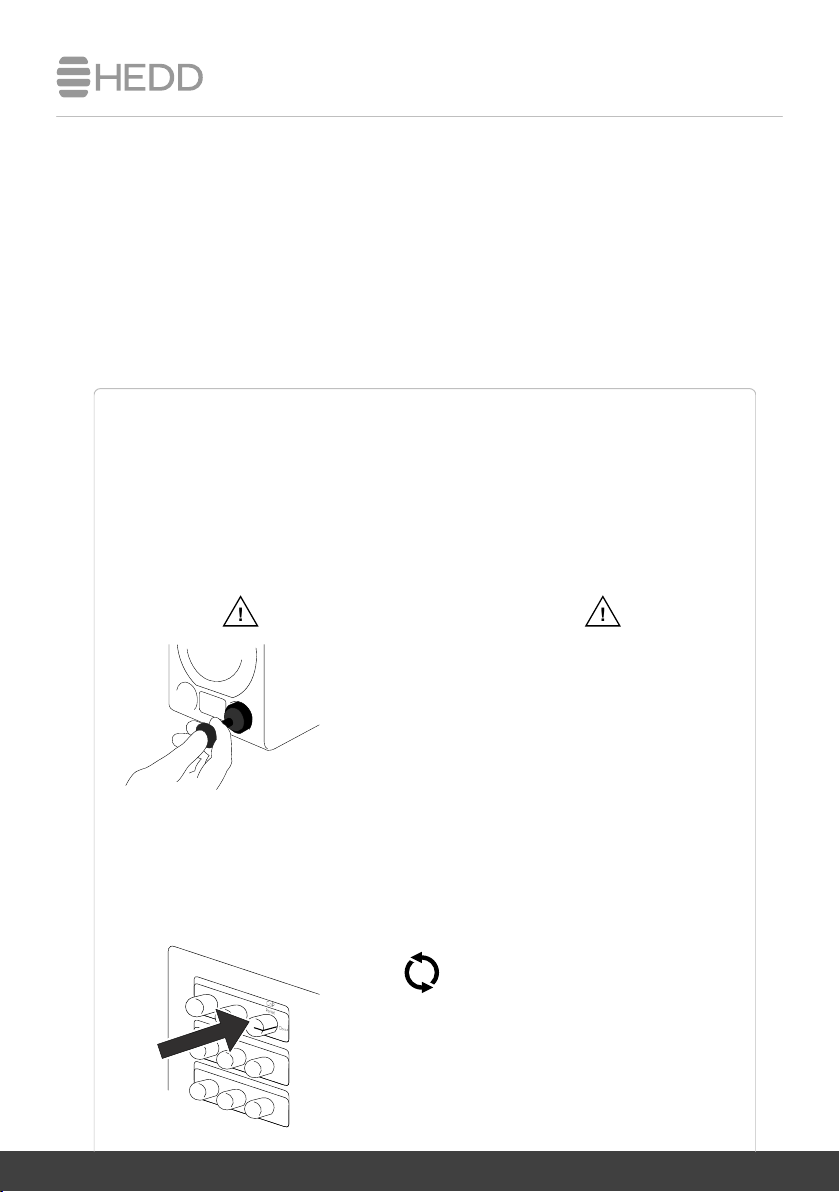
By default, the HEDD speakers are "ported." This means that the bass port is open. To
switch to "closed" mode, please follow the steps below.
1. Insert the included HEDD plugs with help of the HEDD screw to close the ports.
Make sure that the screw is facing outwards!
Push the plugs deep into the bass ports. Make sure that
you can still reach the screw comfortable with your
ngers to pull it out. The plug should not go deeper than
when the bass port starts to bend and the resistance
increases. Once inserted, feel free to unwind and
remove the screw.
2. Switch the knob on the backpanel of your monitors to Closed mode.
Please note that the headroom in Closed Mode is limited compared to Ported Mode.
We highly recommend to lower the volume before switching.
from Closed to Ported
To switch back to Ported Mode, stop the audio
playback, wind the screw back into the plug, gently
pull the plug back out again and change the rotary
switch on the backpanel to Ported.
!
!
Otros manuales para 05 MK2
1
Este manual sirve para los siguientes modelos
1
Tabla de contenidos
Otros manuales de Oradores de HEDD


