HCT HTV021TB Manual de usuario

Please read this manual carefully
before using this TV set and keep it
for future reference.
OWNER'S MANUAL
HTV-021TB
21" FULL MULTI TV


CONTENTS
Before Operation
Basic operation
Please read this manual carefully before using this TV set and keep it for future
reference.
Warning and cautions...................................................................................2
Important safety instructions.......................................................................3
Installation.....................................................................................................5
Aerial connection.........................................................................................5
Preparation of the remote control................................................................5
Function buttons and external sockets......................................................6
Front panel of the TV set.............................................................................6
Rear panel of the TV set...............................................................................6
Using the remote control.............................................................................7
Switching on/off the TV set.........................................................................8
Using the unit in TV mode
Searching channels....................................................................................9
Auto search.................................................................................................9
Search ......................................................................................................10
Manual fine tune............................................................................................11
Program Exchange........................................................................................12
Program skip .............................................................................................13
Watching TV
Watching TV program................................................................................14
Program swap............................................................................................15
Convenient picture functions.....................................................................16
Multiple picture modes .............................................................................16
TV Set up.......................................................................................................17
Language....................................................................................................17
Blue Back....................................................................................................17
Game..........................................................................................................17
Calendar......................................................................................................18
Teletext..........................................................................................................19
Others
Connection to the external audio and video equipment.........................20
Troubleshooting guide...............................................................................21
Specifications..............................................................................................22
Warranty.......................................................................................................23
1

Warning and cautions
Cleaning the tube
Should the picture tube require cleaning, disconnect the power and use a dry
soft cotton cloth. Do not use any cleaner or abrasive cloths.
2
CAUTION: TO REDUCE THE RISK OF ELECTRIC SHOCK, DO NOT REMOVE
COVER (OR BACK). NO USER SERVICEABLE PARTS INSIDE.
REFER SERVICING TO QUALIFIED SERVICE PERSONNEL.
DANGEROUS VOLTAGE
Uninsulated Dangerous Voltage, that may be of sufficient magnitude to constitute a risk
of electric shock, is present within the cabinet of this unit.
ATTENTION
The Owner's Manual contains important operating and maintenance instructions. For
your safety, it is necessary to refer to the manual.

1. READ INSTRUCTIONS
All the safety and operating instructions should be read before the unit is operated.
2. RETAIN INSTRUCTIONS
The safety and operating instructions should be retained for future reference.
3. HEED WARNINGS
All warnings on the unit and in the operating instructions should be adhered to.
4. FOLLOW INSTRUCTIONS
All operating and use instructions should be followed.
5. CLEANING
Unplug this unit from the wall outlet before cleaning. Do not use liquid cleaners or aerosol cleaners.
Use a damp cloth for cleaning the exterior cabinet only.
6. ATTACHMENTS
The manufacturer of this unit does not make any recommendations for attachments, as they may
cause hazards.
7. WATERAND MOISTURE
Do not use this unit near water. For example, near a bathtub, washbowl, kitchen sink, laundry tub, in
a wet basement, or near a swimming pool.
8. ACCESSORIES
Do not place this unit on an unstable cart, stand, tripod, bracket, or table.
The unit may fall, causing serious injury, and serious damage to the unit.
When a cart is used, use caution when moving the cart / apparatus
combination to avoid injury from tip-over.
9. VENTILATION
Slots and openings in the cabinet back or bottom are provided for
ventilation, and to ensure reliable operation of the unit, and to protect it
from overheating. These openings must not be blocked or covered.
The openings should never be blocked by placing the unit on a bed,
sofa, rug, or other similar surface. This unit should never be placed near or over a radiator or heat
source. This unit should not be placed in a built-in installations such as a bookcase or rack unless
proper ventilation is provided or the manufacturer=s instructions have been adhered to.
10. POWER SOURCES
This unit should be operated only from the type of power source indicated on the rating plate. If you
are not sure of the type of power supply to your home, consult your appliance dealer or local power
company. For units intended to operate from battery power, or other sources, refer to the operating
instructions.
11. POWER-CORD PROTECTION
Power-supply cords shouldbe routed sothat they arenot likely tobe walked onor pinched by
items placed uponor against them,paying particular attentionto cords atplugs, convenience
receptacles, and thepoint where theyexit from theappliance.
Important safety instructions
3

12. LIGHTNING
Toprotect your unitfrom a lightningstorm, or whenit is leftunattended and unusedfor long
periods of time,unplug it fromthe wall outletand disconnect theantenna or cablesystem.
This will preventdamage to theunit due tolightning and powerline surges.
13. POWER LINES
An outside antennasystem should notbe located inthe vicinity ofoverhead power linesor
other electric lightor power circuits,or where itcan fall intosuch power linesor circuits.
When installing anoutside antenna system,extreme care shouldbe taken tokeep from
touching such powerlines or circuits,as contact withthem might befatal.
14. OVERLOADING
Do not overloadwall outlets andextension cords, asthis can resultin a riskof fire orelectric
shock.
15. OBJECT AND LIQUID ENTRY
Do not pushobjects through anyopenings in thisunit, as theymay touch dangerousvoltage
points or shortout parts thatcould result infire or electricshock. Never spillor spray anytype
of liquid intothe unit.
16. SERVICING
Do not attemptto service thisunit yourself asopening or removingcovers may exposeyou to
dangerous voltage orother hazards. Referall servicing toqualified service personnel.
17. DAMAGE REQUIRING SERVICE
Unplug this unitfrom the walloutlet and referservicing to qualifiedservice personnel under
the following conditions:
a. When thepower-supply cord orplug is damaged.
b. If liquidhas been spilled,or objects havefallen into theunit.
c. If theunit has beenexposed to rainor water.
d. If theunit does notoperate normally byfollowing the operatinginstructions. Adjustonly
those controls thatare covered bythe operating instructions,as an improperadjustment of
other controls mayresult in damageand will oftenrequire extensive workby a qualified
technician to restorethe unit toits normal operation.
e. If theunit has beendropped or thecabinet has beendamaged.
f . Whenthe unit exhibitsa distinct changein performance, thisindicates a needfor service.
18. REPLACEMENT PARTS
When replacement partsare required, besure the servicetechnician uses replacementparts
specified by themanufacturer or thosethat have thesame characteristics asthe original
part. Unauthorized substitutionsmay result infire, electric shockor other hazards.
19. SAFETY CHECK
Upon completion ofany service orrepairs to thisunit, ask theservice technician toperform
safety checks todetermine that theunit is inproper operating condition.
20. HEAT
The product shouldbe situated awayfrom heat sourcessuch as radiators,heat registers,
stoves, or otherproducts (including amplifiers)that produce heat.
21. CONNECTING
When you connectthe product toother equipment, turnoff the powerand unplug allof the
equipment from thewall outlet. Failure to do so may cause an electric shock and serious
personal injury.Read the owner'smanual of theother equipment carefullyand follow the
instructions when makingany connections.
22. SOUND VOLUME
Reduce the volumeto the minimum level before you turn on the product. Otherwise, sudden
high volume soundmay cause hearing or speaker damage.
Important safety instructions (continued)
4

Installation
5
Aerial connection
To connect the aerial, plug the aerial lead into the aerial socket on the rear of the unit.
You can use an outdoor aerial. However, if you use an indoor aerial the quality of the
reception may be reduced and adjustment of the aerial may be required when changing
programmes.
Preparation for the remote control
Battery installation Tips for remote operation
Remove the batteries cover. !When the remote control will not be used for a
long period of time or when the batteries are
worn out, remove the batteries to prevent the
leakage.
!Do not throw the batteries into fire. Dispose of
used batteries in the specified manner.
!Do not drop, dampen or disassemble the
remote control.
Insert two size AAA batteries matching
the +/-polarities of the battery to the +/-
marks inside the battery compartment.
!
!
300 twin-lead cable
Antenna adapter
75 coaxial cable
Plug
AC power socket
Aerial input
75 standard
coaxial type
Note:
* It is recommended that a 75 ohm coaxial antenna is used to avoid
interference.
*To avoid interference from electrical signals, do not bind the antenna
cable together with any mains lead.

Function Buttons and External Sockets
6
Back panel
Power switch
Power indicator
Sensor window
MENU /
(input selector
AV TV Volume up/ down
Channel selector
Antenna input socket
Audio left channeloutput terminal
Audio right channeloutput terminal
Audio left channelinput terminal
Audio right channelinput terminal
Video input terminal
Video output terminal
OUT
IN
VIDEO L R
AUDIO
Front and side panel of the TV set
Audio Input
terminal
VIDEO
R
L
AUDIO
Video Input
terminal
S-VIDEO
S-Video Input
terminal
Note:
Please do not use the S-Video input terminal and the video input terminal together.

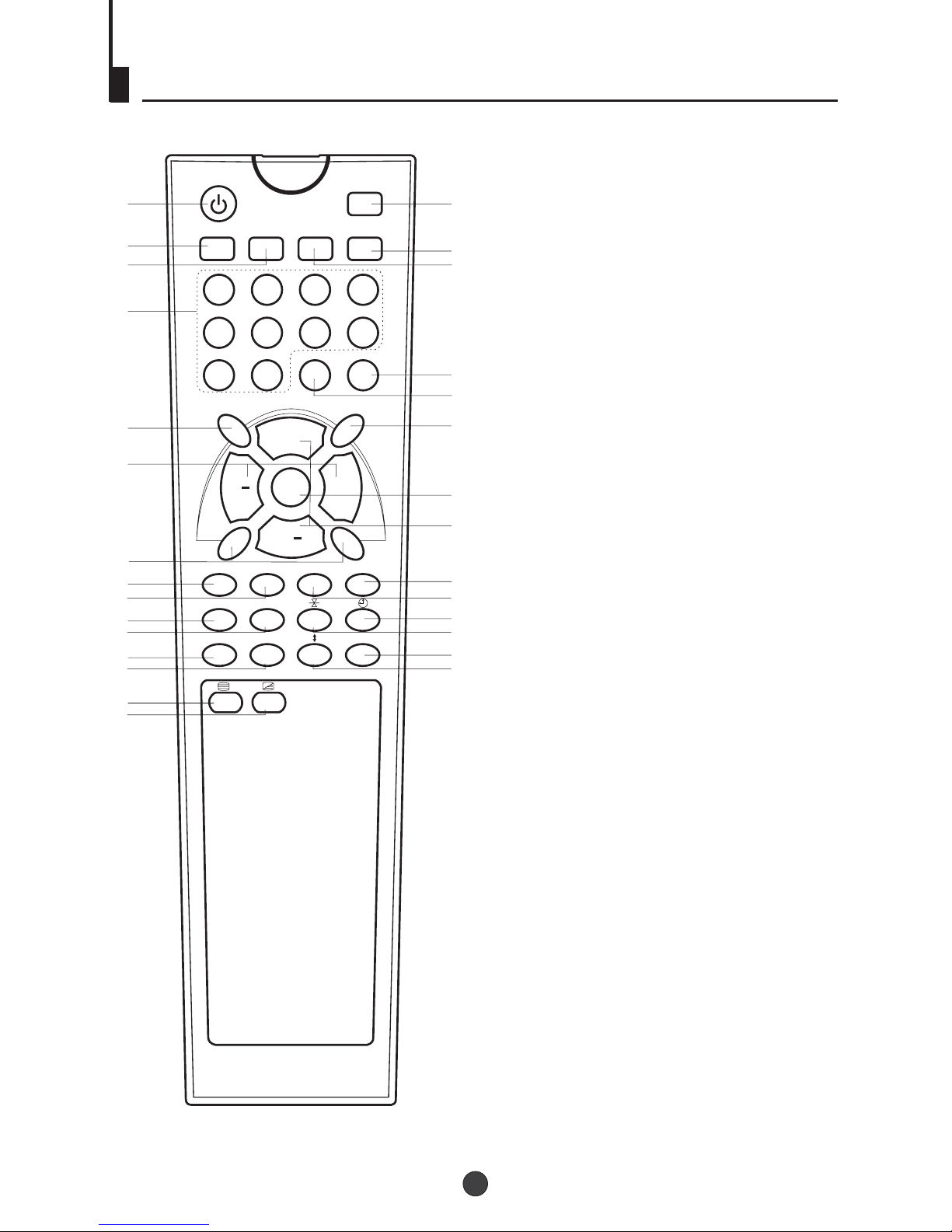
Using the Remote Control
7
STANDBY
PP SLEEP RECALL MUTE
1234
5678
MENU V+
AUDIO
ST/D/I/II
90-/--
TV/AV
P
V
P+
12
3
45
6
7
8
9
10 11
12
13
14
15
16 17
18 19
20
21
22 23
25
26 27
28
24
29
1. Standby Button
2. (No including)
3. PP Button
4.Sleep Button
5.Mute Button
6.Recall Button
7.Numeric Buttons
8.(No including)
9.Multi Digit Button
10.S Button
11.TV/AV Button
12.Volume Button
13.TV Menu Button
14.(No including)
15.Channel Button
16. ( Red)
17.Blue Button
18. ( Green)
19. ( Yellow)
20.Teletext Mode/Swap Button
21.Time / Subcode
22.Index
23.Hold
24.Cancel
25.(No including)
26.Reveal
27.Enlarge
28.Teletext On / Off
29.Mix
tereo
TV Sound
TV Picture Menu
TV Sleep Time Menu
TXT MODE/SWAP
INDEX
X?
SOUND PICTURE SLEEP TIME

MENU V+
P
V
P+
Switching on/ off the TV set
Preparation
.
Note: .
Insert the AC cord plug into the proper AC outlet
When not in use, disconnect the plug from the main power supply
Switching on/ off the TV set
1 To turn on the TV/AV, press the Power button
on the front panel.
2 If the indicator is lighting in red, press the
P+/P- button on the panel or on the remote
control, the power indicator will become green.
After several seconds the TV would start
normal operation.
3 If you want to change to standby status,
please press the button on the remote
control. The power indicator will become red.
Auto switch-off function
If a channel with no boardcast is selected, the
sound will automatically be mute. If a station
stops broadcasting, the TV will automatically
switch to standby mode after 5 minutes.
POWER
STANDBY
1
2
3
8
Este manual sirve para los siguientes modelos
1
Tabla de contenidos
Otros manuales de TELEVISOR de HCT
Manuales populares de TELEVISOR de otras marcas

Philips
Philips Colour Television Manual de usuario

Toshiba
Toshiba 27A10 Manual de usuario

Philips
Philips 42PF9630A/37 Manual de usuario

Hitachi
Hitachi 32FX48B Manual de usuario

DAEWOO ELECTRONICS
DAEWOO ELECTRONICS DTQ-14V1FC Manual de usuario

Changhong Electric
Changhong Electric uhd55b6000is Manual de usuario