
HCP UFP Series Manual de usuario

Dongguan HCP Technology Co., Ltd
41041 Trimboli Way, #1761, Fremont, CA 94538, USA
HCP Technology
UFP Series
User Manual

Dongguan HCP Technology Co., Ltd
41041 Trimboli Way, #1761, Fremont, CA 94538, USA
2
Table of Contents
Part 1 Safety Information…………………………………………………………………3
Part 2 Install the LED Screen
1. Overview………………………………………………………………………………………5
1.1 Components……………………………………………………………………………5
1.2 Tools………………………………………………………………………………………..5
2. Install the Wall Mount Rack…………………………………………………………..6
2.1 Install the horizontal rails…………………………………………………………6
2.2 Install the vertical rails……………………………………………………………..6
2.3 Install the lower rail………………………………………………………………….7
3. Install the LED Cabinets Frame………………………………………………………8
3.1 Install the shrapnel nuts and cabinet connection Plates……………8
3.2 Install the cabinet frames…………………………………………………………11
4. Connect the cables………………………………………………………………………..13
5. Install the LED display screen…………………………………………………………14
Part 3 Trouble Shooting……………………………………………………………………..16

Dongguan HCP Technology Co., Ltd
41041 Trimboli Way, #1761, Fremont, CA 94538, USA
3
Safety Information
Warning!
A warning for a potentially hazardous situation that can result in
death, personal injury, or property damage if not adhered to.
Caution!
A recommendation for a potentially hazardous situation that
may result in personal injury or property damage if not adhered
to.
Warning!
Risk of electric shock or fire due to high-voltage components.
※Do not expose this unit to rain or moisture.
※Do not submerge this unit partially, or completely in water, or
liquids.
※Do not use this unit's polarized plug with an extension cord
receptacle or other outlets unless the prongs can be fully
inserted.
※Do not open the cabinet because of the high-voltage
components inside. There are no user-serviceable parts are
inside.
※Only qualified service personnel are allowed to service and
open the unit.
Risk of electric shock.
※If not in use, fully disengage the power to the unit by
disconnecting the power cord from the AC outlet.
※Do not use damaged cables. Check cables regularly. Replace
damaged cables immediately, they are not user-serviceable.
※Ensure the system is properly grounded.
Risk of overload of the power cable.
To protect the power cable against overload maximum 16
cabinets shall be wired in a row at 100 V AC or 38 cabinets at
240 V AC. The total load must not exceed 16 A per cable.
Risk of fire, injuries and product damage.
※Keep the system away from flammable material.
※Never block the air ventilation spaces around the LED Wall.
Keep them free at all times.
※Only use the supplied cables, which are fit for the system and
its components.

Dongguan HCP Technology Co., Ltd
41041 Trimboli Way, #1761, Fremont, CA 94538, USA
4
Risk of product damage due to dusty environment.
※Do not install or operate the system in a dusty environment.
Risk of product damage by moisture or water.
※Do not clean the system with water. Do not wipe the LED
Panel with a damp cloth.

Dongguan HCP Technology Co., Ltd
41041 Trimboli Way, #1761, Fremont, CA 94538, USA
5
UFP Series-User Manual
1.Overview
1.1 Components
1.2 Tools
Shrapnel nut Rack Connection Plate Cabinet Connection Plate
M8 30*40mm 90*90mm
Hex Socket Head Screws Hex Socket Head Screws Hex Socket Head Screws
M6*6 M8*12 M8*20
1
2
Cordless Hammer Drill Allen Key Phillips Screwdriver
M5&M6
Tape Measure Spirit Level Vacuum Suction Tool

Dongguan HCP Technology Co., Ltd
41041 Trimboli Way, #1761, Fremont, CA 94538, USA
6
2. Install the Wall Mount Rack
2.1 Install the horizontal rails, please ensure the horizontal rails are in the same
levels. The spirit level shall help to adjust the rails and then use the Allen Key for
locking the screws.
WALL
LED Display Screen
3. M8*12 Screws
2. Rack Connection Plate 1
1. Shrapnel nuts
Dongguan HCP Technology Co., Ltd
41041 Trimboli Way, #1761, Fremont, CA 94538, USA
7
2.2 Install the vertical rails in the same manner as horizontal rails.
3. M8*12 Screws
1. Shrapnel nut
2. Rack Connection Plate 2

Dongguan HCP Technology Co., Ltd
41041 Trimboli Way, #1761, Fremont, CA 94538, USA
8
2.3 Install the lower rails in the same manner as horizontal rails.
W A L L
2. Rack Connection Plate 2
1. Shrapnel nut
3. M8*12 Screw

Dongguan HCP Technology Co., Ltd
41041 Trimboli Way, #1761, Fremont, CA 94538, USA
9
3. Install the LED Cabinets Frame
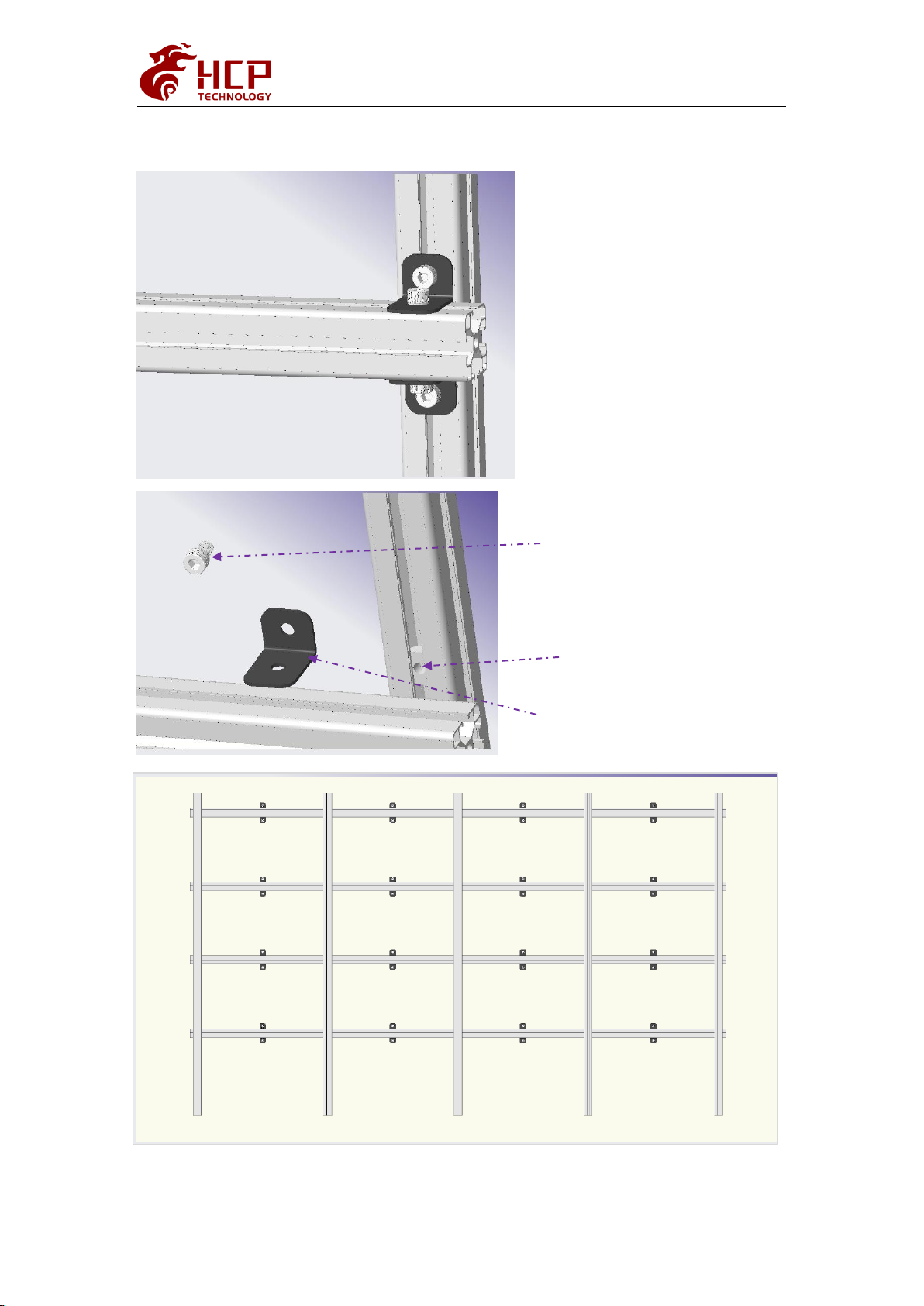
3.1 Install shrapnel nuts and cabinet connection Plates
3. M8*12 Screws
2. Cabinet Connection Plate
1. shrapnel nut

Dongguan HCP Technology Co., Ltd
41041 Trimboli Way, #1761, Fremont, CA 94538, USA
10
3.2 Install the Cabinet Frames
3.2.1 Install the first cabinet frame from the lower middle part. Use a spirit
level to adjust the flatness and verticality and then secure the cabinet frame to
the connection plates on the rails.
Fixed the Cabinet Frames with the Cabinet Connection Plates
M8*20mm Screws
4PCS/Cabinet Frame
1-3
1-3
Tabla de contenidos


