HBOT 3D F300 Manual de usuario

Operating Manual
HBOT 3D F300
3D printer for industrial applications
OM-F300-EN-01-18

2
Table of content
1. Preface 3
1.1 Conventions used in this operating manual 3
1.2 Copyright 3
1.3 Trademarks used in this manual 3
1.4 Manufacturer’s warranty and responsibility 4
1.5 Intended use of the device 4
2. Operational safety 5
2.1 General principles 5
2.2 Electrical hazards 5
2.3 Risk of injury and burn 6
2.4 Noise emission 6
2.5 Safety marking on device 6
3. Device description 7
3.1 Essential components 7
3.2 Extruder and carriage assembly 8
3.3 Extruder assembly 8
3.4 Control panel 9
3.5 Technical specication 9
3.6 Device identication 10
4. Printer installation 11
4.1 Package content 11
4.2 Removing the transport locks 12
4.3 Selecting location 12
4.4 Leveling 13
4.5 Power supply connection 13
4.6 Connection to emergency supply 13
4.7 Initial commissioning 14
5. Description of use 18
5.1 Preparing the build platform 18
5.2 Storing materials 18
5.3 Loading material 18
5.4 Removing material 18
5.5 Changing material 19
5.6 Replenishing material 20
5.7 Starting a print 20
5.8 Pausing and resuming print 21
5.9 Aborting print 21
5.10 Finishing print 21
5.11 Removing print from the build platform 21
5.12 Removing support structures 22
5.13 Nozzle replacement 22
6. Preparing les 24
6.1 Installation of Simplify 3D 24
6.2 Graphical user interface 25
6.3 Importing material congurations 25
6.4 Modifying the default settings 26
6.5 Importing models and orientation 26
6.6 Conguring printing parameters 27
6.7 Displaying print preview and exporting control commands 28
6.8 Editing support structures 28
6.9 Advanced print parameters 29
6.10 Saving a project 33
6.11 Additional software options 33
6.12 Using SD card and USB port 34
7. Maintenance and operation 35
7.1 Recommended maintenance operations 35

1. Preface
3
Preface
This Manual contains relevant information regarding installation, operation and maintenance of your device. Your are kindly requested
to carefully read this Operating Manual before commissioning your device. Strict compliance with the notes contained herein will
prevent the misuse and allow you to take full advantage of the features and functions of your printer. Store this Operating Manual
so that it is always available to you.
The device, before leaving the manufacturing plant is carefully checked before packaging for safety and functionality on our testing
facilities. As a remainder of this control may be the presence of lament inside the nozzle or on its outer surface.
The 3D Printers Team is constantly working on the development of their products and reserves the right to make changes without prior
notice. You can download the latest version of the Operating Manual from manufacturer’s website at www.hbot3d.com.
1.1. CONVENTIONS USED IN THIS OPERATING MANUAL
Below you will nd explanation of conventions used in this Manual.
Important information, instruction which must absolutely be followed or dangers or dangerous actions which may
lead to serious personal injuries and/or damage to property
Tip, important information
1.2 COPYRIGHT
@ All rights reserved. The contents of the manual, logos, pictures, photos, trademarks as well as other its elements are subject
to copyright of 3D Printers sp. z o.o. in Wrocław
The User has the right to print and store this Operating Manual, as well as to save and retrieve the computer le with a copy hereof in
computer’s memory or other electronic equipment designed to receive and process digital content, for the purposes of operating and
maintaining the device.
Without express permission from 3D Printers sp. z o.o. duplicating, reproducing, adapting, translating, copying, processing,
promulgating, selling, or distributing this Operating Manual (including portions hereof) is prohibited.
1.3 TRADEMARKS USED IN THIS MANUAL
DimaFix – is a registered trademark of DIMA 3D Printers
Simplify 3D – is a registered trademark of SIMPLIFY3D LLC
Microsoft, Windows, Windows NT, Windows Server and Windows Vista 64, Windows 7, Windows 8, Windows 8.1 and Windows 10
– are registered trademarks of Microsoft Corporation
Mac and macOS – are registered trademarks of Apple Inc.
Linux – is a registered trademark of Linus Torvalds
Any other products referred to in the Manual may be registered trademarks of their respective owners.
3D Printers sp. z o. o. shall not claim any right to the said trademarks.

1. Preface
4
1.4 MANUFACTURER’S WARRANTY AND RESPONSIBILITY
3D Printers sp. z o. o. grants a 12-month guarantee regarding the device on the basis of a Warranty Card, unless otherwise provided
for in the contract with the buyer, or other documents issued by the manufacturer.
3D Printers sp. z o. o. shall not be liable for damages arising out of the use, storage, modication, abuse and transportation of the
device not conforming to this Manual.
3D Printers sp. z o. o. shall not be liable for damages arising out of the use of additional accessories, consumables, ancillary equipment,
computer software and other items or additions which may accompany the device, or be consumed by the device during its usage,
operation, maintenance or transportation, but which are not manufactured by 3D Printers sp. z o. o.
1.5 INTENDED USE OF THE DEVICE
HBOT 3D F300 is designed to materialise different models directly from three-dimensional CAD documentation, without using
machining or any additional tools. The possibilities of additive technologies, also known as “3D printing”, are invaluable when
designing new products. The HBOT 3D F300 was created for industry, to optimize production processes mostly by reducing its time
and costs. FFF (Fused Filament Fabrication) technology works with a wide range of plastics to build up for the construction of three-
dimensional objects.
Areas of application
prototypes tools small-scale
production
moulding forms nal products production line
maintenance
Key industries
automotive aerospace electronic military manufacturing foundries
Action scheme
preparing 3D cad modelexport to .stl creating .gcode in provided Simplify 3D software transfering the .gcode le to
the printer’s sd card lament insertion starting the printing process.
This product is not intended for use in life support, critical care, medical, safety equipment, or similar applications where product failure
could result in loss of life or personal or physical harm, or any military or defence application, or any governmental procurement to
which special terms or provisions may apply.

2. Operational Safety
5
2.1 GENERAL PRINCIPLES
Basic safety precautions must me followed at all times during device operation. Glasses and protective gloves accompanying the
device must always be worn when carrying out manual operations at the device. Any and all operating and handling activities must be
performed in accordance with this Manual, and using only tools recommended by the manufacturer.
The device is a sophisticated manufacturing tool, and therefore may only be operated by authorized and properly
trained personnel.
The device is not intended for use by children under 13 years of age, or by persons of impaired manual, motor,
or psychomotor capacities.
The device must be stored out of the reach of the children and animals.
Whenever a device malfunction is found, cut off power supply to the device and immediately contact the Technical
Department of the manufacturer.
Do not make any modication and change to the device by yourself. Otherwise you will loose the manufacturer’s
guarantee, or a personal injury or damage to the device may result.
During the printing process do not leave the device unattended.
In order to prevent potential malfunction, periodically check the condition and operating status of the device.
Regularly check the wear status of wearing parts of the device. For detailed device maintenance recommendations
refer the chapter “MAINTENANCE AND OPERATION”
2.2 ELECTRICAL HAZARDS
HBOT 3D F300 Printers have been manufactured as a Class I appliance in terms of protection against electric shock and tested for
conformance to LVD and EMC Directives.
Before connecting the printer to a power outlet ensure that the available power supply voltage meets the
specications for the device. For power supply specications, see the device nameplate on the back of the device.
Avoid overloading the power outlet the printer is plugged into.
The device must be properly grounded. Always connect the device to a power supply mains with a fully functional
protective earthing conductor PE.
Use only original power cord. Do not damage, cut or make any repairs to it. Damaged cord must immediately be
replaced with a new one supplied by the manufacturer.
Cleaning, repairs or maintenance must be made after power has been cut off to the printer. Never expose the
device to contact with water or moisture.
2. Operational Safety

2. Operational Safety
6
2.3 RISK OF INJURY AND BURN
To ensure the highest degree of safety and avoid personal injuries, always wear protective glasses and gloves and follow the
instructions. To ensure the highest degree of safety and avoid personal injuries, always wear protective glasses and gloves and follow
the instructions.
Touching the print head during operation is prohibited. Contact with hot print head may result in severe
burns.
Do not touch hot printing platform during device operation. Contact with hot printing platform may result in
severe burns.
Do not put parts of your body, or mechanical parts into operating fans, also prevent your hair or loose parts
of your clothing from getting into moving parts of the printer.
For safety reasons the top and front door must be closed during the printing process.
Keep a safe distance when the device is in operation. Direct contact with moving and hot parts may result in
a bodily injury to the operator.
The nished print should be removed using protective gloves, the scraper provided for this purpose and
after the build platform has been removed from the device.
In the event of burn or bodily injury, follow the general rules of rst aid.
2.4 NOISE EMISSION
The sound pressure level at the workplace where the HBOT3D F300 printer is operated does not exceed 70 dB (A).
2.5 SAFETY MARKING ON DEVICE
The device has “HOT SURFACE” warning labels on relevant parts of the device. Always exercise special care when handling hot parts.
Wearing protective gloves is obligatory. Temperature of some components may reach 300°C.

Drukarka3D
Model:HBOT3D F300
S/N:XXX/YYYY/123456
Rokprodukcji | Production year: YYYY
lyvoltage: 100-240V ~ 500W 50-60Hz
zy230V | Nominalcurrent at 230V: In = 2.0A
Spełnianenormy / Complaints with: EN 61000-6-3:2007,EN 61000-6-1:2007
3DPrinters sp. z o.o.
AlejaLudomira Różyckiego 1C/4
51-608Wrocław
www.HBOT3D.com
Top door
Stand-by button
Front door
Chamber fan
air intlet
Filament holder
Leveling feet
USB socket
SD Card slot
Build platform
Chamber fan
air outlet
Touch
Control Panel
Print head
Lead screw
Bowden tube
entry
Guide
rods
Power
switch
Nameplate
Power cord
connection
3. Device Description
7
Before operating the device be sure to familiarize yourself with all device parts. Your failure to familiarize yourself with their locations
and functions may result in misoperation of the device and/or its damage due to user’s fault.
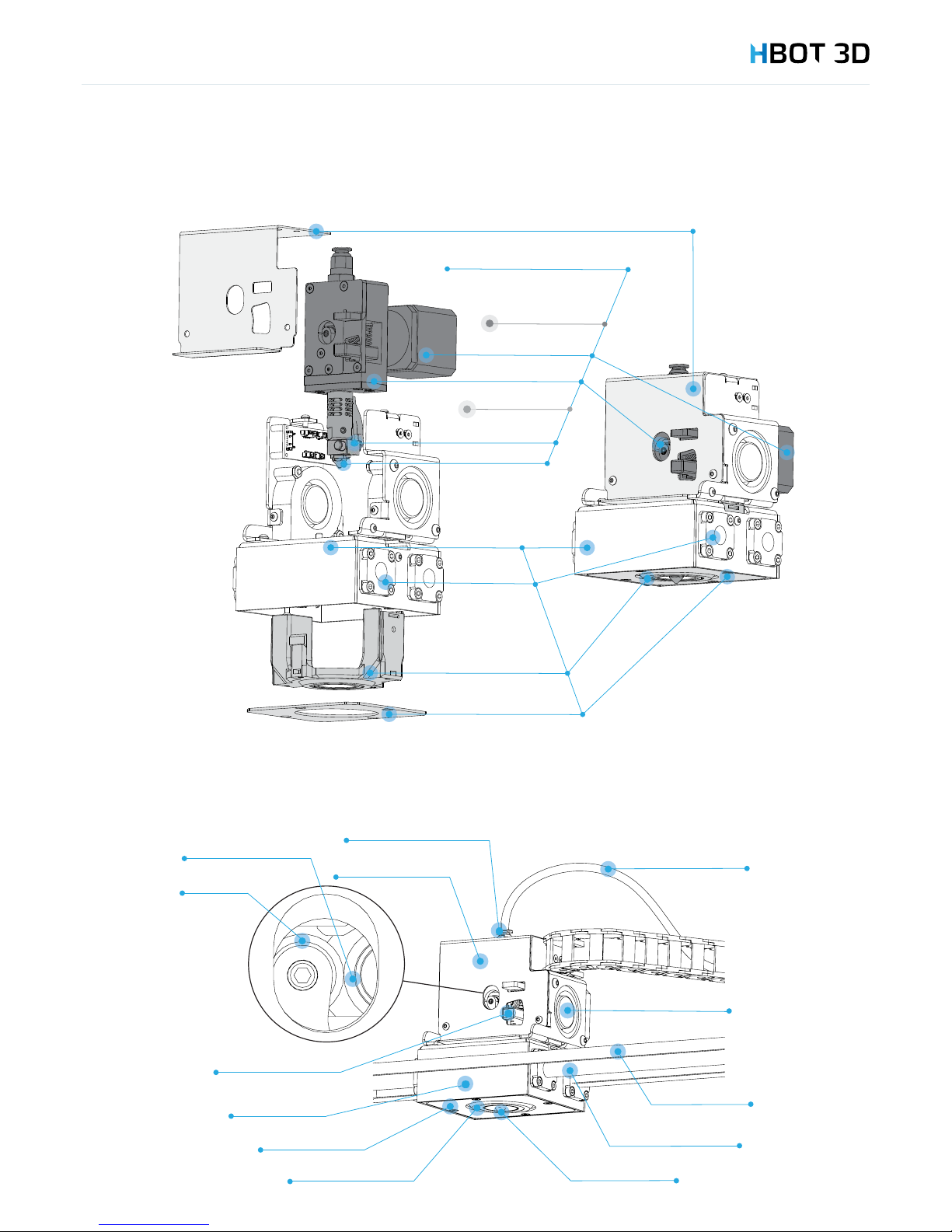
3.1 ESSENTIAL COMPONENTS
3. Device Description

Extruder Case
Extruder block
Gear motor
Hotend
Nozzle
Cooling channels
Carriage cover
Extruder & Hotend assembly
Extruder assembly
Heater block
Carriage
Bearings
Bowden
tube
Drive gear
Extruder lever
Nozzle
Cooling channels
Extruder
fan
Guide rods
HTD Belt
Carriage cover
Carriage
Bearing
Extruder case
Bowden push-fit connector
Extruder Case
Extruder block
Gear motor
Hotend
Nozzle
Cooling channels
Carriage cover
Extruder & Hotend assembly
Extruder assembly
Heater block
Carriage
Bearings
Bowden
tube
Drive gear
Extruder lever
Nozzle
Cooling channels
Extruder
fan
Guide rods
HTD Belt
Carriage cover
Carriage
Bearing
Extruder case
Bowden push-fit connector
3. Device Description
8
3.2 EXTRUDER AND CARRIAGE ASSEMBLY
3.3 EXTRUDER ASSEMBLY

3. Device Description
9
3.4 CONTROL PANEL
The device is equipped with a capacitive touch LCD panel for operating the printer. Below you will nd a diagram of available screens
and functions supported by the display.
3.5 TECHNICAL SPECIFICATION
General information
Technology FFF
Build volume 300 x 300 x 300 mm
Build chamber Closed, with forced ventilation
Build platform Heated, borosilicate glass covered with kapton foil
Hotend positioning Automatic
Build platform leveling Semi-automatic
Extruder Single
Maximum hotbed temperature 120°C
Maximum hotend temperature 260°C
Nozzle diameter 0.2 mm, 0.4 mm, 0.6 mm, 0.8 mm, 1.0 mm
Coordinate system Cartesian XY
Printing accuracy
Single layer height 0.05 – 0.70 mm
Minimum wall thickness 0.4 mm
XY Resolution of single printable point 0.01 mm
Print accuracy +/- 0.1 mm (excludes material shrinkage)
Overall dimensions
Device dimensions 540 mm x 570 mm x 820 mm
Dimensions with the packaging 650 mm x 710 mm x 1020 mm
Weight / weight with packaging 35 kg / 50 kg
• hotbed leveling
• information
• nozzle exchange
• operator panel
• remove
• insert
• printing
• select model

3. Device Description
10
Electrical parameters
Mains Power 100-240V AC 50-60Hz
Fire safety Class I
Maximum absorption power 450 W
Average absorption power 250 W
Hotbed heating power 300 W
Print head heating power 40 W
Software
Operating system Windows Vista 64, 7, 8.x, 10; Mac OC X; Ubuntu Linux
Firmware Original
PC Software (slicer) Simplify 3D
Compatible le formats STL, OBJ
Compatible CAD software All available
Electronics
Control Electronics Sunbeam 3.0
Processor ARM Cortex M3 32bit
Control Panel Colour touch panel 4,3”
External communication SD Card, USB 2.0
Materials
Container Spool (1kg, 2.3 kg, 4.5 kg, 8 kg)
Diameter 2.85 mm
Maximum extrusion temperature 260°C
Filaments PC-ABS, ABS-X, PP, PLA-X, PLA, ASA-X, PET-G ESD, PET-G, HIPS, TPU, H-GLASS
Alternative** Compatible
** The manufacturer does not guarantee the quality and may refuse warranty repair if you use materials not provided by 3D Printers sp. z o.o.
Other
Warranty 12 months
Certication CE Declaration
Operating costs from 0.5 EUR/h (incl. lament & energy )
3.6 DEVICE IDENTIFICATION
Your device is identied by a serial number. It is printed on:
1. The nameplate located on the back panel of the device
2. In the Warranty Card accompanying the device
Serial number is composed of 13 characters split into 3 parts separated by slash marks: H3D/YYYY/123456.
Example of a serial number: H3D/2015/130234
Always quote the serial number of your device when contacting the Technical Department.
Tabla de contenidos