
HAUTAU WLAN-Box Manual de usuario

Einbindung der WLAN-Box
in einen bauseitigen Router
Integration of the WLAN-Box
into a router on site
Montage- und Betriebsanleitung
Installation and operating instructions
04/2017 500623
© HAUTAU GmbH
Reprint, even in excerpts, not without the publisher’s approval.
In consideration of progress, we reserve the right to apply construction modifications and to consequently change any figures, dimensions, wire specifications etc.
The figures do not show items in their actual size and are also not of the same proportion.
t
D
© HAUTAU GmbH
Nachdruck, auch auszugsweise, nur mit schriftlicher Genehmigung des Herausgebers.
Im Sinne des Fortschritts behalten wir uns Konstruktionsänderungen und dadurch bedingte Abweichungen von Abbildungen, Abmessungen, Leitungsangaben
usw. vor. Die Abbildungen zeigen die Artikel nicht in natürlicher Größe und stehen auch nicht im gleichen Verhältnis zueinander.
Inhaltsverzeichnis
Seite
Einleitung ................................................................................ 2
Vorbereitungen ....................................................................... 2
Prinzipielle Funktion ................................................................ 3
Prinzipielles Verfahren ............................................................. 3
Aufbau einer WLAN-Direktverbindung ..................................... 4
Einstellungen am ConfigTool ................................................... 4
Verbindung zum Router .......................................................... 4
Einstellungen im Router .......................................................... 5
Adresse der WLAN-Box ......................................................... 6
Einstellungen im ConfigTool .................................................... 7
Fertigstellung .......................................................................... 7
Table of content
page
Intruduction ............................................................................ 2
Preparation ............................................................................. 2
General function ..................................................................... 3
General procedure .................................................................. 3
Establishing of a WLAN direct connection ............................... 4
Adjustments at the ConfigTool ................................................ 4
Connection to the router ......................................................... 4
Adjustments within the router ................................................. 5
Address of the WLAN-Box ..................................................... 6
Adjustments within the ConfigTool .......................................... 7
Finishing ................................................................................. 7
Vorgehensweise am Beispiel einer FritzBox
procedure using the example of a FritzBox

2
Einleitung
Die WLAN-Box bietet serienmäßig folgende Möglichkeiten für
eine WLAN-Bedienung:
a) als WLAN Access Point
Die WLAN-Box sendet und empfängt die WLAN Befehle direkt
vom Tablet oder Smartphone.
Diese Variante ist sinnvoll, wenn kein heimisches WLAN Netz-
werk vorhanden ist, keine Einbindung in einen Router gewollt ist
oder bei der Installation und Funktionsübergabe kein bauseitiger
Router installiert war.
b) als Client
Die WLAN-Box sendet und empfängt die WLAN Befehle von
einem Router. Der Router empfängt die Befehle von einem
Tablet oder Smartphone.
Diese Variante ist sinnvoll, wenn eine gleichzeitige Bedienung
über die WLAN-Box und Internetfunktionen, wie z.B. surfen
im Internet, gewünscht sind. Dadurch entfällt das händische
Wechseln der unterschiedlichen WLAN-Verbindungen.
In diesem Abschnitt wird die Funktion als WLAN-Client
beschrieben.
Vorbereitungen
Bauseitiger Router
Der Router muss betriebsbereit sein. Ein Internetzugang ist für
die Funktion mit der WLAN Box nicht erforderlich.
Folgende Informationen zum Router müssen bekannt sein:
a) der Name vom Router (WLAN SSID)
b) das Passwort vom Router zum Aufbau einer WLAN-
Verbindung
c) die Internetadresse, mit welcher der Router über einen
Browser erreichbar ist
d) das Passwort für den Zugriff auf die Konfigurationsebene des
Routers
WLAN-Box
Die WLAN-Box muss betriebsbereit sein. Die HAUTAU-App
„ConfigTool“ muss installiert sein. Die HAUTAU-Produkte
müssen in die WLAN-Box eingebunden sein. Dies betrifft die
Verkabelung mit der WLAN-Box und die Integration mittels des
ConfigTools per Gerätescan und ggf. neuer Adressvergabe.
Ein Internetzugang ist für die Funktion mit der WLAN Box nicht
erforderlich.
Folgende Informationen zur WLAN-Box müssen bekannt sein:
a) der Name der WLAN-Box
(Beispiel: „HAUTAU-WLAN-BOX-H0000110“)
b) das Passwort der WLAN-Box zum Aufbau einer
WLAN- Verbindung (Beispiel: „H0000110“)
Preparation
Router on site
The router has to be ready for operation. For the function with
the WLAN-Box no internet access is required.
The following information concerning the router have to be
known:
a) the name of the router (WLAN SSID)
b) the code of the router to set up a WLAN connection
c) the web address that is necessary to get in contact with the
router by means of a browser
d) the code to access the configuration level of the router
WLAN-Box
The WLAN-Box has to be ready for operation. The HAUTAU app
„ConfigTool“ has to be installed. The HAUTAU products
have to be linked to the WLAN-Box. This applies to the
wiring with the WLAN-Box and to the integration by means
of the ConfigTool by device scan and, if applicable, with new
address assignment. A web access is not required for the
function with the WLAN-Box.
The following information concerning the WLAN-Box have to be
known:
a) the name of the WLAN-Box
(example: „HAUTAU-WLAN-BOX-H0000110“)
b) the code of the WLAN-Box to set up a WLAN connection
(example: „H0000110“)
Introduction
The WLAN-Box provides the following options for a WLAN ope-
ration as a standard:
a) as WLAN Access Point
The WLAN-Box transmits and receives the WLAN commands
directly from tablet or smartphone.
This option is meaningful, if no local WLAN network is available,
no integration into a router is intended or no router was installed
during installation and functional putting into service on site.
b) as client
The WLAN-Box transmits and receives the WLAN commands
from a router. The router receives the commands from a tablet
or a smartphone.
This option is meaningful, if a simultaneous operation via the
WLAN-Box and internet tasks, such as surfing the web, is
required. Thereby the manual changing of the different WLAN
connections ist not applicable.
Within this section the function as a WLAN client will be
described.

3
Prinzipelle Funktion
Die Verkabelung hat gemäß der Montageanleitung zur WLAN-
Box zu erfolgen. Dieses Anwenungsbeispiel zeigt die prinzipielle
Funktion der WLAN-Box als Client in Kombination mit einem
bauseitigen Router.
General function
The wiring has to be carried out acc. to the installation
instructions of the WLAN-Box. This application example
shows the general function of the WLAN-Box as a client in
combination with a router on site.
Prinzipielles Verfahren
Prinzipielles Verfahren zur Einrichtung der WLAN-Box und
des Routers. Details sind den nachfolgenden Schritten zu
entnehmen.
General procedure
This is the general procedure to set up the WLAN-Box and the
router. For details, please have a look at the following steps.
Schritt Kurzbeschreibung
1
Herstellen einer WLAN-Direktverbindung zwischen
WLAN-Box und Tablet bzw. Smartphone.
2
ConfigTool starten und im Menü auf den Modus „über
Router“ umschalten und die Kennung vom Router
eingeben (Routername und Routerpasswort).
3
Herstellen einer WLAN-Verbindung zwischen Router und
Tablet bzw. Smartphone.
4
Internetbrowser starten und die Adresse zum Zugriff
auf den Router eingeben. Mittels Passwort auf die
Konfigurationsebene des Router zugreifen. Die WLAN-
Box muss hier aufgeführt sein. Der WLAN-Box ist immer
die gleiche IP-Adresse zuzuweisen.
5
Die angezeigte Adresse der WLAN-Box ist aus der
Konfigurationsoberfläche des Routers zu notieren.
6
Die Adresse der WLAN-Box ist in das ConfigTool zu
übertragen.
7
Die Funktion der WLAN-Box als Client wurde eingerichtet.
Eine Bedienung über den Router ist hergestellt.
step short description
1
Establishing of a WLAN direct connection between
WLAN-Box and a tablet respectively a smartphone
2
Start ConfigTool and switch to mode „über Router“
(=via router) within the menue and input the identification
of the router (name and code)
3
Establishing of a WLAN connection between router and a
tablet respectively a smartphone
4
Start internet browser and input the address for access
to the router. Get access to the configuration level of the
router by means of the code. The WLAN-Box has to be
specified here. Always the same IP address has to be
assigned to the WLAN-Box.
5
The displayed address of the WLAN-Box has to be noted
from the configuration interface of the router.
6
The address of the WLAN-Box has to be transferred to
the ConfigTool.
7
The function of the WLAN-Box as a client has to be
installed. An operation via the router has been established.

4
Aufbau einer WLAN-Direkt-
verbindung
Die WLAN-Box muss betriebsfertig montiert und an einer
Energie versorgung 24 V DC angeschlossen sein. Am Smart-
phone oder Tablet ist die Suche nach neuen WLAN-Netz-
werken einzuschalten. Nach kurzer Zeit wird die WLAN-Box mit
ihrem Namen erkannt.
Im Namen der WLAN-Box ist der WLAN-Schlüssel für die
erstmalige Verbindung enthalten, gemäß Beispiel „H0000110“.
Nach erfolgreicher Verbindung ist der WLAN-Schlüssel mittels
der HAUTAU-App „ConfigTool“ zu ändern.
Establishing of a
WLAN direct connection
The WLAN-Box has to be installed ready for operation and
connected to power supply 24 V DC. The search for new
WLAN networks has to be switched on at the smartphone or at
the tablet. After a short time, the WLAN-Box will be identified by
its name.
The WLAN code for the first connection is included within
the name of the WLAN-Box, acc. to example „H0000110“.
After successful connection, the WLAN code has to be
changed by means of the HAUTAU-App „ConfigTool“.
Verbindung zum Router
Herstellen einer WLAN-Verbindung zum Router. Hierfür wird
das Passwort vom Router für den WLAN Zugang benötigt.
Beispiel für eine erfolgreiche Verbindung zum Router. Der auf-
geführte Name „WlanBoxRouter“ ist exemplarisch.
Connection to the router
Establishing of a WLAN connection to the router. For this, the
code of the router for WLAN access is required.
Example for a succesful connection to the router. The listed
name „WlanBoxRouter“ is exemplarily.
Einstellungen am CongTool
Um die notwendigen Einstellungen vornehmen zu können, muss
eine Direktverbindung zwischen WLAN-Box und Tablet bzw.
Smartphone hergestellt werden. Hierfür wird das Passwort für
den Verbindungsaufbau zur WLAN-Box benötigt.
Adjustments at the
CongTool
To carry out the required adjustments, a direct connection
between WLAN-Box and tablet or smartphone has to be
established.
Beispiel für eine erfolgreiche Verbindung
Example for a successful connection
Nachdem die Verbindung erfolgreich aufgebaut
und das ConfigTool gestartet wurde, kann das
Menü aufgerufen werden:
ConfigTool > Einstellung >Modus >
WLAN Box Verbindung
After successful establishing a connection and
starting the ConfigTool, the menue can be
selected:
ConfigTool > Einstellung >Modus >
WLAN Box Verbindung
Einstellung für den Zugriff auf den Router vornehmen:
WLAN-Box-Verbindung = über Router
Netz-Name (SSID): Hier wird der Name vom Router
eingegeben.
Passwort: Hier wird das Passwort
des Routers für den WLAN-
Zugang eingegeben.
Die Eingaben sind mit „Übernehmen“ zu bestätigen.
Carry out adjustment for access to the router:
WLAN-Box-Verbindung = über Router
Netz-Name (SSID): input the name of the
router here
Passwort: input the code of the
router for WLAN access
here.
The inputs have to be confirmed with
„Übernehmen“.
Achtung: Den Routernamen und das Routerpasswort auf
Richtigkeit prüfen und nicht den Namen und Zugangsschlüssel
der WLAN-Box eintragen. Andernfalls ist kein Zugriff mehr
auf die WLAN-Box möglich und es muss ein Reset an der
WLAN-Box auf Werkseinstellungen durchgeführt werden.
Attention: Verify the name and the code of the router and do not
input the name and the access code of the WLAN-Box. Other-
wise it is not possible to access the WLAN-Box and a reset to
factory settings at the WLAN-Box has to be done.

5
Einstellungen im Router
Anschließend ist der Internetbrowser zu öffnen und die Adresse
für den Zugang zum Router einzugeben. Nun öffnet sich die
Anmeldeseite für den Zugang zur Konfigurationsebene. Hier ist
das Zugangskennwort einzugeben und mit Anmelden zu
bestätigen.
Beispiel für den Zugang auf eine FritzBox: www.fritz.box
Adjustments within the router
Afterwards the internet browser has to be opened and the address
for access to the router has to be input. Now the registration site
for access to the configuration level opens. The access code has
to be input here and to be confirmed with Anmelden.
Example for the access to a FritzBox: www.fritz.box
Hinweis:
Sollte ein Zugriff auf den Router nicht möglich sein, so ist die
Adresse im Internetbrowser auf Richtigkeit zu überprüfen.
Es öffnet sich die Router-Konfigurationsoberfläche. Sollte die
mobile Ansicht gemäß Screenshot dargestellt werden, so muss
in die klassische Ansicht gewechselt werden.
Note:
If an access to the router is not possible, the address within the
internet browser has to be checked for correctness.
The router configuration interface opens. If the mobile view acc.
to the screenshot should be displayed, you have to change to
the classical view.
Screenshot der mobilen Ansicht Screenshot of the mobile view
change to classical view
Screenshot der klassischen Ansicht Screenshot of the classical view
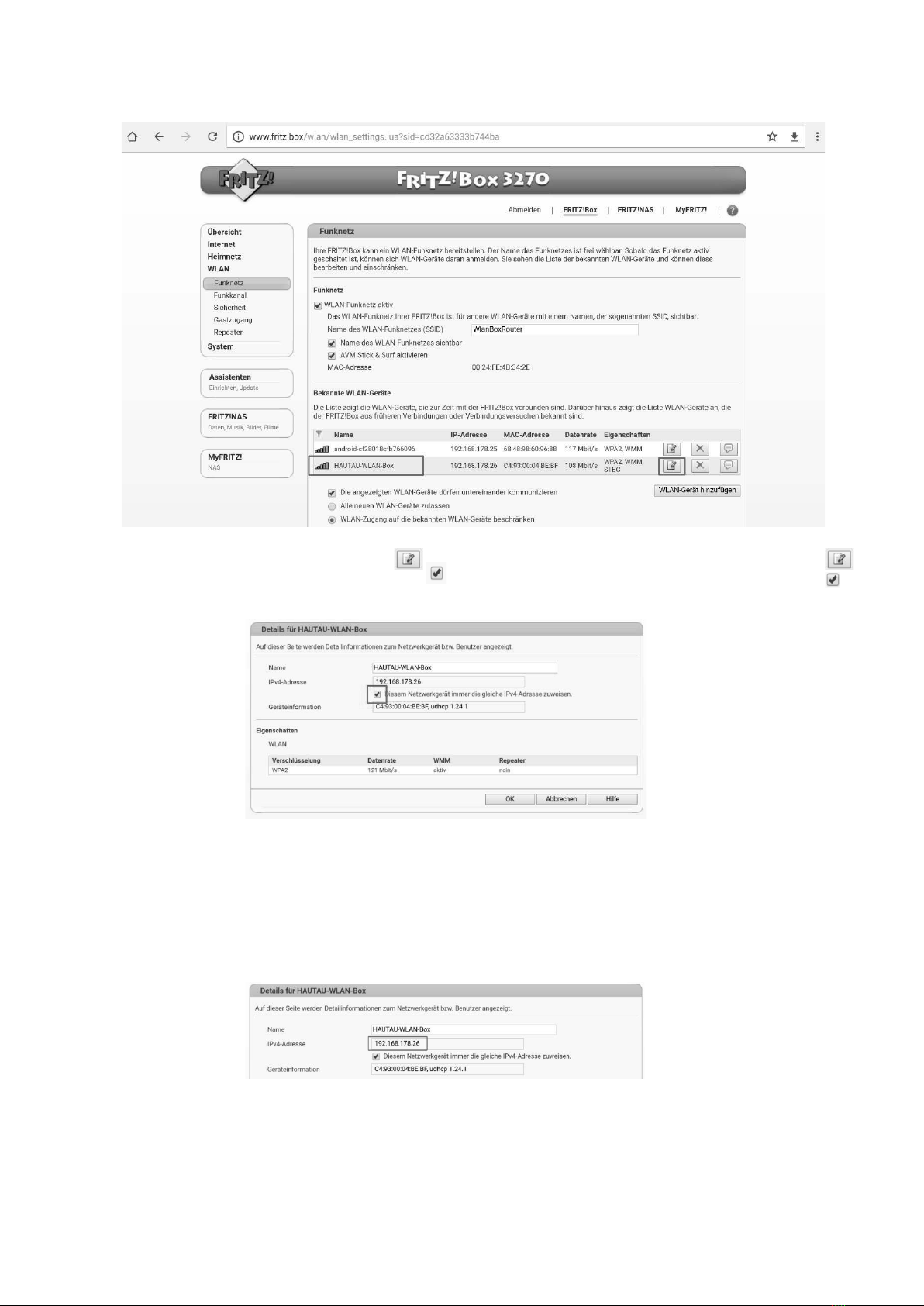
Nach der Umschaltung auf die klassische Ansicht ist der
Menüpunkt WLAN zu wählen.
Dort muss die WLAN-Box automatisch in der Übersicht der
„Bekannten WLAN-Geräte“ angezeigt werden. Sollte dies nicht
der Fall sein, so sind die Einstellungen gemäß dieser Anleitung
zu prüfen und ggf. zu korrigieren.
The WLAN-Box has to be displayed within the overview of the
known WLAN devices („Übersicht“). If this is not the case, the
adjustments have to be checked and corrected acc. to these
instructions, if necessary.
After switching to classical view, the menu item WLAN has to
be chosen.
6
Einstellungen im Router
(Forts.)
Adresse der WLAN-Box
Die Adresse zur HAUTAU WLAN-Box ist zu notieren für die
Eintragung ins ConfigTool.
Adjustments within the router
(con‘d)
Address of the WLAN-Box
For entry in the ConfigTool the address to the HAUTAU WLAN-
Box has to be noted.
Damit dem Netzwerkgerät „HAUTAU-WLAN-Box“ immer
die gleiche IP Adresse zugewiesen wird, ist über das Symbol
(„Bearbeiten“) die Detailansicht zu öffnen und das Häkchen
bei „Diesem Netzwerkgerät immer die gleiche IPv4-Adresse
zuweisen“ zu setzen.
Always the same IP address has to be assigned to the
network device „HAUTAU WLAN-Box“. To do this, via symbol
(„Editing“) the detailed view has to be opened and check mark
has to be set at „Diesem Netzwerkgerät immer die gleiche
IPv4-Adresse zuweisen“.

7
Einstellungen im CongTool
Als letzten Schritt muss im ConfigTool eingegeben werden, unter
welcher IP-Adresse die WLAN-Box erreichbar ist. Die Adresse
ist der Konfigurationsoberfläche des Routers zu entnehmen bzw.
der gemachten Notiz. Beispielsweise gemäß obigem Screenshot:
192.168.178.26
ConfigTool > Einstellung > Adresse > WLAN Box erreichbar unter
Fertigstellung
Die WLAN-Box ist nun eingerichtet für den Betrieb über einen
Router und eine Bedienung der HAUTAU-Produkte mittels
ConfigTool kann ohne WLAN-Netzwerkumstellung erfolgen.
Adjustments within the
CongTool
Finally, within the ConfigTool it is to be inputted, under which
IP adress the WLAN-Box is accessible. The address can be taken
from the configuration interface of the router or from the note
made in advance. For example acc. to the screenshot above:
192.168.178.26
ConfigTool > Einstellung > Adresse > WLAN Box erreichbar unter
WLAN-Box accessible at
input IP adrress
via router
cancel
Finishing
Now the WLAN-Box is installed for operation via a router.
Handling of HAUTAU products can be done by means of the
ConfigTool without change of WLAN network.

HAUTAU GmbH | Wilhelm-Hautau-Str. 2 | 31689 Helpsen | Germany | Tel +49 5724/393-0 | info@hautau.de | www.hautau.de
Otros manuales para WLAN-Box
1
Tabla de contenidos
Manuales populares de Hardware de red de otras marcas

Matrix Switch Corporation
Matrix Switch Corporation MSC-HD161DEL Manual de usuario

B&B Electronics
B&B Electronics ZXT9-IO-222R2 Manual de usuario

Yudor
Yudor YDS-16 Manual de usuario

D-Link
D-Link ShareCenter DNS-320L Manual de usuario

Samsung
Samsung ES1642dc Instrucciones de uso

Honeywell Home
Honeywell Home LTEM-PV Instrucciones de montaje


