
Harman EASY Touch Control Manual de usuario

1
Owner’s Manual
EASY Touch Control
Easy,Accurate, Smart and providesYearly savings.

Harman EASY Touch Control Owners Manual2
EASY Touch Control Overview .............................3
Quick Start: Starting Your Pellet Stove ........................4
Menus .................................................5
Menu I Overview ......................................6
Burn Mode ..........................................7
Cleaning Prompts .....................................8
Diagnostics ..........................................9
Feed Limit ..........................................12
Igniter .............................................13
Room Fan ..........................................15
Schedule ...........................................16
Test ...............................................18
Menu 2 Overview .....................................19
Home Screen Options ................................20
Screen Brightness ....................................21
Day/Time...........................................22
Fuel Calibration......................................23
Lock...............................................24
Languages & Units....................................25
Menu 3 Overview .....................................26
Dealer Information ...................................27
Factory Defaults .....................................28
USB ...............................................29
Video/Manual........................................30
Prompts, Messages & Errors...............................31
Software Updates .......................................32
FAQ ..................................................33
Table of Contents
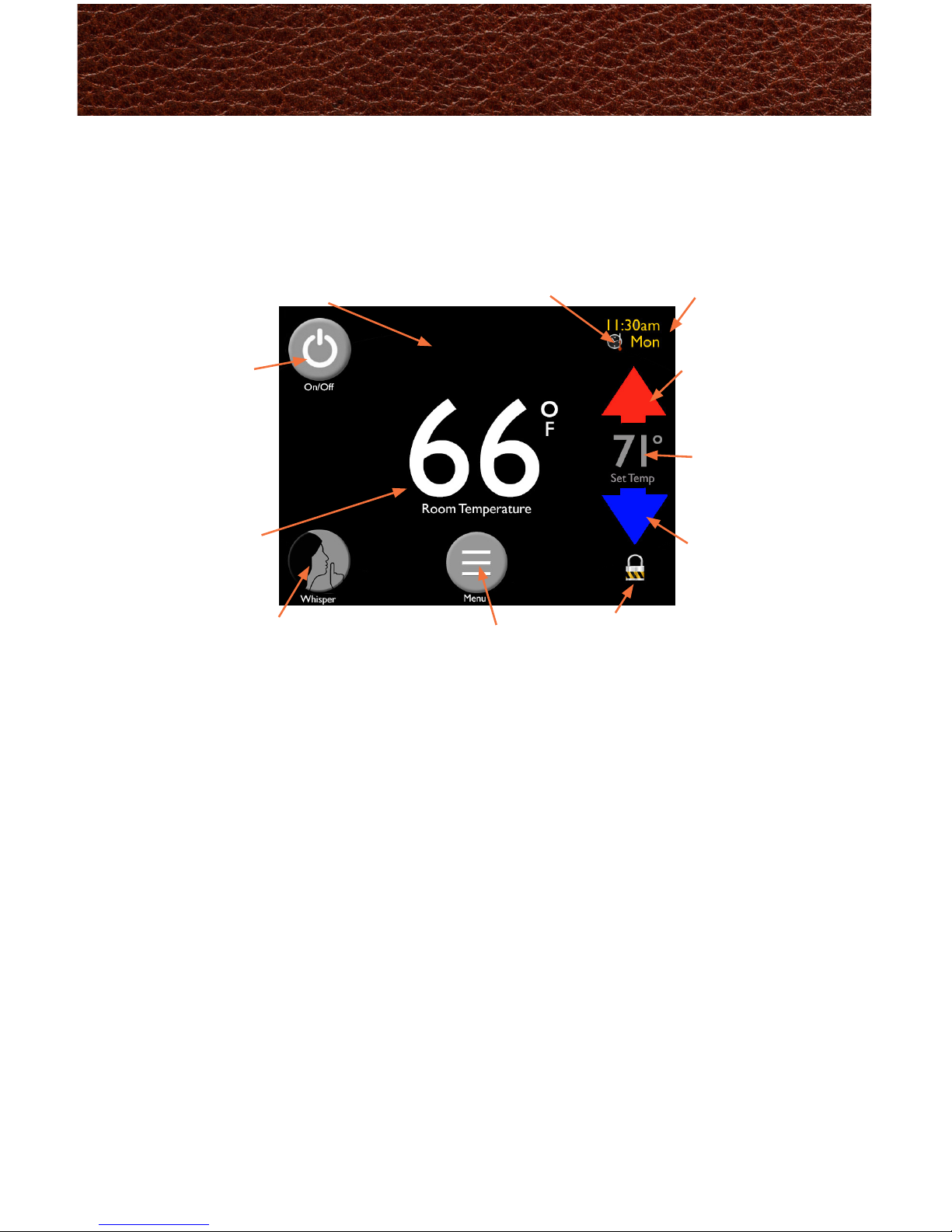
Harman EASY Touch Control Owners Manual3
The EASY Touch Control home screen manages the essential functions of
your Harman pellet stove.
Day/Time
Current day/time
when set
Power Icon
Turns unit
on/off
Whisper Mode
Shows if
“Whisper”
mode is on
or off
Blue Arrow
Press to
decrease the
desired room
temperature
Schedule Icon
Appears if “Scheduling” is
turned on.
Lock Icon
Appears if the
control is locked
Setting
Displays
current
temperature
setting
Menu
Allows you to
scroll through
3 additional
menus
Red Arrow
Press to
increase the
desired room
temperature
Message Area
Prompts and messages will
appear in the top center of
the screen
Actual Room
Temperature
EASY Touch Control Overview

Harman EASY Touch Control Owners Manual4
Your EASYTouch Control automatically runs at our factory default settings
which is the most convenient way to heat with a Harman pellet stove.
Factory default settings include but are not limited to:
• Room Sensing Mode
• Automatic Ignition
• Automatic Fan
Note:
• The rst time the unit is plugged in, you will need to choose the
preferred language, then hit the “Home” icon
• The temperature setting must be 3 degrees higher than the room
temperature for the stove to light
Fill the Hopper
with Pellets
Use the Up and Down
Arrows to set desired
room temperature
Touch the Power Icon
1
2
3
Quick Start: Starting Your Pellet Stove

Harman EASY Touch Control Owners Manual5
You can easily heat your home
using just the home screen
functions.
Using the “Menu”,“Home”,“Left”
and “Right” arrow icons you can
get to any function.
When more customization is
desired the “Menu” icon allows
you to scroll through 3 pages
of icons to access controls for
individual features.
We have organized the menu pages
in order of most frequent use.
Menus
Home Screen
Menu 1
Menu 2
Menu 3

Harman EASY Touch Control Owners Manual6
The rst menu gains access to the most used options.
A - Burn Mode: Select “Room Sensing” or “Constant Burn Sensing”
B - Cleaning: Displays current cleaning percent accumulated and allows
for reset
C - Diagnostics: 6 pages of data showing how the stove is performing
D - Feed Limit: Adjust the amount of pellets being fed to the burn pot
E - Igniter: Select method of ignition and shut down, automatic or disabled
F - Fan: Choose automatic or manual fan
G - Schedule: Program when you want your temperatures to change,
7 days a week
H -Test: Test individual functionality of motors and igniter
Note: You cannot cause harm to the unit by changing settings, however,you may not achieve
your ideal temperature. If you are unsure of what you have set,you can always go to“Factory
Default” on page 3 to revert to factory settings.
A B C D
E
F
H
G
Menu 1Overview

Harman EASY Touch Control Owners Manual7
“Burn Mode” allows you to select how you want the stove to operate. Refer
to the stove owner’s manual for detailed description.
Room Sensing utilizes the onboard sensor
or optional wireless remote sensor to monitor
temperatures and automatically adjusts the stove
to maintain your desired temperature setting.
The home screen will display your actual room
temperature on the center of the screen in this
mode.
Constant Burn allows you to manually control
heat output. In Constant Burn you will set the
heat level at a number between 1(low) to 7(high)
using the slider bar on the home screen.For your
reference,the room temperature is displayed to
the right of the slider bar on the home screen.
The stove will not shut down regardless of room
temperature, until you manually turn it off.
Burn Mode

Harman EASY Touch Control Owners Manual8
The “Cleaning” screen displays the percentage of time that has
accumulated since the last cleaning.When it reaches100%, you will get
messages on the home screen to perform that specic maintenance. Press
the checkmark on the home screen to reset. Resetting the maintenance
sets it back to 0% and tells the control to start calculating until the next
cleaning is needed.
In the case you clean your stove before prompted, this menu allows you to
manually reset the percent accumulated.You can expect to see messages at
the following intervals:
Burn Pot: You will be prompted to scrape the burn pot
approximately every ve days*
Ash Pan: You will be prompted to empty it every 5 days*
Total Clean: You will be prompted to completely clean
the unit and venting after each ton*
It is important to perform these maintenance tasks to keep your Harman
pellet stove/insert warming your home as efciently as possible.
*Depending on stove model and quality of the pellets burned
** See “Fuel Calibration” screen for more details
Cleaning Prompts

Harman EASY Touch Control Owners Manual9
There are 6 pages of diagnostic information that will be helpful if you
ever have questions about your Harmanpellet product.The data on these
screens allows you to understand and reference how your unit is working.
Diagnostic information on Page 1 of 6 includes:
• Room Fan: Current room fan speed percent
• Combusion Fan RPM: Current fan RPMs
• Feed Motor: Displays if the feed motor is currently on or off
• Feed Rate: Current feed rate percentage
• Igniter: Displays if igniter is currently on or off
• Pressure Switch: Displays if the pressure switch is currently
open or closed
Diagnostics - Page 1

Harman EASY Touch Control Owners Manual10
Diagnostic information on page 2 of 6 displays temperature sensors
ESP Temperature: Displays the
current temperature of the Exhaust
Sensing Probe
Room Temperature: Displays
room temperature sensed from
the on-board or Wireless Remote
Sensor(optional).
Return Air Temperature:
Displays the room air temperature
returning to the unit.This
temperature becomes the set
point for the stove to achieve if the wireless sensor loses signal.You will see
“Using Back Up Sensor” on your home screen.
Wireless Sensor: Displays whether or not the optional wireless sensor is
disabled or enabled.
OutsideAirTemperature: Displays outside temperature when the optional
Outside Air Kit is installed.
Diagnostic information on Page 3 of 6 displays Limits and Fuel Usage.
Ignition ChargeTime (min):
This can only be altered by an
Authorized Harman Dealer.
Displays amount of time the auger
feeds fuel during the ignition cycle.
Feed Rate Limit (%):Displays the
maximum allowed percentage as set
in the “Feed Limit” screen.
ESPTemperature Limit: Displays
the maximum temperature of the
ESP allowed by the control, based
on current settings.
Fuel Used in 24 Hours: Displays the amount of pounds burned in the past
24 hours.
Fuel Used Since Cleaning: Displays how many pounds of fuel was used
since last total clean.
Fuel Remaining: Displays amount of fuel in hopper.To enhance accuracy,
fuel calibration should be completed, see Menu 2.
Diagnostics - Pages 2 & 3
Otros manuales para EASY Touch Control
1
Tabla de contenidos


