
Harbor Freight Tools 68770 Manual de usuario
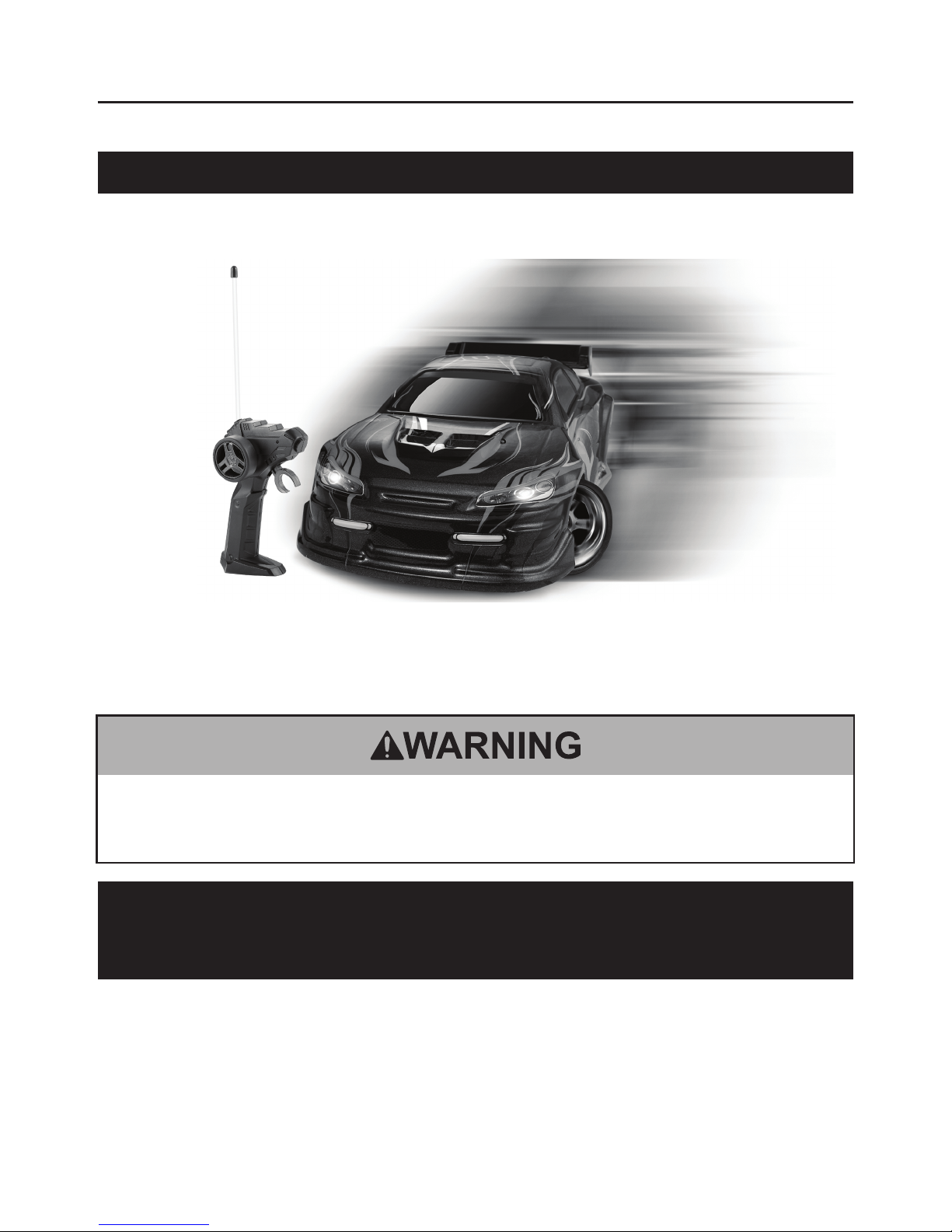
Remote Control Drift Model Car
Item 68770
INSTRUCTIONS AND PRECAUTIONS
Visit our website at:
http://www.harborfreight.com
Read this material before using this product. Failure
to do so can result in serious injury.
SAVE THIS MANUAL.
When unpacking, make sure that the product is intact and undamaged.
If any parts are missing or broken, please call
1-800-444-3353 as soon as possible.
Copyright©2011 by Harbor Freight Tools®. All rights reserved. No portion of this document or any
artwork contained herein may be reproduced in any shape or form without the express written consent
of Harbor Freight Tools. Diagrams within this document may not be drawn proportionally. Due to
continuing improvements, actual product may differ slightly from the product described herein. Tools
required for assembly and service may not be included.
For technical questions or replacement parts,
please call 1-800-444-3353.

Page 2 For technical questions, please call 1-800-444-3353. SKU 68770
Specications
Charger
Input 120 V~ / 60 Hz
Output 6 V
Charging Time 4 - 5 hours
Car Batteries
(included) 6 V, 500 mAh NiCd battery
Remote Control
Batteries
(sold separately)
Two “AA” batteries
Frequency 49 mHz and 27 mHz
Range Up to 98 FT.
Scale 1:18
This device complies with part 15 of the
FCC Rules. Operation is subject to the
following two conditions:
(1) This device may not cause harmful
interference, and
(2) this device must accept
any interference received,
including interference that may
cause undesired operation.
IMPORTANT SAFETY
INFORMATION
In this manual, on the labeling,
and all other information
provided with this product:
This is the safety alert symbol. It
is used to alert you to potential
personal injury hazards. Obey
all safety messages that follow
this symbol to avoid possible injury or death.
DANGER
DANGER indicates a hazardous
situation which, if not avoided, will
result in death or serious injury.
WARNING
WARNING indicates a hazardous
situation which, if not avoided, could
result in death or serious injury.
CAUTION
CAUTION, used with the safety
alert symbol, indicates a hazardous
situation which, if not avoided, could
result in minor or moderate injury.
Notice
NOTICE is used to address practices
not related to personal injury.
CAUTION
CAUTION, without the safety alert
symbol, is used to address practices
not related to personal injury.
WARNING Read all safety
warnings and instructions.
Failure to follow the warnings
and instructions may result in
serious injury.
Save all warnings and instructions
for future reference.
1. Intended for adult-supervised
use by ages 6 years and older.
Keep out of reach of children
younger than 6 years old.
2. Do not expose to rain or wet conditions.
3. Position batteries in proper polarity
and do not install batteries of
different types, charge levels, or
capacities together. Only an adult
should install or charge batteries.
Page 3For technical questions, please call 1-800-444-3353.SKU 68770
4. Adult must inspect toy before and
after every use; do not allow children
to use if parts are loose, deteriorated,
or damaged. Conduct frequent
inspections to help prevent injuries
caused by sharp points, corners,
or edges that may develop as a
result of wear and tear on the toy.
5. Store idle equipment. When not
in use, turn the Power Switch off,
remove the batteries and store all
components in a dry location to
decrease exposure to moisture.
6. Plug charger into properly grounded,
120V~, 60Hz outlet only.
7. Battery tool use and care
a. Recharge only with the charger
specied by the manufacturer.
A charger that is suitable for
one type of battery pack may
create a risk of re when used
with another battery pack.
b. Use the Car only with specically
designated battery packs. Use
of any other battery packs may
create a risk of injury and re.
c. When battery pack is not in use,
keep it away from other metal
objects, like paper clips, coins,
keys, nails, screws or other
small metal objects, that can
make a connection from one
terminal to another. Shorting
the battery terminals together
may cause burns or a re.
d. Under abusive conditions,
liquid may be ejected from the
battery; avoid contact. If contact
accidentally occurs, ush with
water. If liquid contacts eyes,
additionally seek medical help.
Liquid ejected from the battery
may cause irritation or burns.
e. Keep Charger and batteries
out of reach of children.
8. WARNING: Handling the cord on
this product’s charger will expose
you to lead, a chemical known to
the State of California to cause
cancer, and birth defects or other
reproductive harm. Wash hands
after handling. (California Health &
Safety Code § 25249.5, et seq.)
9. The warnings, precautions, and
instructions discussed in this instruction
manual cannot cover all possible
conditions and situations that may
occur. It must be understood by the
operator that common sense and
caution are factors which cannot
be built into this product, but must
be supplied by the operator.
SAVE THESE
INSTRUCTIONS
Extension Cords
Note: Extension cords must not be
used with this item’s charger.

Page 4 For technical questions, please call 1-800-444-3353. SKU 68770
Set Up and Operating Instructions
Read the ENTIRE IMPORTANT
SAFETY INFORMATION
section at the beginning of
this manual including all text
under subheadings therein
before set up or use of
this product.
Installing Remote
Control Batteries
Before rst use and when the
Remote Control batteries need to be
changed, install 2 “AA” batteries:
1. Slide open the battery cover on the
bottom of the Remote Control.
2. Insert two “AA” batteries (sold
separately), being careful to position
the batteries in the proper polarity.
3. Replace the battery cover.
Charging the Car Batteries
1. Place the Battery Pack on a dry
reproof surface in a room where
the temperature is from 50-104º F.
Note: If recharging a newly spent Battery
Pack, allow it to cool completely before
charging. Check that the Battery
Pack is undamaged; do not charge
a cracked or leaking battery pack.
2. Plug the charger into a grounded,
120 V~, 60 Hz outlet.
3. Plug the Battery Pack into the Charger.
4. Allow the Battery Pack to
charge for 4 to 5 hours.
5. When the Battery Pack is done
charging, unplug it from the Charger
and unplug the Charger from the outlet.
6. Allow the Battery Pack to cool
completely before using it.
7. Store the Charger indoors,
out of reach of children.
WARNING! DO NOT use a different
Charger or Battery to power
this Remote Control Car.
Installing the Car Batteries
1. Locate the Power Switch on the
bottom of the Car and turn it off.
2. Remove the four clips on the top of
the body and remove the body.
3. Unthread the screw holding the Battery
Cover and remove the Battery Cover.

Page 5For technical questions, please call 1-800-444-3353.SKU 68770
4. Plug the Battery Pack cable into the
Battery Compartment inlet and t the
Battery Pack in the Compartment.
5. Replace the Battery Cover and
secure with the screw.
6. Replace the Body and secure
with the four clips.
Operation
1. Install the batteries in the Remote
Control and Charge the Car
Battery Pack according to the
directions on the previous page.
Install the Car Battery Pack.
2. Turn on the Car Power Switch.
3. To operate the Car, slide the trigger
forward or backward to make the
car move forward or backward.
4. Turn the Dial to make the
car turn right or left.
5. Switch off car, then switch off
remote control after use.
Note: If the vehicle does not drive
straight, adjust the steering by
rotating the steering control
on the bottom of the Car.
Tip: To drift, while driving on a smooth
surface, turn the car right or left
at high speeds to cause the rear
section to drift while turning.
Page 6 For technical questions, please call 1-800-444-3353. SKU 68770
Maintenance
TO PREVENT INJURY:
Turn off the Power Switch of both the Remote Control and the
Car and remove the Remote Control batteries before performing
any inspection, maintenance, or cleaning procedures.
1. BEFORE EACH USE, inspect the general condition of the Car and
Remote Control. Check for loose hardware, misalignment or binding of
parts, cracked or broken parts, damaged electrical wiring, and any other
condition that may affect its safe operation. Do not use if damaged.
Note: NiCd Battery must be recycled or disposed of properly.
Do not short, incinerate or open Battery Pack.
2. AFTER USE, wipe external surfaces of the Remote Control and Car with a clean cloth.
WARNING! If the supply cord of the charger is damaged, it must be replaced only by a
qualied service technician.
Problem Possible Causes Likely Solutions
Car moves slowly
or not at all.
1. No Power.
2. Batteries not installed
correctly.
3. Batteries not charged.
4. Battery Contacts dirty.
1. Be sure Power Switch is turned on.
2. Check that the Batteries in the
Remote Control and the Battery Pack
in the Car are properly installed.
3. Check that the Battery Pack is fully
charged and that the Batteries in the
Remote Control are not spent.
4. Check that the Battery Contacts are
clean and free from corrosion.
Car movement is
erratic or range
is reduced.
1. Location has too much
radio interference.
2. Other cars in the
same area are on the
same frequency.
1. Move Car to a different location.
2. Move away from Cars with
the same frequency.
Troubleshooting

Page 7For technical questions, please call 1-800-444-3353.SKU 68770
Parts List and Assembly Diagram
Record Serial Number Here:
Note: If product has no serial number, record month and year of purchase instead.
Part Description Qty
1 Car 1
2 Remote Control 1
3 Charger 1
4 Battery 1
1 32 4
PLEASE READ THE FOLLOWING CAREFULLY
THE MANUFACTURER AND/OR DISTRIBUTOR HAS PROVIDED THE PARTS
LIST AND ASSEMBLY DIAGRAM IN THIS MANUAL AS A REFERENCE TOOL
ONLY. NEITHER THE MANUFACTURER OR DISTRIBUTOR MAKES ANY
REPRESENTATION OR WARRANTY OF ANY KIND TO THE BUYER THAT HE
OR SHE IS QUALIFIED TO MAKE ANY REPAIRS TO THE PRODUCT, OR THAT
HE OR SHE IS QUALIFIED TO REPLACE ANY PARTS OF THE PRODUCT. IN
FACT, THE MANUFACTURER AND/OR DISTRIBUTOR EXPRESSLY STATES THAT
ALL REPAIRS AND PARTS REPLACEMENTS SHOULD BE UNDERTAKEN BY
CERTIFIED AND LICENSED TECHNICIANS, AND NOT BY THE BUYER. THE BUYER
ASSUMES ALL RISK AND LIABILITY ARISING OUT OF HIS OR HER REPAIRS TO
THE ORIGINAL PRODUCT OR REPLACEMENT PARTS THERETO, OR ARISING
OUT OF HIS OR HER INSTALLATION OF REPLACEMENT PARTS THERETO.

3491 Mission Oaks Blvd. • PO Box 6009 • Camarillo, CA 93011 • (800) 444-3353
Tabla de contenidos
Otros manuales de Coche de juguete motorizado de Harbor Freight Tools

Harbor Freight Tools
Harbor Freight Tools 66151 Instrucciones de montaje

Harbor Freight Tools
Harbor Freight Tools ROCK CRAWLER Manual de usuario

Harbor Freight Tools
Harbor Freight Tools 03516 Manual de usuario

Harbor Freight Tools
Harbor Freight Tools 62527 Manual de usuario

Harbor Freight Tools
Harbor Freight Tools Remote Control Stunt Car Instrucciones de montaje

Harbor Freight Tools
Harbor Freight Tools 90285 Manual de usuario


