
HappyJapan HCH(Puls) Manual de usuario
FCRC20-4
HCH(Puls)
,HCS2,
HCD2,HCD3
Side Clamp Frame
INSTRUCTION MANUAL
Program Ver. *1.60 ~
IMPORTANT SAFETY INSTRUCTIONS
Use this Manual together with Instruction Manual of embroidery machine for mounting this appliance and for
operating.
Use this appliance only for its intended use as described in this manual. Use only attachments recommended
by the manufacturer as contained in this manual.
Keepngersawayfromallmovingparts.Specialcareisrequiredaroundthesewingmachineneedle.
Do not pull or push fabric while stitching. It causes damage.
Do not modify this appliance.
SAVE THESE INSTRUCTIONS
0

-FC -2
INDEX
BASICINFORMATIONOFSIDECLAMPFRAME .. 1-1
ACCESSORIES........................................................ 1-2
ADJUSTMENTOFEMBROIDERYAREA................ 2-1
ADJUSTMENTOFUPPERARM ............................. 2-2
INSTALLINGTHEFRAME ....................................... 3-1
HOOPINGMATERIAL.............................................. 4-1
STARTINGTOEMBROIDER ................................... 5-1
ETC.
EXCHANGESPONGEANDSHEET..................... 6-1
PARTSLIST ............................................................. 7-1
0_1 PB19
0-1

-FC -31_1 PB19
BASIC INFORMATION OF SIDE CLAMP FRAME 1-1
The types of side clamp frame are described below.
Use correct type of side clamp frame for your embroidery machine.
FRA21G0
Side Clamp Frame (for HCH, HCS2)
FRA21G1
Side Clamp Frame (for HCD2, HCD3)
CAUTION: To avoid problems.
To use side clamp frame , select “Special frame” from frame selection menu.
Please note that the following functions will be canceled at “Special Frame” mode.
* Frame conrmation (embroidery area of frame)
* Auto stop function when frame movement exceeds the carriage limit.
1-2
ACCESSORIES
FRA21181 Sponge (2 pcs)
FRA21191 Sheet (2 pcs)
(packed with frame)

-FC -4
ADJUSTMENT OF EMBROIDERY AREA 2-1
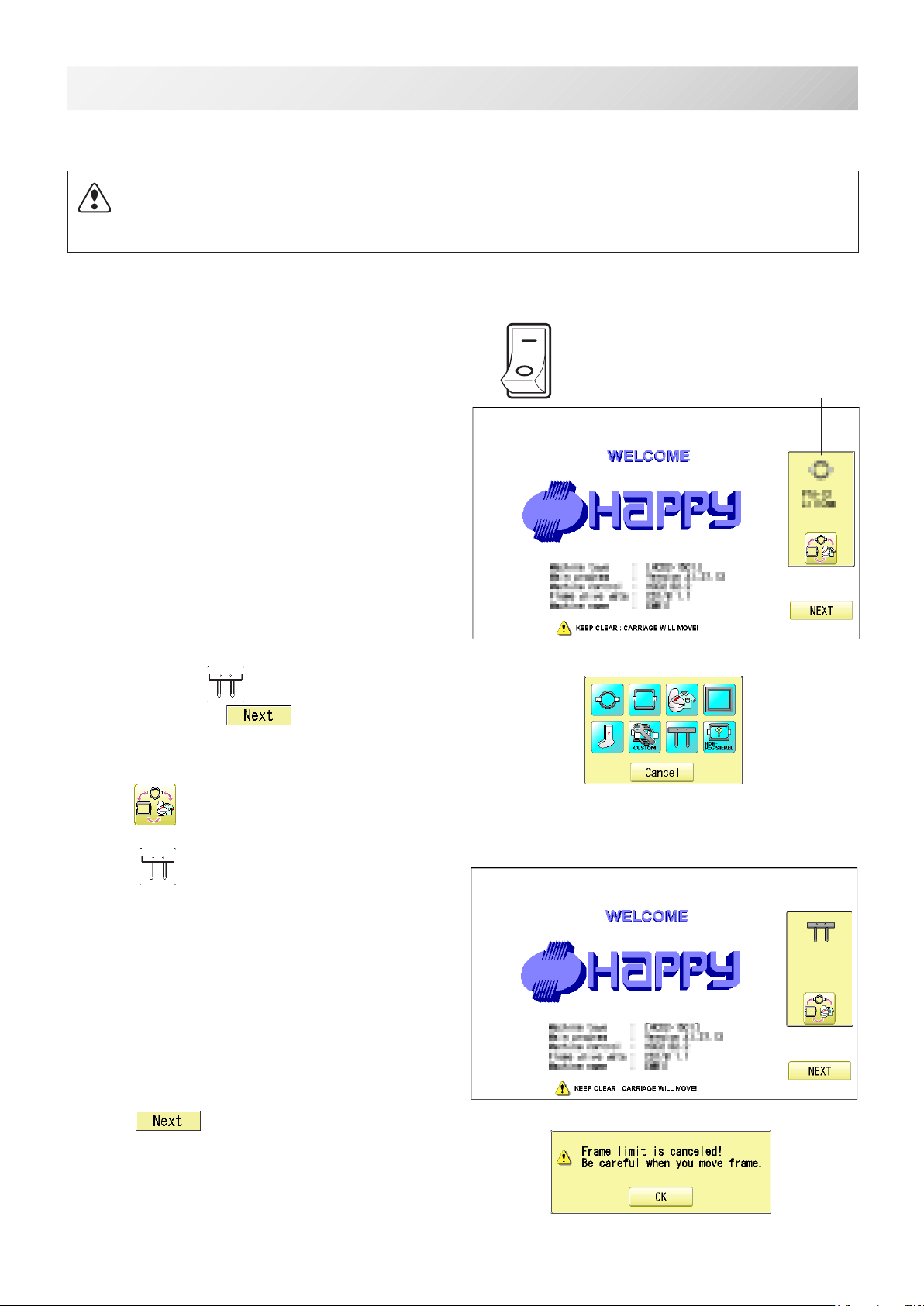
Adjust width of the upper arm to meet size of material and embroidery design.
Widthofthearmshouldhaveenoughmarginsforembroideryarea.
Loosenbothsideknobnutsforadjustmentofarm.
Tightenallknobnutsafteradjustment.
Knob nut
Arm
0 ~ 220mm
140mm
Knob nut
2_1 PA13
Pleasenotethatbasicallytheupperarmandthelowerarmshouldbeparallelatlockingposi-
tion.
Incasethethicknessofthematerialisuneven,useadjustingsetscrewandeccentricpinto
changeangleoftheupperarmtogiveholdingpressureevenly.
Lowerarm
Setscrew
Eccentricpin
Upper arm
Parallel
2-2
ADJUSTMENT OF UPPER ARM
Open
Close
Open
Close
RightLeft
Lever
Arm
5mm ~ 5mm ~
-FC -5
3-1
INSTALLING THE FRAME
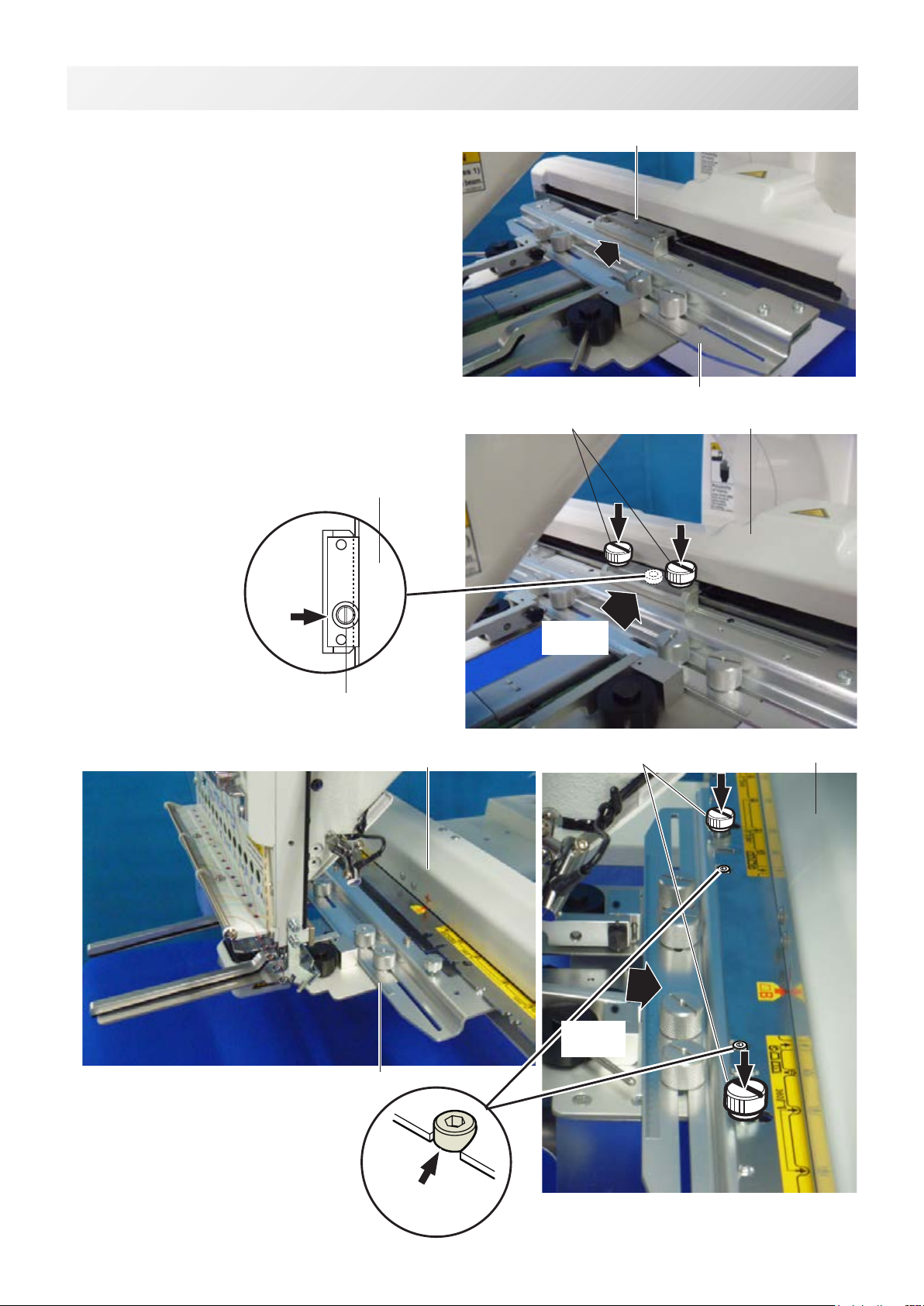
Whenyouusesideclampframe,pleasemakemachinesettingaccordingtoframetypeselected.
CAUTION: To avoid problems.
Themachineand/orframemaybedamagediftheincorrectframesettingsareused.
ON
OFF Selectedframe
1. Turnonthepowerswitch.
Indicates the selected frame.
2. Incaserequired “Specialframe”isalready
selected,pressthe and jump to operation
no.4.
Incaseselectedframetypeisnot“Specialframe”,
press .
3. Select “Specialframe”.
4. Press .
3_1 PA13

-FC -6
3-2
INSTALLING THE FRAME
5. Press .
Iindication of frame type disappears.
It means that “Special frame” is selected.
When you need to change from Special frame to oth-
er type of frame, please powor machine off and start
again.
Without re-starting machine, machine will move in-
correctly.
6. Press and move the carriage to the position
shown by press .
Frame Iindication disappears
HCD2,
HCD3
HCH, HCS2
3_2 PA13
Machine
Carriage
Machine
Carriage
-FC -7
3-3
INSTALLING THE FRAME
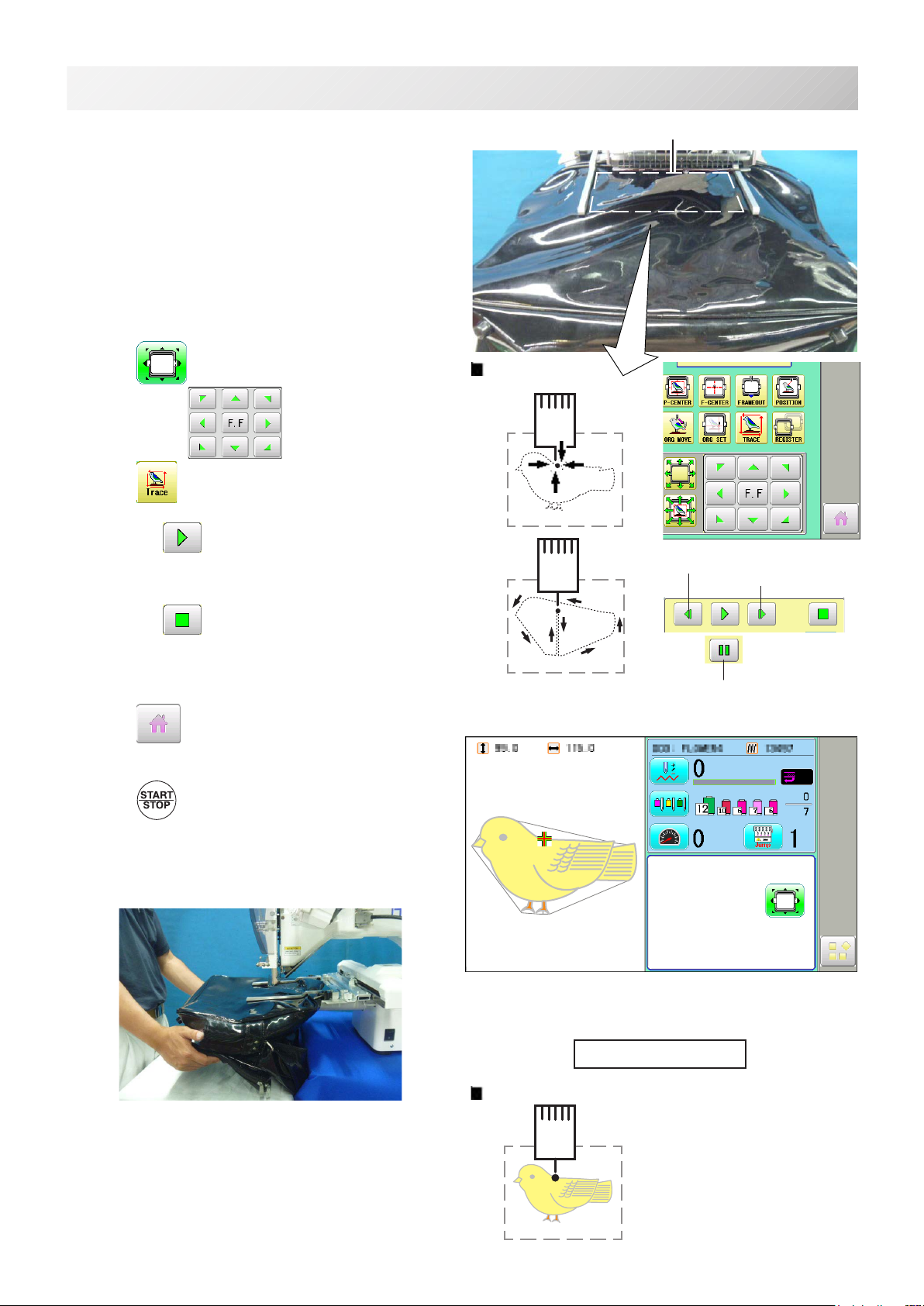
7. Insertshoeframetobelowthexingbaseof
carriage by sliding on bed.
Fixknobscrewsashittingthebearing
against the carriage while pressing the side
clamp frame to the carriage.
HCD2, HCD3
HCH, HCS2
Carriage
Knob screw
Fixingbase
Side clamp frame
Carriage
Knob screw
Fixingbase
Side clamp frame
3_3 PA13
Pushing
against
Positioning bolt
Pushing
against
Bearing
Carriage

-FC-8
4-2
HOOPING MATERIAL
Lever
1. Adjust width of the arm to meet size of ma-
terial and embroidery design.
Widthofthearmshouldhaveenoughmar-
gins for embroidery area.
Loosenbothsideknobnutsforadjustment
of arm.
Tightenallknobnutsafteradjustment.
2. Turnrightandleftlevertoopentheupper
arm.
3. Takeoffallremovablepartslikeinsoleto
reduce weight of the bag.
Openallsidezipperstokeepthematerial
exible.
Upper arm
Knob nut Knob nut
Arm Arm
Thefollowingisanexampleforbagembroidery.
4_1 PA13
Open
Close
Open
Close
RightLeft
5mm ~ 5mm ~

-FC -9
4-2
HOOPING MATERIAL
4. Turnrightandleftlever,thenthebagwillbe
locked.
Pleasemakesurethatthematerialinsideof
embroideryareaissetat.
Pleasealsocheckthatnohardmaterial
likemetalhookislocatedintheembroidery
area.
Edgeofbagshouldbesetinthespacebe-
low upper arm.
Ifthebagistooheavy,usesupporttableto
preventthearmfromslantingdown.
4_2 PA13
Embroideryarea
Spacebelowupperarm
Lever
Table (HCS2)
-FC -10
5-1
STARTING TO EMBROIDER
:Originalpoint
(Startpoint)
1. Press andmovetheframetotheoriginal
point with the .
2. Press .
Press ,andtheembroideringframemoves
for the design trace.
Youcanconrmoutlinetraceandthepositionof
the design.
Press ,andtraceisstopped.
Goontostep4ifyouwanttostartembroidering
without tracing.
3. Press after the trace is completed.
Theembroideringframehasmovedtotherst
stitch point of the pattern.
4. Press .
Theembroiderywillstart.
Handsupportisalsohelpfulwhenthearmis
slanted down due to weigh of the bag.
5. Afterembroideringyourdesigniscomplete,show
“>>End”andthemachinewillstop.
Theembroideryframereturnstotheoriginal
pointautomaticallyifthe“Autoorigin”function
hasbeenactivated.
:Originalpoint(Startpoint)
Forward only when pressing
Backwardonlywhenpressing
Youcanconrmtheoutline
and position of design.
>>End
Embroideryarea
5_1 PA13
(HCS2)
Pause button
Otros manuales para HCH(Puls)
1
Este manual sirve para los siguientes modelos
3
Tabla de contenidos
Otros manuales de Máquina de coser de HappyJapan


