Grants Automaton AN1404 Manual de usuario

AN1404 4G Door Station 2 Revision R11 Feb. 2020
TABLE OF CONTENTS
IMPORTANT SAFETY INSTRUCTION ...................................................................... 3
AN1404 4G DOOR STATION INTRODUCTION ........................................................ 4
AN1404 4G DOOR STATION WITH ACCESSORIES................................................ 4
INSTALLATION............................................................................................................... 5
AN1404 4G Door Station Unit Introduction................................................................... 5
Wiring Diagram .............................................................................................................. 7
LED Indicator ............................................................................................................... 8
AN1404 4G DOOR STATION OPERATION................................................................. 8
To Enter System Menu.................................................................................................... 9
Enter Listener Monitoring Mode .................................................................................. 10
Enter Access Control Mode .......................................................................................... 10
Enter Programming Mode............................................................................................. 10
Programming..................................................................................................................11
Door/ Gate Release ..................................................................................................... 13
Check 4G Signal Strength ........................................................................................... 14
Check Relay and Detect Status ................................................................................... 14
Door Opening Detection ............................................................................................. 15
Panel Opening Detection................................................................................................15
Administrator Number....................................................................................................15
Check a Log of Dial In and Dial Out Numbers Via E-Mail Or SMS.............................16
How to program checking the log of dial in numbers via SMS...................................... 17
USER COMMANDS......................................................................................................... …19
HOW TO RESET THE HARDWARE WHEN YOU FORGET YOUR PASSWORD......…20
SPECIFICATIONS .......................................................................................................... 21
QUICK PROGRAMMING VIA SMS............................................................................. 22

AN1404 4G Door Station 3 Revision R11 Feb. 2020
Thank you for purchasing AN1404 4G Door Station. Please read this manual carefully before
using. Be sure to keep this manual for future reference.
IMPORTANT SAFTY INSTRUCTIONS
When using this AN1404 4G Door Station, basic safety precautions should always be followed to
reduce the risk of fire, electric shock and personal injury. Please read the following before using
your equipment.
1. Follow all warning and instructions on the product.
2. Unplug all the connections of product before cleaning. Do not use liquid cleaners or aerosol
cleaners. Use a damp cloth for cleaning.
3. Do not use this product near water.
4. Do not use this product near an area where there is a potential of gas leaks or near any fumes
that can be explosive.
5. Do not place this equipment near or over a radiator or any other heat source.
6. Do not overload the wall outlet or power cord where the power adapter is installed. This can
result in fire or electric shock
7. Avoid spilling liquid on this equipment and do not insert any objects through the ventilation
slots.
8. Avoid using the equipment during an electrical storm. There is a remote risk of electrical shock
from lighting.
AN1404 4G DOOR PHONE INTRODUCTION
The 4G Door Station AN1404 is an intercom system and access control device which can be installed
at the entrance of a building, gate fence or door. The device can operate on local 12-24volt AC or
DC power. It enables you to speak with visitors from any location on or off the premises.
Door or gate release is activated from your phone keypad by pressing * duration the conversation and
can also be activated by calling the SIM card in the unit from an authorized phone number (guest). The
door unit will recognize an authorized phone (guest) number calling it and will then not answer the call,
but will release the door or gate. This call is free.

AN1404 4G Door Station 4 Revision R11 Feb. 2020
Product main features:
1. Stainless-Steel faceplate, Weatherproof.
2. Standalone and Vandal resistant design.
4. Calls up to 3 numbers in sequence.
5. Caller ID access by free call from an authorized phone number (guest).
6. Up to 48 guest numbers can be stored.
7. Can be used for silent monitoring.
8. Ring time/ call time/ relay activate time is adjustable.
9. Relay can be controlled to hold or release the gate.
10. Simple programming via SMS
11. Works with power supplies in the range 12~24VAC/DC.
12. Check dial in and out numbers log via SMS or E-mail
13. Works with mobile phones and land lines.
AN1404 4G DOOR PHONE AND ACCESSORIES
Item
Description
Q’ty
Included
Optional
1
AN1404 –4G Door Station
1
√
2
Power adapter
1
√
3
Operational manual
1
√
4
Surface mounting enclosure
1
√

AN1404 4G Door Station 5 Revision R11 Feb. 2020
INSTALLATION
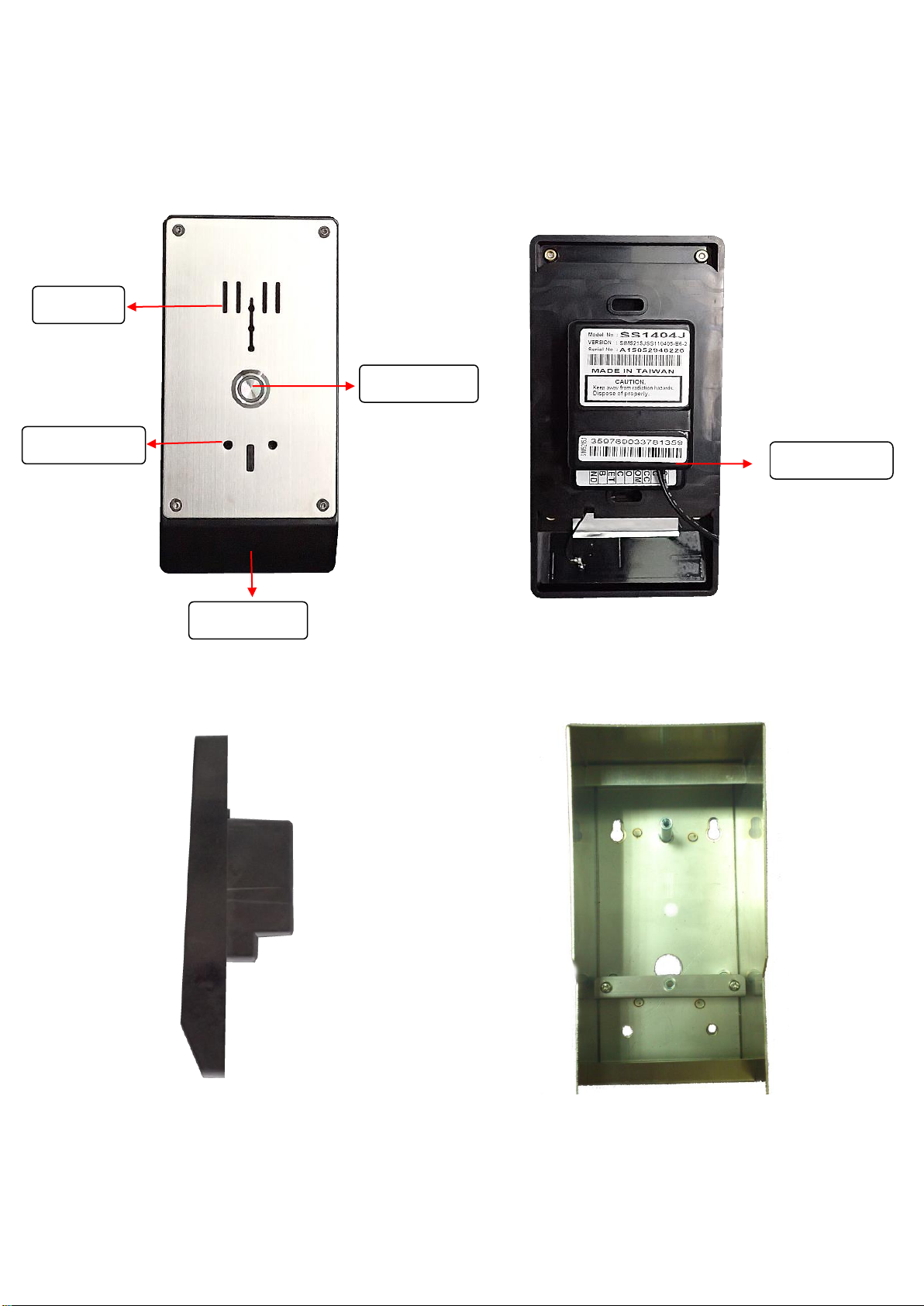
AN1404 4G Door Station Layout
This4G Door Station is suitable for both flush and surface mounting.
(Front View)
(Side View)
(Rear View)
(Surface Mounting Enclosure)
Speaker
Call Button
Microphone
Antenna
Connector
ANs

AN1404 4G Door Station 6 Revision R11 Feb. 2020
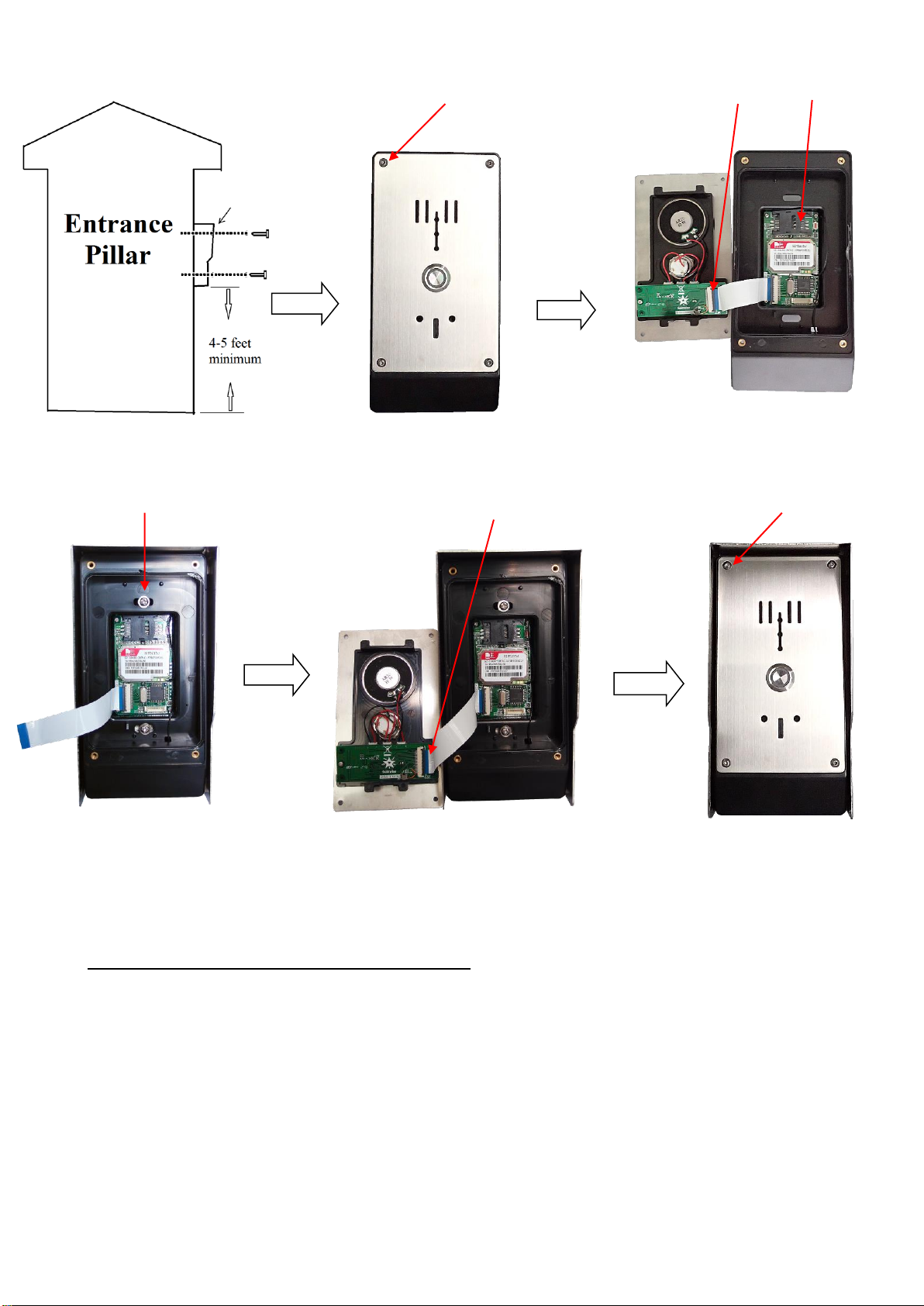
Ensure that there is good network reception at the location where it will be installed
Follow the instructions step by step for installation:
1. Install the surface mounting enclosure by using appropriate fixings on the entrance pillar at
150-160 mm height.
2. Remove security screws from the front panel.
3. Remove the flat cable from the back panel and insert the SIM card.
4. Put the main station unit into the enclosure and fasten it with screws on top and bottom.
5. Connecting the flat cable (BLUE side face up) back to the back panel
6. Fasten the front panel with security screws
Remove
Remove
Screw
Connector
4G door station
Side view
(1)
(2)
(4)
(5)
(3)
(6)
Insert SIM
Screw

AN1404 4G Door Station 7 Revision R11 Feb. 2020
Wiring Diagram
Please follow the wiring instructions carefully.
1. SIM card
Register your SIM card with the network, and check it works in a mobile phone
You MUST remove the PIN code from the SIM before inserting it in the AN1404.
Ensure the power is OFF before inserting the SIM card. Carefully slide the SIM holder in the
OPEN direction, insert the SIM, and slide in the CLOSED direction to lock it in place.
2. Door Lock
Connect an electric door lock to terminals marked “NO or NC & COM as required.
3. Power Supply
- Connect a 12 volt DC power supply to terminals marked “AC, AC”.
- The power supply should be capable of supplying a constant current of no less than 1amp.
- Alternatively, you may use local 12-24 DC or AC power source.
4. After a final check of wiring, switch on the power.
5. Allow 20~30 seconds for the unit to boot up and detect the network. Once a successful
connection has been made, the unit will sound a confirmation tone and the status LED will
begin flashing.

AN1404 4G Door Station 8 Revision R11 Feb. 2020
LED Indicators
(Also see wiring diagram)
1. LED “Door Station Status “ Indicator
LED
Status
Yellow (standby)
0.1sec ON / 2 sec OFF
Yellow (using)
Solid
2. LED ‘Network “Indicator
LED
Status
Green (ready)
1 sec ON/ 1 sec OFF
Green (searching)
Solid
Green (busy)
Solid
3. LED “ Power “ Indicator
LED
Status
Red (power on)
Solid
Red (power off)
Off
AN14044GDoorStationOperation
When the visitor pushes the call button to activate 4G door station, aring tone will be heard from
the Door Station. At the same time, a connection is being established with the phone number that is
stored in the door station. If the first number is busy or has not answered the call can be diverted to
another phone number, (mobile or landline). When the remote phone answers the call from the door
station and converses with the visitor, the door or gate release can be activated by pressing * on the
phone’s keypad. Relay can also be temporarily or permanently switched on or off by pressing #and 1.
To enter system menu:
There are three different modes under the system menu.
1. Monitoring mode ( listening)
2. Access control mode
3. Programming mode
To gain access to the system menu via phone follows these steps:
1. Call the telephone number of the Door Station
2. Wait for the door station to answer and signal by one beep to enter system menu
3. Enter the password of the mode you require.
4. Password correct is one beep, password error is 3 beeps.
5. After 3 failed attempts at the password, the call hangs up.

AN1404 4G Door Station 9 Revision R11 Feb. 2020
Enter Monitoring Mode (listening)
1. Call the telephone number of the 4G door station
2. This device will then verify your phone number with your predefined numbers.
3. You will hear a “Do” tone to enter motoring mode by pressing【*13*1212#】where 1212
is the password. Then you will be able to listen to door station.
*This feature can also be carried out by sending the same SMS commands
* Under the monitoring mode speaker is OFF. (Press 35#to turn on speaker)
* You can still press * to active relay under this mode but speaker must be ON status.

AN1404 4G Door Station 10 Revision R11 Feb. 2020
Enter Access Control Mode
1. Call the telephone number of the door station.
2. This device will then verify your phone number with your predefined numbers.
3. You will hear a “Do” tone to enter access control mode by pressing【*33*5678#】where
5678 is the password.
4. The door will be opened after entering the correct password
*(To open the door by using password, if the number is not stored in the guest list)
Enter Programming Mode
1. Call the telephone number of the door station
2. This device will then verify your phone number with your predefined numbers.
3. You will hear a “Do” tone to enter into programming mode by pressing【*12* 1234#】
where 1234 is the password.
4. You are now in the “programming mode”
Note: At the end of each command there can be one of the two indications:
Successful: is a long “beep” tone, failed: are three short “beep” tones.
5. To make changes on settings please refer to the user commands.
6. To end programming mode just hang up.
NOTE:
*For less chance of interference during programming, originate the call from a land line, rather than a
mobile, and enter the digits slowly or using programming by text message.
Programming by text message
Programming can be carried out by phone or text message
(Certain programming features can only be set up by text message, refer to user commands)
Programming by text message is the simplest way to customize the settings of the Door Station and to
add or delete guest telephone numbers. Simply send texts in the format to the telephone number of
the SIM within the 4G Door Station.
Note:
1. A Single SMS text messages is limited to 140 characters.
2. You can program many different user command codes in one text message with SMS command
format. *12*1234 # [command Code1] # [command Code 2] # [command Code3] #........
3. Each SMS must start with the pass code , default 1234 in the following format *12*1234 #
Followed immediately by a command.
Tabla de contenidos