Grandstream Networks GSC3516 Manual de usuario

Grandstream Networks, Inc.
GSC3516/GSC3506
User Manual

GSC35X6 – User Manual
WELCOME
The GSC3516 is a SIP intercom speaker and microphone that allows offices, schools, hospitals, apartments, and more to build
powerful voice intercom solutions that expand security and communication. This robust SIP intercom device offers 2-way
voice functionality with both a high fidelity 15W HD speaker and 3 directional microphones with Multichannel Microphone
Array Design (MMAD) and 1 omnidirectional auxiliary microphone that offers a 4.2-meter pickup distance. The GSC3516
supports a wide range of peripherals including Bluetooth devices, a built-in whitelist, and blacklists to block unwanted calls
easily, integrated dual-band Wi-Fi, and advanced acoustic echo cancellation. By pairing the GSC3516 with other Grandstream
devices, including desktop and cordless IP phones as well as the GDS series of Facility Access products, users can easily sculpt
a state-of-the-art security and voice intercom solution. Thanks to its modern industrial design, a cleanable exterior surface,
and rich features, the GSC3516 is the ideal intercom speaker/microphone for any setting.
The GSC3506 is a 1-way public address SIP speaker that allows offices, schools, hospitals, apartments, and more to build
powerful public address announcement solutions that expand security and communication. This robust SIP speaker offers
crystal clear HD audio functionality with a high-fidelity 30-Watt HD speaker. The GSC3506 support built-in whitelists,
blacklists, and greylists to easily block unwanted calls, SIP and multicast paging, group paging, and PTT. users can easily sculpt
a state-of-the-art security and PA announcement solution. Thanks to its modern industrial design and rich features, the
GSC3506 is the ideal SIP speaker for any setting.
PRODUCT OVERVIEW
Feature Highlights
The following table contains the major features of the GSC35X6:
GSC3516/GSC3506 Features in a Glance
GSC3516
●Up to 16 SIP accounts.
●Ethernet RJ45 10/100Mbps, PoE/PoE+, Integrated Bluetooth, Wi-Fi.
●2-way voice functionality with both a high-fidelity 15W HD speaker and 3
directional microphones with Multichannel Microphone Array Design
(MMAD) and 1 omnidirectional auxiliary microphone that offer a 4.2 meter
pickup distance
GSC3506
●Up to 16 SIP accounts.
●Ethernet RJ45 10/100Mbps, PoE/PoE+, Integrated Bluetooth, Wi-Fi.
●1-way public address SIP speaker with crystal clear HD audio functionality
with a high-fidelity 30-Watt HD speaker.
●2-Pin port enabling Alarm configuration
●USB Plug support

GSC3516 Technical Specifications
The following table resumes all the technical specifications including the protocols/standards supported, voice codecs,
telephony features, languages, and upgrade/provisioning settings for GSC3516.
Protocols/Standards
SIP RFC3261, TCP/IP/UDP, RTP/RTCP, RTCP-XR,HTTP/HTTPS, ARP, ICMP, DNS (A record, SRV,
NAPTR), DHCP, PPPoE, SSH, TFTP, NTP, STUN, LLDP-MED, SIMPLE, LDAP,TR-069, 802.1x, TLS, SRTP,
IPv6, OpenVPN®
Network Interfaces One 10/100 Mbps port with integrated PoE/PoE+
Operating System Linux
Bluetooth Yes, integrated. Bluetooth 2.1+Enhanced Data Rate (EDR)+ BT4.2
Wi-Fi Yes, dual-band 2.4 & 5GHz with 802.11 a/b/g/n/ac
Auxiliary Port One 2-pin multi-purpose input port, Reset
Voice Codecs and
Capabilities
G.711µ/a, G.722 (wide-band), G.726-32, iLBC, Opus, G.723, G.729A/B, in-band and out-ofband DTMF (In
audio, RFC2833, SIP INFO), VAD, CNG, AEC, PLC, AJB, AGC, ANS
Telephony Features SIP Paging, Multicast Paging,Group Paging, PTT, Call-waiting with priority override, Bluetooth SCO call
HD Audio Yes, HD speakerphone with support for full band audio with 48KHz
voice sampling frequency
Speaker
15W high-fidelity HD speaker
Frequency: 100Hz-20000 Hz
Volume: Up to 90 dBA at 1W power at 0.5 meter
Microphones 3 directional microphones with beam-forming capability and up to 4.2-meter voice pickup distance and 1
omnidirectional auxiliary microphone
QoS Layer 2 QoS (802.1Q, 802.1p) and Layer 3 (ToS, DiffServ, MPLS) QoS
Security User and administrator level passwords, MD5 and MD5-sess based authentication, 256-bit AES encrypted
configuration file, TLS, SRTP, HTTPS, 802.1x media access control,secure boot
Multi-language English, German, French, Spanish, Portuguese, Russian & Chinese
Upgrade/Provisioning Firmware upgrade via TFTP / HTTP / HTTPS or local HTTP upload, mass provisioning using GDMS/TR069 or
AES encrypted XML configuration file
Power & Green
Energy Efficiency Integrated PoE* 802.3af Class 3, PoE+ 802.3at Class 4
Temperature and
Humidity
●Operation: 0°C to 40°C
●Storage: -10°C to 60°C
●Humidity: 10% to 90% Non-condensing
Package Content
●GSC3516 SIP Intercom Speaker/Microphone
●Mounting kits
●Quick installation guide

GSC3506 Technical Specifications
The following table resumes all the technical specifications including the protocols/standards supported, voice codecs,
telephony features, languages, and upgrade/provisioning settings for GSC3506.
Physical Specifications ●Unit Dimensions: 257mm (diameter) x 68.5mm (depth).
●Unit Weight: 0.92kg , Box Weight: 1.75kg.
Compliance
●FCC: FCC 47 CFR Part 15 Subpart B;FCC 47 CFR Part 15 Subpart C;FCC 47 CFR Part 15 Subpart E.
●IC: ICES-003;RSS-247 Issue 2;RSS-Gen Issue 5;RSS-102 Issue 5.
●CE: ETSI EN 300 328;ETSI EN 301 893;ETSI EN 300 440;ETSI EN 301 489-1;ETSI EN 301 489-3;ETSI
EN 301 489-17;EN 55032;EN 55035;EN IEC 61000-3-2;EN 61000-3-3;EN IEC 62311;EN IEC 62368-1.
●UKCA: ETSI EN 300 328;ETSI EN 301 893;ETSI EN 300 440;ETSI EN 301 489-1;ETSI EN 301 489-
3;ETSI EN 301 489-17;BS EN 55032;BS EN 55035;BS EN IEC 61000-3-2;BS EN 61000-3-3;BS EN IEC
62311;BS EN IEC 62368-1.
●RCM: AS/NZS CISPR 32;AS/NZS 62368.1;AS/NZS 4268;AS/NZS 2772.2.
Protocols/Standards
SIP RFC3261, TCP/IP/UDP, RTP/RTCP, RTCP-XR,HTTP/HTTPS, ARP, ICMP, DNS (A record, SRV,
NAPTR), DHCP, PPPoE, SSH, TFTP, NTP, STUN, LLDP-MED, SIMPLE, LDAP,TR-069, 802.1x, TLS, SRTP,
IPv6, OpenVPN®
Network Interfaces One 10/100 Mbps port with integrated PoE/PoE+
Operating System Linux
Auxiliary Port
●One 2-Pin switch-in input port.
●One Alarm-in input port.
●vol +/- Key,
●Reset Button
●Network Button
USB Port USB2.0, External USB used for storage purposes.
Voice Codecs and
Capabilities
G.711µ/a, G.722 (wide-band), G.726-32, iLBC, Opus, G.723, G.729A/B, in-band and out-ofband DTMF (In
audio, RFC2833, SIP INFO), VAD, CNG, PLC, AJB
Telephony Features SIP Paging, Multicast Paging,Group Paging, PTT, Call-waiting with priority override.
HD Audio Yes, HD speakerphone with support for full band audio with 48KHz
voice sampling frequency
Speaker
30W high-fidelity HD speaker
Frequency: 100Hz-20000 Hz
Volume: Up to 90 dBA at 1W power at 0.5 meter
QoS Layer 2 QoS (802.1Q, 802.1p) and Layer 3 (ToS, DiffServ, MPLS) QoS
Security User and administrator level passwords, MD5 and MD5-sess based authentication, 256-bit AES encrypted
configuration file, TLS, SRTP, HTTPS, 802.1x media access control,secure boot
Multi-language English, German, French, Spanish, Portuguese, Russian & Chinese
Upgrade/Provisioning Firmware upgrade via TFTP / HTTP / HTTPS or local HTTP upload, mass provisioning using GDMS/TR069 or
AES encrypted XML configuration file

GSC3506 Technical Specifications
GETTING STARTED
This chapter provides basic installation instructions including the list of the packaging contents and also information for
obtaining the best performance with the GSC3516/GSC3506.
Equipment Packaging
GSC3516
GSC3516 Package Content
Power & Green
Energy Efficiency Integrated PoE* 802.3af Class 3, PoE+ 802.3at Class 4
Temperature and
Humidity
●Operation: 0°C to 40°C
●Storage: -10°C to 60°C
●Humidity: 10% to 90% Non-condensing
Package Content
●GSC3506 SIP Speaker
●Mounting kits
●Quick installation guide
Compliance
●FCC: FCC 47 CFR Part 15 Subpart B.
●CE: EN 55032:EN 55035; EN IEC 61000-3-2: EN 61000-3-3; EN IEC 62368-1.
●IC: ICES-003.
●UKCA: BS EN 55032;BS EN 55035;BS EN IEC 61000-3-2;BS EN 61000-3-3;BS EN IEC 62368-1.
●RCM: AS/NZS CISPR 32:AS/NZS 62368.1
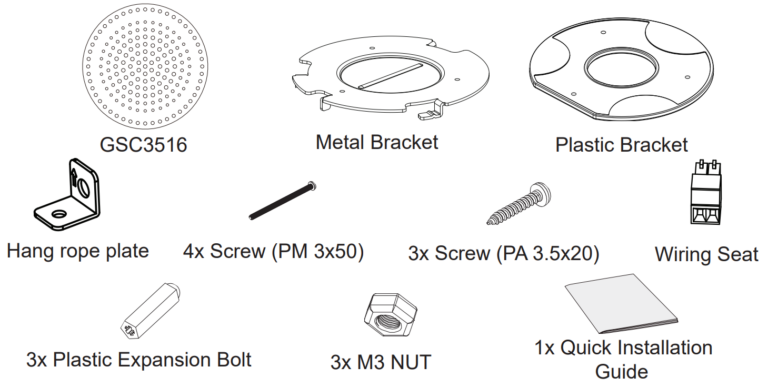
1x GSC3516 Main Case.
1x Metal Bracket
1x Plastic Bracket
Hang rope plate
4x Screw (PM 3x50)

Equipment Packaging
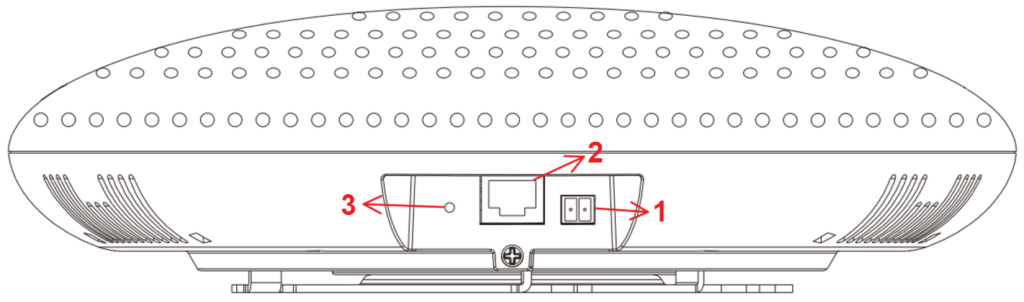
GSC3516 Ports
GSC3516 Ports
Ports Description
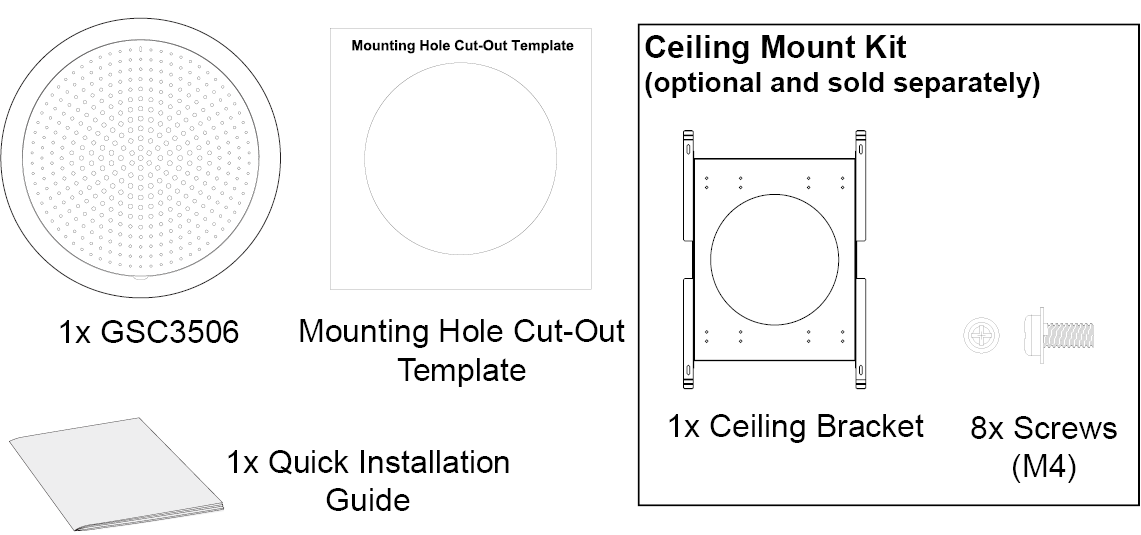
GSC3506
GSC3506 Package Content
3x Screw (PA 3.5x20)
Wiring Seat
3x Plastic Expansion Bolt
3x M3 NUT
1x Quick Installation Guide
Note
Check the package before installation. If you find anything missing, contact your system administrator.
1 2-PIN Port 2-PIN Multi-Purpose Input Port.
2 NET/PoE Ethernet RJ45 port (10/100Mbps) supporting PoE/PoE+.
3 RESET Factory reset pinhole.
Press for 10 seconds to reset factory default settings.
1x GSC3506

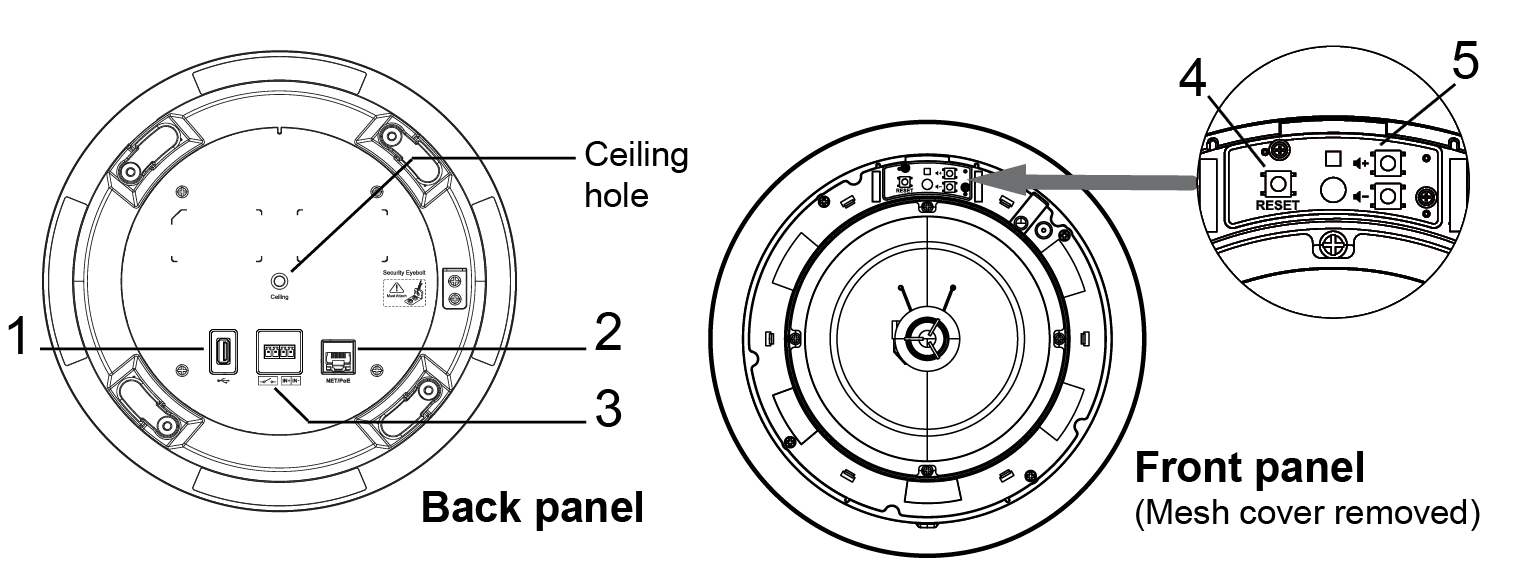
GSC3506 Ports and buttons
GSC3506 Ports and Buttons
LED Indicators
The GSC35X6 contains 4 types of colored LEDs (Red, Green, White and Blue light) that are used in some specific situations and
operations. Please, refer to the following table describing each one of the LED Indicators’ statuses:
1x Mounting Hole Cut-Out Template
1x Quick Installation Guide
1USB Port USB2.0, External USB Storage.
2 NET/PoE Ethernet RJ45 port (10/100Mbps) supporting PoE/PoE+.
3 2-PIN Port 2-pin switch-in input port
Alarm-in input port (Access voltage 5V to 12V).
4 RESET Factory reset button.
Press for 10 seconds to reset factory default settings.
5Volume Sound Volume buttons.
Note
Check the package before installation. If you find anything missing, contact your system administrator.
Color LED Indicator Status Description
Red Light
Fast Flashing (every 1s) Rebooting/factory resetting
Slow Flashing (On 1s, Off 2s)
Unhandled event: (Included Missed call(s), new voice mails, new SIP messages).
Note: In case it's connected via Bluetooth, Missed Call/Voicemail Red LED will not
light and will remain flashing in blue.
Solid Red The contacts/storage space is full
Green Light Fast Flashing (every 1s) Incoming calls / outgoing call (only for GSC3516)

LED Indicators
Hardware Installation
GSC3516 Hardware installation
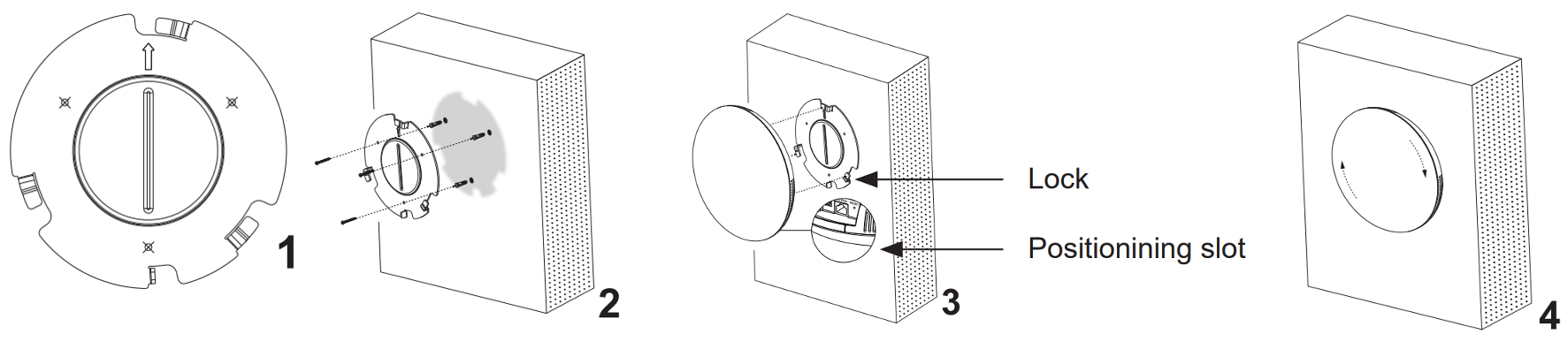
GSC3516 can be mounted on the wall or ceiling. Please refer to the following steps for the appropriate installation :
Wall Mount
1. Locate the equipment holder in the desired position with the arrow up. Drill three holes on the wall referring to the
positions of holes on the metal bracket.
2. Fix the metal bracket on the wall with expansion screws.
3. Align the position line on the device’s back cover with the positioning slot.
4. Rotate the device clockwise until it is locked in the right position.
Wall Mount
Ceiling Mount
1. Put the ceiling mounting (metal bracket) in the ceiling’s center and mark the position of the three screw holes.
2. Drill a round hole with a diameter of 18mm for the Ethernet cable. The distance between its center and the highlighted
hole on the plastic bracket should be 35mm.
3. Fix the plastic and metal brackets on the ceiling with flat-head screws and locknuts. Then place an Ethernet cable pass
through the 18mm-round hole.
4. Align the position line on the device’s back cover with the positioning slot.
5. Rotate the device clockwise until it is locked in the right position.
Ceiling Mount
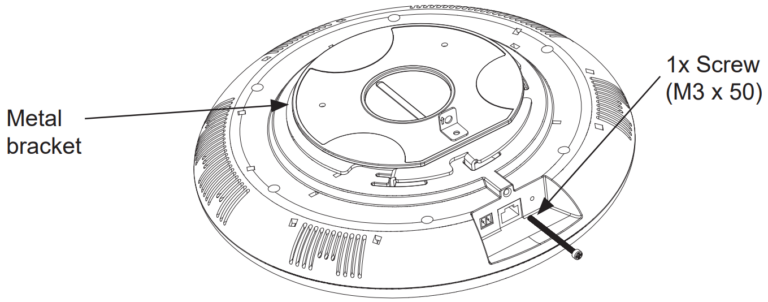
Anti-theft Installation
After the device is assembled with the metal bracket support on the wall or ceiling, use the anti-detachable screw (M3 x 50) in
order to prevent theft.
Slow Flashing (On 1s, Off 2s) Call on hold.
Solid Green During the call.
White Light Fast Flashing (every 1s) Upgrading the firmware.
Blue Light Fast Flashing (every 1s) Bluetooth pairing. ( only for GSC3516)

Anti-theft Installation
GSC3506 Hardware installation
GSC3506 can be mounted on the ceiling or the Boom. Please refer to the following steps for the appropriate installation.
Ceiling Mount
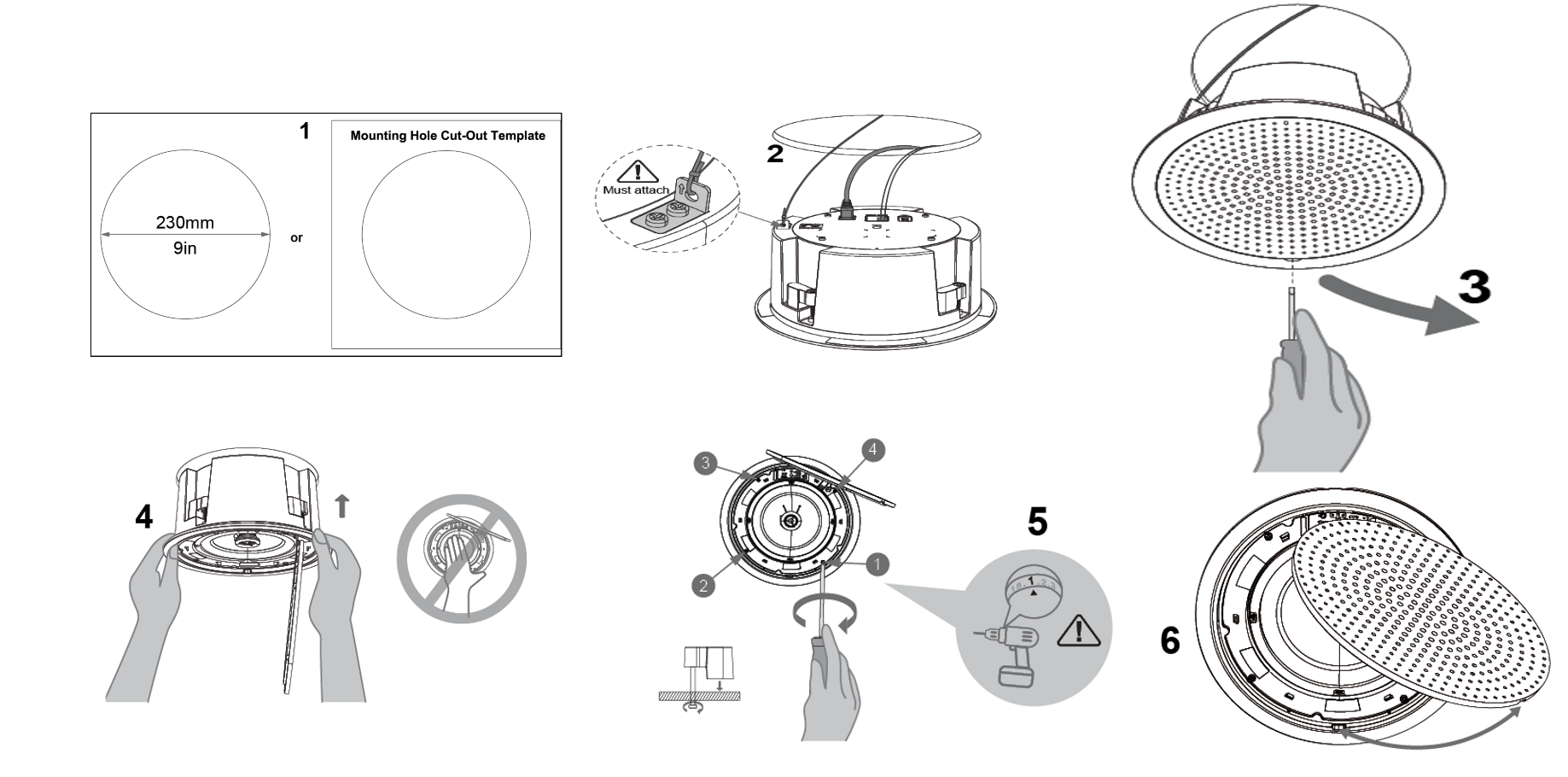
1. Drill a round hole with a diameter of 230mm or use the Mounting Hole Cut-Out Template.
2. To ensure safety, install first the anti-fall ropes, then plug in the Ethernet and 2-pin cables.
3. Open the front cover with a flat-head screwdriver.
4. Align the device with the hole and push it up slowly with two hands.
5. Use a screwdriver and gently rotate clockwise the screws marked as (1), (2), (3), and (4) in the step 5 illustration.
6. Align the notch on the front cover with the notch on the device, and press the whole front cover to ensure that each
buckle is fastened.
Ceiling Mount
Boom Mount
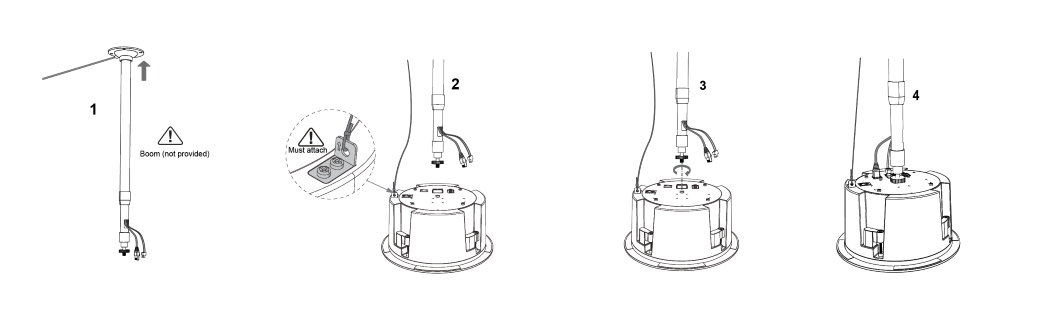
1. Fix the Boom in the ceiling.
2. To ensure safety, install first the anti-fall ropes.
3. Attach the Boom with the GSC3506 ceiling hole and rotate to fix it in place.
4. Plug in the Ethernet and 2-pin cables.
Boom Mount

Powering and Connecting GSC3516
The GSC3516 can be powered on using PoE/PoE+ switch or PoE injector using the following steps:
Step 1: Plug an RJ45 Ethernet cable into the network port of the GSC3516.
Step 2: Plug the other end into the power over Ethernet (PoE) switch or PoE injector.
Powering GSC3516
Connecting Wiring Seat for GSC3516
GSC3516 support to connect a “Key & LED” or “Normal Key” to the 2-pin port via Wiring Seat using the following steps:
Step 1: Take the wiring seat from the install kits.
Step 2: Connect the “Key & LED” or “Normal Key” with the wiring seat (as shown in the figure below)
Note: This port supports the parallel connection of an incandescent lamp (with less than 1W) or an LED lamp (with less than
100mA).
Connecting Wiring Seat
Powering and Connecting GSC3506
GSC3506 can be powered on using PoE/PoE+ switch or PoE injector using the following steps:
Step 1: Plug an RJ45 Ethernet cable into the network port of the GSC3506.
Step 2: Plug the other end into the power over Ethernet (PoE) switch or PoE injector.
Note
Otros manuales para GSC3516
2
Este manual sirve para los siguientes modelos
1
Tabla de contenidos
Otros manuales de Oradores de Grandstream Networks
Grandstream Networks
Grandstream Networks GSC3510 Manual de usuario

Grandstream Networks
Grandstream Networks GSC3516 Manual de usuario

Grandstream Networks
Grandstream Networks GSC3516 Manual de usuario

Grandstream Networks
Grandstream Networks GSC35 Series Manual de usuario

Grandstream Networks
Grandstream Networks GSC3506 Manual de usuario