
Global A-Series Manual de usuario

110-013-079 REV E
ECO 202802 Date Effective: JUNE 2017
A-SeriesTM Surgical Operating
Microscope System
OWNER’S MANUAL
M A730 Series
Controlled Document
Not To Be Reproduced

When contacting Global Surgical Corporation for either Customer Service or
Technical Service, it will be helpful if you have your Customer Identication
Number and your Customer Order Number available. Please take a moment
to record these numbers (printed on invoice) in the spaces below.
Customer Identication Number: ___________________________________
Customer Order Number:__________________________________________
3610 TREE COURT INDUSTRIAL BLVD.
ST. LOUIS, MO 63122
1-800-861-3585
IF OUTSIDE THE USA:1-636-861-3388
© COPYRIGHT 2015, GLOBAL SURGICAL CORPORATION. NO PART OF THIS PUBLICATION MAY BE
COPIED, PHOTOCOPIED, REPRODUCED, TRANSLATED, OR REDUCED TO ANY ELECTRONIC MEDIUM
OR MACHINE-READABLE FORM, IN WHOLE OR IN PART, WITHOUT THE PRIOR WRITTEN CONSENT OF
GLOBAL SURGICAL CORPORATION, 3610 TREE COURT INDUSTRIAL BLVD., ST. LOUIS, MO 63122
COPYRIGHT NOTICE

Congratulations on your purchase of the
A-Series Surgical Operating Microscope System.
We truly appreciate your business,
and we’re grateful for the trust you’ve placed in us.

TABLE OF CONTENTS
Section 1 Important Safety Instructions........................................................................................ 1-1
1.1 Symbol Denitions................................................................................................................. 1-1
1.2 Warnings and Cautions ......................................................................................................... 1-2
Section 2 Unpacking Instructions.................................................................................................. 2-1
Section 3 Product Information ....................................................................................................... 3-1
3.1 A-Series Surgical Operating Microscope Systems ............................................................. 3-1
3.2 Microscope Support Systems Congurations .................................................................... 3-1
Section 4 Accessories .................................................................................................................... 4-1
4.1 Microscope Components and Accessories ......................................................................... 4-1
4.2 Installation of Optical Accessories....................................................................................... 4-7
4.3 Installation of the Multi Focal Objective Lens ..................................................................... 4-8
Section 5 Operating Instructions................................................................................................... 5-1
5.1 Turning On The System ......................................................................................................... 5-1
5.2 Description and Location of Controls .................................................................................. 5-1
5.3 Counterbalancing Adjustment .............................................................................................. 5-2
5.4 Spring Arm Tension Adjustment........................................................................................... 5-2
5.5 Pivot Adjustment .................................................................................................................... 5-3
5.6 Roll Angle Adjustment ........................................................................................................... 5-3
5.7 Pitch Angle Adjustment ......................................................................................................... 5-3
5.8 Floorstand Locking Casters.................................................................................................. 5-3
5.9 Microscope Maneuvering Handles ....................................................................................... 5-3
5.10 Microscope Components....................................................................................................... 5-4
5.11 Magnication Selection.......................................................................................................... 5-4
5.12 Focusing The Microscope ..................................................................................................... 5-5
5.13 M A801-LED Light Source Operation.................................................................................... 5-6
5.14 Brightness Settings and Memory ......................................................................................... 5-7
5.15 Filter......................................................................................................................................... 5-7
5.16 Binocular Adjustment ............................................................................................................ 5-8
5.17 Eyepieces................................................................................................................................ 5-8
5.18 Diopter Adjustment ................................................................................................................ 5-8
5.19 Fuse Replacement.................................................................................................................. 5-9

TABLE OF CONTENTS
Section 6 Care and Maintenance ................................................................................................... 6-1
6.1 Cleaning and Disinfecting ..................................................................................................... 6-1
6.2 Cleaning the Microscope Optics........................................................................................... 6-1
Section 7 Troubleshooting ............................................................................................................. 7-1
7.1 Troubleshooting ..................................................................................................................... 7-1
Section 8 Service and Warranty..................................................................................................... 8-1
8.1 Warranty Information ............................................................................................................. 8-1
8.2 Technical Services Department ............................................................................................ 8-2
Section 9 Technical Information ................................................................................................... 9-1
9.1 Microscope Support System Specications........................................................................ 9-1
9.2 Binocular Focal Lengths........................................................................................................ 9-1
9.3 M A801-LED Storage and Operations Specications ......................................................... 9-2
9.4 A-Series Microscope Total Magnication Chart .................................................................. 9-3
9.4 Finding Total Magnication ................................................................................................... 9-4
9.5 Effects of Changing Components......................................................................................... 9-4
Section 1 Important Safety Instructions
1-1
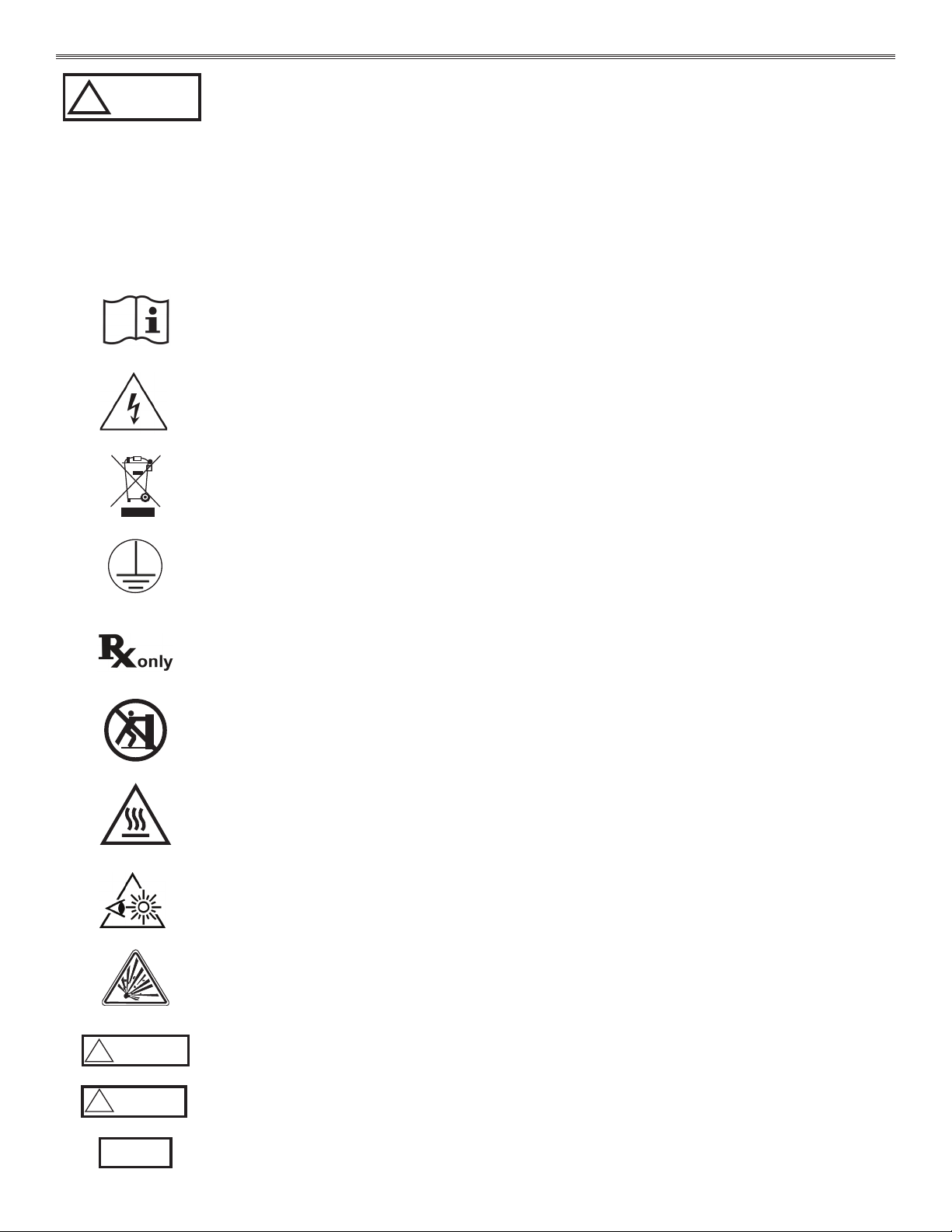
1.1 Symbol Denitions
This symbol on the product is an attention symbol, alerting the user to read the
Owner’s Manual for important installation, operating instructions or safety information.
This symbol on the product indicates a potential electrical shock hazard and alerts the
user to read the Owner’s Manual for important safety information.
Symbol indicating “not for general waste.” Recycle per the EUROPEAN WASTE ELECTRICAL
AND ELECTRONIC EQUIPMENT (WEEE) DIRECTIVE.
This symbol indicates earth ground.
For Professional Use Only.
Do Not Push.
This symbol indicates a surface that could be hot to the touch.
This symbol alerts the user that this product emits bright light.
This symbol indicates an explosion hazard.
WARNING
!This symbol indicates a situation in which incorrect handling through disregard of a
warning might result in death or serious personal injury.
CAUTION
!This symbol indicates a situation in which incorrect handling through disregard of a
caution might result in personal injury or may result in damage to property.
NOTICE This symbol indicates a message to avoid property damage or additional information to
help complete a procedure.
!
WARNING
THE SAFETY AND SATISFACTION OF OUR CUSTOMERS AND THEIR PATIENTS
ARE THE HIGHEST PRIORITIES OF GLOBAL SURGICAL CORPORATION. THIS
MANUAL CONTAINS IMPORTANT INFORMATION REGARDING THE SAFE AND
PROPER USE OF THIS EQUIPMENT AND SHOULD BE READ THOROUGHLY BY
ALL OPERATORS PRIOR TO THEIR FIRST USE OF THE EQUIPMENT. FAILURE
TO READ AND UNDERSTAND THIS MATERIAL COULD RESULT IN INJURY TO
PATIENTS OR PERSONNEL OR IN DAMAGE TO THE EQUIPMENT.

Section 1 Important Safety Instructions
1-2
!
WARNING
ONLY QUALIFIED PERSONNEL SHOULD WORK ON OR AROUND THIS EQUIPMENT
AFTER BECOMING THOROUGHLY FAMILIAR WITH ALL WARNINGS, SAFETY
NOTICES AND MAINTENANCE PROCEDURES CONTAINED HEREIN. FOR THE
PURPOSES OF THIS MANUAL AND PRODUCT LABELS, A QUALIFIED PERSON IS
ONE WHO HAS BEEN TRAINED ON THE INSTALLATION, CONSTRUCTION,
OPERATION AND MAINTENANCE OF THIS EQUIPMENT AND WITH THE HAZARDS
INVOLVED.
WARNING
DISCONNECT ALL ELECTRICAL POWER PRIOR TO CLEANING AND
DISINFECTING. RISK OF ELECTRIC SHOCK RESULTING IN DEATH OR INJURY
IS POSSIBLE IF THE ELECTRICAL POWER IS NOT DISCONNECTED PRIOR TO
CLEANING THE UNIT.
WARNING TO AVOID THE RISK OF ELECTRIC SHOCK, THIS EQUIPMENT MUST ONLY BE
CONNECTED TO A SUPPLY MAINS WITH PROTECTIVE EARTH (=GROUND).
!
WARNING THIS UNIT MUST BE USED ONLY WITH HOSPITAL GRADE EARTH-GROUNDED AC
OUTLETS.
WARNING RISK OF EXPLOSION IF USED IN THE PRESENCE OF FLAMMABLE ANESTHETICS.
!
WARNING CONNECTING EQUIPMENT TO THE MULTIPLE SOCKET-OUTLET EFFECTIVELY
LEADS TO CREATING A MEDICAL ELECTRICAL SYSTEM AND THE RESULT CAN
BE A REDUCED LEVEL OF SAFETY.
!
WARNING
IT IS HIGHLY RECOMMENDED THAT THE INSTALLATION OF THIS EQUIPMENT BE
PERFORMED BY QUALIFIED TECHNICIANS. INSTALLATION BY UNQUALIFIED
INDIVIDUALS COULD RESULT IN PERSONAL INJURY.
WARNING MINIMIZE SKIN EXPOSURE BY FOCUSING THE LIGHT ON THE AREA WHERE
SURGERY IS BEING PERFORMED.
WARNING
START THE MICROSCOPE WITH MINIMAL LIGHT INTENSITY AND INCREASE THE
INTENSITY GRADUALLY. AVOID MAXIMUM INTENSITY OR USE IT FOR AS SHORT
A TIME AS POSSIBLE.
!
WARNING NO MODIFICATION OF THE EQUIPMENT IS ALLOWED.
!
WARNING FAILURE TO FOLLOW THESE INSTRUCTIONS WILL RESULT IN DAMAGE TO THIS
SYSTEM OR POSSIBLE INJURY (RECEIVER’S RESPONSIBILITY).
!
WARNING
WHEN OPENING THE SHIPPING CARTON THE PLASTIC BANDS WILL SPRING
APART WHEN CUT. ENSURE THEY WILL NOT HIT ANYONE OR ANYTHING. EYE
PROTECTION SHOULD BE WORN WHEN REMOVING THE PLASTIC BANDS.
WATCH FOR SHARP EDGES.
!
WARNING CONTACT GLOBAL TECHNICAL SERVICES BEFORE REPLACING THE FUSE.
1.2 Warnings and Cautions

Section 1 Important Safety Instructions
1-3
!
WARNING DISCONNECT ALL ELECTRICAL POWER PRIOR TO REPLACING FUSE.
!
WARNING USE ONLY A 5MM X 20MM CYLINDER, SLOW-BLOW, 6 AMP 250 VOLT FUSE.
!
WARNING NEVER REPLACE A BLOWN FUSE WITH A HIGHER-AMP FUSE. ALWAYS REPLACE
THE FUSE WITH ONE WITH THE SPECIFIED AMP RATING.
!
CAUTION Contents are fragile and should be removed carefully.
!
CAUTION Some of the parts may be damaged by knives, open boxes carefully.
!
CAUTION After opening boxes check the serial numbers of the optics against the packing
slip.
!
CAUTION Open boxes containing the optics over a table or counter.
!
CAUTION When handling the optics do not touch the glass with your ngers.
!
CAUTION Do not clean any surface with petroleum-based solvents such as acetone or M.E.K.
(Methyl Ethyl Ketone). These solvents will remove paint and cause permanent
damage to plastic surfaces. Using these solvents also presents a danger to
individuals if the solvents are opened in a poorly ventilated room.
!
CAUTION Replacement parts, such as cables, must be purchased through Global Surgical to
ensure proper compliance requirements. The use of other cables may affect EMC
performance. Unauthorized use of these items will void warranty and may cause
injury to you, others and/or the equipment.
!
CAUTION When used in clinical or residential areas near radio or TV units, this equipment
may be subjected to radio interference. To avoid adverse electromagnetic effects,
do not operate this equipment near RF energy equipment.
!
CAUTION To prevent any potential electromagnetic interference, do not use any kind of
cellular phone near the equipment.
NOTICE Check for damage before discarding the shipping material and notify Global
Surgical Customer Service if shipping damage is observed.
NOTICE Contents are packed in several boxes. Before discarding any packaging ensure no
components are still within.
NOTICE Save this manual for future reference.
NOTICE If you have ordered accessories, then some of these may be assembled to the unit while
others are supplied unassembled. Please examine the content of the box thoroughly. If
any accessories require assembly, then instructions will be included.

Section 1 Important Safety Instructions
1-4
!
CAUTION ARMS SHOULD BE FOLDED AND LOCKED IN STORAGE
POSITION, AS SHOWN IN THIS FIGURE FOR SAFE
TRANSPORT. FAILURE TO DO SO COULD RESULT IN
DAMAGE TO THE SYSTEM OR PERSONAL INJURY.
!
CAUTION DO NOT PUSH UNTIL SUPPORT SYSTEM
IS IN TRANSPORT POSITION.
!
CAUTION
This equipment needs special precautions regarding EMC and needs to be installed
and put into service according to the EMC information provided in the installation
manual 110-013-080 M A730 Series Installation Manual.
NOTICE Portable and mobile RF communications equipment can affect medical electrical
equipment.
See the owner’s manual for each electrical component for
specic safety and use information.
Transport Position
Position de Transport

Section 2 Unpacking Instructions
2-1
!
WARNING
FAILURE TO FOLLOW THESE INSTRUCTIONS WILL RESULT IN DAMAGE TO THIS
SYSTEM OR POSSIBLE INJURY (RECEIVER’S RESPONSIBILITY).
!
WARNING
THE PLASTIC BANDS WILL SPRING APART WHEN CUT ON THE SHIPPING BOX.
ENSURE THEY WILL NOT HIT ANYONE OR ANYTHING. EYE PROTECTION SHOULD
BE WORN WHEN REMOVING THE PLASTIC BANDS. WATCH FOR SHARP EDGES.
!
CAUTION Contents are fragile and should be removed carefully.
!
CAUTION Some of the parts may be damaged by knives, open boxes carefully.
!
CAUTION After opening boxes check the serial numbers of the optics against the packing slip.
!
CAUTION Open boxes containing the optics over a table or counter.
!
CAUTION When handling the optics do not touch the glass with your ngers.
NOTICE Check for damage before discarding the shipping material and notify Global Surgical
Customer Service if shipping damage is observed.
NOTICE Contents are packed in several boxes. Before discarding any packaging ensure no
components are still within.
NOTICE Save this manual for future reference.
NOTICE
If you have ordered accessories, then some of these may be assembled to the unit while
others are supplied unassembled. Please examine the content of the box thoroughly. If any
accessories require assembly then instructions will be included.
All shipping materials should be retained until it has been determined that the unit was not damaged
during shipment.
If damage is discovered, complete the following:
1. Do not refuse shipment.
2. Make a notation on the delivery receipt and inspect the carton for damage.
3. Take pictures of damage to the equipment and to the packaging (if evident).
4. If damage is discovered, leave in original container and request immediate inspection from the carrier
within 3 days.
5. Contact the Global Surgical Customer Service Department at 1-800-861-3610.
If the product is damaged electrically or mechanically and in the event the original packing materials are no
longer available, contact Global Surgical Technical Services Department.
Refer to Section 8 of this manual regarding Technical Service contact information and proceed as instructed.
Este manual sirve para los siguientes modelos
6
Tabla de contenidos
Manuales populares de Microscopio de otras marcas


VWR
VWR VisiScope 384 Series Manual de usuario

Nikon
Nikon ECLIPSE E200 POL Manual de usuario

Leica
Leica DI C800 Manual

ThermoFisher Scientific
ThermoFisher Scientific Continuµm Manual de usuario

ThermoFisher Scientific
ThermoFisher Scientific Continuµm Manual de usuario

Olympus
Olympus SZ61 Manual de usuario