
Glensound ADDA 1 Manual de usuario

ADDA 1, DAC 1 & ADC 1
ANALOGUE/ DIGITAL AUDIO
CONVERTERS
Analogue to Digital and Digital to Analogue (ADDA),
Digital to Analogue (DAC) & Analogue to Digital (ADC)
audio converters.
User Guide
Glensound
6 Brooks Place, Maidstone
Kent, UK, ME 4 HE
Tel: +44 (0) 622 753662
www.glensound.co.uk

Page 2 of 27
Glensound Electronics Ltd
Thank you for choosing a new Glensound product.
All rights reserved.
Information contained in this manual is subject to change without notice, if in
doubt please contact us for the latest product information.
If you need any help with the product then we can be contacted at:
Glensound Electronics Ltd
– 6 Brooks Place
Maidstone
Kent
ME 4 HE
United Kingdom
Telephone: +44 (0) 622 753662
Fax: +44 (0) 622 762330
EMAIL ADDRESSES
General enquires: office@glensound.co.uk
Technical enquires: techinfo@glensound.co.uk
Sales enquires: sales@glensound.co.uk

Page 3 of 27
IMPORTANT SAFETY INSTRUCTIONS
1) Read these instructions
2) Keep these instructions
3) Heed all warnings
4) Follow all instructions
5) Do not use this apparatus near water
6) Clean only with a dry cloth
7) Do not block any ventilation openings. Install in accordance with manufacturer’s
instructions
8) Do not install near any heat sources such as radiators, heat registers, stoves, or other
apparatus (including amplifiers) that produce heat
9) Do not defeat the safety purpose of the polarized or grounding type plug. A polarized plug
has 2 blades with one wider than the other. A grounding type plug has 2 blades and third
grounding prong. The wider blade or the 3
rd
prong are provided for your safety. If the
provided plug does not fit into your outlet, consult an electrician for replacement of the
obsolete outlet
10) Protect the power cord from being walked on or pinched, particularly at plugs,
convenience receptacles and the point where they exit from the apparatus
11) Only use attachments/ accessories specified/ supplied by the manufacturer
12) Use only with the cart, stand, tripod, bracket, or table specified by the
manufacturer, or sold with the apparatus. When a cart is used, use caution when moving
the cart/ apparatus combination to avoid injury from tip over
13) Unplug tis apparatus during lightning storms or when unused for long periods of time
14) Refer all servicing to qualified service personnel. Servicing is required when the apparatus
has been damaged in any way, such as power supply cord or plug is damaged, liquid has
been spilled or objects have fallen into the apparatus, the apparatus has been exposed to
rain or moisture, does not operate normally, or has been dropped
15) Do not attempt to modify this product. Doing so could result in personal injury and/ or
product failure
This symbol is intended to warn that
dangerous voltages within the product are
present and constitute a risk of electric
shock.
This symbol is intended to highlight that
there are important operating &
maintenance instructions in the literature
accompanying this unit.

Page 4 of 27
IMPORTANT: MAINS PLUG WIRING INSTRUCTIONS
This Signature unit is supplied with a moulded mains plug fitted to the AC mains
lead.
Mains wiring colours/ connections:
The Green/ Yellow or Green wire must be connected to the terminal in the plug
marked ‘E’ or with the Earth Symbol.
The Blue or Black wire must be connected to the terminal in the plug marked ‘N’
(Neutral).
The Red or Brown wire must be connected to the terminal in the plug marked ‘L’
(Live).
THIS UNIT MUST BE EARTHED
THIS UNIT IS FITTED WITH AN INTERNAL MAINS FUSE.
The fuse is located internally between the Live terminal of the IEC plug and the
Live input of the power supply. The fuse should only be changed by a qualified
service engineer. If replacing the fuse care should be taken to fit a correctly rated
replacement. The fuse rating can be found in the technical specifications page of
this handbook.

Page 5 of 27
CE
This equipment manufactured by Glensound Electronics Ltd of Brooks Place
Maidstone Kent ME 4 HE is CE marked and conforms to:
Low Voltage Directive: EN60065
Emissions: EN55 03.
Immunity: EN55 03.2
WASTE ELECTRICAL AND ELECTRONIC E UIPMENT
REGULATIONS 2006 (WEEE)
Glensound Electronics Ltd is registered for business to business sales of WEEE in
the UK our registration number is:
WEE/JJ0074UR
RoHS2 DIRECTIVE
EC directive 20 /65/EU restricts the use of the hazardous substances listed below
in electrical and electronic equipment.
This product conforms to the above directive and for this purposes, the maximum
concentration values of the restricted substances by weight in homogenous
materials are:
Lead
0. %
Mercury
0. %
Hexa
valent Chromium
0. %
Polybrominated Biphenyls
0. %
Polybrominated Diphenyl Ethers
0. %
Cadmium
0.0 %

Page 6 of 27
PRODUCT WARRANTY:
All equipment is fully tested before dispatch and carefully designed to provide you
with trouble free use for many years.
We have a policy of supporting products for as long as possible and guarantee to
be able to support your product for a minimum of 0 years.
For a period of one year after the goods have been despatched the Company will
guarantee the goods against any defect developing after proper use providing
such defects arise solely from faulty materials or workmanship and that the
Customer shall return the goods to the Company’s works or their local dealer.
All non-wear parts are guaranteed for 2 years after despatch and any defect
developing after proper use from faulty materials or workmanship will be repaired
under this warranty providing the Customer returns the goods to the Company's
works or their local dealer.
Page 7 of 27
ADDA 1, DAC 1 & ADC 1 Analogue & Digital Audio Converters
Handbook Contents
Issue ,
Description Page No.
Contents
IMPORTANT SAFETY INSTRUCTIONS ........................................................................................................................ 3
PRODUCT WARRANTY: ...................................................................................................................................................... 6
OVERVIEW .......................................................................................................................................................................... 9
PHYSICAL INSTALLATION ............................................................................................................................................... 10
AUDIO BLOCK DIAGRAMS .............................................................................................................................................. 12
EXAMPLES OF USE ........................................................................................................................................................... 13
. ADC Radio Station Analogue to Digital Conversion ..................................................................................... 13
2. DAC Connecting Active Monitors to a Digital System .................................................................................. 14
USER CONTROLS & CONNECTIONS ................................................................................................................................ 15
. Select Button....................................................................................................................................................... 15
2. Done Button ....................................................................................................................................................... 15
3. Up/ Down Buttons .............................................................................................................................................. 15
4. Headphone Volume ........................................................................................................................................... 16
5. Headphone Output Socket ............................................................................................................................... 16
6. Mains In ............................................................................................................................................................... 17
7. External DC Input ............................................................................................................................................... 17
8. Balanced Analogue Outputs 2 .......................................................................................................................... 17
9. Unbalanced Analogue Outputs 2 ..................................................................................................................... 17
0. Word Clock Sync Input .................................................................................................................................. 18
. AES (DARS) Clock Sync Input ........................................................................................................................ 18
2. Unbalanced Analogue Input ......................................................................................................................... 18
3. Balanced Analogue Input .............................................................................................................................. 18
4. Digital Outputs ............................................................................................................................................... 18
5. Digital Inputs .................................................................................................................................................. 18
MENU & SETTING OPTIONS ............................................................................................................................................. 19
DAC Output Level ........................................................................................................................................................ 19
DAC Input Source ........................................................................................................................................................ 20
DAC De-emphasis ........................................................................................................................................... 20

Page 8 of 27
DAC Ident Tone............................................................................................................................................................ 20
ADC Input Level ........................................................................................................................................................... 21
ADC Input Source ........................................................................................................................................................ 21
ADC Clock Source ........................................................................................................................................................ 22
ADC Master Rate .......................................................................................................................................................... 22
ADC Sync Source ......................................................................................................................................................... 23
ADC Data Format ......................................................................................................................................................... 23
ADC Ident Tone............................................................................................................................................................ 24
WIRING INFORMATION ................................................................................................................................................... 25
SPECIFICATIONS .............................................................................................................................................................. 27

Page 9 of 27
OVERVIEW
This handbook covers three products with the ADDA basically being a product that
combines both the DAC and the ADC in one unit.
Signature DAC is a single stereo digital to analogue audio converter.
Signature ADC is a single stereo analogue to digital converter.
Signature ADDA is a bi-directional analogue/ digital converter containing x DAC and x
ADC .
The Glensound Signature Series converter range are professional audio digital and analogue
converters. They are manufactured using high quality components and low noise audio
circuits to provide many years of trouble free use.
The primary job of the converter range is to interface analogue and digital audio equipment
together.
Although traditionally a broadcast manufacturer, Glensound’s products are equally at home
in professional and high end home studios, industrial installations and live pro sound
environments. The converter range can therefore be used in a number of applications.
The converter range are powered from internal switch mode mains power supplies fed from
filtered IEC mains plugs suitable for use Worldwide. They have an internal fuse for safety. The
units can also alternatively be powered from external +/- 2V DC power sources (such as the
Signature Series PS ). If both mains and external DC power sources are present then, if one
power source were to fail the unit would continue to work seemlessly from the other source.
Page 0 of 27
PHYSICAL INSTALLATION
The Glensound Signature Series have been designed to be highly versatile for installation and
can be installed in 9” racks with either their front or rear panels facing the front of the rack.
They can also be mounted underneath desks or work tops and can be either permananetly
mounted or stood (using the supplied feet) on top of desks or worktops.
INSTALLING SIGNATURE SERIES IN A 19” RACK
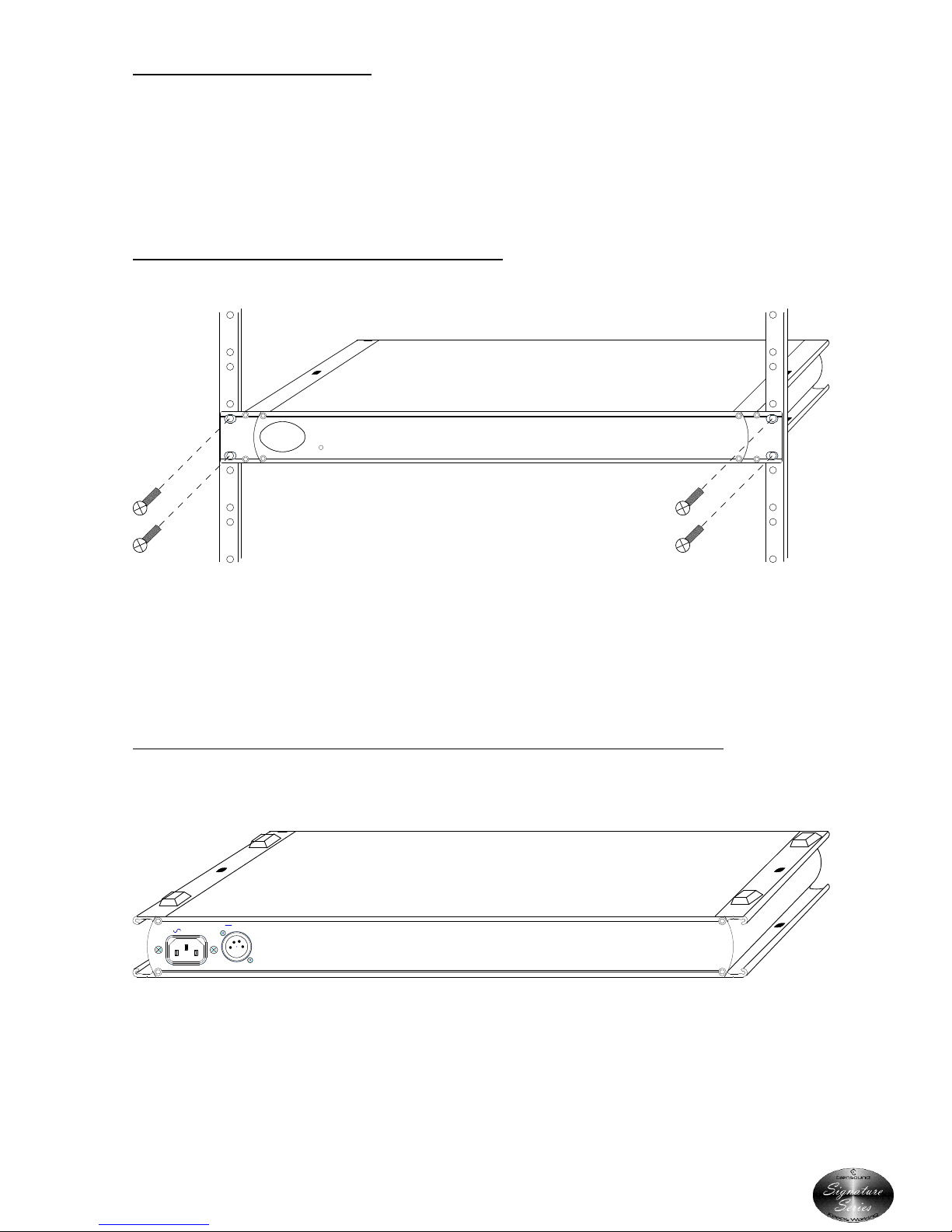
Firmly hold the signature subrack within the 9” rack and locate in RU of space. Use the
supplied 6mm rack screws to securly attach the unit to the rack.
INSTALLING ADHSIVE FEET FOR NON PERMANENT TABLE TOP MOUNTING
Remove the front rack ears (if they are not required), turn the unit upside down and attach
the supplied 4 sticky feet as per the above drawing.
Signature
g
Series
Keeps Working
PWR ON
PART No
CE
W
50/60Hz 2.7 Watts
100-240V
+/-12V - - -
PIN 1 = GND
PIN 3 = -12V (100mA)
PIN 2 = +12V (100mA)
Top
Este manual sirve para los siguientes modelos
2
Tabla de contenidos
Otros manuales de Convertidor de medios de Glensound


