GenScript eZwest Lite Manual de usuario

eZwestTM Lite
Automated Western Device
Start Your Easy Western from Here


3
3
3
4
4
5
5
7
7
7
9
10
Table of Contents
Components and Initial setup
Warranty
1. Instrument Overview
1.1 Instrument overview
1.2 Specifications
1.3 Ordering information
1.4 Safety & Maintenance
2. Instructions
2.1 Instrument display and feature location
2.2 Basic operation
Save cassette ID when using the cassette for the first time
View and modify methods
Set cassette specific methods
2.3 Using the Pre-programmed blotting method
3. Sample Protocols
3.1 Quick Protocol
3.2 Normal Protocol
3.3 Overnight Protocol
4. Troubleshooting and FAQs
4.1 Error messages
4.2 FAQ
5. Technical Support
Appendix
A-1. Buffer recipes
1
2
12
12
12
12
16
16
16
17
18
18
Version 20220615

- 1 -
eZwestTM Lite Automated
Western Device
Initial setup
eZwestTM Lite Automated Western Device
eZwest Membrane Cassette
eZwest Cleaning Cassette
Stylus Pen
Power Cord
Forceps
Roller
Silicone Tubing
Waste Bottle
Wash Buffer Bottle
50 mL Tube
Membrane Spacer Sample
Quick Guide
Manual
1
1
1
1
1
1
1
1
1
1
1
1
1
1
Step
1
2
3
4
5
6
7
Description
Check and make sure the power plug matches the outlet
Place eZwestTM Lite device on a steady and levelled lab bench
Keep the vicinity of the instrument clean and ventilated
Make sure the power switch is OFF before plug in the instrument
Locate the three ports on the back of the device and connect them to
corresponding bottles with supplied tubing: wash buffer port to wash buffer
bottle, waste 1 and waste 2 ports to waste bottle
Power on the system
The device should beep and start
self-check. Once the screen displays
the main menu as shown on the right,
the unit is ready to go.
Important! Please check that all parts listed below are included with your package.
Components and Initial setup
L00816
L00820
L00821
L00822
-
-
-
-
-
-
-
-
-
-
1 unit
1 unit
1 unit
1 pc
1 pc
1 pc
1 pc
3 pcs
1 pc
1 pc
3 pc
10 pcs
1 pc
1 pc
Components
Cat.
Size
Quantity
Note: Before relocating the instrument, please drain liquid in the 50 ml tubes.
For the best result, please follow
these instructions to set up the
device before your first experiment.

- 2 -
Warranty
GenScript warrants that eZwest
TM
Lite Automated Western Device is free from defects
in material and workmanship for a period of one year from the date of purchase or an
accumulative working time of 10,000 minutes, whichever comes first. If any defects
occur during this warranty period GenScript will at its option, repair, replace, or refund
the purchase price of the product at no charge to you.
Note: Damage caused by improper transportation, or any of the following actions are excluded:
• Improper operation.
• Repair or modification done by any other party than GenScript or an authorized
agent.
• Use of fittings or other spare parts supplied by any other party than GenScript.
• Damages caused by disasters.
For consultation and maintenance services, please contact GenScript’s customer
service and provide the following information.
Instrument model:
___________________________
Instrument serial number:
___________________________
Order number:
___________________________
Date of purchase:
___________________________

- 3 -
Features and Benefits Hands-free: Press “START” and walk away
Easy-to-use: Set up in less than 10 minutes
Reliable: Comparable results to conventional manual method
Flexible: Fully customized procedures and solutions
Antibody Saver: Recovery of primary antibody
Multi-Blot Processing: Incubate up to two membranes at once
1.2 Specifications eZwestTM Lite Automated Western Device
Weight:
Dimensions(LxWxH):
Electrical Requirements:
Operating Temperature:
Max Membrane Size(WxH):
Throughput:
Application:
eZwest Lite:
Forceps:
Roller:
6.48 Kg
230×230×230 mm, 9.06x9.06x9.06 in
100-120 V or 220-240 V,50/60 Hz
15-40°C, 59-104°F
90x83 mm, 3.5x3.2 in
1 channel for up to 2 membranes
Western blotting
ABS,PP,stainless steel,silicone
ABS
Stainless steel, POM
1. Instrument Overview
1.1 Instrument
Overview
eZwestTM Lite is a fully automated blotting device that frees researchers from the
manual labor of traditional western protocol. eZwestTM Lite can be programmed to
run a sequence of western blot membrane incubation steps automatically including:
blocking, primary antibody and secondary antibody incubations and washing. When
desired, the primary antibody can be recovered for re-use. The processed
membranes are ready for detection. Automation of the incubation steps minimizes
errors and variability typically associated with manual operations contributing to
experimental reproducibility.
The eZwestTM Lite device is compatible with the traditional reagents and protocols
used for conventional western blotting. No proprietary reagents are required. Fully
customizable steps and solutions make eZwestTM Lite a powerful tool fitting specific
experiment needs for both routine and novel western blotting conditions.

- 4 -
1.4 Safety & Maintenance
To ensure optimal performance,
we recommend regularly
cleaning the eZwest instrument.
Component
eZwest device: routine
cleaning with the
membrane cassette
eZwest device:
extensive cleaning with
the cleaning cassette
Membrane cassette
Note
Description
After each use, please clean the device following the procedure
below.
1. Insert the membrane cassette into the device.
2. Go to “Method”
3. Select “System Clean”
4. Add 20 mL wash buffer (PBST or TBST) in the Blocking buffer
tube. Keep the 1° Ab and 2° Ab tubes clean and empty.
5. Ensure there is at least 100mL wash buffer in the wash buffer
bottle and the Waste bottle is empty. Press OK to confirm the
buffer volume message.
6. Start “System Clean” method by clicking OK again.
7. After the cleaning procedure is finished, dispose the waste
solution.
After every 20 uses or every 2 weeks,perform the extensive
cleaning following the procedure below.
1. Empty the Wash bottle and Waste bottle
2. Add 100 mL wash buffer in the Wash bottle
3. Insert the cleaning cassette into the device.
4. Go to “Method”
5. Select “System Clean”
6. Add 20 mL of eZwest cleaning solution (Appendix A-1) in the
Blocking buffer tube. Keep the 1° Ab and 2° Ab tubes clean and
empty. Click OK to confirm the buffer volume message.
7. Start “System Clean” program by clicking OK again.
8. After the cleaning procedure is finished, remove the cleaning
cassette and dispose the waste solution.
9. Perform the routine cleaning protocol once.
Open the membrane cassette and rinse with distilled water or 10%
ethanol/IPA and let it dry after each use.
If the device will be left unused for over 2 weeks,
please ensure the tubes in the device are filled with regular wash
buffer (1X PBST or TBST with 20 mM EDTA).
1.3 Ordering information
eZwest Membrane Cassette
(included in L00816)
Product
eZwest Membrane Cassette
Size
1 unit
Cat.
L00820
Accessories and other
reagents
Quantity
1
Product
eZwest Cleaning Cassette
Membrane Spacer
Stylus Pen
Size
1 unit
50 pcs
1 pc
Quantity
1
1
1
Cat.
L00821
L00824
L00822

- 5 -
2. Instructions
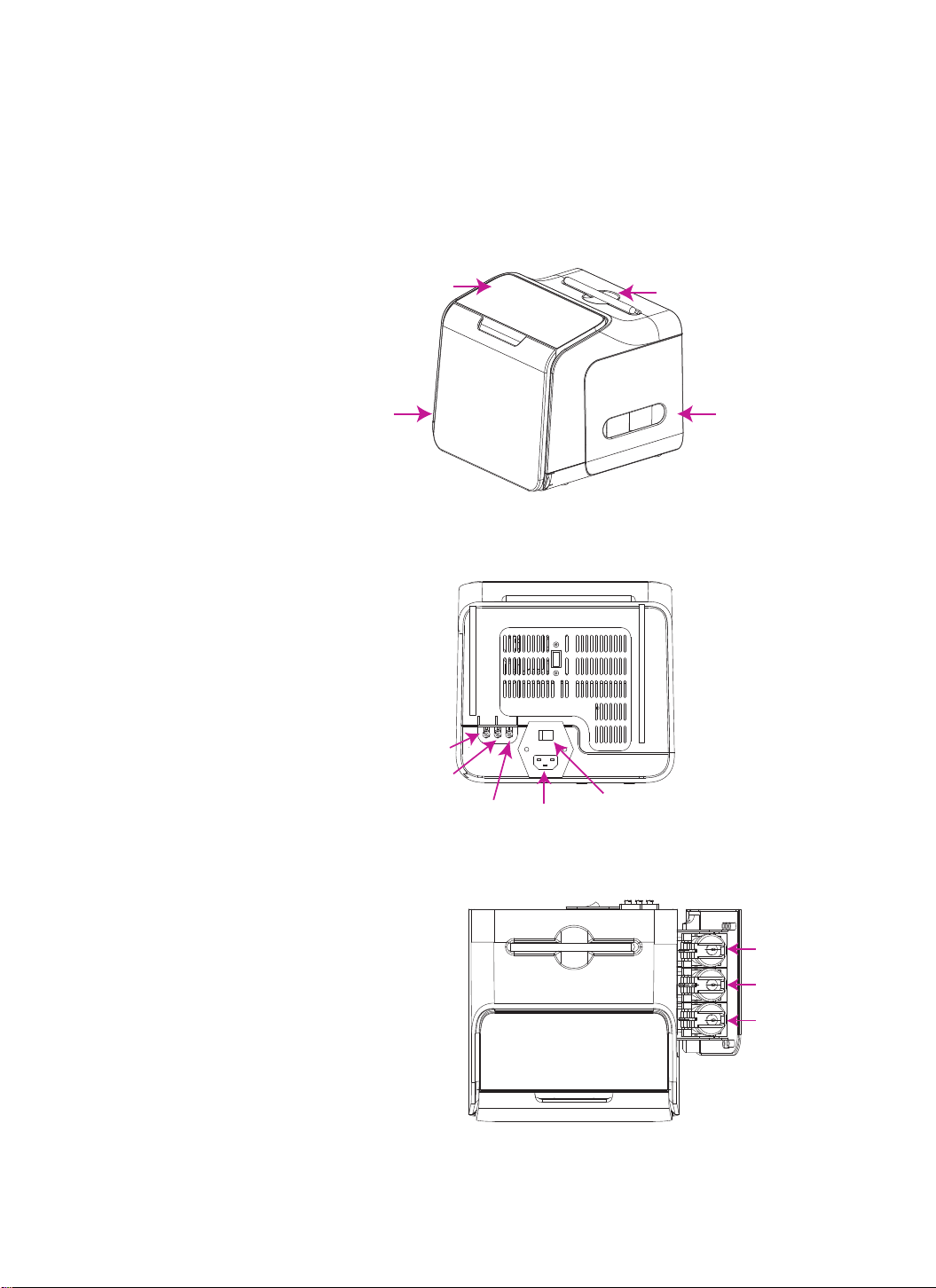
2.1 Instrument display and feature location
eZwestTM Lite automated
western device Touch screen Stylus pen
Front cover Reagent chamber
AC power receptacle
System ON/OFF switch
Wash buffer
Waste 1
Waste 2
Blocking
buffer
1°Ab
2°Ab
Front view
Back view
Top view
Fig. 1
Fig. 2
Fig. 3

- 6 -
Screen display (main menu) Current program name
System menu Method menu
Current program
steps
Program timer
Start program
Screen display (Method view) Exit
Device programs
System clean
Cassette program
Program steps
Select program Save program
Membrane cassette
Latch
Buffer ports
Sensor chip
Fig. 4
Fig. 5
Fig. 6

- 7 -
2.2 Basic operation
Save cassette ID when using the
cassette for the first time
1. Switch on the device.
2. Insert the membrane cassette into the device as shown in Fig. 7. Make sure the pins
are pushed all the way in, and the side with the “eZwest” logo is upright.
Note: The pins are designed to be movable as part of the auto-seal mechanism. They may
appear to be in different position after removing the cassette, which is normal.
3. After the cassette is inserted, you will be asked if you want to “save ID”.
4. Press OK to save cassette ID as show in Fig. 8.
Note: Each eZwest Lite device could save up to 5 cassette IDs.
View and modify methods 1. Enter method setting by pressing "Method” on the upper right corner of the main menu.
Fig. 7
Fig. 8
Fig. 9
Otros manuales para eZwest Lite
1
Tabla de contenidos
Otros manuales de Equipo de laboratorio de GenScript
Manuales populares de Equipo de laboratorio de otras marcas

Agilent Technologies
Agilent Technologies 5800 ICP-OES Manual de usuario

Endress+Hauser
Endress+Hauser Cleanfit CPA875 Manual de usuario

NI
NI PXI-5422 Manual

Collomix
Collomix Aqix Manual de usuario

SPEX SamplePrep
SPEX SamplePrep 6875 Freezer/Mill Series Manual de usuario

Ocean Insight
Ocean Insight FLAME-NIR+ Manual de usuario