
GE DVZ Manual de usuario

User Manual
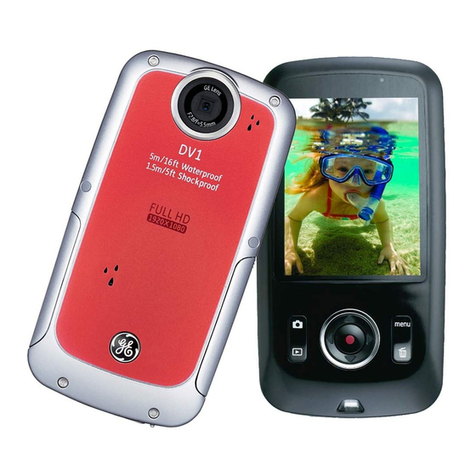
HD Digital Video Camera
DVZ
imagination at work

1
PRECAUTIONS
Preface
Thank you for purchasing this GE digital video camera. Please read this manual
carefully and keep it in a safe place for future reference.
Copyright
Copyright 2012 General Imaging Company. All rights reserved.
No part of this publication may be reproduced, transmitted, transcribed, stored
in a retrieval system, or translated into any language or computer language, in
any form, by any means, without the prior written permission of General Imaging
Company.
Trademarks
All trademarks mentioned in this manual are used for identification purposes
only and are properties of their respective owners.
About this manual
This manual provides you with instructions on how to use your GE digital video
camera. Every effort has been made to ensure that the contents of this manual
are accurate, however General Imaging Company reserves the right to make
changes without notice.
Symbols used in this manual
Throughout this manual, the following symbols are used to help you locate
information quickly and easily:
Indicates important information.
Indicates precautions to be taken while operating the video camera.

2
WARNING
For Customers in the U.S.A.
Tested To Comply With FCC Standards
FOR HOME OR OFFICE USE
FCC Statement
This device complies with part 15 of the FCC Rules. Operation is subject to the
following two conditions:
(1) This device may not cause harmful interference, and
(2) This device must accept any interference received, including interference that
may cause undesired operation.
For Customers in Europe
"CE" mark indicates that this product complies with the European
requirements for safety, health, environment and customer protection.
"CE" marked video cameras are intended for sales in Europe.
This symbol [crossed-out wheeled bin WEEE Annex IV] indicates
separate collection of waste electrical and electronic equipment in the
European countries. Please do not throw the equipment into the trash.
Please recycle this and other electronics responsibly.

3
Declaration of Conformity
Model Name: DVZ
Trade Name: GE
Responsible Party: General Imaging Company
Address: 1411 W. 190th Street, Suite 550, Gardena, CA 90248, USA.
Telephone Number: +1-800-730-6597
(Outside U.S. & Canada: +1-310-755-6857)

4
SAFETY PRECAUTIONS
Video Camera Notes:
• Do not store or use the video camera in the following types of locations:
1. In direct sunlight for a long period of time or high temperature (beyond
40ºC/104F);
2. In environments with high magnetic fields;
• If the video camera will not be used for a long period of time, we suggest you
download photos and remove the memory card to prevent losing photos and
videos.
• If the video camera is taken from a relatively cool environment (lower than
40ºC/104F), and placed in a warmer or more humid atmosphere, condensation
may occur within the device. We suggest you wait for the unit to warm to
room temperature before turning on the video camera.
• General Imaging is not responsible for any loss of data.
Memory Card Notes:
• When using a new memory card, or a memory card has been initialized
by a computer, you might have to format the card if the camera does not
recognize it. Please back up any data on the card as the formatting will
erase all data on the card.
• Do not directly edit the data on the memory card. Copy the data to your
computer before you edit them.
• Do not change or delete the folder names or file names on the memory card
from your computer, to avoid causing unrecognizable files in the original
folder or file in your video camera.
• Only remove and insert a memory card when the camera is off, as data loss
and/or corruption may occur.
• When inserting a memory card, make sure the notch of the card matches
the markings on the top of the card slot.

5
LCD Screen Notes:
• Due to current LCD manufacturing technology, you may see a few light or dark
pixels on your LCD. This is normal.
• These light or dark pixels will not affect the quality of the photo or video
images you capture.
• If the LCD screen is damaged, take particular care with the liquid crystal in
the screen. If any of the following situations arise, take the recommended
immediate action indicated below:
1. If liquid crystal comes in contact with your skin, wash thoroughly with
soap and running water.
2. If liquid crystal gets into your eye, flush the eye with clean water for at
least 15 minutes and then seek immediate medical assistance.
3. If liquid crystal is swallowed, flush your mouth thoroughly with water and
induce vomiting. Seek medical assistance immediately.
Please read the following important information carefully
before using the product:
• Do not disassemble or attempt to service the video camera yourself.
• Improper handling may damage the product and will void the warranty.
• Turn the video camera off before inserting or removing the a memory card.
• Avoid touching the video camera lens.
• Do not expose the video camera lens to direct sunlight for extended periods
of time.
• Do not use abrasive cleansers, alcohol-based, or solvent based cleaners to
clean the video camera body. To clean, wipe the video camera lens with a
professional lens cleaning cloth and special cleaning agent made for cameras
and electronics.

6
Functions and Notes
Waterproof/Dust Proof/Shockproof/Freezeproof
• The video camera meets JIS/IEC waterproof grade 8 (IPX8) and JIS/IEC
dustproof grade 6 (IPX6).
Height for shockproof rating is 1.5m.
Suitable temperature range for freezeproof capability is -10°C~40°C
• The accessories included with the this video camera are not for use in wet
conditions.
Precautions Before Using
• Please make sure that the Micro SD cover and HDMI/USB interface cover
(hereinafter referred to as “interface cover”) are locked securely.
• The rubber mating surfaces on the covers and doors should be clean and free
of foreign matter to insure a tight seal.
• Units with damaged rubber waterproofing should not be used in wet
conditions.
• Do not use this video camera in a geothermal spring.
• When using this video camera in water, a wrist strap is highly recommended.
Precautions When Using
• Do not use the video camera below 5 meters (approximately 15 feet)
underwater.
• Do not use the video camera under water for more than 2 hours.
• Avoid dropping the video camera suddenly into water. The Micro SD card
cover or interface cover may be open or not closed securely. Always check
your video camera carefully before taking it near water.
• Do not open the Micro SD cover or interface cover underwater .
• If the video camera cannot be turned on due to extenuating circumstances,
please contact our customer service center for help.

7
Maintenance Precautions After Using
• Wipe the video camera with a clean, dry , lint free cloth.
• When the MicroġSD cover or interface cover is opened, after underwater use,
there may be water drops on the inside of the Micro SD cover or interface
cover.
• After using the video camera in the water or near sand, mud or other foreign
materials, please rinse it with clean water (don’t open the Micro SD card cover
or interface cover when cleaning). After cleaning, wipe out the video camera
with a clean, dry, lint free cloth.
• To help ensure the camera's waterproof ability, wipe off any dust, sand or
other foreign material from the rubber gaskets and corresponding interface
areas.
• Don’t use any chemical solvents or agents to clean the camera. Do not use
silicone conditioners on the rubber.
Damaged rubber, waterproof gaskets with cracks or scratches will allow
water or other elements to penetrate the camera. Contact customer service
for assistance with replacment of parts or the video camera itself.

8
CONTENTS
PRECAUTIONS ......................................................................................... 1
Preface...........................................................................................................................1
WARNING ......................................................................................................................2
SAFETY PRECAUTIONS.................................................................................................4
Video Camera Notes...........................................................................................4
Memory Card Notes ...........................................................................................4
LCD Screen Notess..............................................................................................5
Please read the following important information
carefully before using this product.................................................................5
Functions and Notes...................................................................................................6
Waterproof/Dust proof/Shockproof/Freezeproof.......................................6
Precautions Before Using .................................................................................6
Precautions When Using...................................................................................6
Maintenance Precautions After Using...........................................................7
CONTENTS ............................................................................................... 8
GETTING STARTED ................................................................................12
Accessories ................................................................................................................12
Part Names.................................................................................................................13
Installing Battery and Memory Card.....................................................................14
Charging Battery.......................................................................................................15
Turning On/Off ...........................................................................................................16

9
Setting Language and Date/Time..........................................................................17
Setting your Language and Date/Time........................................................17
Resetting your Language................................................................................18
Resetting Date/Time........................................................................................19
BASIC OPERATION ................................................................................20
Movie Recording........................................................................................................20
Zoom Function...................................................................................................20
Image Pixel.........................................................................................................21
Image Color........................................................................................................21
LCD Screen Display ...................................................................................................22
Shooting Screen ................................................................................................22
DISPLAY...............................................................................................................23
Video Recording ................................................................................................24
Playback..............................................................................................................25
Video Panorama Mode.............................................................................................26
PLAYBACK ..............................................................................................28
Preview Photos and Videos.....................................................................................28
Video....................................................................................................................28
Zoom in Photos..................................................................................................30
Screen Display in the Playback Mode...........................................................31
Delete Photos and Videos ...............................................................................32
Tabla de contenidos
Otros manuales de Videocámara de GE




Manuales populares de Videocámara de otras marcas


Panasonic
Panasonic AG-HMC152EN Manual de usuario

Insignia
Insignia NS-DCC5HB09 - Camcorder - 720p Manual de usuario

MYDLINK
MYDLINK DCS-6100LH Manual de usuario

Sony
Sony video Hi8 Handycam CCD-TR555 Manual de usuario

SECURECOM
SECURECOM V-5014B Manual de usuario

Panasonic
Panasonic HDC-SD100 Manual de usuario


