
Gazer F150 Manual de usuario

GAZER F150/F150g


3
ENG
Contents
1. Warnings ...................................................................... 4
2. Important information .................................................... 5
3. Package contents........................................................... 6
4. Controls ....................................................................... 7
5. Usage .......................................................................... 8
6. Preparing Memory Card ................................................ 10
7. Preparing MVR............................................................. 11
8. Setting menu .............................................................. 12
9. Viewing records ........................................................... 13
10. Mount installation ...................................................... 14
11. Specications ............................................................ 16

ENG
4
Warning
Congratulations on your purchase of Gazer mobile video recorder.
Please read this manual carefully, before using the device.
Warnings
•Do not expose the device to direct sunlight.
•Do not apply any chemicals when cleaning the device. Only use
soft cloth to clean the frame and lens.
•Prevent the device from falling or being damaged by other
objects.
•Do not use or store the device in cold or hot places.
- Storage temperature: from -20°C to +60°C
- Operation temperature: from -5°C to +45°C
•Make sure the device warms up before starting, if it was exposed
to the low temperature for too long.
•Do not attempt to repair the appliance yourself. In case of
damage, contact your dealer or service center.
•The manufacturer is not responsible for any losses or missed
opportunities due to use of videos and data obtained with the
help of this MVR.
• Technical specications may be changed without prior notice to
improve the quality of the product.

5
ENG
•Do not insert or remove the SD card when the device is on.
This can lead to the MVR malfunction. Wait for 30 seconds
after MVR shutdown, make sure that all the lights are off for
at least 10 seconds, and only then safely remove the memory
card.
•Set the correct time and date before using the device.
•Use at least 0.5 seconds time interval while pressing control
buttons, this guarantees proper functioning of the device.
•Do not turn off the power for at least 20 seconds after the
power supply cable is connected. This is necessary to help the
built-in battery function correctly. If after you have started the
car (when the power supply cable is connected to the MVR),
the device failed to switch to the recording mode automati-
cally, simply unplug the power supply cable for ten seconds
and then try again.
•Use the restart option (by pressing RESET button) in the fol-
lowing cases:
- power indicator is not on when the power supply cable is
connected;
- the device does not switch from the standby to the recording
or control mode;
- the device fails to function properly.
• To prevent loss of protected les or recording interruption,
make sure that the memory card is not lled up with les
protected from loop overwriting (by G-sensor or PROTECT
button).
Warning!
Important information

ENG
6
Package contents
Gazer MVR
F150/F150g
Windshield
mount*
Cigarette lighter
socket power unit
(with an integrated
+5V converter)
User Manual
Gazer MVR F121 Gazer micro SDHC
memory card + adapter
User Manual
Vacuum windshield
mount
3M scotch tape
windshield mount
Mounting clips kit
Package contents
Cigarette lighter
socket power unit
(with an integrated +
5V converter)
USB cable for
connection to the
car’s power unit
using the cigarette
lighter socket (with
an angular mini USB
connector)
USB-cable for PC
connection (with a
direct mini USB
connector)
Gazer micro SDHC
memory card +
adapter (optional)
*With a built-in GPS module for model Gazer F150g.

7
ENG
Controls
1. Mount release button.
2. Screen.
3. UP button – menu
navigation; stop sound
recording (in video mode).
4. PROTECT button – set/
remove loop overwriting
protection from the current
video clip.
5. MENU button – access
settings menu, go back to the
previous menu.
6.ОN/OFFbutton – long press -
power on/off; short press -
monitor on/off.
7. MODE button – switch
between Video/Time-Lapse/
Photo/Viewing modes.
8. DOWN button – menu
navigation, go to the last
recorded le (in viewing
mode).
9. Microphone.
10. LED status indicator –
red light – MVR is on;
blinking red light – МVR is in
recording mode; red light on
a turned off device – battery
is charging (the indicator light
goes out when the device is
fully charged).
11. Mount USB port.
12. MVR USB port.
13. Additional micro SD
memory card slot (for
GazerF150);HDMIport
(forGazerF150g).
14. Primary micro SD memory
card slot.
Do not insert or remove your
SD memory card when the
power or indicator lights are on.
15. OK button: start/stop video
recording; snapshot; menu
selection conrmation;
playback/pause (in viewing
mode).
16. Camera tilt angle
adjustment knob.
17. Windshield mount.
18.3Мtapebaseformounting
on the windshield.
19. Lens.
20. AV output.
21. RESET button.
22. Speakers.
22
21
20
17
11
1
2
3
4
5
6
7
8
9
10
12
13
14
15
16
18
19

ENG
8
Usage
• When connected to a power source, the МVR switches to the
recording mode automatically, and pressing the OK button (15) man-
ually is not required. When the power is off, the МVR automatically
stops recording, saves the video le and shuts down. Prior (before
turning off the power) manual shutdown is not required. If needed,
you can turn the МVR off manually by pressing the ON/OFF button
(6) or set the required turn off time in the «Power off delay» menu.
• The MVR has protection against loop overwriting of recorded les.
This function is activated automatically when the G-sensor trips or
when the PROTECT button (4) is pressed.
• The MVR his capable of frame-by-frame shooting (Time-Lapse video
recording). To enable this function, one must select Time-Lapse re-
cording mode by pressing the MODE button (7). When this function
is enabled, the МVR will shoot frames with 1 sec., 5 sec., 10 sec., 30
sec., or 1 min. intervals generating a 30fps video le.
Recommendation: Use the recording mode with a minimum
video length (1 minute).
Note: Do not turn off the recorder manually if it is in the recording mode
(this may damage the last recording). First stop the recording by short
pressing the OK button (15) and then turn off the device. The MVR can
operate independently for a certain period of time. The time of ofine
operation depends on the condition and charge of the built in battery.
Note: No sound is recorded when the frame-by-frame shoot-
ing function is enabled. Frame-by-frame shooting may come
in handy during long monotonous trips for sparing use of the
memory card space.
• There is a password protection function to restrict unauthorized ac-
cess to the МVR settings and recorded video les. To set or change
the password, go to the «Set password» menu item and set the de-
sired password.
Caution! Make sure that les protected from loop overwriting are
deleted from the memory card in a timely manner. Should the
memory card overll with protected les, the МVR will stop recording.
Caution! Whenever you set a password, please, save it on reliable
data storage media. If you forget the password, please contact Gazer
support center for assistance. Contact information can be found on
the ofcial website www.gazer.com.

9
ENG
• The Gazer F150g МVR has a function to display shooting location
coordinates on the video. For coordinates to be displayed, the GPS
function must be enabled in the setting menu. One can use the
special Gazer Player to view recorded video clips with reference to
the map. For more details, go the ofcial website www.gazer.com.
Usage
Caution! To prevent the MVR from stopping to record, it is
recommended to enable the loop recording function in the settings
menu. In this case, after the secondary memory card becomes full,
the MVR will automatically switch to the primary card and record new
video les over the old ones in a loop mode. Video will be recorded
continuously due to automatic switching between memory cards
whenever either of them runs out of space.
Note: Copied photo and video les are stored in the COPY folder in
the memory card root directory. Use a PC to view copied media les.
• Gazer F150 MVR supports up to two memory cards with the total
storage capacity of 128Gb and allows copying les from one card to
the other. Thanks to this feature, one can record and store more video
les and manage them directly on the MVR.
To select a memory card for recording video les, press MENU (5) to
access the menu, go to the «System Settings»/»Storage» from the
options and then select the memory card.
When the primary card is selected in the menu, it will be used for video
recording until it runs out of space. Once the primary memory card is
full, the MVR will automatically switch to the secondary memory card.
When there is no free space on the secondary memory card, video
recording will stop.
To copy video les from one memory card to the other, select the video
le you need to copy, press MENU (5) to access the menu, select “Copy
le”, and then conrm the selection by pressing ОК (15). To access
the list of les stored on the second memory card, press MENU (5)
to access the submenu, select “Switch card”, and then press ОК (15).
ENG
10
Preparing Memory Card
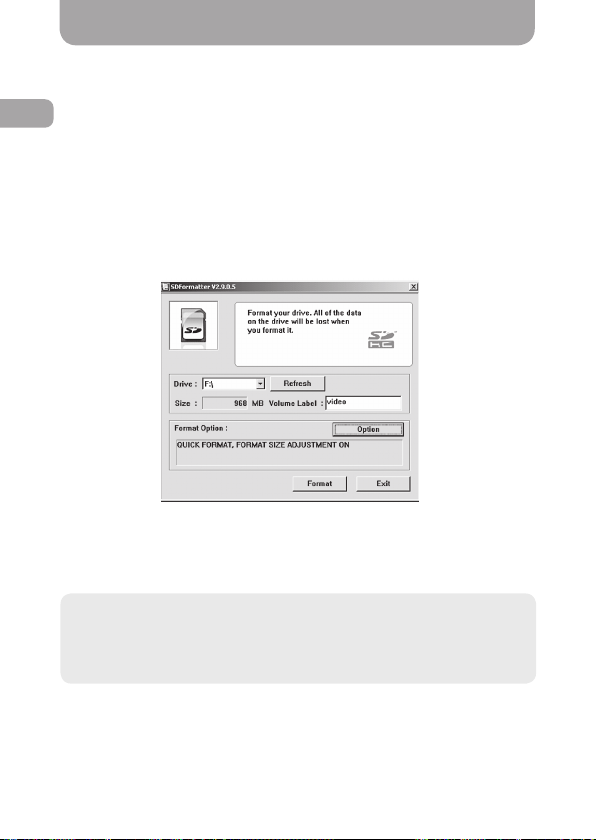
Before using the MVR, it is important to format your memory card
using specialized tools. We recommend using a free SDFormatter
utility. Use a search engine to nd and download it from one of many
Internet resources or from the web portal http://www.sdcard.org.
Formatting is necessary to optimize the memory card access speed.
The system formats the card in accordance with SD Memory Card
Format speci cation, which allows the MVR to access the card
faster. This cannot be done with regular Windows formatting tools.
SD Formatter also (by selecting option of Format Size
Adjustment=ON) creates an optimal le system structure (cluster
size, etc.).
If you use an unformatted memory card, the MVR may fail to record
or record incorrectly (long pauses between videos). Formatting with
SDFormatter reduces the duration of pauses to a minimum.
Recommendation: To ensure that the МVR delivers maximum
performance, use such a memory card:
- 8-128* Gb Сlass 10 (for Gazer F150);
- 8-32 Gb Сlass 10 (for Gazer F150g).
*The total storage capacity of two memory cards.
Este manual sirve para los siguientes modelos
1
Tabla de contenidos
Idiomas:
Otros manuales de Cámara de salpicadero de Gazer

Gazer
Gazer MMR51 SERIES Manual de usuario

Gazer
Gazer F750w Manual de usuario

Gazer
Gazer H521 Manual de usuario

Gazer
Gazer F720 Manual de usuario

Gazer
Gazer CC100 Manual de usuario

Gazer
Gazer H714 Manual de usuario

Gazer
Gazer F122G Manual de usuario

Gazer
Gazer S110 Manual de usuario

Gazer
Gazer F225 Manual de usuario

Gazer
Gazer F730 Manual de usuario


