
FUJICA ZC1000 Manual de usuario

OWNER'S
MANUAL
Thank
you for choosing
the FUJICA
Single-8ZCIOOO.We are sure
you
will likeit.
This
camera
hasmanyfeatures
which
are
not provided
in other8mm movie
cameras.Please
readthis
manual
care-
fully
sothat
you
cantake
full
advantage
of its capabilities
and enjoy all the
pleasures
of 8mm movie-making.
"-;
P Ë'ii,R[:5
Your
FUJICA
Single-8
ZCl OOOis
an interchangeable
lens camera. lt comes with a 1Oy magnification
macro-zoom lens,and this alone will let you shoot
in most situations,
but it will alsotake wideangle
and
telephoto lensesto let you shoot wide scenesfrom
short distances as well as close-upsof distant sub-
jects.
This camera can also be mounted on microscopes,
endoscopesand other optical instrumentsfor taking
pictures of objects too small to see with the naked
eye, for taking pictures of the insidesof the human
body, etc.
fts other featuresinclude
72 Íps high speedshooting
for taking slow-motion movies, single-frame ex-
posure for taking trick shots, easy-to-see return
mirror viewfinder for an extra-clear view of the
subject, simultaneous recording of lip-synchronized
sound and picture, and digital frame counter for
simplified shooting of lap-dissolves,superimposed
pictures
and time-lapse
shots.
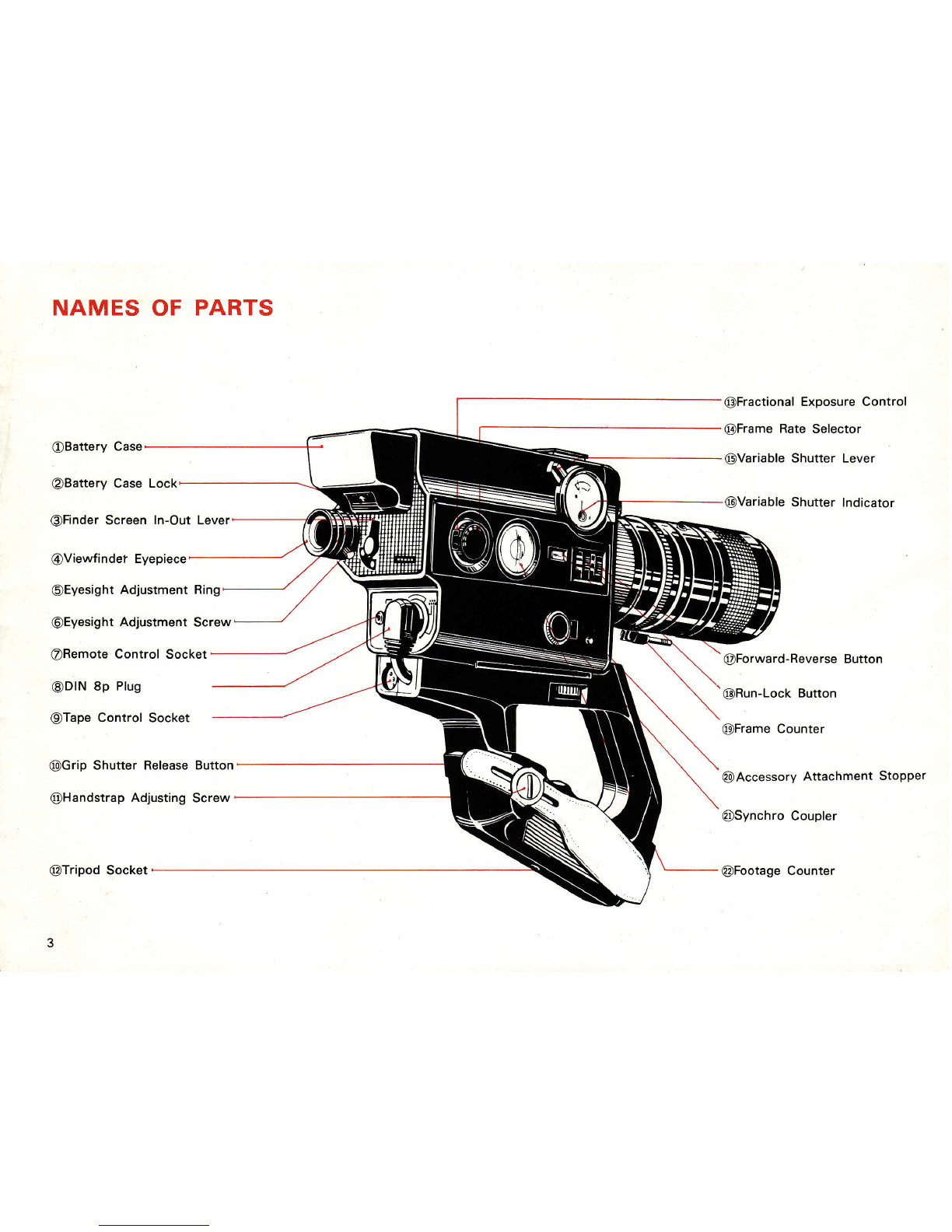
NAMES OF PARTS
OBattery C
@Battery Case Lock
@Finder Screen In-Out Lever
@Viewfindet Eyepi
@Eyesight Adjustment Ring
@Eyesight Adjustment Screw
@Remote Control Socket
@DlN 8p Plug
@Tape Control Socket
@Grip Shutter ReleaseButton
@Handstrap Adjusting Screw
@Fractional Exposure Control
@Frame Rate Selector
@Variable Shutter Lever
Shutter Indicator
@Forward-Reverse Button
@Run-Lock Button
@Frame Counter
@Accessory Attachment StoPPer
@Synchro Coupler
@Footage Counter
@Tripod Socket

@Film
Chamber Lock
@Take-up
Spindle
@Film Speed Setting Pin
@FeedSpindle
@Film
Chamber
@Film Gate
@Accessory Socket
@Accessory Shoe
@Macro-focusing Lever
@Aperture Control Ring
@Lens Setting Marks
@Focusing
Ring
@Body Shutter ReleaseButton
@Zoom Lever
@Battery Compartmenl
Cover
@Battery Compartment
Chamber Door
@Film
Chamber Window
@Grip Securing
Screw
@Grip(holds batteriesfor
high speed photography)
Cover Screw

4.Variabfe
Shutter lever and frame counter...........................23
5.Fading ............24
6. How to rewind the film................. ...............25
7. Lap-dissofves
................... ............................25
8.Superimposed
titles.'......... ...........................26
9. Macrophotography .......... ............................27
1O.How to use the depth of field table.................................27
oTaking special
situation
pictures
with extra accessones
1.Lens interchangeability ..........3O
2. Photomicrography-peeking into the microscopic
wor|d......32
3. Uftra-macrophotography .......32
4. Simultaneous
recording of sound and picture.....-...............33
5.Remotecontrol photography
............. ..........33
6. Manualfilm advance .............34
7.Single-frame
exposurewith strobe |ight..............................34
8.Time-lapse
pictures
(memomotion) ..............35
9. How to use the right anglefinder ........... ..............35
1O.How to use the battery pack ....................36
11.How to use the close-uplens
...'.....'......t.........................36
12.Light balancingfilter LBA-12Ax4 ........... ..............37
13.Functions
of the DIN 8P plug . ..................37
oCamera care ...........'. ........'......3g
Specifications ..'....39

MAIN OPERATION
POINTS
I press up the Battery Case ? Place4 penlight batteries in Q Drop the film cartridge
in the 4 Makesurethe Macro-focusing
I Lock @ and pull out the - th" B.tt"ry Case
@ and insert - FilmChamber
@. ' Lever
@ isset on the top side
Battery Case @. the casein the camera battery of the lens barrel in line with
case comoartment. Also load the Lens Setting Marks @
4 penlight
batteries
in
theGriP
@. The grip batteriesare used
for high speedshooting.
Set the controls (the inscriptions in green are your guide)
@WH@
f (1)Set the Fractional
Exposure (2)Set the Variable shutter (3)Setthe Run-LockButton
@ (4)Set the Forward-Reverse
s Control
@ at
Oand
the Frame Lever @ at OPEN. at RUN. Button
@ at F.
i- RateControl
@ at 18.
E
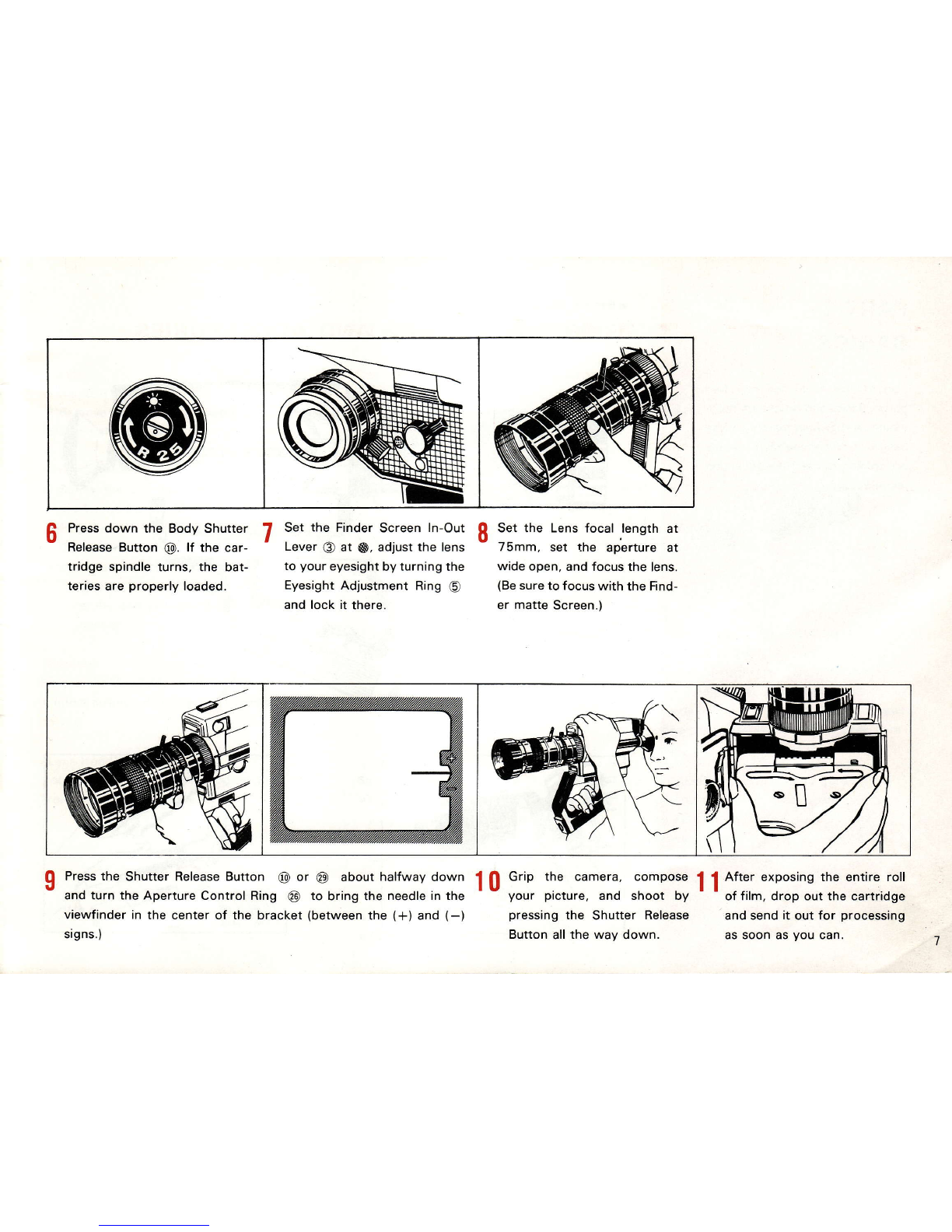
ft Pressdown the Body Shutter 7 Set the Finder Screen In-Out fl Set the Lens focal length at
- ReleaseButton @. lÍ the car- ' Leuer.
€, at @, adjust the lens - 75mm, set the aperture at
tridge spindle turns, the bat- to your eyesight
by turning the wide open, and focus the lens.
teries are properly loaded. Eyesight Adjustment Ring @ (Be
sureto focus with the Find-
and lock it there. er matte Screen.)
\
-[
Q Pressthe Shutter ReleaseButton @ or @ about halfwaydown f fl Grip the camera, compose | { After exposingthe entire roll
u and turn the Aperture Control Ring ü) to bring the needlein the ! t yow picture, and shoot by I I of film, drop out the cartridge
viewfinderin the center of the bracket (between
the (*) and (-) pressing
the Shutter Release andsendit out for processing
signs.) Buttonall
the way down. assoon asyou can.

oBeÍore shooting
1-MOUNT THE LENSAND ACCESSORIES
2-LOAD THE BATTERIES
(Camera batteries) Usealkaline
batteÍies
(Lens)
(1)Remove
the lensrearcap.
(2)Remove
the lens mount cap.
(3)Screw the lens
firmly into the lensmount.
(Grip)
(1)Screw the Grip SecuringScrew @ into
the Tripod Socket @.
(2)Plug
the DIN 8P Plug
(9 intothesocket
in
the camera
rear.
Note: Unlessthis plug is connected the Grip
Shutter ReleaseButton @ will not op-
erate,
and you cannot shoot at high
speeos.
(Eyecup)
Fitit on the Mewfinder Eyepiece
@
andmove
it into a position that feelsmost comfortable
to vou.
(Lens Hood)
Loosen the screw, fit the hood on the lens
front end and tighten the screw.
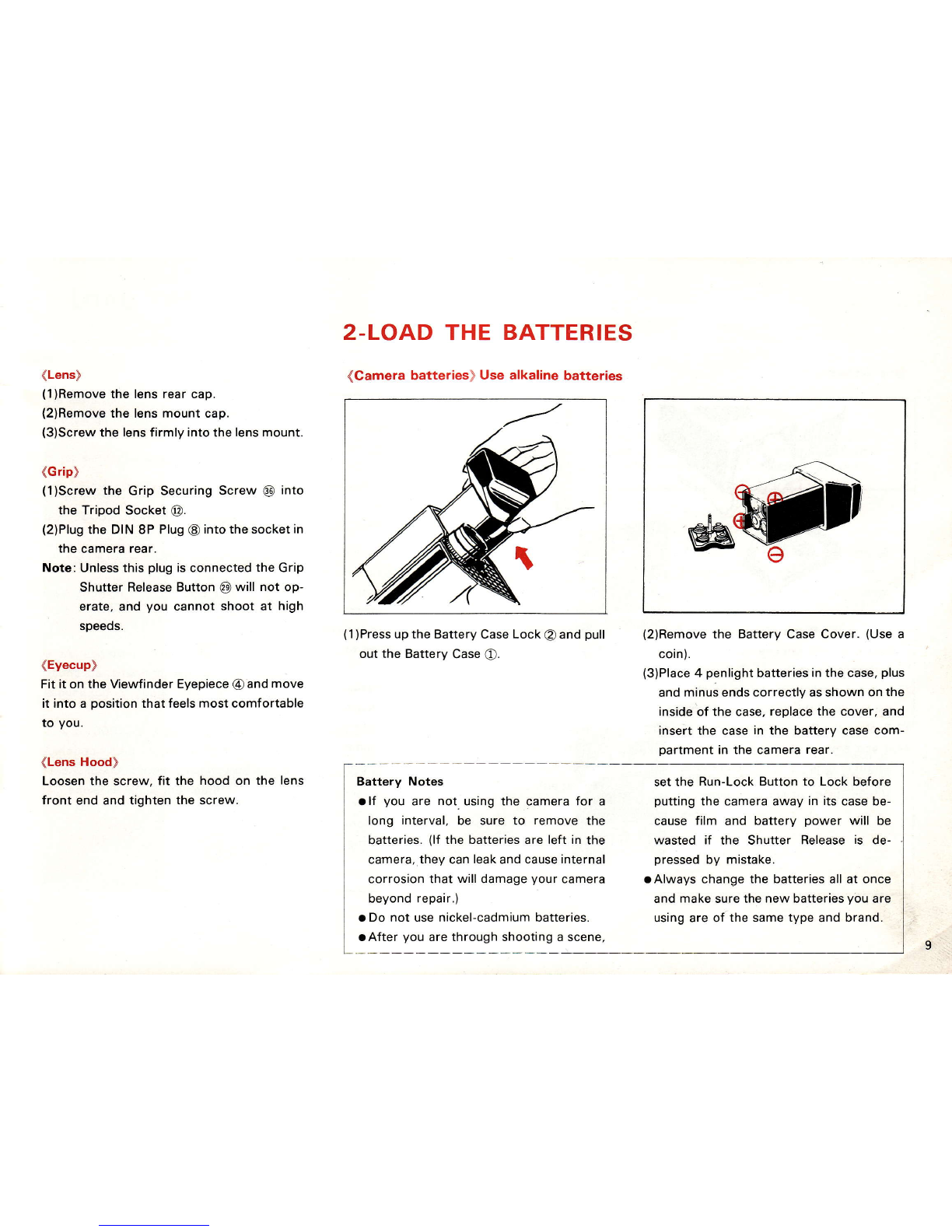
(1
)Press
up the BatteryCaseLock @ and pull
out the Battery Case
@.
Battery Notes
rlf you are not usingthe camerafor a
long interval, be sure to remove the
batteries. (lf the batteriesare left in the
camera.thev can
leak
andcause
internal
corrosionthat willdamage
yourcamera
beyond
repair.)
a Do not usenickel-cadmiumbatteries.
aAfter you arethroughshootinga scene,
(2)Removethe Battery Case Cover. (Use a
coin).
(3)Place
4 penlightbatteriesinthe case,
plus
and
minus
ends
correctlyasshownon
the
insideoÍ the case,
replacethe cover,and
insert the case in the battery case com-
Dartment
in the camera
rear.
setthe Run-Lock Button to Lock before
puttingthe cameraaway in itscasebe-
cause film and battery power will be
wasted if the shutter Release is de-
pressed
by mistake.
aAlways change
the batteriesallat once
and make surethe new batteries
vou are
usingareof the same
type and brand.
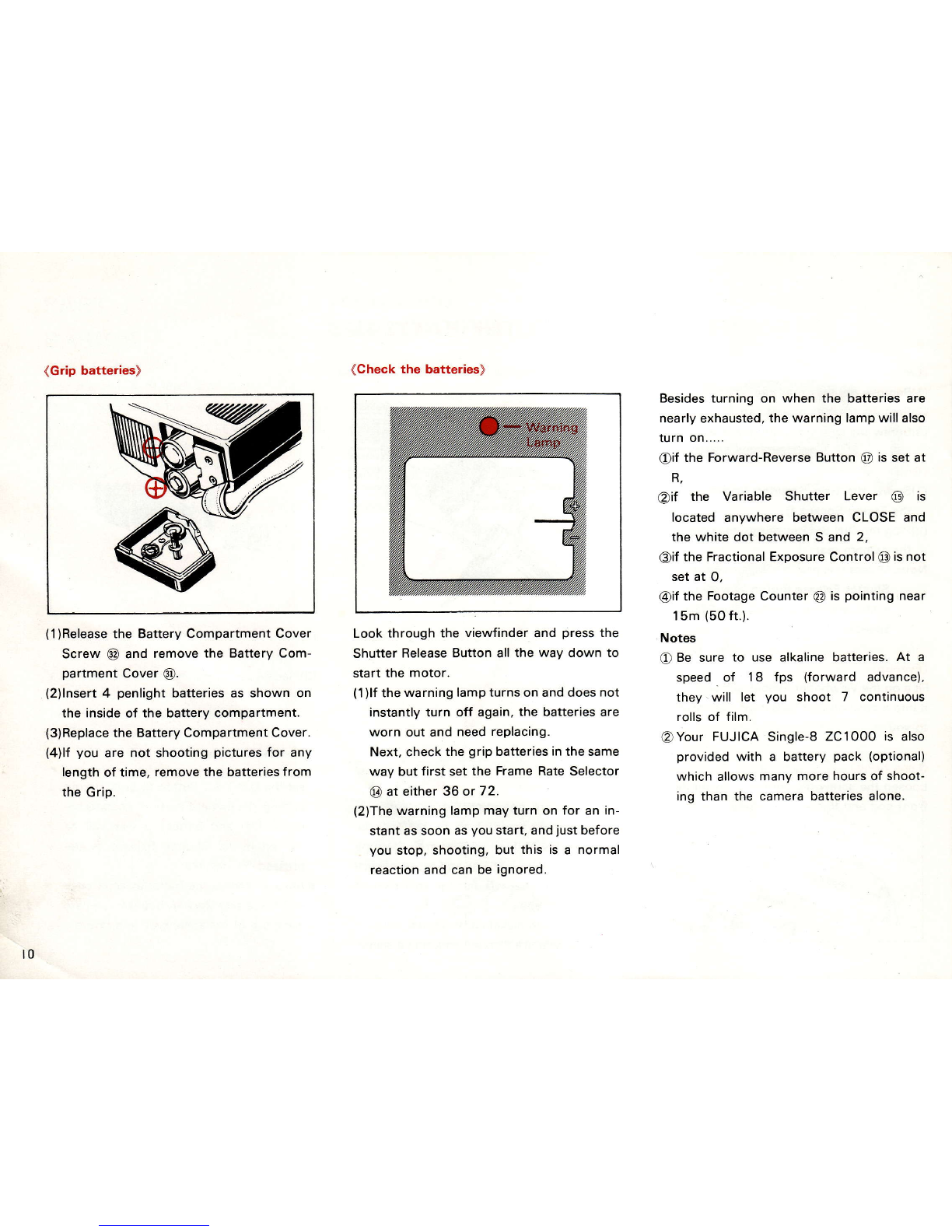
(Grip batteries)
(1)Release
the BatteryCompartment
Cover
Screw @ and remove the Battery Com-
partment cover @.
(2)lnsert
4 penlightbatteriesas shown on
the inside of the battery compartment.
(3)Replace
the BatteryCompartment Cover.
(4)lf you are not shooting pictures for any
length of time, removethe batteries
from
the Grip.
(Check the batteries)
Look through the viewfinder and press the
Shutter ReleaseButton allthe way down to
start the motor.
(1)lÍ
the
warninglampturnson anddoes
not
instantly turn off again,the batteries are
worn out and need
rePlacing.
Next, check the grip batteriesinthe same
way but first set the Frame Rate Selector
@ at either36 or 72.
(2)The
warning lamp
mayturn on for an in-
stant as soon asyou start, andjust before
you stop, shooting,but this is a normal
reactionand can be ignored.
Besidesturning on when the batteries are
nearly
exhausted,
the warning lampwillalso
rurn on.....
@if the Forward-Reverse
Button @ is set at
R.
@if the Variable Shutter Lever @ is
located anvwhere between CLOSE and
the white dot between S and 2,
@if the FractionalExposureControl @isnot
set at o,
@iÍ
the FootageCounter
@ is pointing
near
15m (50ft.).
Notes
O Be sure to use alkaline batteries. At a
speed of 1I fps (forward advance),
they.will let vou shoot 7 continuous
rollsof Íilm.
@Your FUJICA Single-8 ZC1O0O is also
provided with a battery pack (optional)
which allows
many more hours
of shoot-
ing than the camera batteriesalone.
t0
Otros manuales para ZC1000
2
Este manual sirve para los siguientes modelos
1
Tabla de contenidos
Otros manuales de Lente de la cámara de FUJICA

Manuales populares de Lente de la cámara de otras marcas


Canon
Canon FD 35 - 70 mm Manual de usuario

Sony
Sony SAL-85F14Z - 85mm f1.4 Carl Zeiss Planar T Coated Telephoto... Manual de usuario

ARRI
ARRI Lenses Manual de usuario

Panasonic
Panasonic LUMIX G X Vario 45-175mm f/4.0-5.6 Manual de usuario

Nikon
Nikon AF-S VR 24-120 f/3.5-5.6G IF-ED Manual de usuario

Rokinon
Rokinon DS50M-C Manual de usuario


