
FLINQ FQC8284 Manual de usuario

FlinQ Smart Garden
Irrigation Control
FQC8284 | Instruction Manual
EN NL DE FR
2
EN Manual
Thanks for purchasing one of our items! To ensure continuous operation
and accuracy, please read these operating instructions carefully before use
and save this manual for future use. Passing certain procedures may result
in incorrect reading and incorrect use of this product. We hope that you will
enjoy using your new FlinQ-product! If by any chance the item is damaged,
defective or broken, you are covered with warranty! Please do not hesitate
to contact us for any questions, concerns or suggestions at the email
address as mentioned in this manual.
Register your FlinQ product
We can imagine you want to treat your FlinQ item carefully.
Register your product and you will be entitled to the following:
1 year extra warranty (2+1)
Personal support
Digital warranty certi cate
Digital manual
Welcome to the FlinQ family
Scan the QR code or go to inqproducts.nl/registration

3
FlinQ Smart Garden Irrigation Control
Please read this manual thoroughly before using the product! Keep it at
a safe place for future reference. This product can be used outdoors (see
below for more info).
This appliance may be used (but not installed) by children aged 12 and
over, and by persons with reduced physical, sensory or mental capacities
or a lack of sucient experience and/or knowledge, provided they are
supervised or have been trained in the safe use of the appliance and
understand the potential dangers.
Cleaning and maintenance must not be carried out by children without
supervision. Children must not be allowed to play with the appliance.
Keep the packaging material away from children. There is a risk of
suocation!
Do not allow unsupervised children to clean or maintain this device.
Specications
Batteries DC 1.5V AA x 4 (included)
Battery lifetime About 4 - 5 months
Waterproof Yes, IPX4
Water pressure range 0.34 - 8.27 bar
Wireless connection 2,4 GHz Wi-Fi only
Connection distance 10 - 30 m (depens on obstacle(s)
between device and router)
Working temperature 5°C - 40°C
Working humidity 0 - 95%RH, no condensation
Dimension 141 x 75 x 99 mm
Notes
- Regularly wash the lter to prevent clogging.
- Remove from faucet when temperature reaches below 5°C , drain all
water and remove batteries to avoid oxidization.
- Do not use with operating pressure higher than 8.27 bar, and with
watertemperature exceeding 40°C .
- Do not install into any type of valve box or under the soil level.
- Do not submerge in water or other liquids.
- Use with tap water only.

4
EN Manual
Package includes
- Smart Garden Irrigation Control
- 4x AA batteries
- User manual
Reset device
Hold and press the reset button above 5 seconds.
Indicator light status
- Wi-Fi pairing mode: ash in red.
- Irrigation on / o: ash 1 time in blue.
- Low battery: ash 3 times in blue when press button.
Turn on / o watering valve
1. The default manually watering time is 10 minutes by on / o button on
device or app; The manually watering time can be set from 1 minute to
24 hours in the app.
2. The countdown timer refesh in every 1 minute in the app until watering
stopped.
3. Device will response in 0-30 seconds when set on / o command from app,
because the device is in sleep mode and will wake up in every 30 seconds.
Product Appearance
1. Input 3/4’ size
2. Indicator light
3. On / of button
Reset button
4. Output
5. Battery compartment
1
2
3
5
4

5
FlinQ Smart Garden Irrigation Control
Before you begin
Make sure your mobile device is running iOS 9 or higher or Android 5 or
higher. Verify your Wi-Fi network/name and ensure your mobile device
is connected to the same 2.4 GHz Wi-Fi network/name/router (5.0 GHz
Networks are NOT supported!).
IMPORTANT: Make sure that the smart irrigation control is, placed and
covered inside the same Wi-Fi network as the router and mobile device
during the 1st setup!
Download the FlinQ app
Search for ‘FlinQ’ in the Apple App Store or the Google Play Store and
download the application.
Register / Login / Prole
1. Open the FlinQ Smart application.
2. Tap ‘agree’ to conrm the privacy policy.
3. To register, please enter your mobile phone numer or email address.
4. Press ‘verication code retrieval’
5. Enter the verication code that was sent to your phone number or
email address.
6. Create a password and login for the new app user. If you already have an
existing account, please go to Login.

6
EN Manual
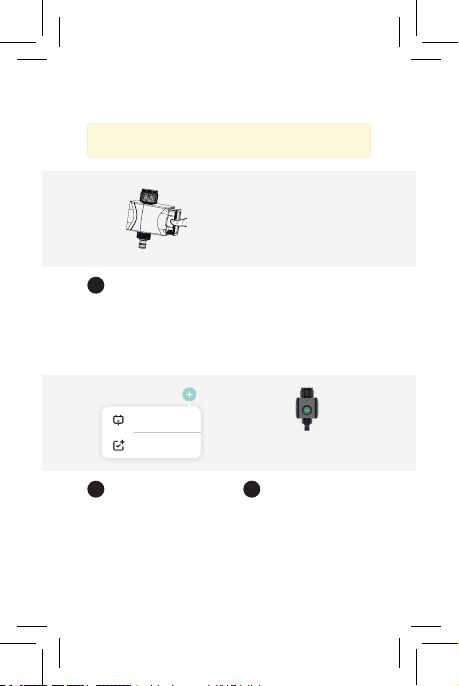
Installation
Open the battery compartment
on the back of the device.
Install the device to the outside
water tap / faucet.
Install the batteries
Install the device and app
Install the 4x AA batteries. Make
sure you put them the right
way in (+/-).
Open the FlinQ app on your
mobile device.
Open compartment
Install the device
Install batteries
Open the FlinQ app
1
1
2
2
Notes: Please note that only 2,4 GHz networks are supported. 5
GHz networks will not work. Ask your provider how to turn on both
frequencies.
7
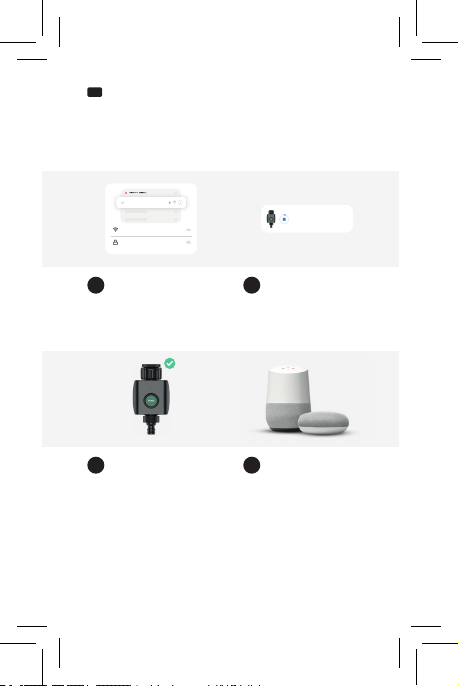
Place compartment back in
Add device Select product type
3
3 4
Place the batterie compartment
back in the device.
Select ‘Add Device’ or the ‘+’ sign
and make sure the indicator light
on the irrigator is ashing rapidly.
If the light is not ashing rappidly
hold and press the on / of button
for 5 seconds.
Select your product type via
the garden section tab. Please
select the ‘FlinQ Smart Outdoor
Irrigation Control’.
Add Device
Create Scene FlinQ Smart Outdoor
Irrigation Control
FlinQ Smart Garden Irrigation Control
Notes: Battery life is around 4 - 5 months, based on 2 - 3 times of
watering per day.
8
EN Manual
Installation
Now follow the instructions within
the application during connection
and con guration.
Install the device and app
The device is installed. This can
take up to 2 minutes.
Follow instructions
Device added succesfully Google Home &
Amazon Alexa
Device is being added
5
7 8
6
The device is installed succesfully
and added to your list of
products. You can now setup
timers and control your device
remotely.
To control your device by using
your voice via a smart speaker,
please refer to the manufacturers
instructions manual on how to
enable a voice command through
your device.
Wi-Fi name
************
Wi-Fi - 5GHz
Wi-Fi -
5GHz
Wi-Fi - 2.GHz
FlinQ Smart Irrigation Control
Being added...

9
FlinQ Smart Garden Irrigation Control
Frequently Asked Questions
Can I share with family and friends?
Yes, you can share your Garden Irrigation Controls with family and
friends who will have access to control your Garden Irrigation Control.
In the app, click the Family name at the top and click on the“Home
Management”button, and you will be able to give or revoke sharing
permissions. In order to share, the other user should already have
downloaded the app and registered a new account.
What’s the Wireless Range?
The range of your home Wi-Fi is heavily dependent on your home router
and the conditions of the room. Check with your router speci cations for
exact range data. The distance is 50 meters in open area, if there is obstacle
between device and Wi-Fi router, the distance would be less, normally it’s
10 - 30 meters.
How many Smart Garden Irrigation systems can I control?
The FlinQ app can control an unlimited amount of devices in an unlimited
amount of locations. Your router may have a limit of how many devices can
be connected to one router, regularly it’s 15 devices around.
My device can’t be connected to network with App
- Make sure the device is under the con g status (indicator light is ashing).
- Make sure the Wi-Fi is avaliable and the device is not far away from the
router.
- Make sure the Wi-Fi password you input is correct.
- Make sure the Wi-Fi is separate 2.4GHz band.
My device shows offl ine in my App
- Make sure the device is powered on.
- Make sure the network is stable and the Wi-Fi name and password not
modi ed. If not, add device again.
- If the network is normal, but its still offl ine. Check if there are too many
Wi-Fi connections. You can restart your router to check the status of
the device.

10
EN Manual
FlinQ Commerce, hereby conrms that the FlinQ Smart Garden Irrigation
Control complies with Directive 2014/53 / EU. The full text of the EU
Declaration of Conformity is below internet address available: www.
inqproducts.nl.
Compliance with the WEEE Directive and waste disposal. This product has
been manufactured from parts and materials of high quality that can be
reused and can be recycled. Therefore, do not throw this product away with
waste normal household appliances at the end of their useful life. Take him
away at a collection point for recycling equipment electric and electronic.
This is indicated by this symbol on the product, in the user manual and
on the packaging. Please consult the local authorities to nd out where
the point of nearest collection. Help protect the environment by recycling
used products.
The packaging materials of the product are made in accordance with our
national environmental regulations made from recyclable materials made.
Packing materials not together with dispose of with household waste or
other waste. Bring them to the collection points prescribed by the local
authorities for packing material.
Tabla de contenidos
Idiomas:
Manuales populares de Sistema de riego de otras marcas

Hunter
Hunter Institutional Series Manual de usuario

Cellfast
Cellfast 52-305 Manual de usuario

Tyco Fire Product
Tyco Fire Product Star Galaxy SGQR Manual de usuario

Tyco Fire Product
Tyco Fire Product CENTRAL A Manual de usuario

Oral Care Technologies
Oral Care Technologies Hydro Floss Manual de usuario

Reliable
Reliable F1-300 Manual de usuario


