
FLAGHOUSE Aura Manual de usuario
1. Product Name
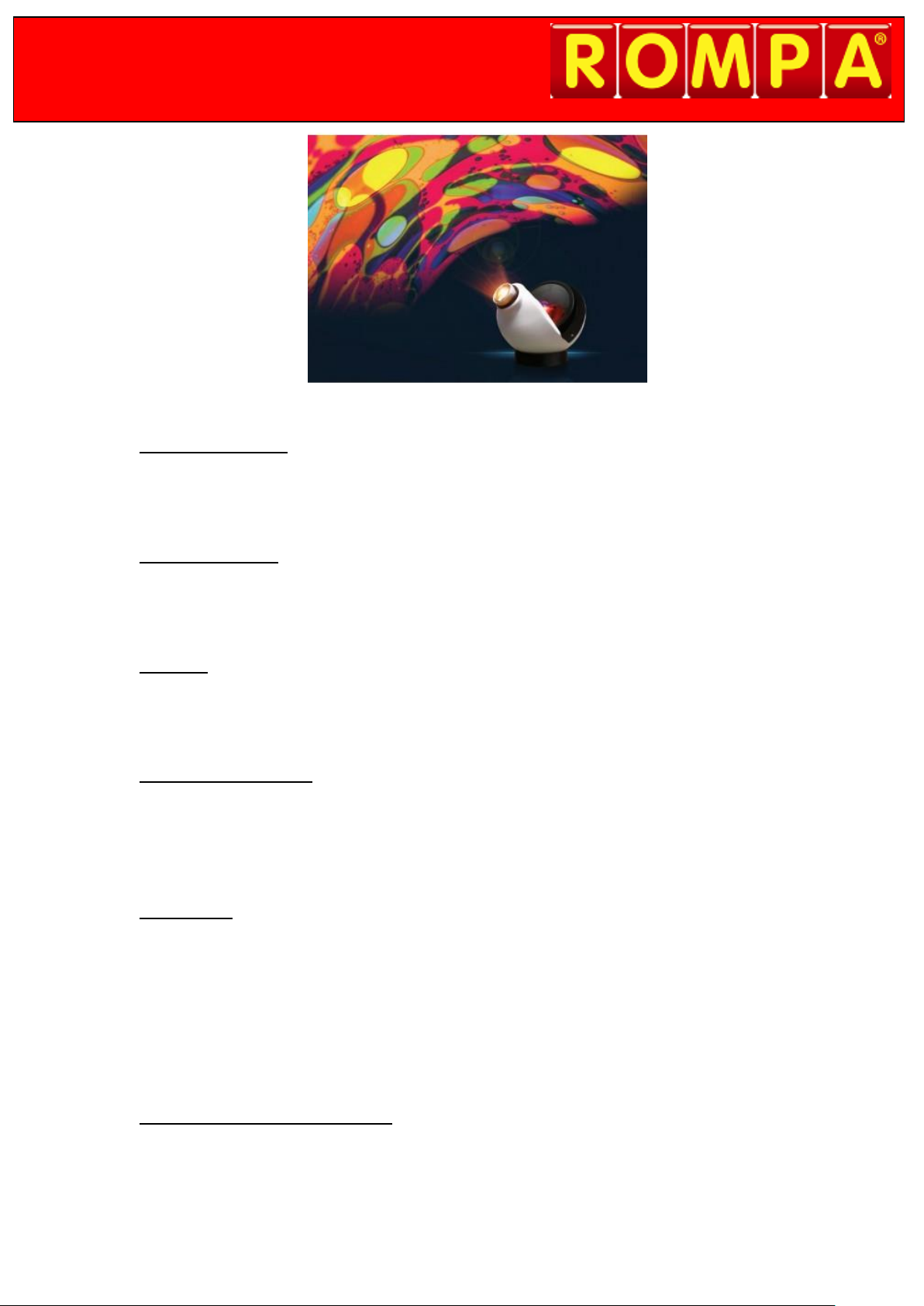
Aura Projector
2. Product Code
22662
3. Colour
As shown
4. Brief Description
The perfect projector for the home. High quality, and an appropriate brightness for
bedrooms.
5. Contents
1 x Aura Projector
1 x Power Supply
1 x Effect Wheel (design may vary)
1 x Table Stand (foam ring)
1 x Wall Mount (with fittings)
6. Snoezelen® Stimulations
Sight

7. Best Use
Use indoors, in a darkened environment. Project onto a flat, white or pale-coloured and
smooth surface. This projector is best suited to smaller rooms. Use the effect wheel supplied.
8. Compatible ROMPA® Products
This projector can be used with the many effect wheels from ROMPA®, including abstract
liquid wheels and effect wheels with themes and images. See www.rompa.com to view
the full effect wheel selection.
9. Starting Up
Mount the Projector.
Attach the effect wheel (removing the magnetic adapter as necessary for your own wheel).
Connect the power supply.
10. Detailed Description
The perfect projector for the home. High quality, and an appropriate brightness for
bedrooms (LED100 and LED Projectors are brighter for multi-sensory Snoezelen®
environments). Features include:
• Timer • LED so no bulb changes and no heat
• Dimming control • Includes a Liquid Wheel (cannot be specified)
• Compatible with our extensive range of effect wheels• Built in Wheel Rotator
Not compatible with the Panoramic Rotator, Distortion Wheel, Clip-on Prism, Multi-
Facet Mirror or the ROMPA® Wi Fi range of products.

11. Safety
Always supervise the use of this product.
Install indoors in a dry environment.
Do not use if the power cord is damaged or if the projector has been dropped.
12. Technical Specification
Power supply: 9V AC 6W
Size: 20 x 20 x 20cm
Weight: 889g
13. Installation
1. Choose a suitable location for the projector, making sure that the power cable will
not be tripped over, pulled or come into contact with hot surfaces. If an extension
cord is necessary, a cord with a current rating at least equal to that of the appliance
should be used. Cords rated for less amperage than the appliance may overheat.
2. Mount the projector using the table stand (foam ring) provided
or wall-mount. The wall mount should be screwed to a
wall in a vertical position so that it supports the bottom
and top of the projector. Fittings are provided.
Please note: when wall mounting, the safety cord should
be fitted to the projector. To do this, attach the spring clip
on the safety cord onto the side of the projector.
3. Install the supplied effect wheel. This has a magnetic
attachment –the slide on the left of the magnetic adapter
should be at the top as shown. Position the magnetic wheel
onto the magnetic adapter on the projector. To remove the
wheel simply lift it off.

4. To use standard ROMPA® effect wheels with this projector,
first remove the magnetic adapter from this projector. To do
this, use the small allen key provided and place this in the
hole on the top of the magnetic adapter. Twist the allen key
anti-clockwise and the adapter will loosen and detach from
the projector.
Please note: You may have to turn on the projector to move
the rotator. The hole on the top of the magnetic adapter
must face the top of the projector.
To reattach the magnetic adapter, make sure that the flat of
the shaft is facing the top of the projector. Place the
magnetic adapter onto the shaft and twist the allen key
clockwise in the hole on the magnetic adapter. The adapter
will subsequently tighten and attach to the projector.
Once the magnetic adapter has been removed, push the
wheel onto the shaft of the wheel rotator as shown. A slight
twist when attaching the plastic-bossed push on effect wheel
will help.
To attach glass-bossed effect wheels (e.g. liquid wheels),
tighten the cross-head screw on the shaft of the wheel
rotator as shown.
The screw needs to be aligned to the flat of the shaft.
To detach a bossed push on effect wheel, unscrew the wheel
if it has a screw (e.g. a liquid wheel), and make sure the wheel
is vertical and straight. Then use both hands to pull the wheel
off the shaft.
5. Connect the power supply to the inlet socket on the right
hand side of the projector. The projector will turn on as you power up the projector.
6. To focus the projected effect, twist the slide on the lens
forward and backwards until your desired focus is achieved.
7. The maximum projected image size should be no bigger than 4m in diameter.

8. To turn the projector off without the app, press and hold the
‘DIM – OFF –TIMER’ button until the light turns off.
9. To dim the image, press and hold down the ‘DIM – OFF –TIMER’ button until you reach
your desired light output level. Please note: it may take up to 15 minutes for liquid
wheels to start to work as these contain oil that will flow freely once warmed. This
warmth will come from the projector.
10. Use of the timer function is ideal for those who want to automatically turn the
projector off after a certain time. Turn on the projector and wait 10 seconds. To start
the timer double-click the ‘DIM – OFF –TIMER’ button. To indicate the timer starting,
the projected light will flicker. The timer automatically sets to 30 minutes, and dims
down then turns off.
This projector is not part of the ROMPA® Wi Fi range of products, and so it cannot be
controlled using ROMPA®’s wireless controllers such as the 8 Colour Wirefree
Controller.
Using the App
A free of charge App is available that allows you to control the Aura Projector remotely. The
app is available on IOS and Android platforms and can be downloaded from the App Store or
by Google Play. Alternatively visit www.optiaura.co.uk/control-app


14. Care and Maintenance
Use and store in dry environments and moderate climates
only. Avoid excessive heat, humidity, dust and vibration.
Unplug before any cleaning and servicing.
Do not attempt to take the projector apart.
To clean the focusing lens, use a soft tissue or lens cloth with
a little methylated spirit or pure alcohol.
Do not attempt to service this projector unless you are
qualified to do so and you are working under the direction of
the manufacturer.
Pull the plug to disconnect from the mains –do not pull the cord to unplug the
projector.
15. Troubleshooting
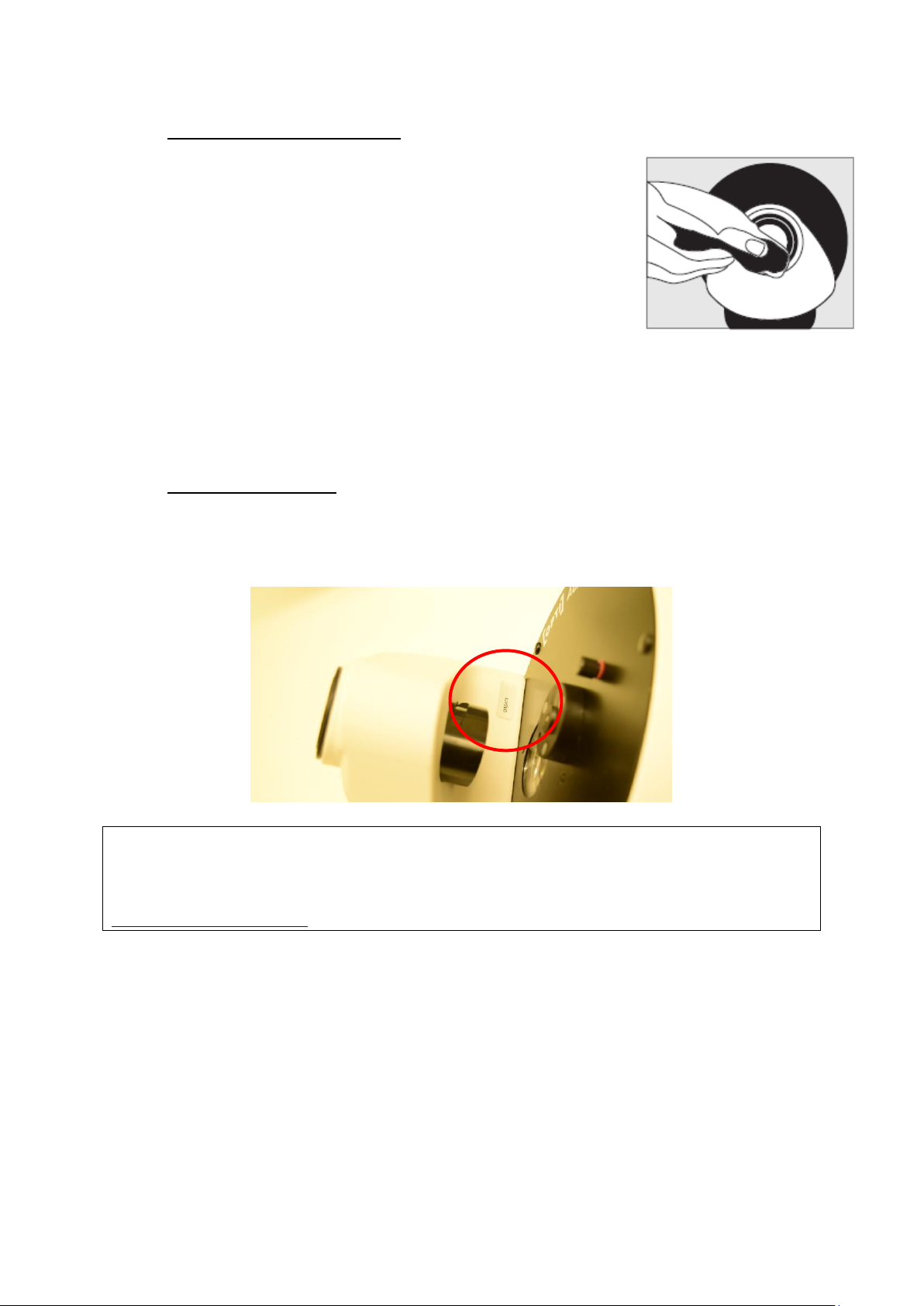
Should you need to contact us about this product, please have the serial number to hand.
This can be located as indicated below:
Further copies of these instructions can be downloaded at www.rompa.com
We hope you find our instructions invaluable. If you have any suggestions for improving
them further your comments will be greatly received –please contact us at
Aura Projector 22662, May 2019
Copyright ROMPA® Ltd

1. Naam van het product
Aura Projector
2. Product Code
22662
3. Kleur
Zoals afgebeeld
4. Korte omschrijving
De perfecte projector voor thuis. Van een hoge kwaliteit en met een geschikte helderheid
voor slaapkamers (LED 100 and LED Projectors geven meer licht voor in de multi-sensorische
snoezelruimte). Niet te gebruiken in combinatie met de Panorama rotator, Vervormwielen,
Voorzetprisma en Multi-facetspiegel.
5. Inhoud
1 x Aura Projector
1 x stroomvoorziening
1 x effectwiel
1 x tafelstandaard
1 x wandmontage

6. Snoezelen stimulatie
Zicht
7. Algemeen
Gebruik het product binnenshuis, in een donkere omgeving. Projecteer op een platte, witte of
lichtgekleurde en glad oppervlak. Deze projector is het meest geschikt voor kleinere ruimtes.
Gebruik het meegeleverde effectwiel.
8. In gebruik nemen
Monteer de projector
Voeg het effectwiel toe
Sluit de stroomvoorziening aan
9. Aanvullende informatie
De projector is voorzien van de volgende kenmerken:
- Timer
- Dimmer
- LED lamp (geen vervanging nodig, geen hitte)
- Toepasbaar met de bestaande serie effectwielen
- Inclusief een vloeistofwiel
- Ingebouwde wielmotor
- 12 volt uitvoering dus ook te gebruiken in badkamers
10. Veiligheid
Houd altijd toezicht als het product in gebruik is.
Installeer het product binnenshuis in een droge omgeving.
Gebruik het product niet als de stekker beschadigd is of als de projector is gevallen.
11. Technische informatie
Stroomvoorziening: 9V AC 6W
Afmeting: 20 x 20 x 20 cm
Gewicht: 889 gram
Este manual sirve para los siguientes modelos
1
Tabla de contenidos
Idiomas:


