
Fiso R2022 Manual de usuario

1
Smart phone
R2022
User Manual

2
Please read this guide carefully before use and keep it for future use.
1.For your safety
Please read this manual before using the cell phone to ensure your safety and proper use.
SWITCH OFF IN HOSPITALS
Please abide by relevant provisions or regulations. Please turn off your mobile phone near medical
equipment.
SWITCH OFF WHEN REFUELING
Don’t use the phone at a refueling point. Don’t use near fuel or chemicals.
SIM CARDS AND TF CARD ARE PORTABLE
Keep your phone, phone parts and accessories out of children’s reach.
BATTERY
Please do not destroy or damage the battery, it can be dangerous and cause fire. Please do not throw battery
in fire to avoid hazard. When battery cannot be used, please dispose in safe environment. Do not try to
dismantle the battery. If the battery or authorized charger is broken or old, please stop using them, and
replace with certified genuine battery.
USE QUALITY EQUIPMENT
Use authorized equipment to avoid danger.
ROAD SAFETY COMES FIRST
Give full attention while driving, Park before using your phone. Please follow traffic rules of local city town.
INTERFERENCE
All wireless devices may be susceptible to cause interference, which could affect performance.
SWITCH OFF IN AIRCRAFT
Wireless devices can cause interference in aircraft. It’s not only dangerous but also illegal to use mobile
phone in an aircraft.
2.Learn about the phone
Overview
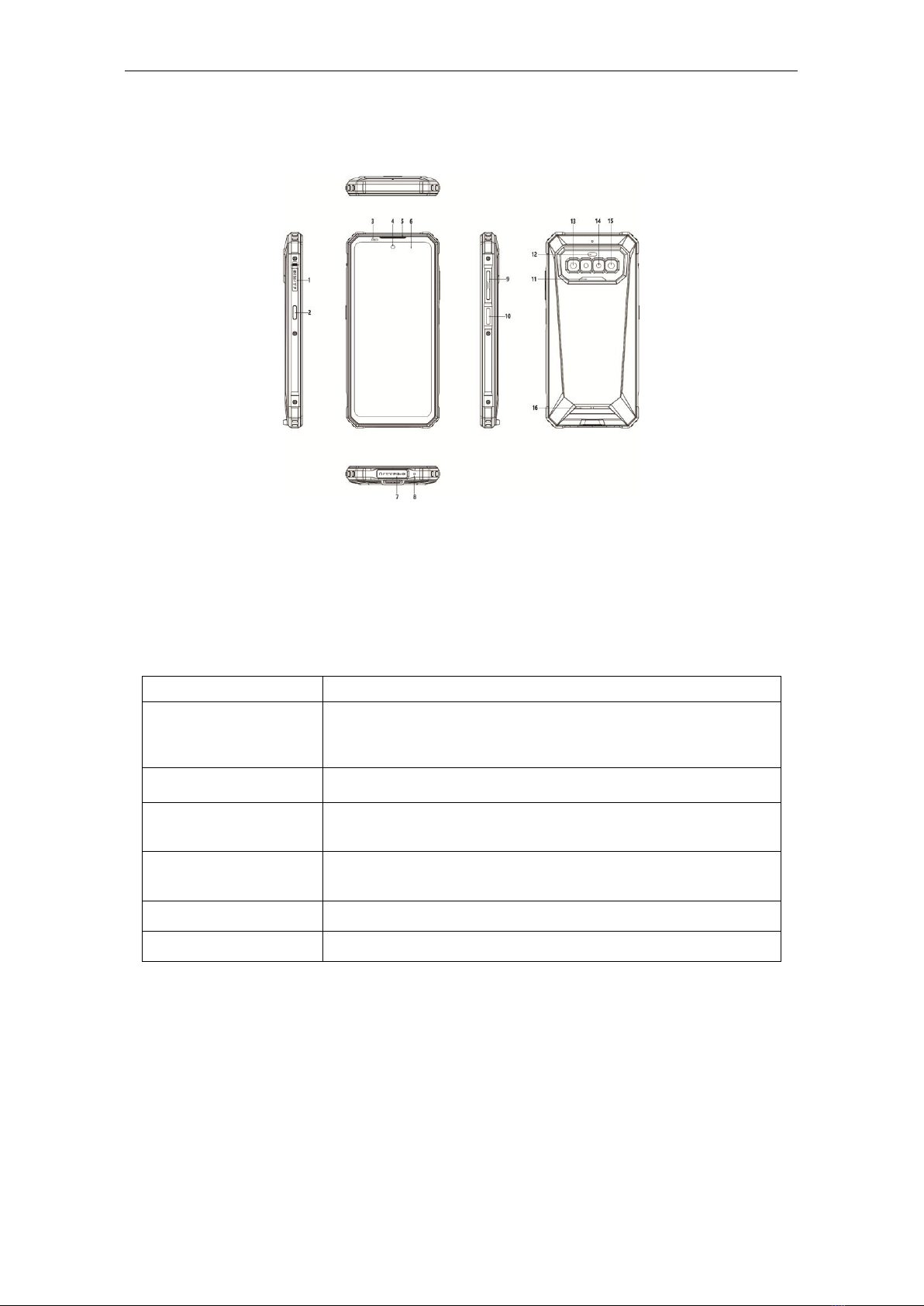
3
1--Card Tray 2--F150 Key 3--Light Sensor
4--Front Camera(16M) 5--Receiver 6--Touch screen
7--Headset/USB interface 8--Microphone 9--Volume Key
10--Power Key/Fingerprint 11--Photo flash 12--Infrared lamp
13--Rear Camera(64M) 14--Macro camera(2M) 15--Night vision camera(20M)
16--Speaker
Function Keys
Keys
Functions
Power Key
Press to turn on/off the screen.
Press and hold to reboot, power off the phone, and
screenshot.
Volume Key
Press to adjust the volume of device.
Home Key
(on the screen)
Tap to return to Home screen.
Back Key
(on the screen)
Tap to return to the previous screen.
Fingerprint key
Press to unlock the phone.
F150 Key(SOS)
Click 5 times to enter SOS mode.
Note
Multi Task Key and Back Key can be exchanged the layout in Settings --> Navigation
bar. You can customize the navigation bar.
3.Before using
The phone is a Dual SIM mobile that allows you to use two mobile networks.
Insert SIM cards and TF card
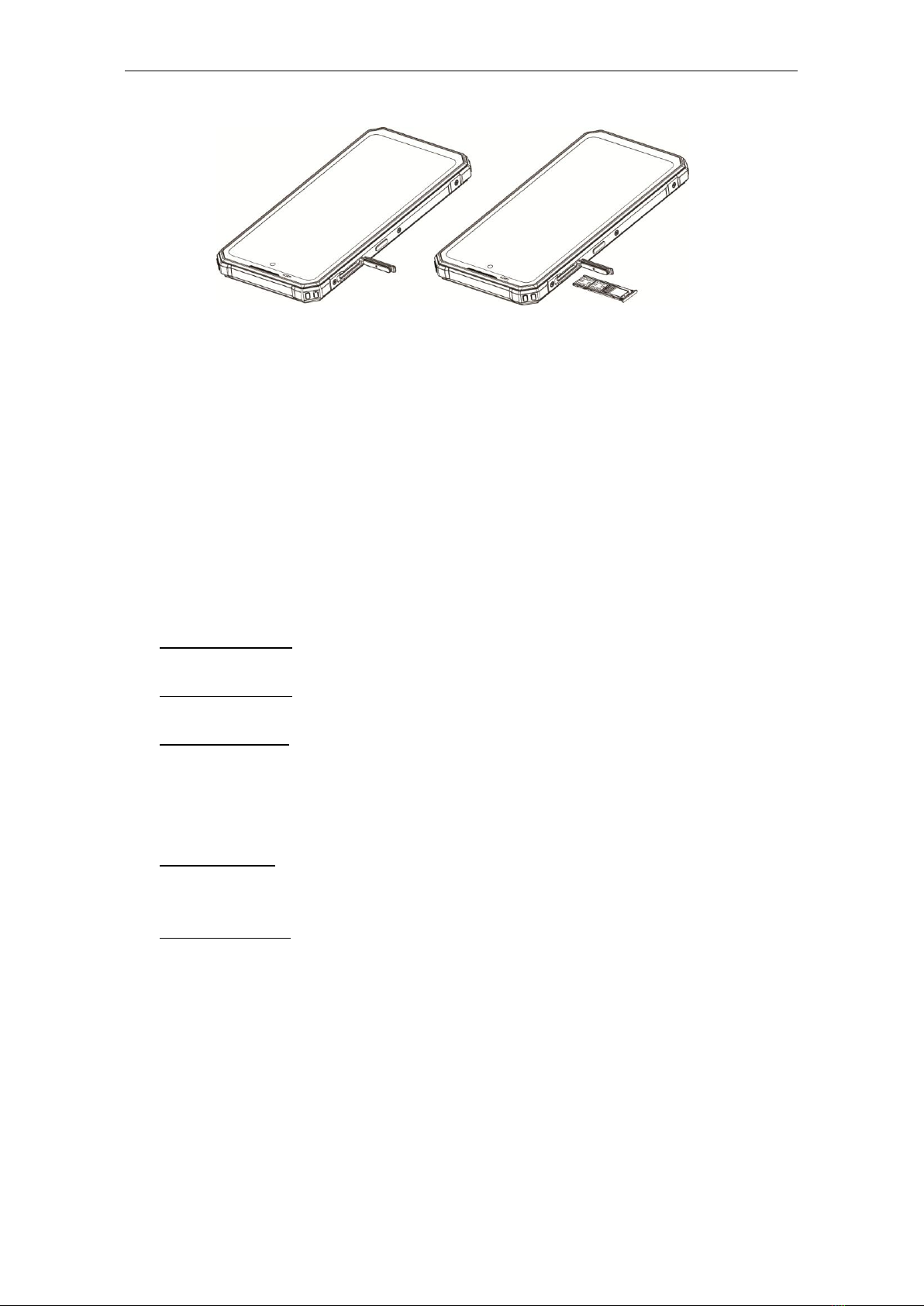
Stick into the pin hole with eject tool, and then card tray will be out of phone.
1) Insert the Nano SIM cards and TF card to the card slots correctly.
Card 1 supports Nano SIM1 card.
Card 2 supports Nano SIM2 card.
4
Card 3 supports TF card.
Note:
Do not remove the cards while the device is transferring data. Doing so may cause data
to be lost or damage to the cards and device.
The SIM cards and TF card are small parts. Please keep away from Children to avoid
swallowing the card by accident.
Please do not touch the metal surface of SIM and TF cards and keep them away from
electromagnetic field to avoid damaged data.
Charge the Battery
Charge the battery before using it.
4.Getting started
Basic Function
Turn on the phone
Press and hold the power key for a while to turn on the phone.
Turn off the phone
Long press the power key until a menu shows. Choose “Power off’’ to turn off the phone.
Restart the phone
Option 1: Long press the power key until a menu shows. Choose “Reboot’’ to restart the
phone.
Option 2: Long press the power key till 13 seconds to auto restart the phone
automatically.
Lock the screen
Option 1: Press the power key to turn off the screen and lock it.
Option 2: The screen will auto lock if you don't use the phone for a while.
Unlock the screen
Press the power key for unlocking.

This device complies with part 15 of the FCC rules. Operation is subject tothe following two
conditions: ( 1) This device may not cause harmful interference, and (2) this device must accept
any interference received, including interference that may cause undesired operation.
15.21 Information to the user.
Any changes or modifications not expressly approved by the party responsible for compliance
could void the user'sauthority to operate the equipment. 15.105 Information for the user.
Note: This equipment has been tested and found to comply with the limits for a Class B digital
device, pursuant topart 15 ofthe FCC rules. These limits are designed to provide reasonable
protection against harmful interference in a residential installation. This equipment generates, uses
and can radiate radio frequency energy and, if not installed and used in accordance with
theinstructions, may cause interference to radio communications. However, there is no guarantee
that interference will not occur in a particular installation. If this equipment does cause harmful
interference to radio or television reception, which can be determined by turning the equipment off
and on, the user is encouraged to try to correct the interference by one or more of the following
measures:
- Reorient or relocate the receiving antenna.
- Increase the separation between the equipment and receiver.
- Connecting the equipment to a socket on a circuit different from that to which the receiver is
connected.
- Contact with the provider or a radio f TV technician for help.
Specific absorption rate (SAR):
This mobile phone meets the government's requirements for exposure to radio
waves. The guidelines are based on standards developed by independent scientific organizations
through periodic and thorough evaluation of scientific studies. The standards include a margin of
safety designed to ensure the safety of all people regardless of their age or health.
The FCC Statement of Exposure to RF and the SAR limit for the United States (FCC) is 1.6 W/kg
average for each gram of tissue. This device was tested for typical operations of use on the body,
with the back of the phone at l0mm from the body. To maintain compliance with FCC RF
exposure requirements, use accessories that maintain a distance of 10mm between the user's body
and the back of the phone. The use of belt clips, covers and similar accessories must not contain
metallic components in their assembly. The use of accessories that do not meet these requirements
may not meet FCC RF exposure requirements and should be avoided.
Functioning in the body
This device was tested for typical operations of use in the body. To comply with RF exposure
requirements, a minimum separation distance of 10mm must be maintained between the user's
body and the telephone, including the antenna. Third-party accessories such as belt clips. covers
and similar accessories used with this device should not contain metallic components, accessories
that do not meet these RF exposure requirements and should be avoided from use on the body. Use
only the supplied antenna or an approved antenna.
Tabla de contenidos
Otros manuales de Teléfono móvil de Fiso


