
Fiberplex FOI-6012 Manual de usuario

USERMANUAL
FlexibleInterfaceDualRX/TXSFP/SFP+Workbox
FOI‐6012/TD‐6012


WarningforYourProtection
1.Readtheseinstructions.
2.Keeptheseinstructions.
3.Heedallwarnings.
4.Followallinstructions.
5.Donotusethisapparatusnearwater.
6.Cleanonlywithadrycloth.
7.Donotblockanyoftheventilationopenings.Installinaccordancewiththemanufacturer’sinstructions.
8.Donotinstallnearanyheatsourcessuchasradiators,heatregisters,stoves,orotherapparatus(includingamplifiers)thatproduceheat.
9.Donotdefeatthesafetypurposeofthepolarizedorgrounding‐typeplug.Apolarizedplughastwobladeswithonewiderthantheother.A
groundingtypeplughastwobladesandathirdgroundingprong.Thewidebladeorthethirdprongisprovidedforyoursafety.Iftheprovidedplug
doesnotfitintoyouroutlet,consultanelectricianforreplacementoftheobsoleteoutlet.
10.Protectthepowercordfrombeingwalkedonorpinched,particularlyatplugs,conveniencereceptacles,andthepointwheretheyexitfromthe
apparatus.
11.Onlyuseattachments/accessoriesspecifiedbythemanufacturer.
12.Useonlywiththecart,stand,tripod,bracket,ortablespecifiedbythemanufacturer,orsoldwiththeapparatus.Whenacartisused,use
cautionwhenmovingthecart/apparatuscombinationtoavoidinjuryfromtip‐over.
13.Unplugthisapparatusduringlightningstormsorwhenunusedforlongperiodsoftime.
14.Referallservicingtoqualifiedservicepersonnel.Servicingisrequiredwhentheapparatushasbeendamagedinanyway,suchaspower‐supply
cordorplugisdamaged,liquidhasbeenspilledorobjectshavefallenintotheapparatus,theapparatushasbeenexposedtorainormoisture,does
notoperatenormally,orhasbeendropped.
Theapparatusshallnotbeexposedtodrippingorsplashing.Noobjectsfilledwithliquids,suchasvases,shallbeplacedontheapparatus.
“WARNING:Toreducetheriskoffireorelectricshock,donotexposethisapparatustorainormoisture.”
GeneralInstallationInstructions
Pleaseconsiderthesegeneralinstructionsinadditiontoanyproduct‐specificinstructionsinthe“Installation”chapterofthismanual.
Unpacking
Checktheequipmentforanytransportdamage.Iftheunitismechanicallydamaged,ifliquidshavebeenspilledorifobjectshavefallenintothe
unit,itmustnotbeconnectedtotheACpoweroutlet,oritmustbeimmediatelydisconnectedbyunpluggingthepowercable.Repairmustonlybe
performedbytrainedpersonnelinaccordancewiththeapplicableregulations.
InstallationSite
Installtheunitinaplacewherethefollowingconditionsaremet:
Thetemperatureandtherelativehumidityoftheoperatingenvironmentmustbewithinthespecifiedlimitsduringoperationofthe
unit.Valuesspecifiedareapplicabletotheairinletsoftheunit.
Condensationmaynotbepresentduringoperation.Iftheunitisinstalledinalocationsubjecttolargevariationsofambient
temperature(e.g.inanOB‐van),appropriateprecautionsmustbetaken.
Unobstructedairflowisessentialforproperoperation.Ventilationopeningsoftheunitareafunctionalpartofthedesignandmust
notbeobstructedinanywayduringoperation(e.g.‐byobjectsplaceduponthem,placementoftheunitonasoftsurface,or
improperinstallationoftheunitwithinarackorpieceoffurniture).
Theunitmustnotbeundulyexposedtoexternalheatsources(directsunlight,spotlights).
AmbientTemperature
UnitsandsystemsbyFiberPlexaregenerallydesignedforanambienttemperaturerange(i.e.temperatureoftheincomingair)of5°Cto40°C(41
°Fto104°F).Whenrackmountingtheunits,thefollowingfactsmustbeconsidered:
Thepermissibleambienttemperaturerangeforoperationofthesemiconductorcomponentsis0°Cto+70°C(32°Fto158°F)
(commercialtemperaturerangeforoperation).
Theairflowthroughtheinstallationmustallowexhaustairtoremaincoolerthan70°C(158°F)atalltimes.
Averagetemperatureincreaseofthecoolingairshallbeabout20°C(68°F),allowingforanadditionalmaximum10°Cincreaseat
thehottestcomponents.
Ifthecoolingfunctionoftheinstallationmustbemonitored(e.g.forfanfailureorilluminationwithspotlamps),theexhaustairtemperaturemust
bemeasureddirectlyabovethemodulesatseveralplaceswithintheenclosure.
GroundingandPowerSupply
Groundingofunitswithmainssupply(ClassIequipment)isperformedviatheprotectiveearth(PE)conductorintegratedinthree‐pinPhoenix™
connector.Unitswithbatteryoperation(<60V,ClassIIIequipment)mustbeearthedseparately.Groundingtheunitisoneofthemeasuresfor
protectionagainstelectricalshockhazard(dangerousbodycurrents).Hazardousvoltagemaynotonlybecausedbydefectivepowersupply
insulation,butmayalsobeintroducedbytheconnectedaudioorcontrolcables.
Thisequipmentmayrequiretheuseofadifferentlinecord,attachmentplug,orboth,dependingontheavailablepowersourceatinstallation.If
theattachmentplugneedstobechanged,referservicingtoqualifiedpersonnel.

Warranty,ServiceandTermsandConditionsofSale
ForinformationaboutWarrantyorServiceinformation,pleaseseeourpublished‘TermsandConditionsof
Sale’.Thisdocumentisavailableonfiberplex.comorcanbeobtainedbyrequestingitfrom
[email protected]orcalling301.604.0100.
Disposal
DisposalofPackingMaterials
Thepackingmaterialshavebeenselectedwithenvironmentalanddisposalissuesinmind.Allpackingmaterial
canberecycled.Recyclingpackingsavesrawmaterialsandreducesthevolumeofwaste.Ifyouneedto
disposeofthetransportpackingmaterials,recyclingisencouraged.
DisposalofUsedEquipment
Usedequipmentcontainsvaluablerawmaterialsaswellassubstancesthatmustbedisposedof
professionally.Pleasedisposeofusedequipmentviaanauthorizedspecialistdealerorviathepublicwaste
disposalsystem,ensuringanymaterialthatcanberecycledhasbeen.Pleasetakecarethatyourused
equipmentcannotbeabused.Afterhavingdisconnectedyourusedequipmentfromthemainssupply,make
surethatthemainsconnectorandthemainscablearemadeuseless.
Disclaimer
Theinformationinthisdocumenthasbeencarefullycheckedandisbelievedtobeaccurateatthetimeof
publication.However,noliabilityisassumedbyFiberPlexforinaccuracies,errors,oromissions,norforlossor
damageresultingeitherdirectlyorindirectlyfromuseoftheinformationcontainedherein.
Notice
ThefirmwareincludedinthisproductutilizestheAtmelSoftwareFramework(ASF),Copyright(c)2011‐2012AtmelCorporation.Allrights
reserved.
Redistributionanduseinsourceandbinaryforms,withorwithoutmodification,arepermittedprovidedthatthefollowingconditionsaremet:
1.Redistributionsofsourcecodemustretaintheabovecopyrightnotice,thislistofconditionsandthefollowingdisclaimer.
2.Redistributionsinbinaryformmustreproducetheabovecopyrightnotice,thislistofconditionsandthefollowingdisclaimerinthe
documentationand/orothermaterialsprovidedwiththedistribution.
3.ThenameofAtmelmaynotbeusedtoendorseorpromoteproductsderivedfromthissoftwarewithoutspecificpriorwrittenpermission.
4.ThissoftwaremayonlyberedistributedandusedinconnectionwithanAtmelmicro‐controllerproduct.
THISSOFTWAREISPROVIDEDBYATMEL“ASIS”ANDANYEXPRESSORIMPLIEDWARRANTIES,INCLUDING,BUTNOTLIMITEDTO,THEIMPLIED
WARRANTIESOFMERCHANTABILITY,FITNESSFORAPARTICULARPURPOSEANDNON‐INFRINGEMENTAREEXPRESSLYANDSPECIFICALLY
DISCLAIMED.INNOEVENTSHALLATMELBELIABLEFORANYDIRECT,INDIRECT,INCIDENTAL,SPECIAL,EXEMPLARY,ORCONSEQUENTIALDAMAGES
(INCLUDING,BUTNOTLIMITEDTO,PROCUREMENTOFSUBSTITUTEGOODSORSERVICES;LOSSOFUSE,DATA,ORPROFITS;ORBUSINESS
INTERRUPTION)HOWEVERCAUSEDANDONANYTHEORYOFLIABILITY,WHETHERINCONTRACT,STRICTLIABILITY,ORTORT(INCLUDING
NEGLIGENCEOROTHERWISE)ARISINGINANYWAYOUTOFTHEUSEOFTHISSOFTWARE,EVENIFADVISEDOFTHEPOSSIBILITYOFSUCHDAMAGE.

Introduction
Thetrue“SwissArmyKnife”offiberoptictransport,theFOI‐6012inconjunctionwithanycombinationofa
myriadofFiberPlexorthirdpartySFP/SFP+(SmallForm‐FactorPluggable)optical&electricalmodules,allows
youtotransportwhatyouwant,whenyouwantit,howyouwantit,whereveryouwantit;alloverone
productsolution...TheFiberPlexFOI‐6012andSFP/SFP+moduleshouldbeineveryone’stoolbox.
KeyFeatures
UltraflexibleSFP+toSFP+DualTX/RXinterface
SupportsDataRatesupto12.5Gbps
USBinterfaceforfullaccesstoallSFPstandardandcustomregisters
LimitlessConversionapplicationsincludingbutnotlimitedto:
o Videodistribution
o AnalogVideotoFiberConversion
o SD‐SDI(composite)toHDvideoconversion
o MADItoFiberConversion
o OM1/OM2toOM3Multi‐modeConversion
o OpticalRepeater
o MultimodetoSinglemodeFiberConversion
TheoryofOperation
Manysortsofinterfaces,notjustfiber,arenowavailableintheSFP/SFP+format,includingFullHDvideoand
networking.Ontheuser,connectorside,theysupportthesignalsappropriatetothoseprotocols,butthen
converttheminternallytoastandardstreamofhigh‐speedserialdata.TheFOI/TD‐6012connectsthose
standardstreamstogether,sothatthedifferentinterfaceprotocolscantalkthesamelanguage.
Sincethefiber‐basedSFPsarethemostgeneric,itisusuallypossibletoconnect,notonlytwodifferentcopper
interfacestogetherinthesameFOI/TD‐6012,butalsotointerposeafiberlinkbetweenthem.Sincetherange
ofsignalsoverfiberissomuchgreaterthanthatofcopper,thisallowssignificantexpansionoftherangeof
thoseprotocols.
SFPsalsohaveanadditional,low‐speedserialinterfacethatprovidesidentification,monitoringandalso
controlofthedevicesthroughtheprocessorintheFOI/TD‐6012.
TheFOI‐6012andTD‐6012supportdualtransmitanddualreceiveSFPandSFP+ONLY.ForstandardMSA
andnon‐MSAtransceiversusetheFOI‐6010orTD‐6010.
DifferencesbetweenFOI‐6012andTD‐6012
Functionally,theFOI‐6012andTD‐6012areidentical.Theonlydifferencesarethepackagingandpower
supply.TheFOI‐6012ispartoftheFOIlineofproductsdesignedforruggedizedmilapplications.Itishousedin
thefamiliarFOIshieldedcanenclosure.ForstandaloneapplicationsitcanbepoweredbyaddingaPSQ‐4909
ACsupplyoraPSQ‐4920DCpowersupply(notincluded).Optionally,upto8FOIunitscanbemountedon
CMAchassisadaptersandinstalledinanRMC‐3101orRMC‐2101rackmountchassis.Theunitsarepowered
redundantlybyacommonbackplaneconnection.
TheTD‐6012ishousedinthecommercial‘ThrowDown’packaging.Thisversionisdesignedtobeaworkhorse
unitinvariouscommercialandindustrialenvironments.Itispoweredeitherbya9VDC‘WallWart’style
supply(included)orviabussedpowersuppliedthroughanintegratedthree‐pinPhoenix™connector.Uptosix
TD‐6012unitscanbeinstalledintheoptional1UTDR‐01rackshelf.

GettingStarted
InitialInspection
Immediatelyuponreceipt,inspecttheshippingcontainerfordamage.Thecontainershouldberetaineduntil
theshipmenthasbeencheckedforcompletenessandtheequipmenthasbeencheckedmechanicallyand
electrically.Iftheshipmentisincomplete,ifthereismechanicaldamage,oriftheunitfailstooperatenotify
FiberPlexandmaketheshippingmaterialsavailableforthecarrier'sinspection.
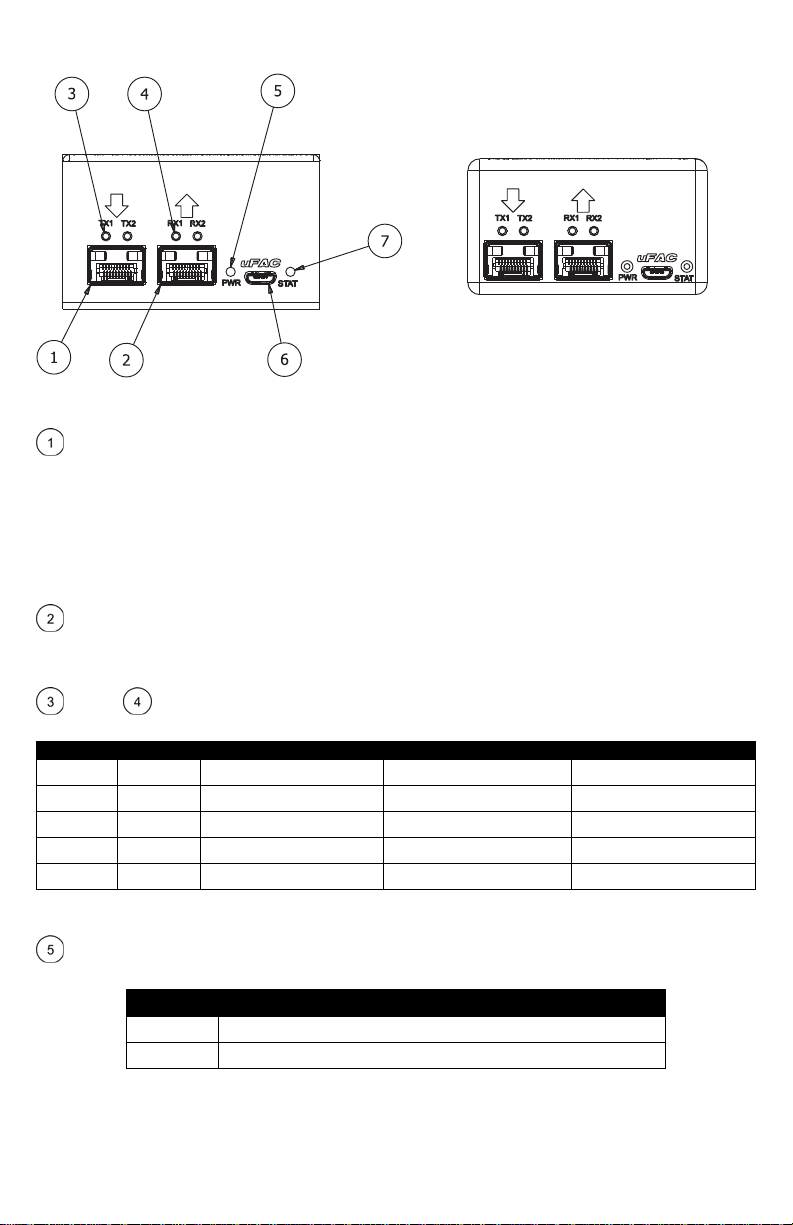
FrontIndicators/Connections
Figure1TD‐6012(left)andFOI‐6012(right)FrontFace
SFPPortA–InstallSFPsinthisslot.TheseslotssupportdualTXordualRXSFPsONLY.Anynon‐MSA
complaintdualtransmitordualreceiveSFPcanbeusedintheseslotsincludingbutnotlimitedtooptical
moduleswithdataratesintherangeof155Mbpsto12.5Gbps,videocoppermodules,copperquadraxSFPto
SFPcables,etc.
EachchannelisindependentandwillacceptanyformatandanyusersuppliedSFPmodulethatisappropriate
fortheuser’sequipment.Above500Mbps,ultra‐lowjitterSFP’sarerecommended(40psec.)aswellasITU‐T
G.652.D/IEC60793‐2‐50.B1.3compliantfiberopticcable.
SFPPortB–AsecondSFPslotfunctionallyequivalenttoSFPPortA.AnySFPinstalledinthisslotwillbe
directlyelectricallyconnectedtotheSFPinPortA.AnysignalspresentedintheReceiveofPortBwillexiton
theTransmitofPortA.
TXFaultRXDetect–ThereisonepairoftheseLEDindicatorsassociatedwitheachSFPslotonthe
unit.Theycorrespondtotheslotdirectlybelow.Colorindicationscanbeinterpretedusingthefollowingtable:
TXFault RXDetect SFPInstalled TransmitterFunctioning* ReceiveSignalPresent*
Off Off No n/a n/a
Red Red Yes No No
Red Green Yes No Yes
Green Red Yes Yes No
Green Green Yes Yes Yes
*NotethatsomecopperEthernetandVideoSFPsmayhavecustomTXFaultandRXDetectimplementations.SeeSFPdocumentationofindividual
SFPformoreinformation.
Power–LEDwhichindicatesthepresenceofDCpowerintheunit.Notethatonstart‐up,theunitwill
performaquicklampcheck,flashingallLEDs
PowerIndicator
Off Nopowerfromtheexternalsupplyorinternalfault
Blue Powersupplyisoperatingproperly
uFAC–USB2.0Micro‐BconnectorforconfigurationandmonitoringofSFPregisters.Thisfunctionisnot
currentlyimplemented.
Status–LEDwhichindicatesthehealthstatusoftheunit.TheLEDcanbeinterpretedaccordingtothe
followingtable.
StatusIndicator
Off IfPowerLEDison,thereisaninternalfailureinsidetheFOI.Replace
Green Powersupplyisoperatingproperly
Amber Atlimitofnormalrangeoftemperature,applymorecoolingtotheunit
Red Exceedingtemperaturelimitsorinternalfailure
RearIndicators/Connections
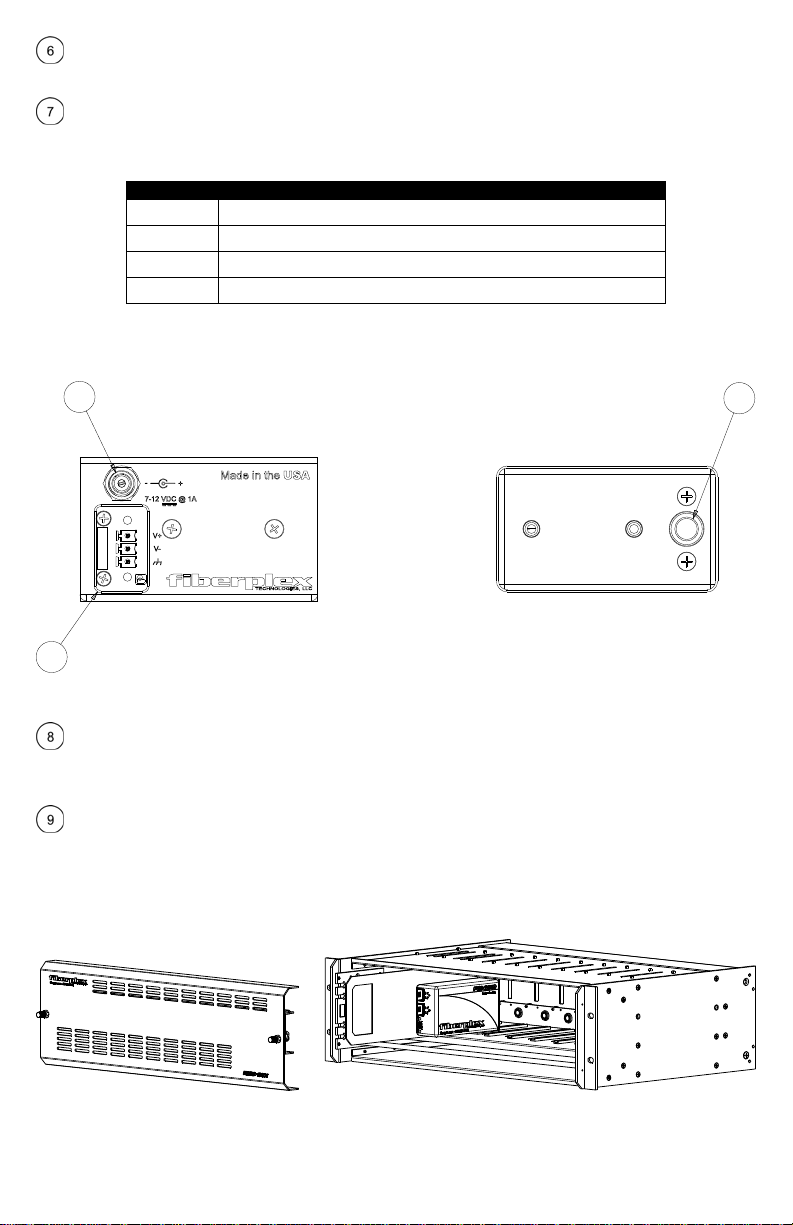
Figure2TD‐6012(left)andFOI‐6012(right)RearFace
CircularDCPowerConnection–DCpowerentryfortheunit.OntheFOI‐6012thisisaLemoconnector
designedtointerfacewitheitheraPSQpowermoduleorRMCchassis.OntheTD‐6012thisisastandardDC
connectionforusewiththeincludedDCwallpowersupply.
PhoenixCDPowerConnection–SecondarypoweroptionfortheTD‐6012.Thisiswiredindirectparallel
withtheCircularconnectorandhastheadditionofapositiveearthchassisgroundconnection.Thiscanbe
usedtopowertheunitonaclientsuppliedpowerbuss.
Figure3FOIModuleInstalledinanRMC‐3101Chassis
8
8
9
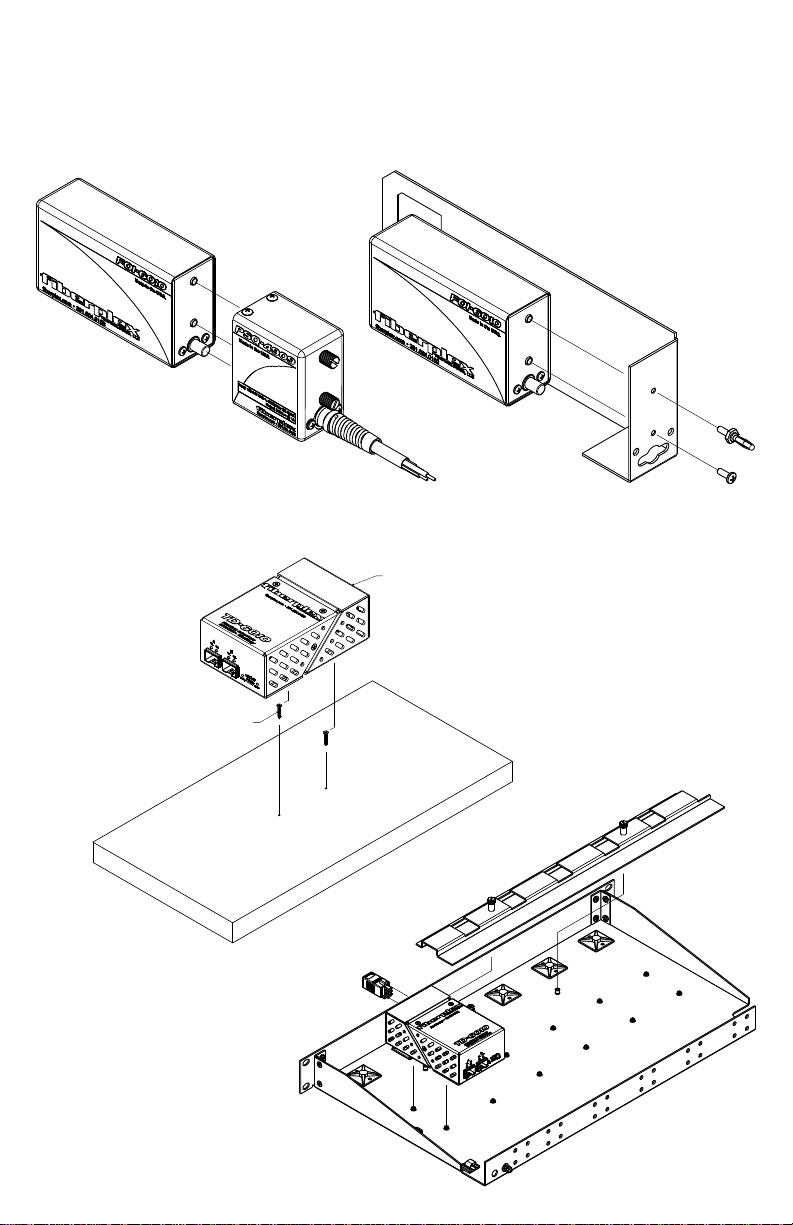
PowerRequirementsandMounting
FlexiblemountingallowstheFOI‐6012tobechassismountedorstandaloneconfiguration.Anycombinationof
8FiberPlexFOIunitscanbemountedinaRMC‐3101usingCMA‐2001chassismountadapters.TheRMC‐3101
canaccommodatehotswappedredundantpower.Alternately,theFOI‐6012canbeusedinastandalone
applicationwhenpairedwithaPSQ‐4909forfullrangeACoperationorthePSQ‐4920for12‐48VDCoperation.
Figure4FOIModulewithPSQ‐4909(left)andwithCMA‐3002(right)
#2 Wood Screw, 1/2" Long, #1 Phillips
Drive
Lower TD Unit Over Screw
Heads,
Figure6TDModuleinstallationonaTDR‐01tray
Figure5InstallingaTDModuleUsing
MountingSlots
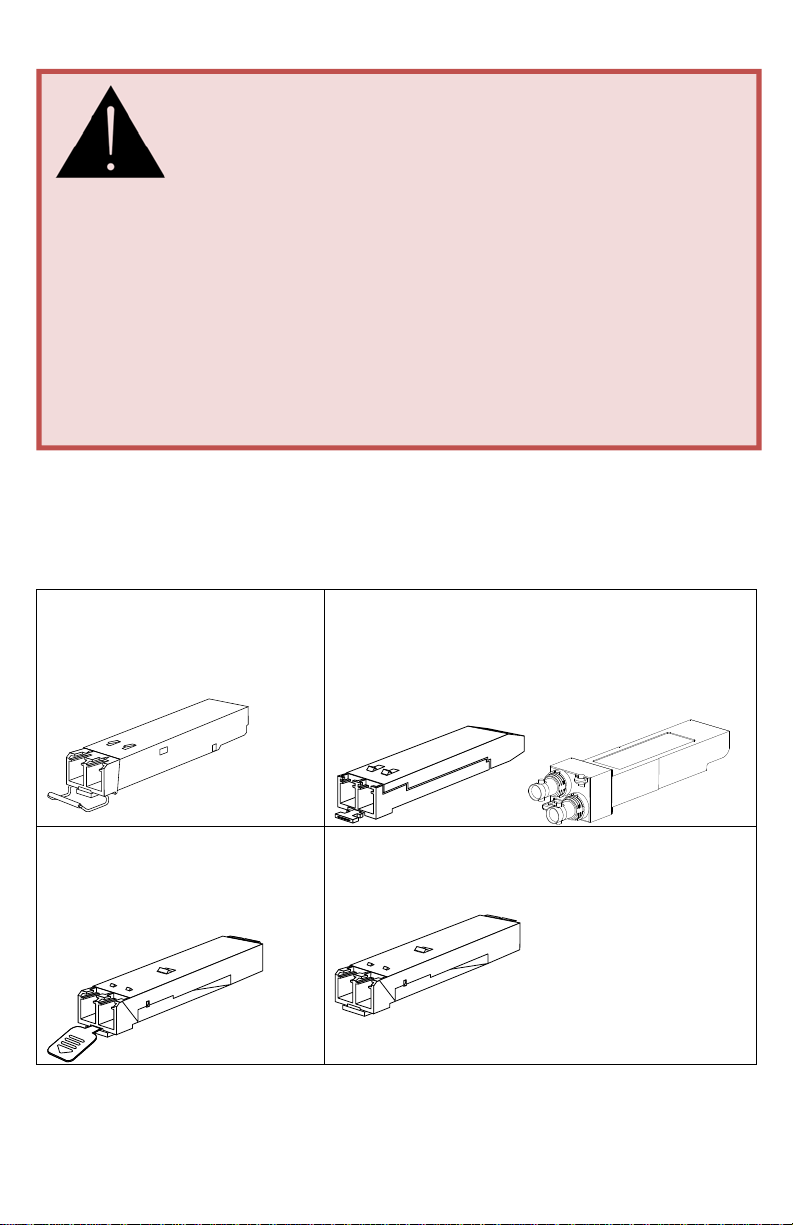
InsertingandRemovingSFPModules
IdentifytheLatchTypeoftheSFPModule
SFPModuleshavevariouslatchingmechanismstosecurethemintotheSFPCageofadevice.TheFiberPlex
WDMcansupportahostofmanufacturersandbrandsofSFPModulessotheusermayencounteranynumber
ofdifferentlatches.Someofthesearedescribedbelow.
BailClasp
ThebailclaspSFPmodulehasaclasp
thatyouusetoremoveorinstalltheSFP
module.
ActuatorButton
TheactuatorbuttonSFPmoduleincludesabuttonthatyou
pushinordertoremovetheSFPmodulefromaport.This
buttoncaneitherlift‘Up’orpress‘In’toreleasetheSFP
Moduledependingonthemanufacturer.
MylarTab
TheMylartabSFPmodulehasatabthat
youpulltoremovethemodulefroma
port.
SlideTab
TheslidetabSFPmodulehasatabunderneaththefrontofthe
SFPmodulethatyouusetodisengagethemodulefromaport.
HandlingWarnings
SFPModulesarestaticsensitive.Topreventdamagefromelectrostaticdischarge(ESD),itis
recommendedtoattachanESDpreventativewriststraptoyourwristandtoabaremetalsurfacewhen
youinstallorremoveanSFPModule.
DisconnectallopticalorcoppercablesfromSFPModulespriortoinstallingorremovingtheSFPModule.
Failuretodosocouldresultindamagetothecable,cableconnectorortheSFPModuleitself.Removing
andinsertinganSFPModulecanshortenitsusefullife,soyoushouldnotremoveandinsertSFPModules
anymoreoftenthanisabsolutelynecessary.
ProtectopticalSFPmodulesbyinsertingcleandustcoversintothemafterthecablesareremoved.Be
suretocleantheopticsurfacesofthefibercablesbeforeyouplugthembackintotheopticalportsof
anotherSFPmodule.AvoidgettingdustandothercontaminantsintotheopticalportsofyourSFP
modules,becausetheopticswillnotworkcorrectlywhenobstructedwithdust.
Este manual sirve para los siguientes modelos
1
Tabla de contenidos
Otros manuales de Equipo de grabación de Fiberplex


Manuales populares de Equipo de grabación de otras marcas


Strymon
Strymon NIGHTSKY Manual de usuario

Mitsubishi Electric
Mitsubishi Electric 16CH DIGITAL RECORDER DX-TL5000U Manual de usuario

Tews Technologies
Tews Technologies TPMC465 Manual de usuario

Honeywell
Honeywell Excel 50 Manual de usuario

SeaLevel
SeaLevel COMM+8.LPCI Manual de usuario

Arturia
Arturia AUDIOFUSE STUDIO Manual de usuario


