
Ferguson S3 Manual de usuario

v1
User manual

Table of contents
Downloadable software...................................................................................................2
GNU/GPL licensing information.........................................................................................2
User manual..................................................................................................................2
Markings and signs.........................................................................................................3
Basic information about t e tablet....................................................................................4
1. Prior to first use.....................................................................................................4
2. Contents of box......................................................................................................4
3. Tablet parts and connectors.....................................................................................5
Tablet operation.............................................................................................................7
4. Tablet first use.......................................................................................................7
5. Basic operation of t e Android operating system.........................................................8
5.1 Home screen elements......................................................................................9
5.2 Applications switc ing......................................................................................10
5.3 Application menu............................................................................................10
5.4 Adding widgets and s ortcuts to your ome screen.............................................11
5.5 WiFi configuration...........................................................................................12
5.6 Basic applications............................................................................................13
5.7 Connecting tablet to a computer.......................................................................14
6. Watc TV DVB-T...................................................................................................15
6.1 Connecting an external aerial antenna...............................................................15
7 MapaMap navigation...............................................................................................15
8 Connect t e tablet to a TV......................................................................................16
9 Factory reset.........................................................................................................17
10 Firmware Upgrade by SDHC card...........................................................................17
11 Playing Media......................................................................................................17
12 FM Transmitter.....................................................................................................17
13 C arging t e battery............................................................................................17
Glossary of terms.........................................................................................................18
Specification................................................................................................................19

Downloadable software
Ferguson as taken every effort to provide users wit software updates in order to ensure t at
t e parameters of t e tablet are up to date. Ferguson reserves itself t e rig t to amend, c ange
or modify t e software used in t e tablet as it s all c oose and wit out prior notification. T e
latest version of t e software is available on t e website ttp://www.ferguson-digital.eu
GNU/GPL licensing information
Please consult t e legal information available on your tablet under Settings > About tablet >
Legal information (internet connection required) or visit
ttp://source.android.com/source/licenses. tml for more information.
User manual
Ferguson as made every effort to provide t e most current information about its products.
Ferguson does not grant any guarantee as to t e contents of t e present instruction manual and
disclaims any implied guarantees concerning market value or suitability for specific purposes.
T e information contained erein is an instruction intended to enable t e correct usage and
maintenance of t e tablet.
Ferguson reserves itself t e rig t to introduce amendments, c anges or translations of t e
instruction manual wit out prior notification t ereof. For t is reason, we recommend you
regularly visit our website ttp://www.ferguson-digital.eu in order to obtain t e latest
information.
2
Markings and signs
Digital signal transmission logo.
T is logo informs t at t e receiver conforms to t e Digital Video Broadcasting
standards.
CE logo.
T is mark tells you t at t e device is following t e provisions of Council Directive
2004/108/EC on t e approximation of t e laws of t e Member States relating to
t e electromagnetic compatibility and t e provisions of Council Directive
2006/95/EC and 93/68/EEC on t e approximation of t e laws of t e Member
States relating to low voltage and electrical safety.
Double insulation logo.
T is logo informs t at t e receiver is an electrically safe device, provided t at it is
used in accordance wit t e recommendations set forward in t e c apter
concerning safety.
Take an acti e part in protecting the natural en ironment!
•Your device is made from materials t at can be processed or recycled.
•To t is end, you s ould deliver it to a designated collection point.
The RoHS mark
T is mark tells you t at t e device is following T e Directive on t e Restriction of
t e Use of Certain Hazardous Substances in Electrical and Electronic Equipment
2011/65/EU (commonly referred to as t e Restriction of Hazardous Substances
Directive or RoHS)
3

Basic information about the tablet
1. Prior to first use
T ank you for purc asing Ferguson tablet. To ensure you a quick and convenient use of your
new tablet, please read t ese instructions carefully prior to use. We ope you will absolutely
enjoy your Ferguson tablet for t e longest time possible!
Do not try to disassemble t e tablet, as t is will void your warranty and may result in
malfunctioning of t e device.
Avoid using t e tablet in a ig or low temperature environment, or in any environment
w ere t e device can get in contact wit moisture, dust or magnetic fields. T e device
s ould be placed away from vases, bottles, aquariums and ot er water containers in
order to avoid damage.
Do not expose t e tablet to strong sunlig t for an extended period of time
Avoid beating of or to t e product
Do not place any objects on t e ousing of t e device. T is may cause screen damage.
Don’t operate t e touc screen of t e tablet wit s arp objects, as t is may result in
scratc ing t e screen surface.
To clean tablet do not use alco ol or liquids containing ammonia or any sort of (glass)
cleaning aid. If necessary, clean wit a soft, lint-free, cotton clot dampened wit water.
Using connected eadp ones on t e tablet for too long and/or setting t e audio volume
up too ig w en using eadp ones may cause serious earing damage.
Do not cross t e road, drive a motor ve icle or bicycle w ile using t e tablet wit
eadp ones to avoid traffic accidents.
Only use permitted batteries, c argers and accessories wit your tablet. T e use of any
ot er products wit t e GoTab can be dangerous and may violate t e warranty
regulations
Do not operate t e tablet w ile driving.
You may go a ead and use your Ferguson tablet rig t out of t e box, wit out c arging t e
battery first. If t e tablet isn’t switc ing on rig t out of t e box, t e battery is already
completely drained and you s ould of course rec arge it first. It is best for t e battery to first
run on t e c arge left in it, and to be fully rec arged once it’s completely drained for t e first
time.
2. Contents of box
Unpack t e box and c eck w et er all of t e following elements are present
Tablet Ferguson
User manual
AC adaper (wall c arger)
Car adaper (car c arger)
Car andle (consisti of two components, one of t em allows you to use t e tablet as a
digital p oto frame)
USB cable to connect to computer
USB OTG cable to connect external devices (3G modem, USB storage)
Antenna adapter
4

3. Tablet parts and connectors
Figure 1
1. touch screen – support soft touc
2. camera for ideo conferencing
5

3. buttons quieter / louder
4. ON / OFF button - wake / sleep tablet, press and old to turn on / off
5. search button
6. back button
7. home button
8. menu button
9. microphone
10.headphone jack
11.microSDHC card slot
12. HDMI type C - audio-video output to HD TV
13. USB OTG 2.0 micro-B – to connect PC, USB memory, 3G modem
14.power connector
15.camera photo
16. antenna connector – connect t roug an adapter, external terrestrial antenna
17. DVB-T antenna - slide if you want to watc TV (DVB-T)
18.speaker
6
Tablet operation
4. Tablet first use
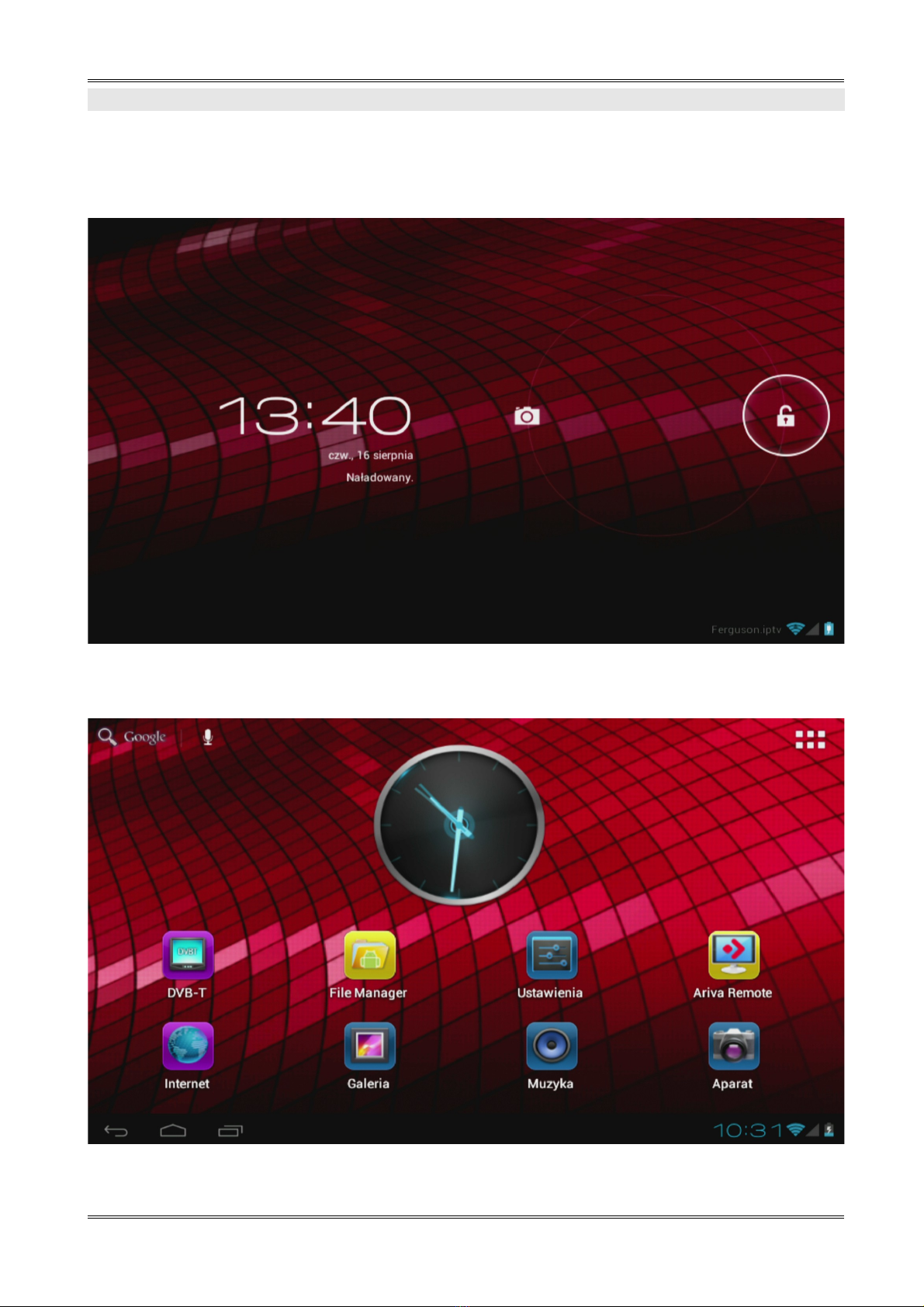
T e very first startup may take a w ile, approximately 2-3 minutes. W en you first power on
your tablet (press button ON/OFF Figure 1 point 4), you will be presented t e Android Lock
Screen.
Figure 2
Slide t e lock circle to t e rig t (to open lock symbol) to unlock t e tablet. You will t en be
taken to t e Android Home Screen.
Figure 3
7

5. Basic operation of the Android operating system
Operating of t e tablet is not muc different from operating p ones wit a touc screen. Used a
capacitive screen does not require t e use of force, it can andle gently brus ing t e screen
wit your fingers. T ere is no need for a pen. To move items on t e screen, c ange desktops,
etc simply swipe your finger across t e screen. Ferguson supports multitouc so it is possible to
zoom in and out wit two fingers. In a similar manner, rotation is performed in applications t at
support it, suc as maps, MapaMap.
Besides t e on-screen buttons Ferguson also as t ree buttons on t e top edge of t e ousing
(quiter, lauder, and suspend / wake) and four on t e front panel (menu, ome, back, searc ).
Usually t ere is no need to s ut down t e tablet. W en tablet is not in use it automatically goes
into sleep mode w ic takes a minimum amount of energy.
You can enter text by t e virtual keyboard displayed on t e screen. You can switc t e input
mode, uppercase c aracters, numbers or special c aracters.
Figure 4
Ferguson as a built-in accelerometer (G-sensor) t at automatically c anges t e screen
orientation to landscape or portrait. T e accelerometer can also be used for ot er purposes suc
as to control t e game.
NOTE: Support for accelerometer and / or change the screen orientation depends on
the application.
8

5.1 Home screen elements
Figure 5
1. Search
2. Voice commands
3. Widget (analog clock)
4. Application and widget menu
5. Application shortcuts
Status bar is always displayed at t e bottom of t e tablet screen. T e status bar displays bot
system information, as well as function keys.
6. Back button – go to t e previous screen or t e previous web page w ile using t e
Internet browser
7. Home button – brings you back to t e Android Home Screen
8. Multitask button – switc or close running applications
9. Time
10.Wi-Fi signal indicator
11.Battery le el indicator
Ot er indicators t at may appear at t e bottom rig t of t e screen, near t e indicators 9, 10
and 11:
- new mail in the mailbox
- aitplane mode
- USB connection
- sound muted
9
Tabla de contenidos
Otros manuales de Tableta de Ferguson


