
Fbt MS02-CD3/DG Manual de usuario

A U D I O C O N T R A C T O R
MUSIC SOURCES
MS02 CD3 / DG


°When the unit is installed in a rack enclosure, the rack must have all the prerequisites required by the EN 60439-1 standard, in particular the
rear part must be closed by means of suitable panels.
INSTALLATION
GENERAL PRECAUTIONS
All FBT equipment is manufactured in accordance with the most stringent international safety standards and in compliance with European
Community requisites. In order to use the equipment correctly and effectively, it is important to be aware of all its characteristics by reading
these instructions and in particular the safety notes carefully. While the equipment is working, it is necessary to provide adequate
ventilation. The equipment must not be closed indide cabinets without ventilation or kept in the vicinity of sources of heat.
• Installation
TO REDUCE THE RISK OF ELECTRIC SHOCK
DO NOT REMOVE COVER (OR BACK)
NO USER SERVICEABLE PARTS INSIDE
REFER SERVICING TO QUALIFIED SERVICE PERSONNEL
TO REDUCE THE RISK OF FIRE OR ELECTRIC SHOCK
DO NOT EXPOSE THIS EQUIPMENT TO RAIN OR MOISTURE
WHERE MARKED, THIS SYMBOL INDICATES A DANGEROUS NON-ISOLATED
VOLTAGE INSIDE THE LOUDSPEAKER: SUCH VOLTAGE COULD BE
SUFFICIENT TO RESULT IN THE RISK OF ELECTRIC SHOCK
WHERE MARKED, THIS SYMBOL INDICATES IMPORTANT USAGE
AND MAINTENANCE INSTRUCTIONS IN THE ENCLOSED
DOCUMENTS. PLEASE REFER TO THE MANUAL
A U D I O C O N T R A C T O R
This equipment is designed for use with a mains voltage of 230Vac ±10% 50/60Hz. The ON/OFF switch controls the mains voltage. The
equipment is supplied with its own power supply cable, which is equipped with an earthing wire. The earth terminal of the mains plug
should never be removed under any circumstances. Connect the mains plug of the equipment to the power mains using the cable included
in the supply. Make sure that the power outlet is equipped with a connection to earth in accordance with the law. The power-supply circuit of
the equipment is protected by a fuse installed on the mains plug of the equipment.
• Power supply and earthing
Any activities inside the equipment such as maintenance and so on may only be carried out by specialised personnel: when the cover is
removed, parts liable to cause electric shocks are exposed. Before removing the cover always make sure that the power cord has been
disconnected. In the event that liquid is accidentally spilt onto the apparatus, disconnect the mains plug immediately and contact the
nearest Service Centre. The chassis connection may be used to connect other equipment only for the purpose of shielding the low signals:
this socket may not be used to connect the chassis to earth for safety purposes.
• Safety notes
1

18,97" / 482mm
1,73"
44mm
17,24" / 438mm
10,43" / 265mm
18,34" / 466mm
• Mains power supply: 230Vac ±10% 50/60Hz
• DC external power supply: 24Vdc
• Mains consumption: 45VA
• DC consumption: 700mA (max)
• CD/USB/SD player output level: 450mV
• USB/SD reader & recorder output level: 450mV
• Net weight: 9,92lb
GENERAL CHARACTERISTICS
A U D I O C O N T R A C T O R
OUTPUT PRIORITY
OUTPUT
OUTPUT REC IN
L
R
L
R
AM
LOOP ANT
FM ANT
75 Ohm DC 24V
+ -
FUSE T1A 250V
AC 230V 50Hz 45W
~
MADE IN TAIWAN
DUAL SOUND SOURCE SYSTEM
MS02-CD3/DG
1) Line output module ANTI SHOCK CD
2) Combined line output ( both modules )
3) Line output module CARD READER RECORDER
4) Recorder input
5) Socket for FM antenna
6) Socket for AM antenna
7) Terminal strip for 24 Vdc external power supply
8) Mains plug
9) Frame connection
1 2 3 4 5 67 8 9
REAR PANEL
DIMENSIONS
2

A U D I O C O N T R A C T O R
3
CARD READER / RECORDER
PITCH CONTROL
7
7
:
:
<;
USB & SD CARD READER AND RECORDER
Features
• Recording format: MP3
• Playing format: MP3 / WMA / MP2 / WAV / FLAC / M4A / AAC
• Accept the capacity to 32G USB / SD card / SDHC
Operation and function of the use of panel description
• • Hold the button for 1 second to turn on/offPOWER
• • Select to use USB or SD CARDMODE
• AUX IN • Connect to other audio source
• USB socket • To insert a USB device
• SD CARD socket • To insert a SD CARD
• PLAY / II • Play and pause; press to play, play again to pause
• STOP • Press to stop playing
• PREV • Backwards; press to backward to last track; long press is reversing fast
• NEXT • Fast forward; press to forward to next track; long press is forwarding fast
• FOLDER • Select forward to next folder
• FOLDER • Select backward to previous folder
• MUTE • Mute function; LCD will flash «MUTE»
• VOLUME • Volume control button; turning to adjust the volume
• RAN / ENTER • Press to play the tracks in a random order. Press again to cancel
• PROG • To memorize the self-set tracks, can only use at «STOP» mode.
- press «PROG» ; then use « FOLDER» or «FOLDER » to select the folder and use « PREV, NEXT » buttons to select the song. Then
press «RAN / ENTER» key to confirm.
- Repeat above step to store more tracks.
- Press «PLAY / II» to play the memory track.
- Press «STOP» to cancel the program function.
• REP / ID3 • Repeating playing function.
Repeat function: need to operate in the playing mode
- Press once, LCD screen displays «REP1", repeat play current track.
- Press twice, LCD screen displays «F», repeat play entire folder.
- Press 3rd times, LCD screen displays «ALL», repeat play all tracks.
- Press 4th times, cancel repeat playback function. The words on LCD screen will be eliminated.
ID3: Hold «ID3" button for 1 second; LCD shows the information such as the title, album, track number, file format. The information to be stored in the
file itself.
• • Delete single track.DEL
Delete current playing track, can be operated under «pause» mode or during «playing» mode
Press «DEL» button, LCD displays flash DEL FILE, reminding you to delete the file, you have 5 seconds to decide delete the file or not, after 5
seconds LCD return to «pause» mode or «playing» mode, then press «DEL» to confirm the deletion.
• PITCH CONTROL• Adjust the tempo of the music quicker or slower.
While adjusting the tempo of the music, the original musical key of the tune can be maintained.
• Low: to adjust slow tempo play; press once, the screen will show "PH01", press one time, it will be +1. It has 10 levels of tempo variation.
• Hi: to adjust fast tempo play; press once, the screen will show "PH -01", press one time, it will be -1. It has 10 levels of tempo variation.
• Nor: press to back to normal tempo.
• RECORDING•
• • Recording function key, need to use this key to record through the Line-in channel.REC / ST.BY
- When only single USB or SD card in the device, can only use record function under "STOP" mode.
- Press "REC / ST.BY", LCD shows "WAIT REC". This is waiting for USB or SD CARD to ready mode; when LCD shows "STAND BY" , press
"REC / ST.BY" again to start to recording, LCD starts to show the current recording time, the REC Led light will turn on.
- During recording press "REC / ST.BY" to pause recording, press "REC / ST.BY" again to continue recording.
- Press "STOP" to finish recording. The LCD will show "REC STOP". It will return to "STOP" mode, the REC Led light will turn off.

A U D I O C O N T R A C T O R
4
- Sound recording through the REC function keys are saved in the directory folder REC
- The track number in the REC folder will start from "R01", and increase gradually. Therefore if want to check the recording file after finish record, the
song will be recorded at the last track in the REC folder.
- To see the record track in computer, the record track will save in REC folder; the track number in the REC folder will start from "REC1" and increase
gradually.
- To play REC track in folder use PREV or NEXT button to select the directory REC, press "PLAY / II" to start playing.
• • This function button particular for playing the first track in REC folder. When press "STOP" to finish recording, then press "REC/PLAY", REC PLAY
will play the last track in REC folder.
LCD DISPLAY:
• : In playing mode
• :Pausing
• M3: When being MP3 mode, the display panel shows M3.
• USB: When use USB function
• SD: When use SD card function.
• REP1: Repeatedly playing the single track.
• F: Repeat specific folder.
• ALL: Repeat all tracks.
• PROG: Program mode.
• RAN: Random mode.
• MUTE: Mute mode, LCD will flashing "MUTE"
• DEL FILE: When using delete function.
• WAIT REC: Preparing the record finction.
• STAND BY: Ready to record.
• REC STOP: Finish the recording.
• : : Under the MP3 mode, it will appear the folder numbers
• 888: Display the current playing track
• 00:00: Display the time for the current playing track
;
X
oX
oX
o
A U D I O C O N T R A C T O R
5
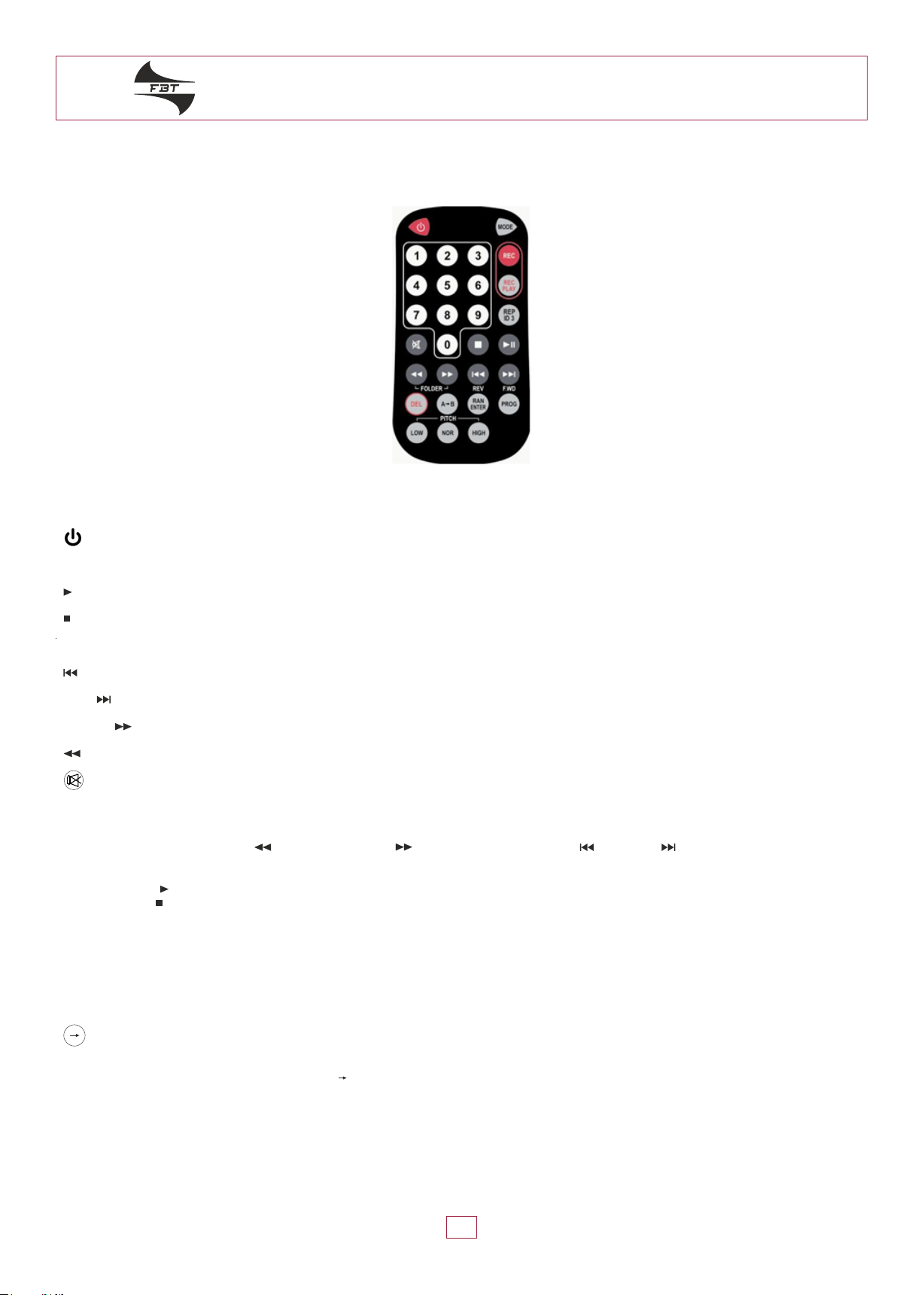
THE FUNCTIONS RESPECTIVELY ON THE REMOTE CONTROLLER
• Hold the button for 1 second to turn on/off
• MODE: Select to use USB or SD CARD
• Play and pause, press to play, play again to pause
• Press to stop playing
• Numeral 0 - 9: Press to select desired track
• REV: Backwards; press to backward to last track. Long press is reversing fast
• F.WD : Fast forward; press to forward to next track. Long press is forwarding
• FOLDER : Select forward to next folder
• FOLDER: Select backward to previous folder
• Mute function, LCD will flash "MUTE"
• RAN ENTER: Press to play the tracks in a random order. Press again to cancel
• PROG: To memorize the self-set tracks, can only use at "STOP" mode
- press "PROG" then use " FOLDER or FOLDER " to select the folder and use " REV, F.WD " buttons to select the song.
Then press " RAN ENTER" key to confirm.
- Repeat above step to store more tracks.
- Press " " to play the memory track.
- Press " " to cancel the program function.
• REP / ID3 • Repeating playing function.
Repeat function: need to operate in the playing mode
- Press once, LCD screen displays «REP1", repeat play current track.
- Press twice, LCD screen displays «F», repeat play entire folder.
- Press 3rd times, LCD screen displays «ALL», repeat play all tracks.
- Press 4th times, cancel repeat playback function. The words on LCD screen will be eliminated.
ID3: Hold «ID3" button for 1 second; LCD shows the information such as the title, album, track number, file format. The information to be stored in the
file itself.
• : Designated area repeating
- press once to start playing the beginning of memory
- press again to stop at the end of memory area. The device repeats to play memory area.
- press it again to stop playing. LCD display will be disappeared.
• • Delete single track. DEL
Delete current playing track, can be operated under «pause» mode or during «playing» mode
Press «DEL» button, LCD displays flash DEL FILE, reminding you to delete the file, you have 5 seconds to decide delete the file or not, after 5
seconds LCD return to «pause» mode or «playing» mode, then press «DEL» to confirm the deletion.
;
;
A B
"A B"

A U D I O C O N T R A C T O R
6
• PITCH CONTROL• Adjust the tempo of the music quicker or slower.
While adjusting the tempo of the music, the original musical key of the tune can be maintained.
• Low: to adjust slow tempo play; press once, the screen will show "PH01", press one time, it will be +1. It has 10 levels of tempo variation.
• Hi: to adjust fast tempo play; press once, the screen will show "PH -01", press one time, it will be -1. It has 10 levels of tempo variation.
• Nor: press to back to normal tempo.
• • Recording function key, need to use this key to record through the line-in channelREC
- When only single USB or SD CARD in the device, can only use record function under "STOP" mode.
- Press "REC", LCD shows "WAIT REC". This is waiting for USB or SD CARD to ready mode. When LCD shows "STAND BY" press "REC" again
to start to recording, LCD starts to show the current recording time, the REC LED light will turn on
- During recording press "REC" to pause recording, press "REC" again to continue recording.
- Press "STOP" to finish recording. The LCD will show "REC STOP". It will return to "STOP" mode, the REC LED light will turn off.
- Sound recording through the REC function keys are saved in the directory folder REC
- The track number in the REC folder will start from "R01", and increase gradually. Therefore if want to check the recording file after finish record,
the song will be recorded at the last track in the REC folder.
- To see the record track in computer, the record track will save in REC folder; the track number in the REC folder will start from "REC1" and
increase gradually.
- To play REC track in folder use PREV or NEXT button to select the directory REC, press "PLAY / II" to start playing.
• • This function button particular for playing the first track in REC folder. When press "STOP" to finish recording, then press "REC/PLAY", REC PLAY
will play the last track in REC folder.
• Remote controller shall appoint to the receiving hole of faceplate.
• Battery installation of the remote controller
1. To open up the battery cover ( on the back side of the remote controller ), press down the cap and slide it from the left to the right, then to pull it out.
2. Place a new battery (battery type CR2025 3V, w/its positive upward)
3. Reverse the actions stated in the statement 1

A U D I O C O N T R A C T O R
7
ANTI SHOCK CD / USB & SD CARD READER
ANTI SHOCK CD
<
7
7
:
:
;
Features
• USB, SD card, CD playing function of each replication
• Playing format: MP3 / WMA
• Accept the capacity of 128 MB to 32G USB or SD card
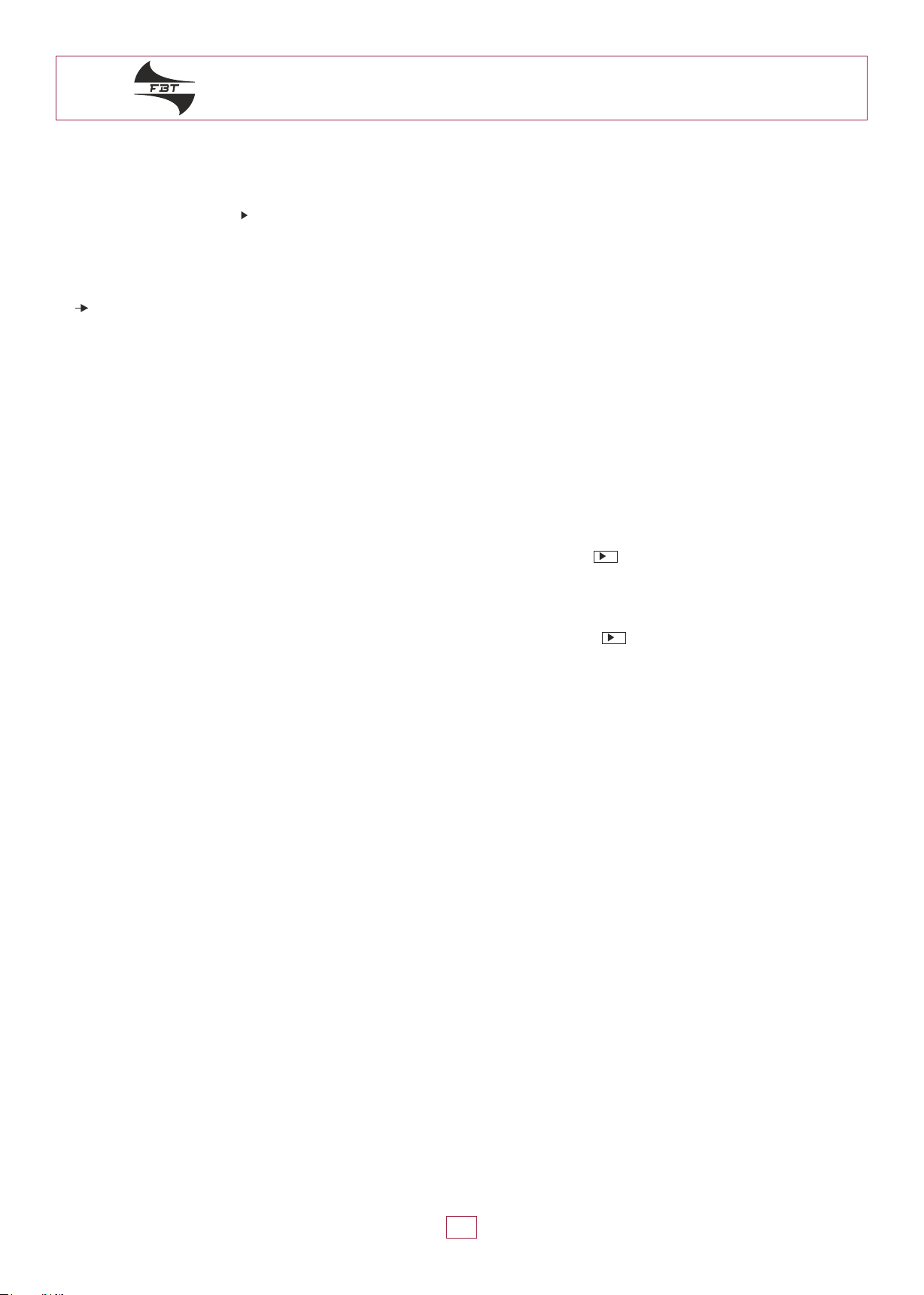
Operation and function of the use of panel description
• • Press to switch on/off the powerPOWER
• VOLUME • Adjust volume level
• • Press to switch to USB, SD or CD modeMODE
• FOLDER • Select folder. Available for playing MP3 format. Press FOLDER to select desired folder.
• REV •Press once, back to the beginning of current track; press again to desired previous track; press and hold the button for fast backward
• PLAY / II • Press once start to play, press again pause to stop
• F.WD • Press to desired next track; press and hold the button for fast forward
• STOP / EJECT • Press to stop playing and press to disk ejected; press again to insert CD
• MUTE • Mute function
• RAN / ENTER • Randomly play and confirmation bottom
• Press to play all songs in a random order. The LCD display shows "RAN"; press again to cancel random mode
• REP / ID3 • Repeat: repeat play
• To play the ordinary format of music:
1. Press once to repeat current track. The LCD display shows "REP1"
2. Press again to repeat whole CD. The LCD display shows "ALL"
3. Then press again to cancel repeat function
• To play MP3 format of CD, USB, SD card:
1. Press to repeat current track; LCD display shows "REP1"
2. Press again to repeat current folder; LCD display shows "REP1 F"
3. Then press again to repeat whole songs in the file; LCD display shows "ALL"
4. Press again to cancel repeating function
ID3: Press ID3 button for 3 seconds, the LCD shows the information such as the title, album, track number, file format.
The information to be stored in the file itself.
• PROG • To memorize the self-set tracks
- Press "PROG". LCD display shows "PROG" then use FOLDER and SKIP buttons to select desired track. Press RAN/ENTER to stock
the track.
- Repeat above step to store more tracks
- To play the memory track press "PLAY / II", LCD display shows "MEMO" and then start to play
- Press PROG again to cancel the program function
• Infrared window: Pick up signal from the remore controller
• USB connector: Accepts USB
• SD connector: Accepts SD card and MMC card
A U D I O C O N T R A C T O R
8
LCD DISPLAY:
• M3: When being MP3 mode the display panel shows M3
• CD: When being CD mode the display panel shows CD
• When in playing mode it display , when pausing, the panel shows II
• When repeatedly playing the single track it shows REP1
• When all songs at the folders are playing repeatedly it shows ALL
• When it appears REP1 F, it refers to playing the tracks repeatedly froma specific folder
• RAN: When random playback
• PROG: Program mode
• MEMO: When playback memory tracks
• A B: When repeat playing between A and B
• 00: Under the MP3 mode it will appear the folder number
•00: Display the current playing track
• 00:00: Display the time for the current playing track
Note:
• When inserts the disk into CD player or takes out the disk, it is necessary to let CD player insert disk and return automatically. It is prohibited to push or
take out the disk by hand before the disk completely return from CD player, thus will cause the machine to be broken down and unable to operate
normally.
SD / MMC card
• Insert SD card or MMC card into the insert hole of SD/MMC CARD in the face plate. Pull the card to get stuck with the tenon. It then finished
the assembly. When taking out he card, please push the card to the bottom and then release to shout it out. Please don't use the force to pull
it out. If so, it will damage the card and the machine.
• Press SD/USB/CD or SD/USB/CD on the remote controller. Select SD then press PLAY/PAUSE or on the remote controller to playing.
As for other playing operation way, please refer to the operation way in PLAYING and the functions respectively on the remote controller.
USB
• Insert USB into the insert hole of USB in the face plate. If don't need to use USB, may take it off directly.
• Press SD/USB/CD or SD/USB/CD on the remote controller. Select USB then press PLAY/PAUSE or on the remote controller to playing.
As for other playing operation way, please refer to the operation way in PLAYING and the functions respectively on the remote controller.
II
II
Tabla de contenidos
Idiomas:
Manuales populares de Equipo de grabación de otras marcas


Strymon
Strymon NIGHTSKY Manual de usuario

Mitsubishi Electric
Mitsubishi Electric 16CH DIGITAL RECORDER DX-TL5000U Manual de usuario

Tews Technologies
Tews Technologies TPMC465 Manual de usuario

Honeywell
Honeywell Excel 50 Manual de usuario

SeaLevel
SeaLevel COMM+8.LPCI Manual de usuario

Arturia
Arturia AUDIOFUSE STUDIO Manual de usuario


