
FBD 372 Manual de usuario

MULTI-FLAVOR
INSTALLATION &
OPERATION MANUAL
372/771/772
24-M4MF-0001_03
MODELS
MERCHANDISER

This manual is for general informational purposes only and is not intended to cover every potential installation or operational
possibility. The parts and equipment addressed herein are warranted only to the extent covered by FBD’s Parts and Equipment
Warranty. FBD makes no express warranties as to any matter whatsoever and hereby disclaims all implied warranties including,
without limitation, the implied warranties of merchantability and fitness for any particular purpose. In no event shall FBD be liable
or obligated to any customer or to any third party for incidental, consequential, or special damages, regardless of the theory of
liability, arising out of, or in any manner related to FBD parts, equipment or any delay with respect to its delivery.
The information contained in this document is subject to change without notice.
© 2021 FBD Partnership, L.P. All Rights Reserved.
FBD TECHNICAL SUPPORT: 866-323-2777 or www.fbdfrozen.com

INSTALLATION & OPERATION ADDENDUM
MULTI-FLAVOR MERCHANDISERS
1
TABLE OF CONTENTS
1. SAFETY .................................................................................................................................... 3
1.1 ELECTRICAL...................................................................................................................... 3
1.2 GENERAL PRECAUTIONS ................................................................................................. 3
2. SPECIFICATIONS AND REQUIREMENTS................................................................................. 4
2.1 GENERAL REQUIREMENTS ............................................................................................... 4
2.2 DIMENSION AND WEIGHT SPECIFICATIONS ..................................................................... 4
2.3 CONTENT SPECIFICATIONS .............................................................................................. 4
3. INSTALLATION ........................................................................................................................ 5
3.1 INSTALLATION OF 372 MULTI-FLAVOR MERCHANDISER ................................................. 5
3.2 INSTALLATION OF 771/772 TOP-OPENING MULTI-FLAVOR MERCHANDISER .................. 6
3.3 INSTALLATION OF 771/772 SIDE-OPENING MULTI-FLAVOR MERCHANDISER ................. 7
4. MULTI-FLAVOR MERCHANDISER DISPLAY ............................................................................ 8
4.1 START-UP ......................................................................................................................... 8
4.2 SCREEN LAYOUT .............................................................................................................. 9
4.3 INITIAL SET UP ................................................................................................................. 9
5. MENU STRUCTURE ............................................................................................................... 10
5.1 ACCESSING MENUS........................................................................................................ 10
5.2 CHANGE GRAPHICS........................................................................................................ 12
5.3 CHANGE VIDEO............................................................................................................... 13
5.4 CLEAN DISPLAY .............................................................................................................. 14
5.5 INFORMATION ................................................................................................................ 15
5.6 STATUS........................................................................................................................... 15
5.7 ALTERNATIVE FLAVOR LOCKOUT ................................................................................... 16
5.8 CONFIGURE FLAVORS .................................................................................................... 17
FLAVOR TYPES................................................................................................................ 17
CALIBRATE FLAVORS...................................................................................................... 18
5.9 SETTINGS........................................................................................................................ 20
CONSUMER INTERFACE ................................................................................................. 20
DISPENSE SETTINGS ...................................................................................................... 22
MISCELLANEOUS SETTINGS ........................................................................................... 26
5.10 DISPENSE DATA ............................................................................................................. 28
SUMMARY ...................................................................................................................... 28
DRINK COMBINATIONS .................................................................................................. 29
5.11 SYSTEM ADMINISTRATION............................................................................................. 30
PASSWORDS................................................................................................................... 30
MEDIA............................................................................................................................. 31
SETTINGS ....................................................................................................................... 32
SYSTEM .......................................................................................................................... 33
6. ADDING IMAGES TO MERCHANDISER.................................................................................. 34
6.1 ADDING CONTENT TO USB DRIVE .................................................................................. 34
6.2 ACCESSING USB PORTS AND USB CONTENT................................................................. 35
7. STATUS MESSAGES .............................................................................................................. 37
8. TROUBLESHOOTING ............................................................................................................. 38
8.1 77X HARDWARE OVERVIEW............................................................................................ 38
8.2 372 HARDWARE OVERVIEW............................................................................................ 39
8.3 77X VIDEO DOOR HARDWARE OVERVIEW....................................................................... 41
8.4 MERCHANDISER-TO-DISPENSER CONNECTIONS........................................................... 43
8.5 STATUS LEDS.................................................................................................................. 43
8.6 TROUBLESHOOT POWER ISSUES ................................................................................... 44
8.7 TROUBLESHOOT COMMUNICATION ISSUES .................................................................. 44
8.8 TROUBLESHOOT DISPLAY ISSUES.................................................................................. 44

INSTALLATION & OPERATION ADDENDUM
MULTI-FLAVOR MERCHANDISERS
2
TABLE OF CONTENTS (CONTINUED)
8.9 CRITICAL ERROR SCREEN .............................................................................................. 45
8.10 TROUBLESHOOTING OVERVIEW..................................................................................... 45
9. APPENDIX ............................................................................................................................. 46
9.1 DISPENSE FUNCTION ..................................................................................................... 46
9.2 DISPENSE FUNCTION (WITH VARIED DISPENSE SETTINGS)........................................... 47
9.3 DISPENSE FUNCTION (WITH ALTERNATIVE FLAVOR)..................................................... 48

INSTALLATION & OPERATION ADDENDUM
MULTI-FLAVOR MERCHANDISERS
3
1. SAFETY
1.1 Electrical
This accessory must be properly installed according to the instructions in this manual. Proper installation will ensure
that the accessory is properly grounded and prevent possible fatal electric shock or serious injury to the operator. Before
attempting any internal maintenance, disconnect electrical power to the dispenser to prevent personal injury. Only
qualified personnel should service internal components or electrical wiring.
1.2 General Precautions
This equipment, depending on the accessory, can weigh up to 25.6 pounds (11.6 kilograms). To avoid personal injury or
equipment damage, do not attempt to lift the merchandiser without help. Working with a partner is highly recommended.
Take care when lifting and positioning the merchandiser to avoid damage and injury.

INSTALLATION & OPERATION ADDENDUM
MULTI-FLAVOR MERCHANDISERS
4
2. SPECIFICATIONS AND REQUIREMENTS
2.1 General Requirements
The merchandiser is compatible with only the dispenser that corresponds to its merchandiser series, and will not function
properly if installed onto a dispenser outside of that series. The 771 and 772 multi-flavor dispensers belong to the 77x
series and therefore use the same merchandiser model; whereas, a 372 multi-flavor merchandiser should only be installed
on a 372 dispenser.
2.2 Dimension and Weight Specifications
2.3 Content Specifications
* Flavor images automatically scale without distortion.
† Use exact sizes for the background images. Graphics will be stretched and distorted if the size is incorrect.
‡The video area can display either a video or static image. Use exact sizes. Content will be stretched and distorted if the
size is incorrect.
Media Type
Supported
File
Formats
Resolution (W x H in pixels)
372 MFLV 771 MFLV 771 MFLV
Video Door 772 MFLV 772 MFLV
Video Door
Base Flavor & Add-in
Flavor Images* PNG 600 x 500 600 x 500 600 x 500 600 x 500 600 x 500
Background Image(s)†PNG, JPEG 800 x 480 1920 x 1080 1080 x 640 950 x 1080 535 x 640
Video Area‡MP4, MOV,
PNG, JPEG N/A N/A 1080 x 1280 N/A 1080 x 1280
Unit Door Type Width Depth Height Weight
372 MFLV Short Door 15.75" (400 mm) 2.2" (56 mm) 13.5" (342 mm) 8.7 lb (3.9 kg)
771 MFLV
772 MFLV
Short Door
17.0" (432 mm) 2.9" (74 mm)
15.6" (396 mm) 12.9 lb (5.9 kg)
Tall Door 23.1" (587 mm) 18.9 (8.6 kg)
Video Door 26.0" (660 mm) 25.6 lb (11.6 kg)

INSTALLATION & OPERATION ADDENDUM
MULTI-FLAVOR MERCHANDISERS
5
3. INSTALLATION
The following installation instructions apply to merchandisers that are not already installed on dispensers upon arrival.
Since the merchandiser receives power from the dispenser and communicates with the main control board, it is important
that power and serial harnesses be connected correctly during installation.
3.1 Installation of 372 Multi-Flavor Merchandiser
1 Remove the merchandiser from the packaging and inspect it for damage or missing parts.
2Align the merchandiser hinges with the bolt holes located at the top-front of the dispenser, and secure all hex
bolts through the hinge and into the frame.
3Connect the door power and serial communication harnesses to their respective mate on the dispenser
(black connector with black connector, white connector with white connector).
4Push the merchandiser down until it snaps into place. Ensure that the pneumatic faceplate’s activation hose
stays looped and is not pinched when the merchandiser is closed.

INSTALLATION & OPERATION ADDENDUM
MULTI-FLAVOR MERCHANDISERS
6
3.2 Installation of 771/772 Top-Opening Multi-Flavor Merchandiser
1 Remove the merchandiser from the packaging and inspect it for damage or missing parts.
2Remove the collar from each of the brackets on the merchandiser with a 3/32" hex wrench. Place the collars
and wrench nearby so they are accessible for the next step.
3 As shown in figure below: (A) slide each of the hinge pins from the merchandiser into the pivot holes on the
upper brackets on the dispenser (from right to left); (B) place the collars back on the hinge pins and tighten
the set screw on each of the shaft collars with the hex wrench.
4 Snap the shocks securely onto the ball joints on the front of the dispenser.
5Connect the power and serial communication harnesses to their respective mate from the dispenser (black
connector to black connector, white connector to white connector). Slowly push the merchandiser down
into "closed" position.

INSTALLATION & OPERATION ADDENDUM
MULTI-FLAVOR MERCHANDISERS
7
3.3 Installation of 771/772 Side-Opening Multi-Flavor Merchandiser
1 Remove the merchandiser from the packaging and inspect it for damage or missing parts.
2 Add the snap ring (1) to the bracket (2). 3 Install the hinge brackets on the front of the dispenser.
Ensure the snap ring faces toward the outside of the
dispenser.
1
2
4Use a 3/32" hex wrench to loosen and remove the collar from the hinge bracket located on the back of the
door. Repeat on lower bracket. Place collars nearby so they are accessible to add back to the brackets once
the merchandiser is connected to dispenser.
COLLAR
5Align the door hinge bracket pins to the holes on the dispenser's hinge bracket. Place the collar back on the
hinge pin and tighten the set screw with a hex wrench.
6Connect the power and serial communication harnesses to their respective mate from the dispenser (black
connector to black connector, white connector to white connector) and close the merchandiser until it snaps
into place.
DOOR
LATCH
INSTALLATION & OPERATION ADDENDUM
MULTI-FLAVOR MERCHANDISERS
8
4. MULTI-FLAVOR MERCHANDISER DISPLAY
4.1 Start-Up
Once the dispenser has been powered on, the digital screen will begin to boot. The display’s backlight will activate and
will be followed by the FBD logo. It may take up to thirty seconds for the display to fully load. Once the boot sequence
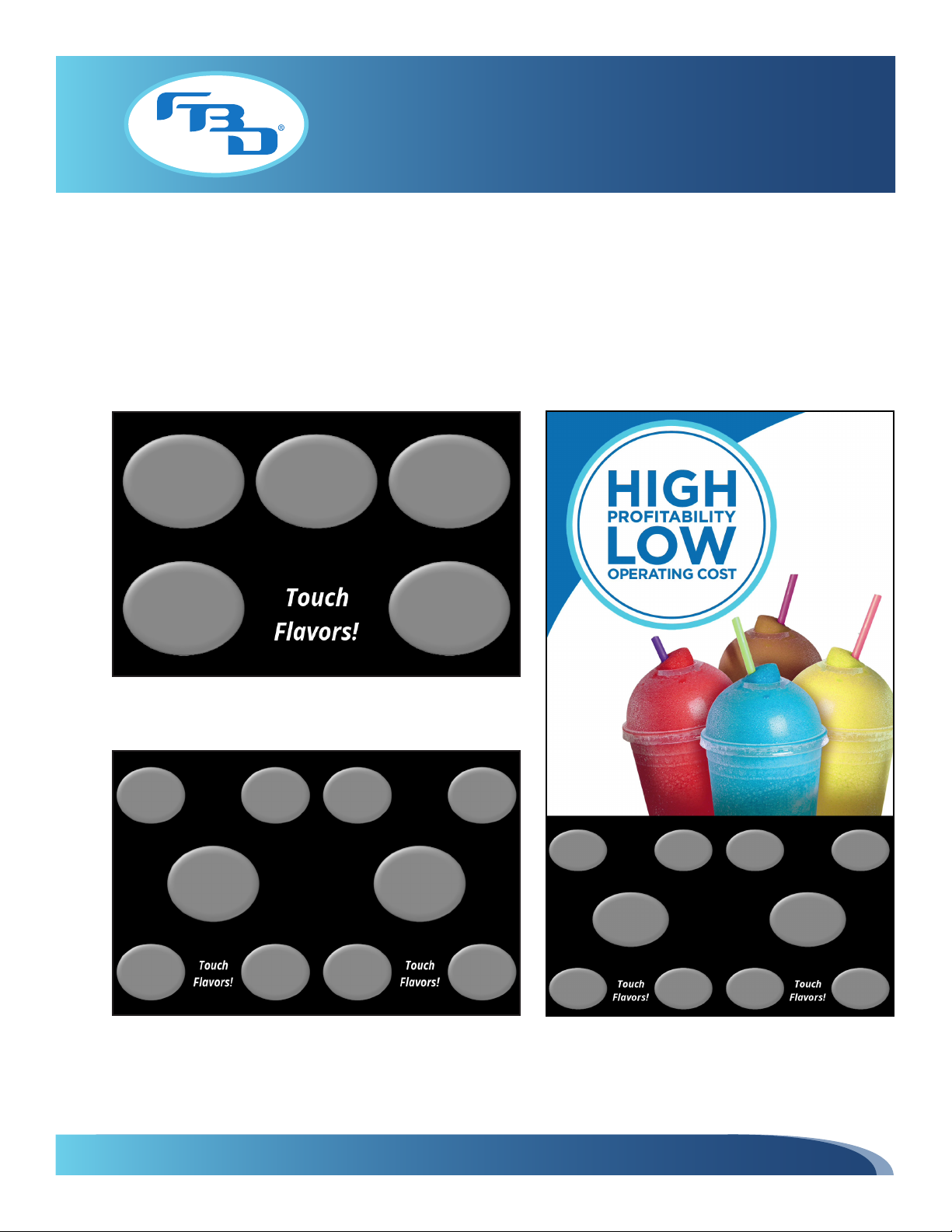
is complete, the FBD logo will be replaced by the multi-flavor interface (shown below). The message on the interface
will vary depending on the state of the dispenser (i.e. if the barrel is off, the message will be "Barrel Off"; if everything is
connected and running, then the message will be "Touch Flavors!").
Interface for 372 MFLV and 771 MFLV
Interface for 772 MFLV Interface for 772 MFLV Video Door
Otros manuales para 372
2
Este manual sirve para los siguientes modelos
2
Tabla de contenidos
Otros manuales de Comerciante de FBD


Manuales populares de Comerciante de otras marcas


True
True GDIM-26 Manual de usuario

Structural Concepts
Structural Concepts Oasis Mobile Series Instrucciones de instalación

Hussmann
Hussmann Q2-SS Instrucciones de funcionamiento originales

Haussmann
Haussmann RL Manual de usuario

Howard McCray
Howard McCray R-CDS32E-4 Manual de usuario

Hussmann
Hussmann microSC SHM-A Series Manual de usuario


