Ezviz T6 Manual de usuario

UD02093B-A


COPYRIGHT ©2016 Hangzhou Hikvision Digital Technology Co., Ltd. or its subsidiaries. ALL
RIGHTS RESERVED.
About this Manual
The Manual includes instructions for using and managing the product. Pictures, charts, images
and all other information hereinafter are for description and explanation only. The information
contained in the Manual is subject to change, without notice, due to firmware updates or other
reasons. Please find the latest version in the ™ website (http://www.ezvizlife.com).
Any and all information, including, among others, wordings, pictures, graphs are the properties
of Hangzhou Hikvision Digital Technology Co., Ltd. or its subsidiaries (hereinafter referred to be
“Hikvision”). This user manual (hereinafter referred to be “the Manual”) cannot be reproduced,
changed, translated, or distributed, partially or wholly, by any means, without the prior written
permission of Hikvision. Unless otherwise stipulated, Hikvision does not make any warranties,
guarantees or representations, express or implied, regarding to the Manual.
Trademarks Acknowledgement
™, ™, and other Hikvision’s trademarks and logos are the properties of Hikvision
in various jurisdictions. Other trademarks and logos mentioned below are the properties of their
respective owners.
Legal Disclaimer
TO THE MAXIMUM EXTENT PERMITTED BY APPLICABLE LAW, THE PRODUCT DESCRIBED, WITH ITS
HARDWARE, SOFTWARE AND FIRMWARE, IS PROVIDED “AS IS”, WITH ALL FAULTS AND ERRORS,
AND HIKVISION MAKES NO WARRANTIES, EXPRESS OR IMPLIED, INCLUDING WITHOUT LIMITATION,
MERCHANTABILITY, SATISFACTORY QUALITY, FITNESS FOR A PARTICULAR PURPOSE, AND NON-
INFRINGEMENT OF THIRD PARTY. IN NO EVENT WILL HIKVISION, ITS DIRECTORS, OFFICERS,
EMPLOYEES, OR AGENTS BE LIABLE TO YOU FOR ANY SPECIAL, CONSEQUENTIAL, INCIDENTAL, OR
INDIRECT DAMAGES, INCLUDING, AMONG OTHERS, DAMAGES FOR LOSS OF BUSINESS PROFITS,
BUSINESS INTERRUPTION, OR LOSS OF DATA OR DOCUMENTATION, IN CONNECTION WITH THE
USE OF THIS PRODUCT, EVEN IF HIKVISION HAS BEEN ADVISED OF THE POSSIBILITY OF SUCH
DAMAGES. TO THE MAXIMUM EXTENT PERMITTED BY APPLICABLE LAW, IN NO EVENT SHALL
HIKVISION’S TOTAL LIABILITY FOR ALL DAMAGES EXCEED THE PURCHASE PRICE THE PRODUCT.
HIKVISION does not undertake any liability for personal injury or property damage, as the result
of product interruption or service termination cause by: a) improper installation or usage

other than as requested; b) the protection of national or public interests; c) Force Majeure; d)
yourself or the third party, including not limitation, using any third party’s products, software,
applications, and among others.
REGARDING TO THE PRODUCT WITH INTERNET ACCESS, THE USE OF PRODUCT SHALL BE WHOLLY
AT YOUR OWN RISKS. HIKVISION SHALL NOT TAKE ANY RESPONSIBILITES FOR ABNORMAL
OPERATION, PRIVACY LEAKAGE OR OTHER DAMAGES RESULTING FROM CYBER ATTACK, HACKER
ATTACK, VIRUS INSPECTION, OR OTHER INTERNET SECURITY RISKS; HOWEVER, HIKVISION WILL
PROVIDE TIMELY TECHNICAL SUPPORT IF REQUIRED.
SURVEILLANCE LAWS VARY BY JURISDICTION. PLEASE CHECK ALL RELEVANT LAWS IN YOUR
JURISDICTION BEFORE USING THIS PRODUCT IN ORDER TO ENSURE THAT YOUR USE CONFORMS
TO THE APPLICABLE LAW. YOU FUTHER AGREE THAT THIS PRODUCT IS ONLY FOR CIVIL USE, AND
HIKVISION SHALL NOT BE LIABLE IN THE EVENT THAT THIS PRODUCT IS USED WITH ILLEGITIMATE
PURPOSES, SUCH AS THIRD PARTY RIGHTS INFRINGEMENT, MEDICAL TREATMENT, SAFETY
EQUIPMENT OR OTHER SITUATIONS WHERE THE PRODUCT FAILURE COULD LEAD TO DEATH OR
PERSONAL INJURY, OR WEAPON OF MASS DESTRUCTION, CHEMINCAL AND BIOLOGICAL WEAPON,
NUCLEAR EXPLOSION, AND ANY UNSAFE NUCLEAR ENERGY USES OR ANTI-HUMANITY USAGES.
YOU SHOULD UNDERTAKE ALL RESPONSIBILITIES FOR LOSSES OR DAMAGES RESULTING FROM
THE ABOVE USAGES WHATSOEVER.
IN THE EVENT OF ANY CONFLICTS BETWEEN THE ABOVE AND THE APPLICABLE LAW, THE LATER
PREVAILS.
Safety Instruction
CAUTION: THE PRODUCT IS BUILT IN A REPLACEABLE BATTERY. RISK OF EXPLOSION
IF BATTERY IS REPLACED BY AN INCORRECT TYPE. DISPOSE OF USED BATTERIES
ACCORDING TO THE INSTRUCTIONS.
Due to the product shape and dimension, the name and address of the importer/
manufacturer are printed on the package.

Regulatory Information
EU Conformity Statement
This product and - if applicable - the supplied accessories too are marked with
"CE" and comply therefore with the applicable harmonized European standards
listed under the Radio Equipment Directive 2014/53/EU, the EMC Directive
2014/30/EU, the RoHS Directive 2011/65/EU.
2012/19/EU (WEEE directive): Products marked with this symbol cannot be
disposed of as unsorted municipal waste in the European Union. For proper
recycling, return this product to your local supplier upon the purchase of
equivalent new equipment, or dispose of it at designated collection points. For
more information see: www.recyclethis.info.
2006/66/EC and its amendment 2013/56/EU (battery directive): This product
contains a battery that cannot be disposed of as unsorted municipal waste in the
European Union. See the product documentation for specific battery information.
The battery is marked with this symbol, which may include lettering to indicate
cadmium (Cd), lead (Pb), or mercury (Hg). For proper recycling, return the battery
to your supplier or to a designated collection point. For more information see:
www.recyclethis.info.
EC DECLARATION OF CONFORMITY
Hereby, Hangzhou Hikvision Digital Technology Co., Ltd. declares that the radio equipment type
[CS-T6-A] is in compliance with Directive 2014/53/EU.
The full text of the EC DECLARATION OF CONFORMITY is available at the following web link:
http://www.ezvizlife.com/declaration-of-conformity.
SAVE THIS MANUAL FOR FUTURE REFERENCE

1
Operations
Step 1
Charging
You’re recommended to charge T6 before you use it for the first time.
Connect the T6 to the power socket with the power cable. The indicator turns red
indicating the T6 is charging and turns blue when T6 is charged.
The battery can last for up to 3 months. Recharge if the battery runs out.
Step 2
Adding to Internet Alarm Hub
The Internet Alarm Hub (such as A1) should be purchased separately.
• Option 1 (Recommended)
1Removing the Base
Slide the base according to the arrow on it to remove it from the T6.
You can see the device QR code on the back of T6.

2
2Adding T6 to Internet Alarm Hub
- Download and install the EZVIZ app by searching the “EZVIZ” in App
Store (iOS version) and Google PlayTM (Android version).
- Start the app and register for an EZVIZ user account following the
start-up wizard.
- Log in the EZVIZ app and scan the device QR code to add it to the
Internet Alarm Hub.
• Option 2 Adding by Operating the Internet Alarm Hub
- Enable the “Adding Detectors Mode” of your Internet Alarm Hub.
- Take T6 close to the Internet Alarm Hub (within 50cm) and press the
button on the T6, the blue indicator flickers twice indicating the adding
signal is sent.
- The Internet Alarm Hub issues a voice prompt of the detector type and
serial No. indicating the detector is added.
Internet Alarm Hub
Indicator
Within 50cm

3
Step 3
Installing Detector
1Pasting the Foam Sticker
Paste the foam sticker to the base of the T6.
If you want to install the T6 to the metal door or window, use the 3 mm thick
foam sticker.
If you want to install the T6 to other doors or windows, use either of the
supplied foam sticker.
2Installing the T6
- You can install the T6 on the door or window, as shown in the following
figures. Paste the base to the desired installation place.
1 mm
3 mm
1 mm
3 mm
Window Door

4
- Slide the T6 to the base and secure it with the base.
3Recording Closed Status
Keep the door or window closed and then press and hold the button on T6 for
2s to record the closed status. The indicator flickers red for 15s indicating
the status is recorded.
The closed status requires recording again after the T6 being taken off
to recharge or adjust the installation position.
If you want to install the T6 to other doors or windows, use either of the
supplied foam sticker.
4Completing Installation
The indicator blinks red when the door or window gets opened and send the
alarm message to the linked EZVIZ account.
The indicator blinks blue when the door or window gets closed.
Maintenance
When the battery runs out, a low battery warning will be sent to the EZVIZ account
to remind you to recharge. Slide the T6 to take it off from the base to recharge and
install it back after recharged.

5
Appendix
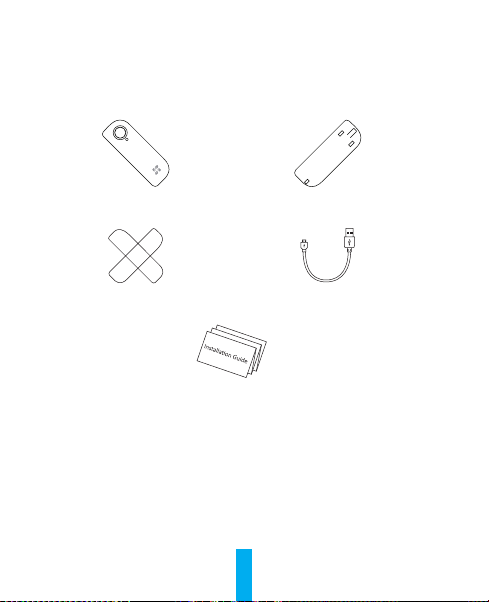
Box Contents
T6 x1 Base x1
(Installed on the back of T6 by default)
Foam Sticker x2
(1 mm thick & 3 mm thick) Power Cable x1
Quick Start Guide x1
Otros manuales para T6
5
Tabla de contenidos
Idiomas:
Otros manuales de Sensor de seguridad de Ezviz