Ezviz CSDL01S Manual de usuario

COPYRIGHT © Hangzhou EZVIZ Software Co., Ltd.. ALL RIGHTS RESERVED.
Any and all information, including, among others, wordings, pictures, graphs are the properties of
Hangzhou EZVIZ Software Co., Ltd. (hereinafter referred to as “EZVIZ”). This user manual (hereinafter
referred to as “the Manual”) cannot be reproduced, changed, translated, or distributed, partially or
wholly, by any means, without the prior written permission of EZVIZ. Unless otherwise stipulated,
EZVIZ does not make any warranties, guarantees or representations, express or implied, regarding to
the Manual.
About this Manual
The Manual includes instructions for using and managing the product. Pictures, charts, images and
all other information hereinafter are for description and explanation only. The information contained
in the Manual is subject to change, without notice, due to rmware updates or other reasons. Please
nd the latest version in the ™ website (http://www.ezviz.com).
Revision Record
New release – January, 2022
Trademarks Acknowledgement
™, ™, and other EZVIZ’s trademarks and logos are the properties of EZVIZ in various
jurisdictions. Other trademarks and logos mentioned below are the properties of their respective
owners.
Legal Disclaimer
TO THE MAXIMUM EXTENT PERMITTED BY APPLICABLE LAW, THE PRODUCT DESCRIBED, WITH
ITS HARDWARE, SOFTWARE AND FIRMWARE, IS PROVIDED “AS IS”, WITH ALL FAULTS AND ERRORS,
AND EZVIZ MAKES NO WARRANTIES, EXPRESS OR IMPLIED, INCLUDING WITHOUT LIMITATION,
MERCHANTABILITY, SATISFACTORY QUALITY, FITNESS FOR A PARTICULAR PURPOSE, AND
NON-INFRINGEMENT OF THIRD PARTY. IN NO EVENT WILL EZVIZ, ITS DIRECTORS, OFFICERS,
EMPLOYEES, OR AGENTS BE LIABLE TO YOU FOR ANY SPECIAL, CONSEQUENTIAL, INCIDENTAL, OR
INDIRECT DAMAGES, INCLUDING, AMONG OTHERS, DAMAGES FOR LOSS OF BUSINESS PROFITS,
BUSINESS INTERRUPTION, OR LOSS OF DATA OR DOCUMENTATION, IN CONNECTION WITH
THE USE OF THIS PRODUCT, EVEN IF EZVIZ HAS BEEN ADVISED OF THE POSSIBILITY OF SUCH
DAMAGES.
TO THE MAXIMUM EXTENT PERMITTED BY APPLICABLE LAW, IN NO EVENT SHALL EZVIZ’S TOTAL
LIABILITY FOR ALL DAMAGES EXCEED THE ORIGINAL PURCHASE PRICE OF THE PRODUCT.
EZVIZ DOES NOT UNDERTAKE ANY LIABILITY FOR PERSONAL INJURY OR PROPERTY DAMAGE AS
THE RESULT OF PRODUCT INTERRUPTION OR SERVICE TERMINATION CAUSED BY: A) IMPROPER
INSTALLATION OR USAGE OTHER THAN AS REQUESTED; B) THE PROTECTION OF NATIONAL OR
PUBLIC INTERESTS; C) FORCE MAJEURE; D) YOURSELF OR THE THIRD PARTY, INCLUDING WITHOUT
LIMITATION, USING ANY THIRD PARTY’S PRODUCTS, SOFTWARE, APPLICATIONS, AND AMONG
OTHERS.
REGARDING TO THE PRODUCT WITH INTERNET ACCESS, THE USE OF PRODUCT SHALL BE WHOLLY
AT YOUR OWN RISKS. EZVIZ SHALL NOT TAKE ANY RESPONSIBILITES FOR ABNORMAL OPERATION,
PRIVACY LEAKAGE OR OTHER DAMAGES RESULTING FROM CYBER ATTACK, HACKER ATTACK,
VIRUS INSPECTION, OR OTHER INTERNET SECURITY RISKS; HOWEVER, EZVIZ WILL PROVIDE
TIMELY TECHNICAL SUPPORT IF REQUIRED.SURVEILLANCE LAWS AND DATA PROTECTION
LAWS VARY BY JURISDICTION. PLEASE CHECK ALL RELEVANT LAWS IN YOUR JURISDICTION
BEFORE USING THIS PRODUCT IN ORDER TO ENSURE THAT YOUR USE CONFORMS TO THE
APPLICABLE LAW. EZVIZ SHALL NOT BE LIABLE IN THE EVENT THAT THIS PRODUCT IS USED WITH
ILLEGITIMATE PURPOSES.
IN THE EVENT OF ANY CONFLICTS BETWEEN THE ABOVE AND THE APPLICABLE LAW, THE LATTER
PREVAILS.


1
Table of Contents
Instruction������������������������������������������������������������������������������������������������2
Packing List ���������������������������������������������������������������������������������������������2
Overview ��������������������������������������������������������������������������������������������������3
1� Lock������������������������������������������������������������������������������������������������������������������������������������������������������������� 3
2� Door Sensor ������������������������������������������������������������������������������������������������������������������������������������������������� 4
Get the EZVIZ App ������������������������������������������������������������������������������������4
Installation Instructions����������������������������������������������������������������������������5
1� Install Mounting Plate ���������������������������������������������������������������������������������������������������������������������������������� 6
2� Insert the Key into the Lock �������������������������������������������������������������������������������������������������������������������������� 8
3� Mount the Lock Body������������������������������������������������������������������������������������������������������������������������������������ 9
4� Instert Batteries ������������������������������������������������������������������������������������������������������������������������������������������� 9
Add Lock to EZVIZ ����������������������������������������������������������������������������������10
1� Add Lock to EZVIZ �������������������������������������������������������������������������������������������������������������������������������������� 10
2� Calibrate the Lock �������������������������������������������������������������������������������������������������������������������������������������� 11
3� Install the Door Sensor ������������������������������������������������������������������������������������������������������������������������������� 12
4� Installation Complete ��������������������������������������������������������������������������������������������������������������������������������� 13
Bluetooth Key Management��������������������������������������������������������������������14
1� Add Bluetooth Keys ������������������������������������������������������������������������������������������������������������������������������������ 14
2� Manage Bluetooth Keys������������������������������������������������������������������������������������������������������������������������������ 14
Accessory Management �������������������������������������������������������������������������14
1� Add Accessory ������������������������������������������������������������������������������������������������������������������������������������������� 14
2� Manage Accessory ������������������������������������������������������������������������������������������������������������������������������������� 15
Card and Password Management������������������������������������������������������������15
1� For Password Keypad ��������������������������������������������������������������������������������������������������������������������������������� 15
2� For Card-password Keypad������������������������������������������������������������������������������������������������������������������������� 15
Lock Using ���������������������������������������������������������������������������������������������15
1� Unlock�������������������������������������������������������������������������������������������������������������������������������������������������������� 15
2� Lock����������������������������������������������������������������������������������������������������������������������������������������������������������� 16
3� Operation and Management������������������������������������������������������������������������������������������������������������������������ 16
Maintenance�������������������������������������������������������������������������������������������17
1� Daily Maintenance�������������������������������������������������������������������������������������������������������������������������������������� 17
2� FAQ ������������������������������������������������������������������������������������������������������������������������������������������������������������ 17
Operations on the EZVIZ App ������������������������������������������������������������������19

2
Instruction
• The installation of EZVIZ Smart Lock (hereinafter referred as to "lock") impacts its normal operation and service
life. It is recommended to let professionals install.
• The lock is designed for indoor use only.
• It is recommended to remove the lock if your house is under decoration, and reinstall it after decoration in case
of lock damage and service life reduction.
• Please note that disinfectant may cause damage to the lock body.
• When battery voltage is low after using for a while, low voltage alarm alerts. Replace batteries timely and pay
attention to positive and negative poles.
• If you leave home or do not use lock for a long time, you should take batteries out to ensure lock service life.
• The lock accommodates up to 50 bluetooth keys, 50 passwords and 50 cards.
Packing List
Smart Lock ×1 Mounting Plate ×2 AA-sized Battery ×4
Hexagon Wrench ×1 Plus Driver ×1 Screw Kit ×1
Door Sensor ×1 Quick Start Guide ×1 Installation Guide ×1
Regulatory Information ×1

3
Overview
1� Lock
Battery Slot
Key Knob
Battery Belt
Front Cover
Key Slot
Matching Key
(LED Indicator Ring)

4
Name Description
Battery Belt • Put the belt under the batteries when you insert the batteries into the slot;
• When you need to change batteries, drag the belt and the batteries will pop out.
Matching Key • Press once, the lock will be locked/unlocked.
• In initialization condition, press and hold for 3s to add to EZVIZ App.
• Press and hold for 3s to enter adding mode.
• Repower the lock, press and hold the Matching Key for 5s until the LED indicator ring is solid orange,
all parameters will be restored to default settings.
LED
Indicator Ring
Solid Orange: Door unlocked or initialization status.
Slow-ashing Orange: Unlock failed.
Fast-ashing Orange: Initializing.
Solid Blue: Locked, calibrated successfully, or added to EZVIZ successfully.
Slow-ashing Blue: Unlock successfully.
Fast-ashing Blue: Adding mode or calibrating.
• The LED will ash only when you are operating the lock.
• In general the lock is in sleep mode and the LED will be off.
2� Door Sensor
Door Sensor
Get the EZVIZ App
1. Connect your mobile phone to Wi-Fi (suggested).
2. Download and install the EZVIZ app by searching for “EZVIZ” in the App Store or Google PlayTM.
3. Launch the app and register an EZVIZ user account.
EZVIZ App
If you have already used the app, please make sure that it is the latest version. To nd out if an update is
available, go to the app store and search for "EZVIZ".

5
Installation Instructions
Make sure your existing lock allows you to fully insert the keys from both sides to unlock.
Please tap to watch the installation video.

6
1� Install Mounting Plate
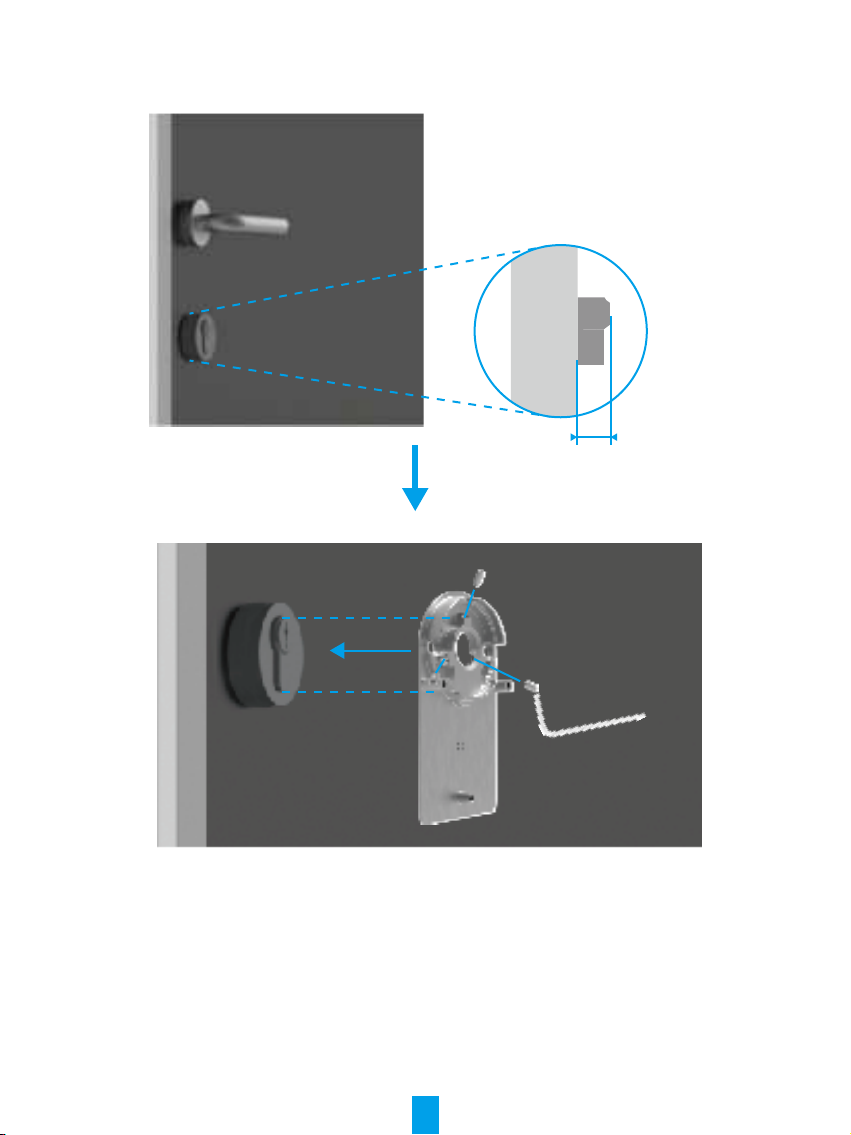
The lock is mounted on the inside of the existing lock cylinder. There are two different types of mounting plates
to choose depending on your cylinder:
Mounting Plate A
Cylinder with less than 3mm overhang on the inside of the door: The lock is glued to your door with special adhesive
pads.
0~3mm
Tear it off

7
Mounting Plate B
Cylinder with at least 3mm overhang on the inside of the door : x the mounting plate B to the cylinder with
screws by the supplied hexagon wrench. Please x the screws carefully and without great physical effort to avoid
damaging the cylinder.
3~30mm

8
2� Insert the Key into the Lock
The lock is supposed to enable keyless door opening. For lock to be compatible with the key, the following
conditions must apply:
- The key must not be thicker than 4 mm.
- The length of the key head including the neck must be less than 37 mm for lock to be compatible (The key
head is the part of the key which people opening the door grasps. The following part of the key head up to the
reliefs is called the neck).
- If a plastic cap is attached to the key, making the key thicker than 4 mm overall, it must be removed. This cap
increases the thickness of the key, making the bow no longer t into the lock.
<37mm
The shape of the key head does not matter at all. It may be round, angular or oval.
Insert your key to the keyhole as showed below (take Mounting Plate A for example):

9
3� Mount the Lock Body
Attach the lock body to the mounting plate with three screws (PM3×16) by the supplied plus driver, (take Mounting
Plate A for example).
4� Instert Batteries
Insert 4 AA-sized batteries into the slot. Please pay attention to positive and negative poles when insert the
batteries. Make sure the battery belt is on the bottom of the slot under the batteries.
Put the front cover aside for further use.
Tabla de contenidos
Otros manuales de Cerrar de Ezviz