
EZ Lite Cruiser STANDARD MODEL Manual de usuario
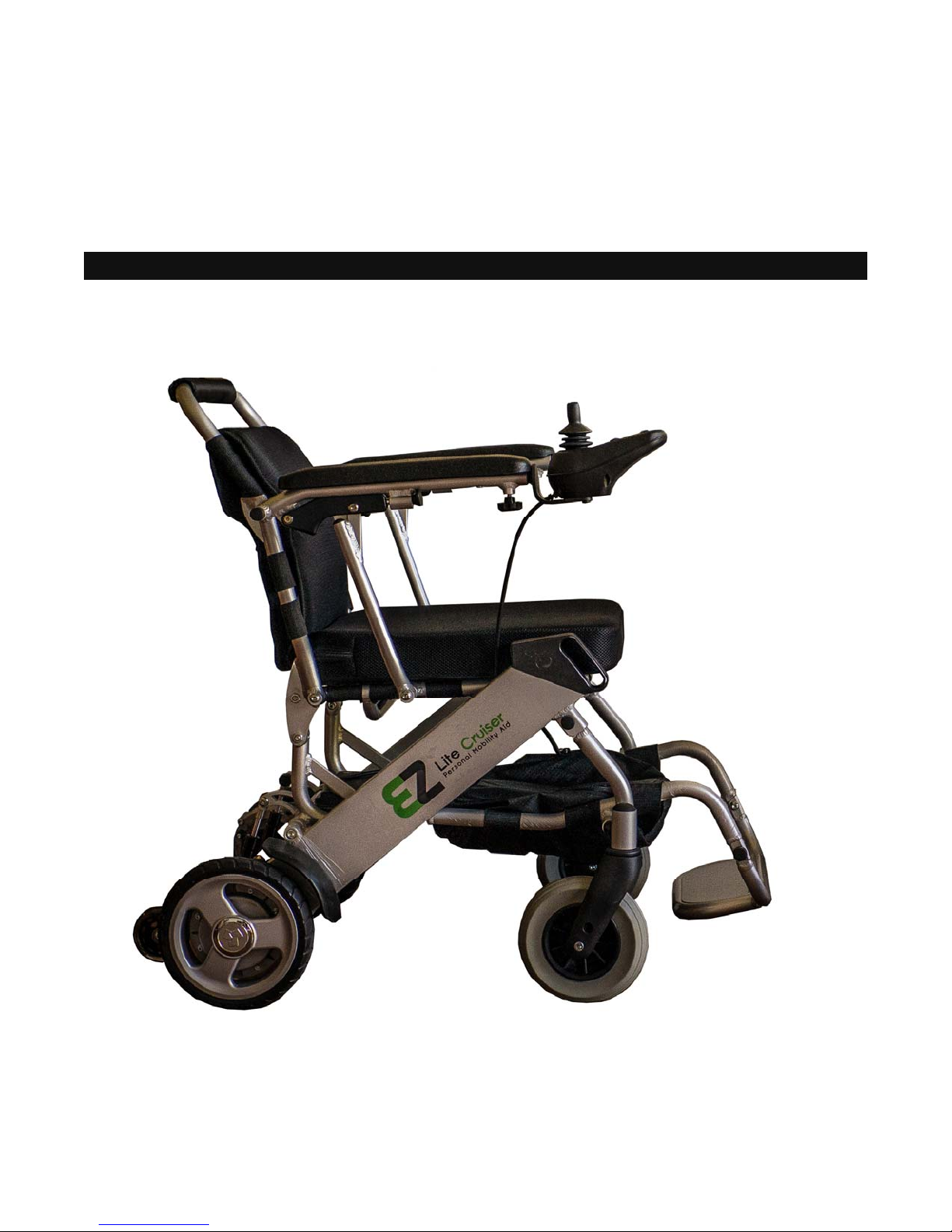
EZ LITE CRUISER
Service & Maintenance Manual

Table Of Contents
Introduction to the EZ Lite Cruiser______________________________________________ 3
Identification of Components __________________________________________________ 4
Controller System Component Diagram _________________________________________ 6
Controller System I/O Ports Detail ______________________________________________ 7
Joystick Control Panel Detail __________________________________________________ 8
Fault Indicator Panel Guide ___________________________________________________ 9
Maintenance & Replacement of Parts ___________________________________________ 10
Arm Rest Pads Replacement ____________________________________________10
Arm Rest Raising Hinge Test, Tightening & Replacement ______________________11
Back Support Cushion and Support Straps Maintenance & Replacement __________12
Seat Cushion and Support Straps Tightening & Replacement ___________________13
CPU Replacement ____________________________________________________ 14
Joystick and Fork Replacement __________________________________________ 15
Front Wheel Maintenance & Replacement _________________________________ 16
Front Wheel Fork Replacement __________________________________________ 17
Foot Rest Maintenance & Replacement ____________________________________ 18
Mud Guard Replacement _______________________________________________ 19
Rear Wheel Replacement _______________________________________________20
Rear Motor Replacement _______________________________________________ 21
Folding Wire Replacement ______________________________________________ 22
Electrical Component Testing _________________________________________________ 24
Connecting the Battery & Testing Battery Voltage Output ______________________ 24
Joystick Charging Port Voltage Testing ____________________________________ 25
Testing for Short Circuits & Open Circuits __________________________________ 26
Helpful Tips ________________________________________________________________ 27
Watch for Wires Getting Caught When Folding_______________________________ 27
Troubleshooting Guide for Common Problems_______________________________ 28

Introduction to the EZ Lite Cruiser
The EZ Lite Cruiser is a Light Weight Power Wheelchair with Brushless Hub Motors. It uses a lithium ion
battery as a source of power. The battery connects underneath the seat, from the CPU controller compo-
nent.
The EZ Lite Cruiser comes with one lithium ion battery as the power source. It operates by using the con-
trol module to deliver all programmed commands to the brushless motors located on the rear wheels.
The joystick component of the control system carries out directional commands, as well as maintaining
the speed and power of the EZ Lite Cruiser.
The charging port for the EZ Lite Cruiser is located on the front (facing head on) of the joystick compo-
nent. The standard wall charger included with the EZ Lite Cruiser will have a matching connector which
can only be inserted one way. Please ensure proper alignment of the connector when plugging it in, and
power off the device when charging.
The main feature of the EZ Lite Cruiser is its ability to fold to a compact space. Using the wire located at
the back of the chair, near the base of the seat, you can fold the chair down. When standing behind the
EZ Lite Cruiser, pull on the wire outward straight on to release the locking mechanisms (spring loaded
pins) from each side of the main frame section.
By pushing downward on the top of the unfolded back support and the EZ Lite Cruiser will collapse on
itself. Notice the top half of the back support can be folded inward. When folding, first keep the top half
of the back support unfolded while pushing down, to expedite the folding overall. When the EZ Lite Cruis-
er is folded, then fold the top half of the back support inward toward the seat cushion.
When folded, the EZ Lite Cruiser can maintain a balanced position and be stood upright on the rear
wheels. It is kept balanced by the metal rods that act primarily to keep the top half of the back support
unfolded. Notice when you fold down the top half of the back support, on each side there are metal rods
protruding out. When the EZ Lite Cruiser is folded, it can stand up on the rear wheels and use those rods
to keep it balanced.
The front wheels of the EZ Lite Cruiser act in the same manner as caster wheels commonly found on
wheelchairs. They rotate completely depending on the direction being driven—forward or reverse. Allow
for adequate space for these to turn when changing direction.
The motors on the rear wheels have electromagnetic locks, by way of levers) to allow or prevent the rear
wheels from moving in free-wheel motion. When these levers are flipped forward towards the chair, the
electromagnetic locks will be disengaged and the wheels can roll freely. When the levers are flipped
backward towards the person standing behind the chair, the locks will be engaged and the rear wheels
will only move in the powered mode.
While the device is powered on, the wheels will always be locked. If the device is used in the powered
mode while the electromagnetic lock is disengaged, a fault indicator on the joystick component of the con-
troller system will indicate that the electromagnetic lock is disengaged.
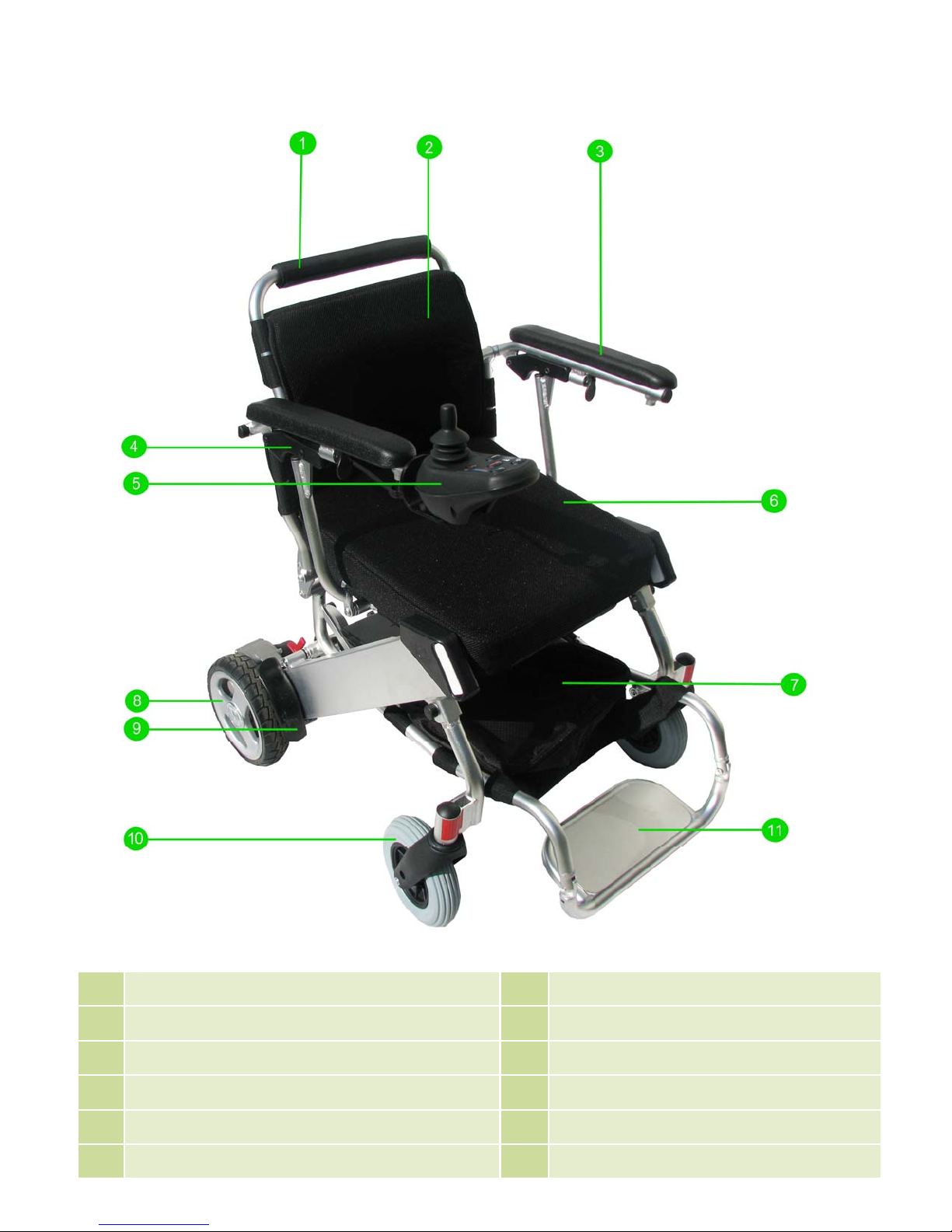
Identification of Components
1 Back Support Bar 2 Back Support Cushion
3 Arm Rest Pad 4 Arm Rest Hinge
5 Joystick 6 Seat Cushion
7 Storage Compartment 8 Rear Wheel
9 Mud/Splash Guard 10 Front Wheel
11 Foot Rest
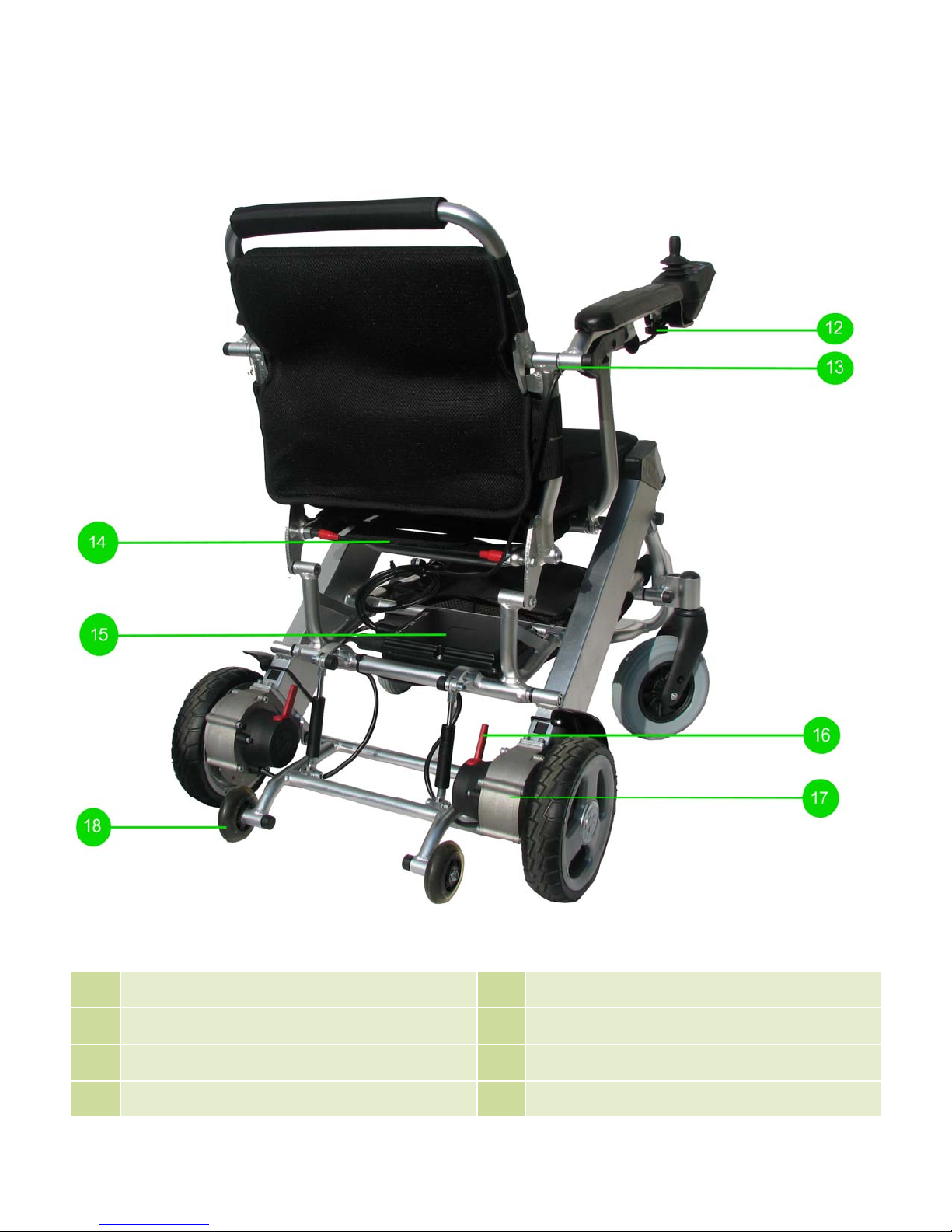
Identification of Components
12 Joystick Mounting Knob 13 Wire Clip
14 Folding Release Wire 15 CPU/Controller
16 Electromagnetic Brake Lever 17 Motor
18 Anti-Tilt Wheel

Controller System Component Diagram
Figure C
Figure C shows a sketched diagram of the full Controller System which powers & drives the EZ Lite
Cruiser.
The Battery and Joystick are connected together into the CPU controller component Input/Power I/O port
to provide power and control commands performed by the user.
The CPU controller component uses these commands to generate a signal that drives the motors in the
direction that the user indicates with the Joystick directional throttle.
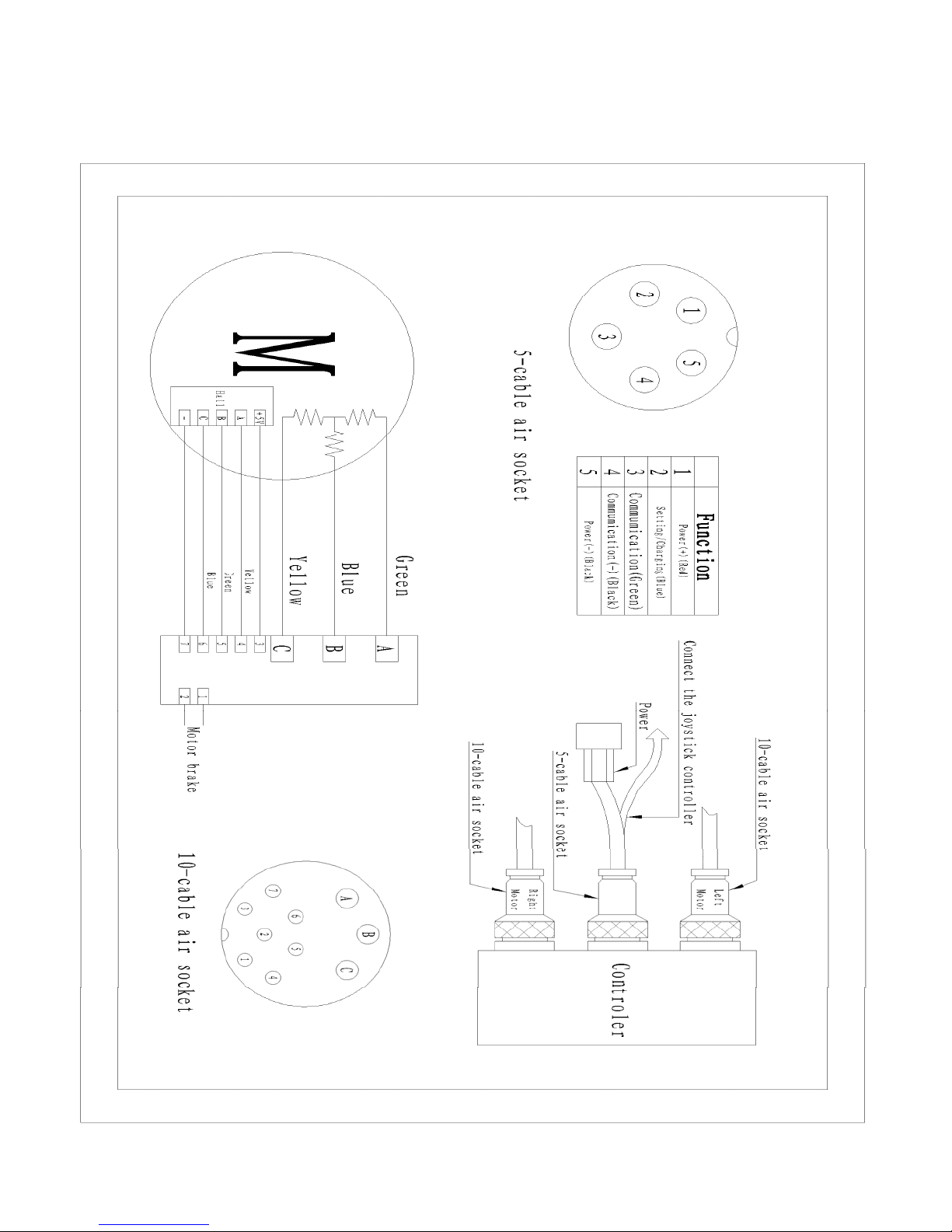
Controller System I/O Ports Detail
Figure D

Joystick Control Panel Detail
Number Function Description of Functionality
1 Power On Button Pressing this button will power on the EZ Lite Cruiser
2 Power Off Button Pressing this button will power off the EZ Lite Cruiser
3 Speed Increase Button Pressing this button will increase the speed of the chair,
and illuminate the Speed Indicator LEDs until all 5 lights
are illuminated (top speed.)
4 Speed Decrease Button Pressing this button will decrease the speed of the chair,
and turn off each light of the Speed Indicator LEDs until
only one light is illuminated (lowest speed.)
5 Horn Pressing this button will sound the horn.
6 Battery Life Indicator LEDs This indicates the battery level. 3 Green, 3 Yellow and 1
Red LED light will be on with full power. As power is di-
minished, each light from top to bottom will turn off.
7 Control Joystick Knob Controls the direction and speed of the EZ Lite Cruiser.
Push the joystick towards the desired direction.
8 Speed Indicator LEDs With 5 LED lights on, the EZ Lite Cruiser is set at its max
speed. With 1 LED light on, the EZ Lite Cruiser is at its
lowest speed. This panel also doubles as a Fault Indica-
tor.
Shown Powered ON
Shown Powered OFF
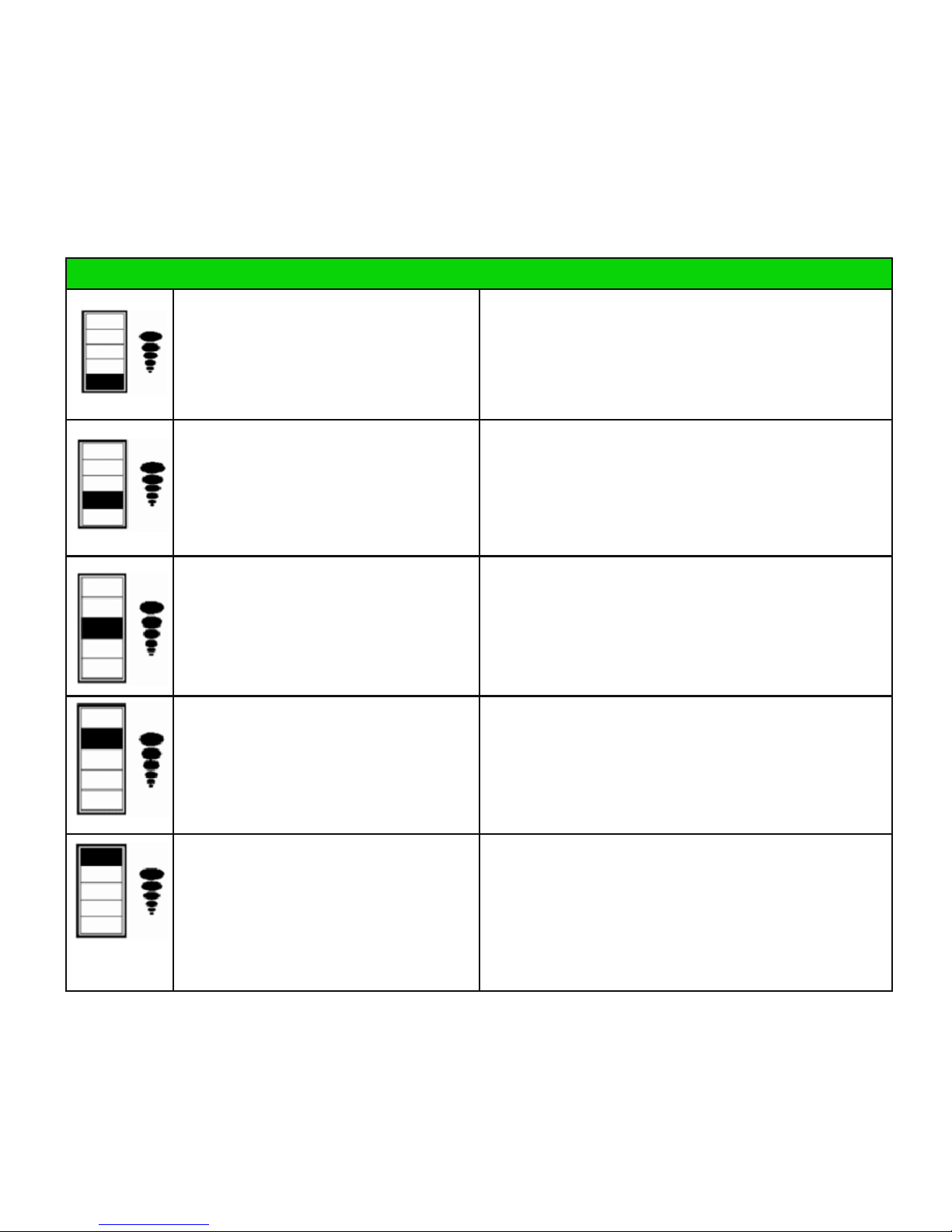
Fault Indicator Panel Guide
Aside from indicating the speed setting of the EZ Lite Cruiser, the Speed Indicator LEDs (number
8 on the figure shown on the previous page) acts as an indicator of common faults in the control-
ler system. When these LEDs flash with the following Display as indicated below, the most com-
mon problems and their respective possible solutions are identified:
Display Problem Solution
Battery power is low. You must recharge or replace the battery.
Joystick cannot deliver signals to the
control module (CPU)
Check to see that all cable connections are firmly
attached. If they are, this would indicate a problem
with the joystick, and it may need to be replaced with
a working joystick. Joystick wire could be cut.
An electronic drive locking function is
engaged to prevent the EZ Lite Cruiser
from being operated. Also acts to indi-
cate that the battery is being charged.
Disconnect the 3-pin Charger cable from the front of
the Joystick component. If it is disconnected, this
would indicate a problem with the Joystick’s Charger
connector I/O port.
Brushless motors fail to move. Check to see that all cable connections are firmly
attached. If they are, this would indicate an open or
short circuit somewhere in the controller system.
Use a multimeter to detect an open or short circuit.
Electromagnetic lock on rear wheels is
disengaged.
Push the electromagnetic levers on the rear wheels
back towards yourself (when standing behind the EZ
Lite Cruiser) to engage the electromagnetic lock.
Maintenance & Replacement of Parts
Arm Rest Pads Replacement
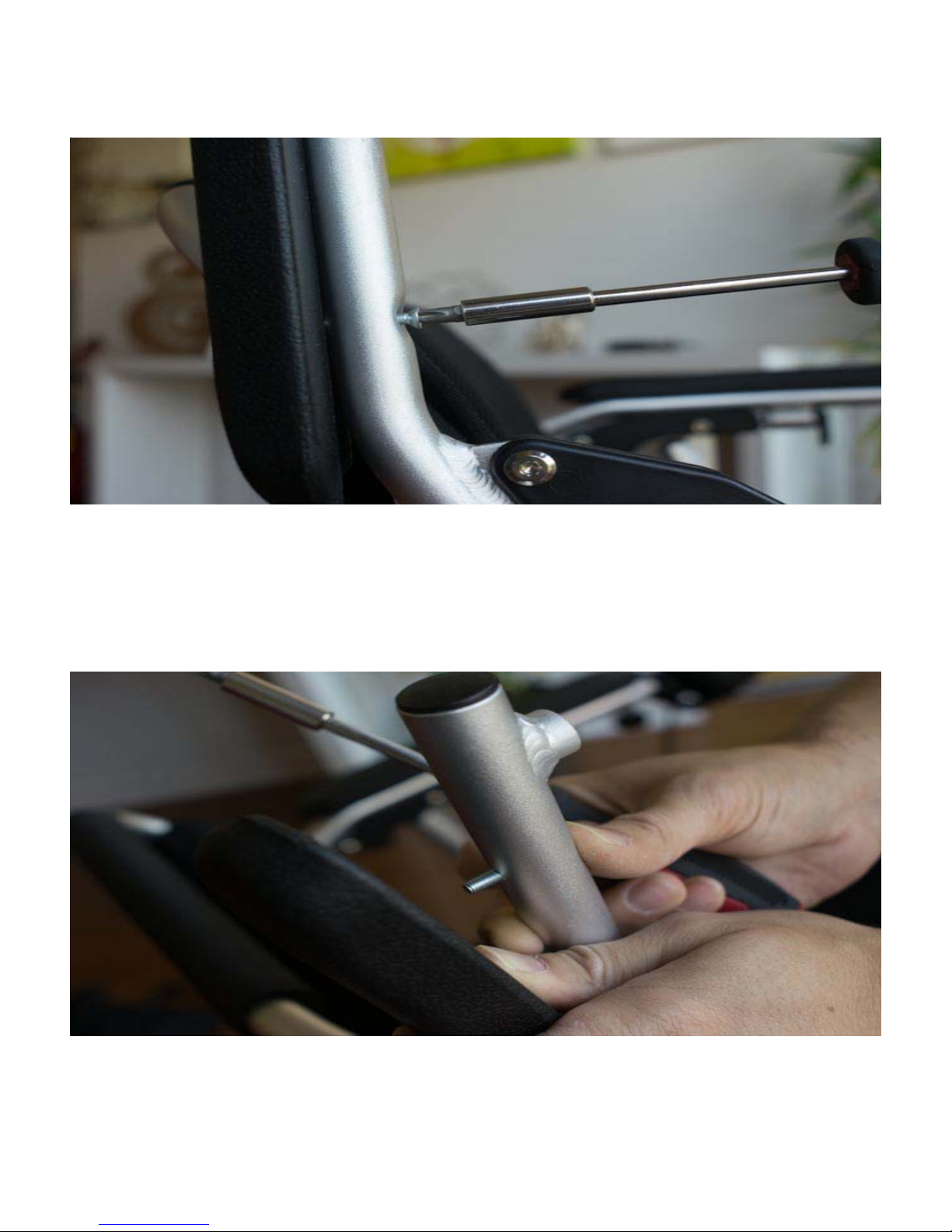
Figure # 1
The EZ Lite Cruiser has foam arm rest pads for comfort. Over time, as they become worn, or loose the
arm rest pads may need to be removed and replaced. To remove the arm rest pads, lift the arm rest as
shown in Figure 3 on the next page, and loosen the two screws that attach the arm rest pad to the arm
rest frame, as shown in Figure 1.
Figure # 2
The screws will go all the way through the bottom of the arm rest frame, as shown in Figure 2, and will
run into the arm rest pads to fasten.
Otros manuales para STANDARD MODEL
1
Tabla de contenidos
Otros manuales de Silla de ruedas de EZ Lite Cruiser


