Explore Scientific Explore One Star Maker Video Kit Manual de usuario

2021
INSTRUCTION
MANUAL
8+
88-83017
EN

22021
About this Instruction Manual
Please read the safety instructions and the operating instructions carefully before use. Keep these
instructions for renewed use at a later date. When the device is sold or given to someone else, the
instruction manual must be provided to the new owner/user of the product.
Read these safety instructions before using your device and store them for possible future reference.
This product is intended only for private use. It was developed as an electronic medium for the use of
multimedia services.
Important Safety Instructions
1) Read these instructions.
2) Keep these instructions.
3) Heed all warnings.
4) Follow all instructions.
5) Store the device in cool, dry and dust-proof places.
6) Do not use this apparatus near water.
7) Clean only with dry cloth.
8) Never touch the lens surface with your fingers.
9) Do not block any ventilation openings. Install in accordance with the manufacturer’s instructions.
10) Never point the camera lens directly at the Sun. Doing so may damage the image sensor.
11) Do not place or store the device near any heat sources such as radiators, heat registers, stoves, or other
apparatus (including amplifiers) that produce heat.
12) Do not defeat the safety purpose of the polarized or grounding-type plug. A polarized plug has two blades
with one wider than the other. A grounding type plug has two blades and a third grounding prong. The wide
blade or the third prong are provided for your safety. If the provided plug does not fit into your outlet, consult
an electrician for replacement of the obsolete outlet.
13) The charging cord should always be readily accessible.
14) While it is charging, keep the product and the power cord out of the reach of children to prevent accidental
suocation or electric shock.
15) Protect the power cord from being walked on or pinched particularly at plugs, convenience receptacles,
and the point where they exit from the apparatus.
16) In case of overheating, smoke, or unpleasant smell in the process of charging, unplug your device
immediately to prevent a fire.

3
2021
17) If the charging cord is damaged, have it repaired by the manufacturer, its service or a similarly qualified
person in order to avoid any hazard.
18) Replacing the battery incorrectly or with a battery that is not the same type or its equivalent could result
in an explosion.
19) The battery should not be exposed to excessive heat such as sunlight, fire or any heat sources such as
radiators, heat registers, stoves, or other apparatus (including amplifiers) that produce heat.
20) The battery must be installed according to the polarity.
21) The battery must be disposed of safely. Always use the collection bins provided (check with your dealer) to
protect the environment.
22) Non-rechargeable batteries are not to be recharged.
23) Rechargeable batteries must be removed from the unit before being charged, and should only be charged
under adult supervision.
24) Do not short-circuit the supply terminals.
25) Only use attachments/accessories specified by the manufacturer or sold with the apparatus. When a cart
is used, use caution when moving the cart/apparatus combination to avoid injury from tip-over.
26) Unplug this apparatus during lightning storms or when unused for long periods of time.
27) Refer all servicing to qualified service personnel. Servicing is required when the apparatus has been
damaged in any way, such as power-supply cord or plug is damaged, liquid has been spilled or objects have
fallen into the apparatus, the apparatus has been exposed to rain or moisture, does not operate normally, or
has been dropped.
28) Do not expose the unit to strong magnetic objects or strong radio waves. Strong magnetic fields may
cause product malfunctions or damage to images and sounds.
29) If the unit has not been operated in a long time, check whether the camera operates normally or not
before using the camera again.
30) Always backup or download any data from any memory card before reusing. It is recommended that you
test any memory card to make sure it is properly storing the data before any imaging session.
31) Please choose branded Micro SD card. Neutral cards are not guaranteed to work normally.
32) Do not place Micro SD card near strong magnetic objects to avoid data loss.

42021
General Warnings
• Risk of choking! — Keep packaging material, like plastic bags and rubber bands, out of the reach of
children, as these materials pose a choking hazard. This product contains small parts that could be swallowed
by children.
• Leaking battery acid can lead to chemical burns! Avoid contact of battery acid with skin, eyes and
mucous membranes. In the event of contact, rinse the aected region immediately with a plenty of water and
seek medical attention.
• Risk of electric shock! — Never bend, pinch or pull the power and connecting cables, extensions and
adapters. Protect the cables from sharp edges and heat. Before operating, check the device, cables and
connections for damage. Never use a damaged unit or a unit with damaged power cables. Damaged parts
must be exchanged immediately by an authorized service centre.
• Risk of property damage! — Do not disassemble the device. In the event of a defect, please contact your
dealer. The dealer will contact the Service Centre and can send the device in to be repaired, if necessary.
• Do not expose the device to high temperatures! Use only the supplied power adapter. Do not short-circuit
the device or throw it into a fire. Excessive heat or improper handling could trigger a short-circuit, a fire or an
explosion.
• Do not interrupt an ongoing data connection to a computer before all data has been transferred! This
could lead to data loss for which the manufacturer is not liable.

5
2021
Notes on Cleaning
Turn o the camera. Clean the eyepieces and/or lenses only with a soft, lint-free cloth, (e.g. microfibre cloth).
To avoid scratching the lenses, use only gentle pressure with the cleaning cloth. Only use a dry cloth to
clean the exterior of the device. To avoid damaging the electronics, do not use any cleaning fluid. Clean the
protective case after each use with clear, clean water and dry it thoroughly.
Disposal
Dispose of the packaging materials properly, according to their type, such as paper or cardboard.
Contact your local waste-disposal service or environmental authority for information on the proper
disposal.
The integrated battery must only be removed for disposal. Opening the device housing can damage
the unit. Drain the battery completely before disposal. Remove all the screws in the housing and
open the device housing. Remove the connections to the battery and remove it. Cover the open
contacts with tape and package the battery in such a way that it cannot shift in the packaging.

62021
02
04
06
05
08
09
11
03
01
12
13
14
15
16
17
18
19
20
07
10

7
2021
Welcome!
Create exciting content for all your favorite apps with the Star Maker Video Kit from Explore One.
This set combines a highly portable 1080P HD pocket camera with a variety of filming accessories
so you can capture your everyday adventures or your own scripted content to share with friends,
family and followers. The camera has a rotatable head, a digital display and multiple data transfer
options. To give your creations a pro edge, the set includes a sturdy extendable stand that can
serve as a tripod or selfie stick, a multi-function LED studio light, a fun green screen and a classic
clapperboard for editing ease. All you need to provide is your own star power!
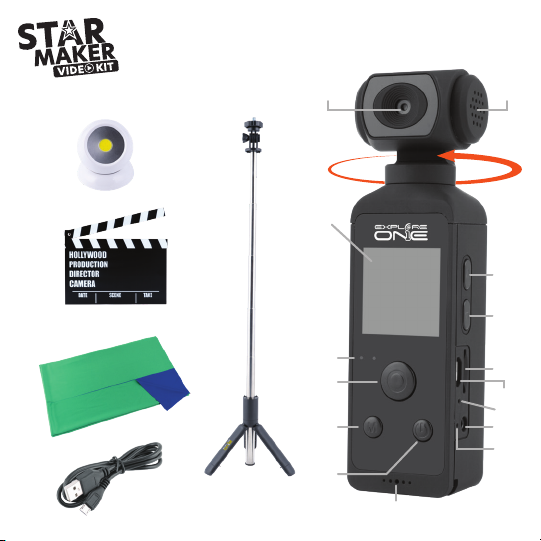
Speaker
270 Rotatable Lens
Display Screen
Up Button
Down Button
MicroFlash Card Slot
MicroUSB Charge Port
Reset Button
External Microphone Port
Charging LED Status
Microphone
Power ON/OFF Button
Menu Button
Shutter/OK Button
Status LED
Tripod/Selfie Stick
Studio Light
Clapperboard
Green Screen
USB Charging Cable
01
02
03
04
05
06
07
08
09
10
11
12
13
14
15
16
17
18
19
20
Contents

82021
Tips Before Using:
1. Make sure battery is full of power for the first time use. Do not recommend to use camera when it
is in Charging Mode.
2. Please insert MicroFlash card before taking photos and videos. Camera will prompt to format
MicroFlash card.
3. It is recommended to download any photos and videos before formatting MicroFlash card by using
a computer.
Operation Guide
Power ON/OFF
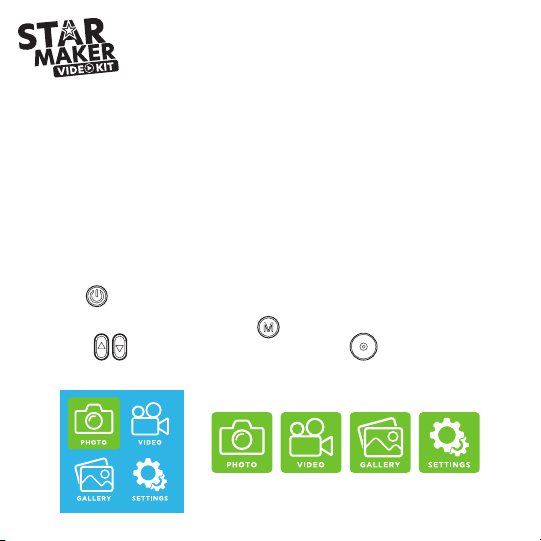
• Long press to Power on, and the camera goes into Photo Mode.
• To change camera mode or for settings, press to show the settings menu. Use the side Up/
Down buttons to select then press the Shutter/OK button to select.
Main Menu Screen
Photo
Mode
Video
Mode
Media
Gallery
Settings

9
2021
Inserting MicroFlash Card (not included)
Note: For best performance, please choose a branded MicroFlash card and format it on the camera
before use. No-name cards are not guaranteed to work flawlessly.
• Insert a memory card with the label facing the back of the camera. See Fig. 1.
• If a new memory card is inserted, the camera screen
will prompt a message to format. Allow camera to format
for best results.
Use brand name memory cards that meet these
requirements:
a) microSD, microSDHC
b) Class 10 speed rating
c) MicroFlash Card up to 64GB
Charging Camera
• Connected computer or power adapter via USB cable
for charging.
• Charging of the camera can be done even when it’s
powered off.
• When it is charging, the charge indicator light will
glow red, and when charging is complete, it will turn off.
Fig. 1

10 2021
Photo Mode
• Select Photo Mode on the menu screen and press to enter Photo-taking mode and
the screen will look like below.
• To take photos, press the Shutter/OK button to capture.
• Camera includes several fun color filters and frames. To choose a color filter, press the Up button
to scroll through each color filter. To choose a frame, press the Down button to scroll.
To remove the color filter and frame, press the Up and Down button till the filters are not longer active
or press the Menu button twice.
Photo Size
MicroFlash card inserted and number
of recordable photos allowed.
Battery Status
Photo Mode
Otros manuales de Juguete de Explore Scientific