
evertz 7700 Series Manual de usuario

7700 MultiFrame Manual
7700S2IP-RCL QMC-2 To RCL Translator
Revision 2.0
TABLE OF CONTENTS
1.
OVERVIEW..................................................................................................................................... 1
2.
CARD EDGE CONTROLS..............................................................................................................2
2.1.
DETERMINING CURRENT IP ADDRESS SETTINGS......................................................................... 2
2.2.
RESTORING FACTORY DEFAULTS................................................................................................... 2
2.3.
CARD EDGE LEDS............................................................................................................................... 2
3.
CONFIGURATION.......................................................................................................................... 3
3.1.
EXAMPLE CONFIGURATION.............................................................................................................. 3
3.2.
STEP 1: CONNECT 7700S2IP-RCL TO THE QMC MASTER CONTROL SWITCHER ..................... 5
3.3.
STEP 2: CONNECT A PC TO THE DEBUG/MONITOR PORT........................................................... 7
3.4.
STEP 3: CONFIGURE NETWORK PARAMETERS............................................................................. 9
3.5.
STEP 4: CONFIGURE SNMP TRAP DESTINATIONS ...................................................................... 11
3.6.
STEP 5: OPEN 7700S2IP-RCL VLPRO CONFIGURATION VIEW................................................... 12
3.7.
STEP 6: CONFIGURE NTP SERVER IP ADDRESS (OPTIONAL) ................................................... 13
3.8.
STEP 7: CONFIGURE CONTROLLER INTERFACE PARAMETERS .............................................. 15
3.9.
STEP 8: ASSOCIATE CONTROLLER DESTINATIONS WITH QMC-2 INPUTS.............................. 20
3.10.
STEP 9: SELECT CONTROLLER SOURCES................................................................................... 25
3.11.
STEP 10: PERFORM A QMC-2 SESSION CONFIGURATION UPDATE ......................................... 26
4.
FIRMWARE UPGRADE................................................................................................................27
4.1.
FTP ...................................................................................................................................................... 27
4.2.
SERIAL................................................................................................................................................ 27

7700 MultiFrame Manual
7700S2IP-RCL QMC-2 To RCL Translator
Revision 2.0
Figures
Figure 2-1: Card Edge......................................................................................................................................2
Figure 3-1: Example Setup...............................................................................................................................3
Figure 3-2: Example Setup...............................................................................................................................4
Figure 3-3: RS-422 Pins...................................................................................................................................5
Figure 3-4: RS-232 Pins...................................................................................................................................6
Figure 3-5: Upgrade Jumper ............................................................................................................................7
Figure 3-6: ‘Connect To’ Window.....................................................................................................................7
Figure 3-7: COM1 Properties ...........................................................................................................................8
Figure 3-8: HyperTerminal Main Menu.............................................................................................................9
Figure 3-9: 7700S2IP-RCL Network Configuration Menu................................................................................9
Figure 3-10: 7700S2IP-RCL Trap Destinations..............................................................................................11
Figure 3-11: VLPro Hardware Navigation Tree..............................................................................................12
Figure 3-12: Specifying NTP Server...............................................................................................................13
Figure 3-13: Checking NTP Server Communication......................................................................................14
Figure 3-14: Controller Interface Parameters.................................................................................................15
Figure 3-15: Session Configuration Update Indication...................................................................................17
Figure 3-16: Conducting a Session Configuration Update.............................................................................18
Figure 3-17: Checking System Controller Communication ............................................................................19
Figure 3-18: QMC-2 Interface Parameters.....................................................................................................20
Figure 3-19: Router Destination to QMC-2 Input............................................................................................21
Figure 3-20: Using Destination Combo Box...................................................................................................22
Figure 3-21: Specifying a Destination Alias....................................................................................................23
Figure 3-22: All QMC-2 Inputs Specified........................................................................................................24
Figure 3-23: Selecting Controller Inputs.........................................................................................................25
Figure 3-24: Checking QMC-2 Configuration Up-To-Date Status..................................................................26
Tables
Table 3-1: RS-422 Wiring.................................................................................................................................5
Table 3-2: RS-232 Wiring.................................................................................................................................6

7700 MultiFrame Manual
7700S2IP-RCL QMC-2 To RCL Translator
Revision 2.0
REVISION HISTORY
REVISION DESCRIPTION DATE
1.0 First Release Feb 08
2.0 Add Source and Destination Aliases. General clean up. Feb 09
Information contained in this manual is believed to be accurate and reliable. However, Evertz assumes no responsibility for the use thereof nor
for the rights of third parties, which may be affected in any way by the use thereof. Any representations in this document concerning
performance of Evertz products are for informational use only and are not warranties of future performance, either expressed or implied. The
only warranty offered by Evertz in relation to this product is the Evertz standard limited warranty, stated in the sales contract or order
confirmation form.
Although every attempt has been made to accurately describe the features, installation and operation of this product in this manual, no
warranty is granted nor liability assumed in relation to any errors or omissions unless specifically undertaken in the Evertz sales contract or
order confirmation. Information contained in this manual is periodically updated and changes will be incorporated into subsequent editions. If
you encounter an error, please notify Evertz Customer Service department. Evertz reserves the right, without notice or liability, to make
changes in equipment design or specifications.

7700 MultiFrame Manual
7700S2IP-RCL QMC-2 To RCL Translator
Revision 2.0
This page left intentionally blank

7700 MultiFrame Manual
7700S2IP-RCL QMC-2 To RCL Translator
Revision 2.0
Page-1
1. OVERVIEW
The basic function of the 7700S2IP-RCL is to provide an interface between a QMC-2 and a RCL-based
router system. In essence, the 7700S2IP-RCL makes the RCL router system (maximum supported
size is 1024 sources by 1024 destinations) appear as a Quartz router (maximum size 240 sources by
16 destinations) to the QMC-2. The 7700S2IP-RCL can communicate with up to two controllers (a
primary and a secondary). Each controller may have either 1 or 2 system controller cards installed.
Thus, the 7700S2IP-RCL can communicate simultaneously with up to 4 system controller cards.

7700 MultiFrame Manual
7700S2IP-RCL QMC-2 To RCL Translator
Page-2
Revision 2.0
2. CARD EDGE CONTROLS
2.1. DETERMINING CURRENT IP ADDRESS SETTINGS
To read the current IP address during normal operation, press the front switch DOWN. The IP address
can be read on the four-character alphanumeric display.
2.2. RESTORING FACTORY DEFAULTS
To restore all settings to factory defaults, apply power to the card while holding the toggle switch UP
until the green LED is illuminated.
2.3. CARD EDGE LEDS
LED 22 is illuminated when Ethernet activity is detected.
All other card edge LEDs are for factory use only.
Figure 2-1: Card Edge

7700 MultiFrame Manual
7700S2IP-RCL QMC-2 To RCL Translator
Revision 2.0
Page-3
3. CONFIGURATION
3.1. EXAMPLE CONFIGURATION
The setup of Figure 3-1 will be used to demonstrate how to configure the 7700S2IP-RCL.
Figure 3-1: Example Setup
Figure 3-1 contains the following elements:
•A primary RCL router controller with a system controller installed in slot 1. The system
controller has IP address 192.168.18.39. It controls the primary RCL router. The primary RCL
router has destination names Out1P, Out3P, Out5P, Out7P, and Out9P and source names
In1P, In3P, In5P, In7P, In9P, In11P, In13P, In15P within area name area.

7700 MultiFrame Manual
7700S2IP-RCL QMC-2 To RCL Translator
Page-4
Revision 2.0
•A secondary RCL router controller with a system controller installed in slot 1. The system
controller has IP address 192.168.18.40. It controls the secondary RCL router. The secondary
RCL router has destination names Out1S, Out3S, Out5S, Out7S, and Out9S and source names
In1S, In3S, In5S, In7S, In9S, In11S, In13S, In15S within area name lala.
•RCL router destinations Out1, Out3, Out5, Out7, and Out9 are connected to QMC master
control switcher inputs Program, Preset, Keyer 1 Fill, Keyer 1 Key, DVE Background
respectively.
•An NTP server with IP address 192.168.18.37. The time provided by the NTP server is used by
the 7700S2IP-RCL when adding entries to its event log.
•VistaLINK PRO with IP address 192.168.18.38. VLPro will be used to configure the 7700S2IP-
RCL. VLPro will receive SNMP traps from the 7700S2IP-RCL.
•7700S2IP-RCL with IP address 192.168.18.54.
The 7700S2IP-RCL communicates:
•with VLPro using SNMP
•with the RCL system controllers via the RCL protocol over a TCP link
•with the QMC master control switcher using the Quartz Remote Control Protocol over a serial
link
Conceptually, this is equivalent to:
Figure 3-2: Example Setup

7700 MultiFrame Manual
7700S2IP-RCL QMC-2 To RCL Translator
Revision 2.0
Page-5
3.2. STEP 1: CONNECT 7700S2IP-RCL TO THE QMC MASTER CONTROL SWITCHER
1. Ensure there is no power applied to the 7700S2IP-RCL.
2. If using RS-422, connect the pins of the 7700S2IP-RCL to those of a serial port of the QMC
master control switcher according to Figure 3-3 and Table 3-1.
3. If using RS-232, connect the pins of the 7700S2IP-RCL to those of a serial port of the QMC
master control switcher according to Figure 3-4 and Table 3-2.
4. Apply power to the 7700S2IP-RCL.
Figure 3-3: RS-422 Pins
7700S2IP-RCL Pin Name QMC Master Control Switcher Pin Name
TX- RX-
TX+ RX+
GND RX GND
RX- TX-
RX+ TX+
GND TX GND
Table 3-1: RS-422 Wiring
7700 MultiFrame Manual
7700S2IP-RCL QMC-2 To RCL Translator
Page-6
Revision 2.0
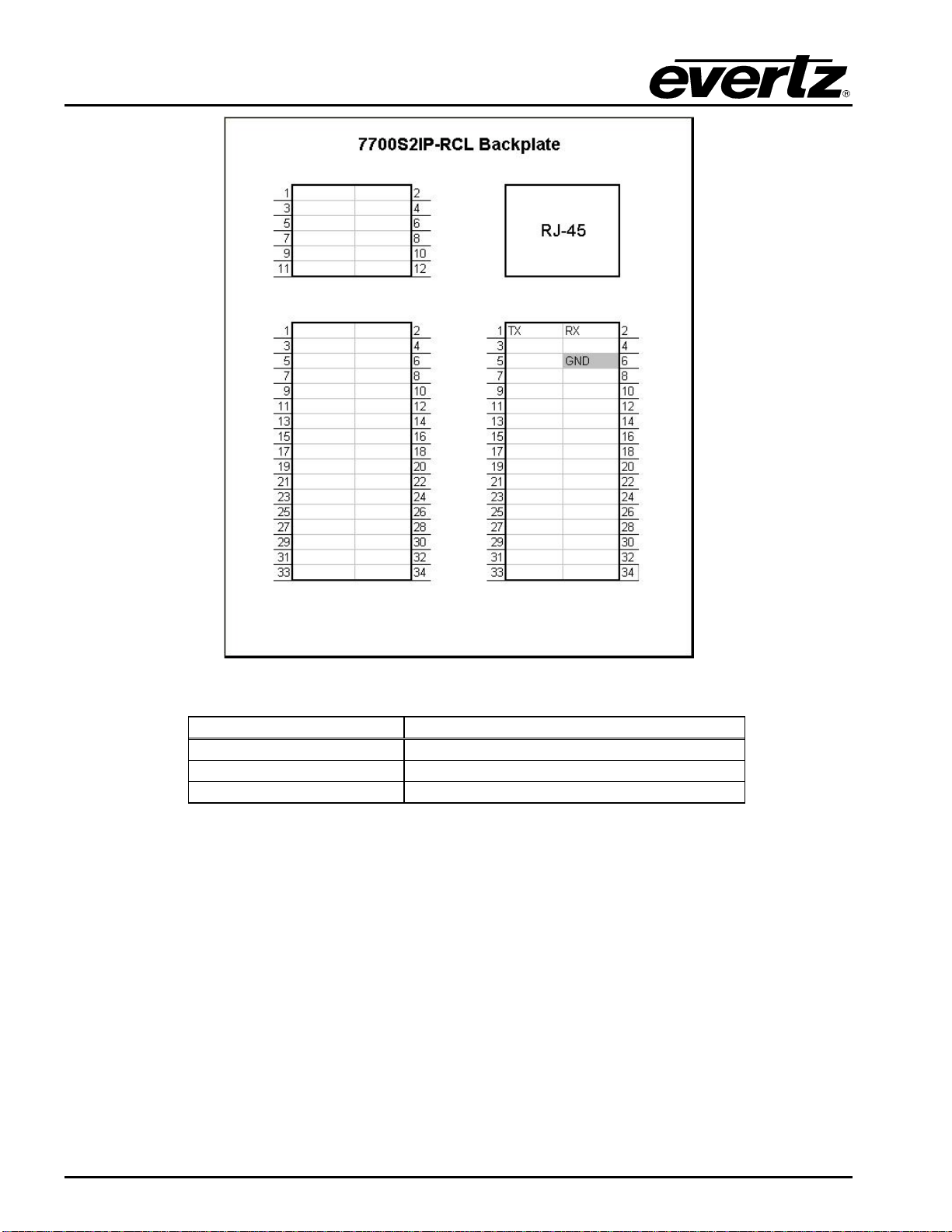
Figure 3-4: RS-232 Pins
7700S2IP-RCL Pin Name QMC Master Control Switcher Pin Name
TX RX
RX TX
GND GND
Table 3-2: RS-232 Wiring
Otros manuales para 7700 Series
127
Este manual sirve para los siguientes modelos
1
Tabla de contenidos
Otros manuales de Diccionario electrónico de evertz

evertz
evertz 7700 Series Manual de usuario

evertz
evertz 7880IPG-NAT Series Manual de usuario

evertz
evertz 7700 Series Manual de usuario

evertz
evertz 570NAT-HW-X19 Manual de usuario

evertz
evertz 7700 Series Manual de usuario

evertz
evertz 7700 Series Manual de usuario

evertz
evertz 7700 Series Manual de usuario

evertz
evertz MultiFrame EMX3 Manual de usuario

evertz
evertz 7700 Series Manual de usuario


