
Esse-ti COMNet Manual de usuario

23/03/2021
User’s manual

TABLE OF CONTENTS
DATA TRANSMISSION .................................................................. 4
PROGRAMMING.............................................................................. 8
Message format ........................................................................................ 8
Notification message format .................................................................... 9
Basic programming ...................................................................... 11
Setting the SIM number ......................................................................... 11
APN setting ............................................................................................ 12
Registering to COMNet server .............................................................. 12
Communication settings ........................................................................ 13
Advanced programming ............................................................... 15
Programming CAN-bus identifiers ........................................................ 15
Programming GSM500.net / 3G.next / 4G.next / 4G.VoLTE / 4GRouter
identifier ................................................................................................. 16
Filter and CAN-bus data packets delay ................................................. 16
Bus termination resistance (GSM500.net) ............................................. 17
Bus termination resistance (3G.next / 4G.next / 4G.VoLTE / 4GRouter)
................................................................................................................ 18
COMNet server connection settings ...................................................... 18
Programming COMNet server password .............................................. 19
Programming GSM500.net / 3G.next / 4G.next / 4G.VoLTE / 4GRouter
access password ..................................................................................... 20
COMNET PC CLIENT .................................................................... 21
Installation ................................................................................... 21
System requirements .............................................................................. 21
Setup ....................................................................................................... 21
Configuration ............................................................................... 22
Connection parameters to COMNet Server ........................................... 22
COMNet PC Client settings ................................................................... 23
Operation ..................................................................................... 25
Entering new devices ............................................................................. 25
Setting up a data connection .................................................................. 26
GSM500.net / 3G.next / 4G.next / 4G.VoLTE / 4GRouter
Configurator ................................................................................. 27

Other functions ............................................................................. 30
Clear items ............................................................................................. 30
Import/export data .................................................................................. 30
Phone validator ...................................................................................... 30
Software update...................................................................................... 30
Connection test ....................................................................................... 30
Page 4
DATA TRANSMISSION
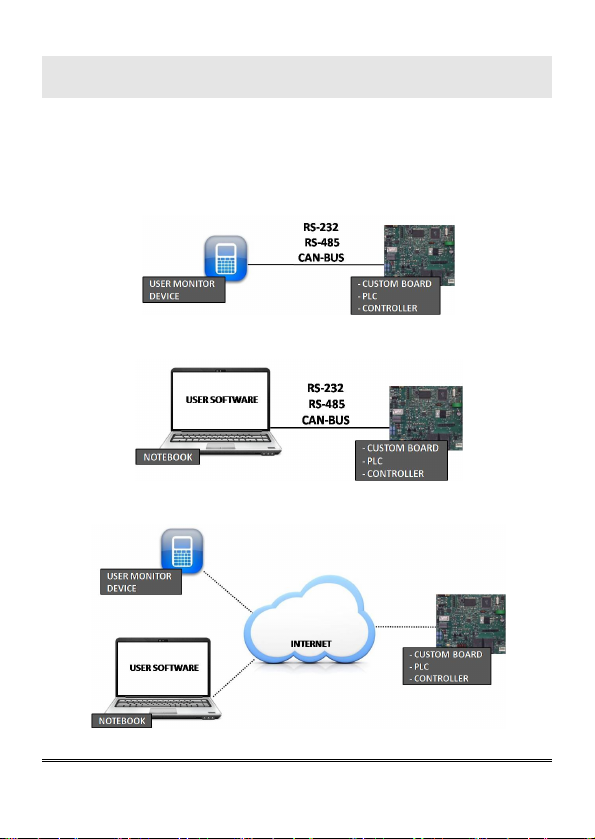
The COMNet system allows users to connect remotely with devices
equipped with RS-232, RS-485, CAN-bus, replacing traditional serial
communication which is commonly performed locally (i.e. between
peripherals and custom boards – Fig. A – or between a PC-based
proprietary application and a lift controller board – Fig. B –).
Figure A: example of local serial communication
Figure B: example of local serial communication
Figure C: general example of remote serial communication
Page 5
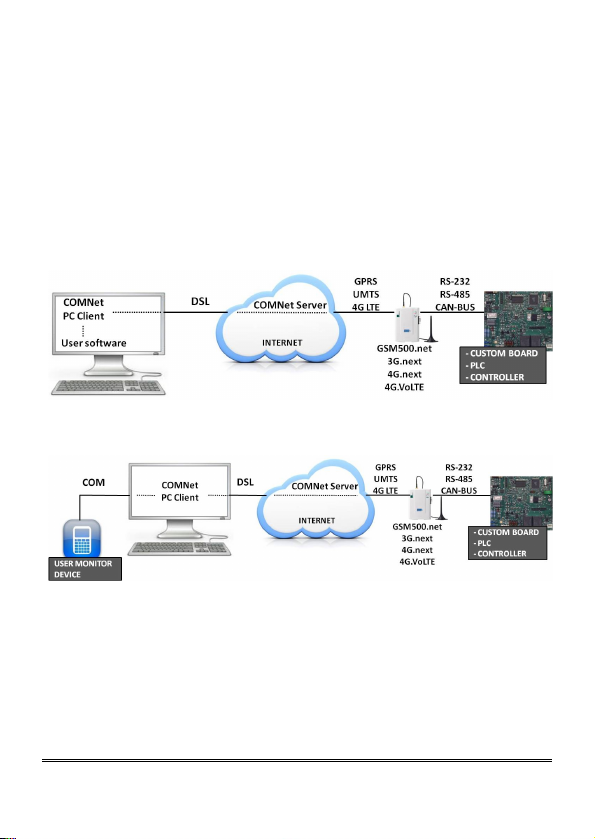
Setting up a COMNet system requires:
- connecting a GSM500.net / 3G.next / 4G.next / 4G.VoLTE /
4GRouter gateway (properly programmed) to the serial port of the
remote device to be controlled (the SIM card to be inserted into the
gateway must be enabled for voice/data/SMS traffic)
- installing the COMNet PC Client software in the PC which will be
used for remote-monitoring (the PC must be able to access the Internet) or
use similar proprietary application (PC application, mobile app, web
server or other solution respecting the COMNet protocol).
Figure D: example of COMNet system
Figure E: example of COMNet system
The COMNet system exclusively allows to set up a remote two-way data
communication. The data flow coming out of the remote device will be
sent to the same application commonly used for local wired
communication or to the a physical COM port of the computer.
Page 6
The connection procedure simply requires to enter the SIM card
telephone number associated with the remote GSM500.net / 3G.next /
4G.next / 4G.VoLTE/ 4GRouter into the COMNet PC Client or similar
proprietary application. This eliminates any difficulties in locating remote
devices not assigned to static IP addresses.
The data connection is established by the system on demand and the data
are transferred over an Esse-ti proprietary server (COMNet Server).
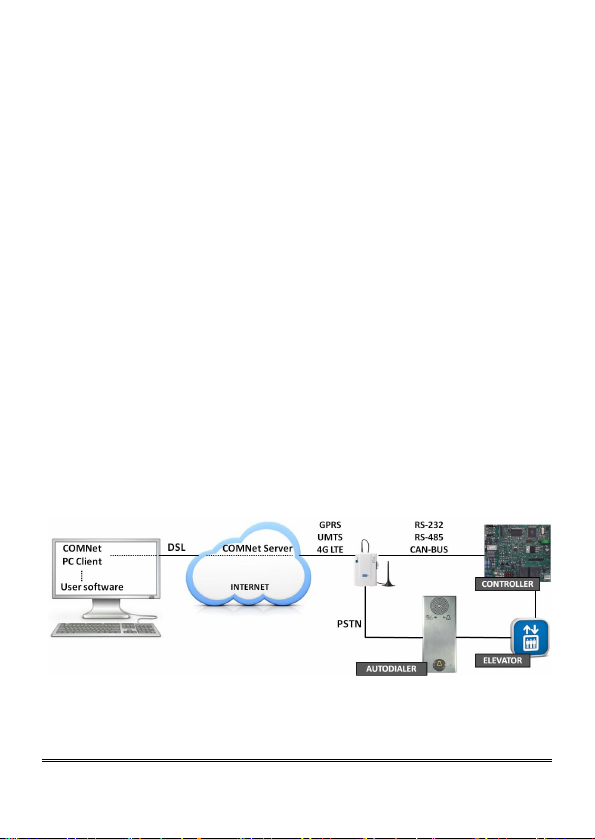
The GSM500.net / 3G.next / 4G.next / 4G.VoLTE / 4GRouter connected
to the remote device to be monitored, may also be used as a standard
gateway for voice transmission, by means of the dedicated plug or
connector (i.e. it can be connected with the elevator emergency phone
dialer) and the same SIM card needed for remote monitoring.
In the GSM500.net / 3G.next the voice call is always privileged over the
data transmission, therefore in case of a voice emergency call, the
ongoing data connection will be automatically cut off.
4G.next, 4G.VoLTE and 4GRouter can manage a data call and a voice
call at the same time, therefore in case of a voice emergency call, the
ongoing data connection will not be cut off.
Figure F: example of COMNet system with GSM500.net / 3G.next / 4G.next /
4G.VoLTE / 4GRouter used as gateway for voice transmission
Page 7
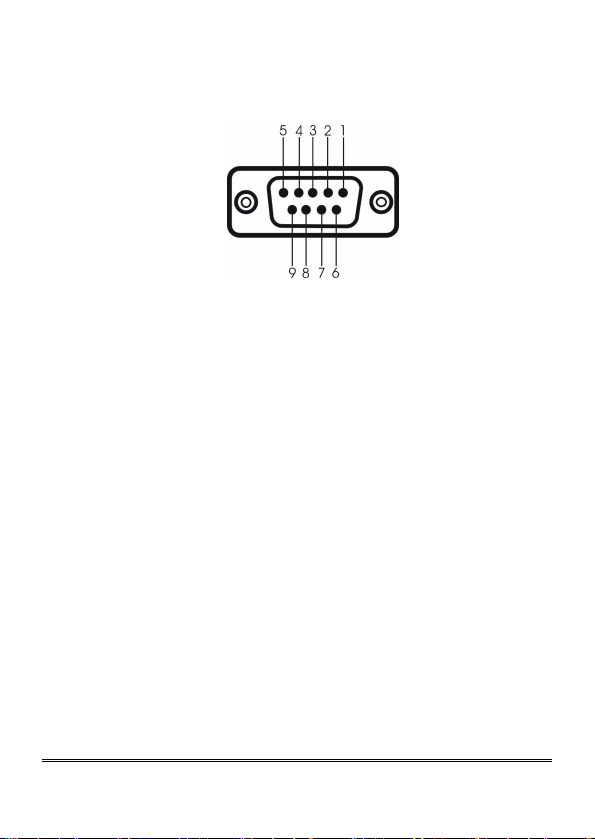
Female DB-9 connector
RS-232
TX PIN2
RX PIN3
GND PIN5
RS-485
TXD- PIN6
TXD+ PIN7
GND PIN5
CAN-bus
CANH PIN8
CANL PIN9
GND PIN5

Page 8
PROGRAMMING
The programming of the GSM500.net / 3G.next / 4G.next/ 4G.VoLTE/
4GRouter, connected to the serial port of the remote device to be
controlled, is possible via SMS by any mobile phone or other device
supporting SMS. In case the administrator number has been previously
set, programming via SMS is only allowed from such telephone number.
An SMS notifying that programming has been completed will be sent
back by the gateway to the same telephone number that forwarded the
programming SMS.
WARNING
Programming via SMS may not be successful if the
message requested format is not respected.
WARNING
Each programming SMS can contain a maximum of
160 characters.
Message format
Each programming SMS must contain the password, allowing to access
programming, and the codes corresponding to the desired settings.
For the GSM500.net the message format is required to be as follows:
ET-IG5*xxx#c..c#c..c#c..c#
For the 3G.next the message format is required to be as follows:
ET-IU1*xxx#c..c#c..c#c..c#
For the 4G.next / 4G.VoLTE the message format is required to be as
follows:
ET-IL2*xxx#c..c#c..c#c..c#

Page 9
For the 4GRouter the message format is required to be as follows:
ET-IL1*xxx#c..c#c..c#c..c#
Where:
ET-IG5 : programming string start for GSM500.net
ET-IU1 : programming string start for 3G.next
ET-IL2 : programming string start for 4G.next / 4G.VoLTE
ET-IL1 : programming string start for 4GRouter
*xxx# : password string (default xxx = 0)
c..c : programming code as per paragraphs below
# : separator character or end string character
Notification message format
The format of the message notifying the user or the administrator who
previously sent out a programming SMS is the same as the programming
message format.
SMS notifying an accepted command - GSM500.net:
ET?IG5*xxx#c..c#
SMS notifying a rejected command - GSM500.net:
ET?IG5*xxx#c..cERR#
SMS notifying an accepted command - 3G.next:
ET?IU1*xxx#c..c#
SMS notifying a rejected command - 3G.next:
ET?IU1*xxx#c..cERR#
SMS notifying an accepted command - 4G.next / 4G.VoLTE:
ET?IL2*xxx#c..c#
SMS notifying a rejected command - 4G.next / 4G.VoLTE:
ET?IL2*xxx#c..cERR#

Page 10
SMS notifying an accepted command - 4GRouter:
ET?IL1*xxx#c..c#
SMS notifying a rejected command - 4GRouter:
ET?IL1*xxx#c..cERR#
Tabla de contenidos
Otros manuales de Hardware de red de Esse-ti

Manuales populares de Hardware de red de otras marcas

Matrix Switch Corporation
Matrix Switch Corporation MSC-HD161DEL Manual de usuario

B&B Electronics
B&B Electronics ZXT9-IO-222R2 Manual de usuario

Yudor
Yudor YDS-16 Manual de usuario

D-Link
D-Link ShareCenter DNS-320L Manual de usuario

Samsung
Samsung ES1642dc Instrucciones de uso

Honeywell Home
Honeywell Home LTEM-PV Instrucciones de montaje


