
ESI ES3247 Instrucciones de funcionamiento

ES3247
3 Channel Programmer
User and Installaon
Instrucons


What is a Channel Programmer? 1
Introducon to the 3 Channel Programmer 2
Programming the Unit
The Factory-set Programme 3
Changing the Programme 4
Linking Central Heang & Hot Water Times 5
Operang the Unit
Choosing the Operang Mode 5
Using the Advance Funcon 6
Using the +HR Boost Funcon 7
Basic Sengs
Seng the Time & Date 8
Seng the Backlight 9
Reseng the Unit 9
Power Interrupon 9
INDEX
User Instrucons

Installaon Instrucons
Technical Data 10
Installaon Safety Instrucons, Maintenance & Safety Noce 11
Pre-Installaon Unit Set Up 12
Fing the Back Plate 12
New Installaons 13
Exisng Installaons 13
Wiring Diagram 14
Fing the Programmer 15
Commissioning 15
Configuraon 16
INDEX

User
Instrucons
Technical Data 10
Installaon Safety Instrucons, Maintenance & Safety Noce 11
Pre-Installaon Unit Set Up 12
Fing the Back Plate 12
New Installaons 13
Exisng Installaons 13
Wiring Diagram 14
Fing the Programmer 15
Commissioning 15
Configuraon 16

What is a Channel Programmer?...
An explanaon for householders
On some programmers you must also set whether you want the
Heang and Hot Water to run connuously, run under the chosen
‘On’ and ‘Off’ heang periods, or be permanently off. The me on
the programmer must be correct. Some types have to be adjusted in
Spring and Autumn upon the changes between Winter and Summer
me.
You may be able to temporarily adjust the heang programme, for
example, ‘Override’,‘Advance’ or ‘Boost’. These are explained in the
manufacturer’s instrucons. The heang will not work if the room
thermostat has switched the heang off. And, if you have a Hot
Water cylinder, the water heang will not work if the cylinder
thermostat detects that the Central Hot Water has reached the
correct temperature.
1
Programmers allow you to set ‘On’ and ‘Off’ me
periods. Some models switch the Central Heang and
domesc Hot Water on and off at the same me, while
others allow the domesc Hot Water and Heang to come on and
go off at different mes. Set the ‘On’ and ‘Off’ me periods to suit
your own lifestyle.

What is a Channel Programmer?...
An explanaon for householders
Introducon to the 3 Channel Programmer
This programmer can automacally switch your Central Heang or
Hot Water ON and OFF up to 3 mes a day, at whatever mes you
choose. Timekeeping is maintained through power interrupons
by a non replaceable baery designed to last for the lifeme of the
programmer and the clock is automacally put forward 1 hour at
1:00am on the last Sunday of March and back 1 hour at 2:00am on
the last Sunday of October. The clock is factory pre-set to UK me
and date, but you can alter it if you wish. During installaon, the
installer selects 24 hour, or 5 day/ 2day, or 7 day programming and
2 or 3 on/off periods per day, via a 4 posion DIP switch on the back
of the unit (see installaon instrucons).
The large, easy to read display makes programming easy and the
unit is designed to eliminate the possibility of accidental changes to
your programme. Buons normally visible, only affect your set
programme temporarily. All buons which can permanently change
your programme are located behind the flip over facia.
- The 24 hour programmer opon runs the same programme every
day.
- The 5/2 Day programmer opon allows different ON/OFF mes at
weekends.
- The 7 Day programmer opon allows different ON/OFF mes for
each day of the week.
- Pumped System (PU) allows independent control of Central
Heang and Hot Water.
- Gravity System (Gr) does not allow Central Heang without Hot
Water but can provide Hot Water without Central Heang.
IMPORTANT: These sengs should only be changed by a qualified
person. Contact your installer. This programmer is not suitable for
the switching of devices greater than 6Amp rated. (e.g. Not suitable
for use as an immersion mer)
2

Introducon to the 3 Channel Programmer Programming the Unit
The Factory-Set Programme
This is the factory-set programme built into the unit. If the user
changes from the factory-set programme and wishes to return to it,
pressing the reset buon with a non metallic pointed tool will return
the unit to the factory-set programme. NB. Every me the reset is
pressed, the me and date must be set again (page 8).
If the unit is installed as a 24 hour programmer the built in
programme will be the same for each day (i.e. Sat-Sun be same as
Mon-Fri above).
Changing The Programme (refer to Fig.1, Page 4)
For 7 Day Programmer Opon - the inial programme displayed will
be for Monday. You can go to any day of the week by pressing the
DAY buon repeatedly. The COPY buon will copy the current
programme onto the next day. NB. It is not possible to copy Sunday
to Monday.
For 5/2 Day Programmer Opon - the inial programme displayed
will be for Monday - Friday. Press the DAY buon for Saturday -
Sunday programme. The COPY buon will copy the current
programme onto the next day group. NB. It is not possible to copy
Saturday-Sunday programme to Monday-Friday programme.
For 24 Hour Programmer Opon - the built in programme will be
the same for each day. The COPY & DAY buons have no effect if
installed as a 24 hour programmer.
3
To change the Central Heang mes
1. Press SET buon (1) unl first radiator icon (2) flashes in the
display and 1 ON (3) appears.
Configuraon
2PU & 2Gr
Configuraon
3PU & 3Gr Mon-Fri Sat-Sun

2. Press the +/- buons (4) to alter the ON me.
3. Press the NEXT buon (5), and the display will now show 1 OFF
(3).
4. Press the +/- buons (4) to alter the OFF me.
5. Press the NEXT buon (5) to access remaining ON/OFF periods
and alter in same manner as above.
6. Press Set Buon (1) to access Heang Zone 2. The second radiator
icon (6) will flash. Repeat proceedures for CH1 if you wish to change
CH2 programme mes.
Programming the Unit
(1)(3)(6) (7) (5)(2) (4) Fig. 1
4
Press SET buon (1) unl tap icon (7) flashes in the display and 1 ON
(3) appears. This indicates the me shown on the display is the first
ON me. Proceed in same manner as ‘To change the Central Heang
mes’ above.
NB: Programming is in 10 minute segments. The programme day is
from 03:00am to 02:50am the next day. If a programme is required
to run from 1.00 am to 8.00 am, 2 programmes must be used (1.00
am-2.50 am and 3.00 am-8.00 am). NB: The unit will automacally
return to RUN mode if a period of 5 minutes passes without any
buons being pressed.
To change Hot Water Times
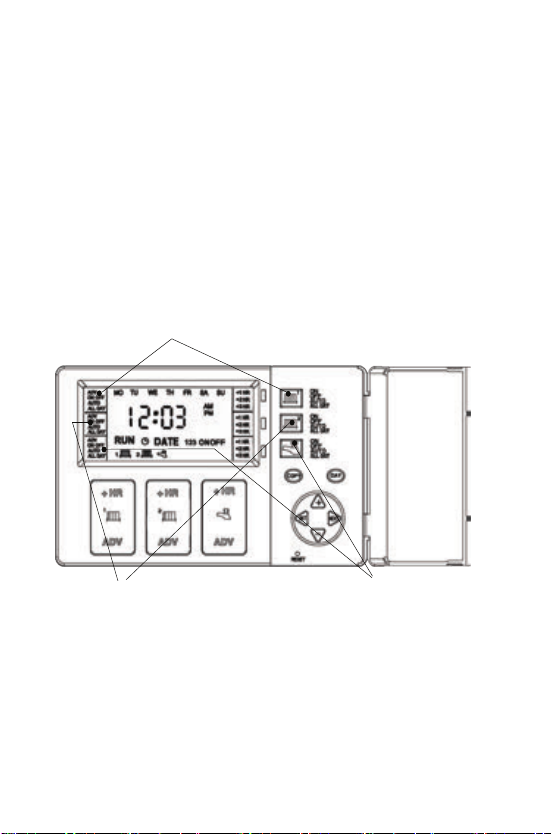
Fig. 1
Operang the Unit
Choosing the Operang Mode
HW Mode
CH2 Mode
CH1 Mode
5
The last leer of the configuraon (either U or A) will be L if the
Central Heang and Hot Water programmes have been linked. In
this mode the Hot Water (and second Central Heang channel in 3
channel programmers) will run from the Central Heang 1
programme, so changes to the programme need only be made once
and this will affect both Central Heang and Hot Water (and second
Central Heang channel in 3 channel programmers).
To link the programmes hold down the COPY buon whilst pressing
RESET. To switch the linked off, just hold down the COPY buon
whilst pressing RESET.
ON : Central Heang and Hot Water is ON connuously
AUTO: Central Heang and Hot Water will be switched ON and
OFF in accordance with set programmes
ALL DAY: Central Heang and Hot Water will switch ON at the first
ON and switch OFF at last OFF
OFF: Central Heang and Hot Water will be permanently OFF
Linking Central Heang & Hot Water Times
Tabla de contenidos
Otros manuales de Placa madre de ESI


Manuales populares de Placa madre de otras marcas


Telit Wireless Solutions
Telit Wireless Solutions SL869-3DR Manual de usuario

Gigabyte
Gigabyte GA-9IVDT Manual de usuario

Texas Instruments
Texas Instruments ADS8372EVM Manual de usuario

Commell
Commell MS-C73 Manual de usuario

IBT Technologies
IBT Technologies MB860 Manual de usuario

Nvidia
Nvidia TEGRA DG-04927-001_V01 Manual de usuario


