
Enlight EN-7180 Series Manual de usuario
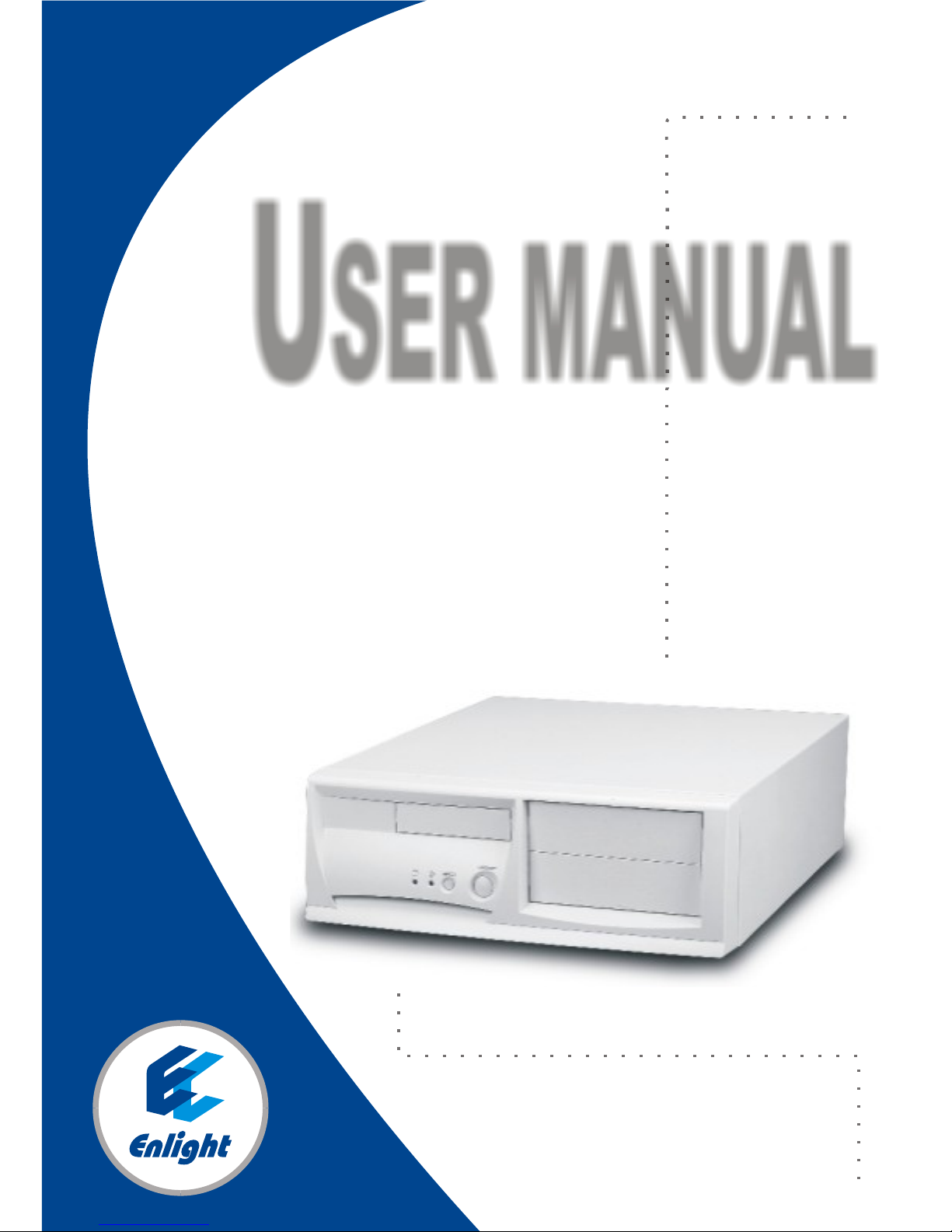
EN-7180
USER MANUAL

Install fan using countersink screws and
place fan in housing (Fig. 4). Connect fan
and speaker wiring to M/B as instructed in
M/B user manual (After M/B is installed!).
Install 3.5" HDD and FDD (floppy)
A.Squeeze tab on top and remove 3.5in.
drive cassette (Fig.5). Slide HDD
into bottom of cassette and fasten
with coarse thread flat head screws.
Slide floppy into the top of the same
cassette and fasten with fine thread
flat head screws.
B.Then slide cassette back in to drive
bay and snap in to place.
Install CD-ROM, (DVD or 5.25" FDD
A.Fasten slide guides to the side of CD-
ROM (DVD or 5.25" FDD) Using
fine thread flat head screws (Fig. 6).
B.Slide CD-ROM in to 5.25" bay and
snap in to place (Fig 7).
Fig:4
Fig:5
Fig:6
Fig:7
Series EN-7180
***Important-First please check your model number before proceeding. The
user manual is set up to correspond to the model number and installation will
vary depending on the model.
Required tools: Phillips head screwdriver, pliers
***(Photos shown may vary according to different model number)
Place case on edge of table (Fig.1).
With 1 hand holding top of chassis,
pull quickly from the bottom of the
bezel to remove it (Fig. 2).
**Note-It might require some force
to remove due to the snug fit to the
chassis.
Remove screws. Place hands on sides
of top cover, and thumbs firmly on
chassis. Slide top cover towards you 1".
Spread sides and lift straight up to
remove (Fig. 3).
Fig:3
Fig:1
Fig:2

Install fan using countersink screws and
place fan in housing (Fig. 4). Connect fan
and speaker wiring to M/B as instructed in
M/B user manual (After M/B is installed!).
Install 3.5" HDD and FDD (floppy)
A.Squeeze tab on top and remove 3.5in.
drive cassette (Fig.5). Slide HDD
into bottom of cassette and fasten
with coarse thread flat head screws.
Slide floppy into the top of the same
cassette and fasten with fine thread
flat head screws.
B.Then slide cassette back in to drive
bay and snap in to place.
Install CD-ROM, (DVD or 5.25" FDD
A.Fasten slide guides to the side of CD-
ROM (DVD or 5.25" FDD) Using
fine thread flat head screws (Fig. 6).
B.Slide CD-ROM in to 5.25" bay and
snap in to place (Fig 7).
Fig:4
Fig:5
Fig:6
Fig:7
Series EN-7180
***Important-First please check your model number before proceeding. The
user manual is set up to correspond to the model number and installation will
vary depending on the model.
Required tools: Phillips head screwdriver, pliers
***(Photos shown may vary according to different model number)
Place case on edge of table (Fig.1).
With 1 hand holding top of chassis,
pull quickly from the bottom of the
bezel to remove it (Fig. 2).
**Note-It might require some force
to remove due to the snug fit to the
chassis.
Remove screws. Place hands on sides
of top cover, and thumbs firmly on
chassis. Slide top cover towards you 1".
Spread sides and lift straight up to
remove (Fig. 3).
Fig:3
Fig:1
Fig:2

A. Orient top cover and spread sides.
Slide vertically down and make
sure slide fastener guides are
properly set in the rails (Fig11).
once top cover is set properly on the
rails, slide away from you to close the
top Cover.
B. Use Hex Head screws to fasten top
Cover.
Line up snaps with holes on chassis
and snap into place starting with top
snaps.
Fig:11
A. Identify if M/B is ATX or microATX.
B. Remove center bar to allow easy access to
electronic bay (Fig 8).
C. Make sure punch out holes for I/O ports on
the I/O plate are punched out matching
ports on the M/B.
D. Install at an angle, first by lining up the I/O
Ports on the M/B with I/O plate (Fig 9).
E. Once holes are lined up, set M/B on
standoffs, make sure the M/B is seated
properly and fasten M/B using hex head
screws.
(M/B mounting screw holes will vary with
manufacturer. Please refer to M/B user
manual for more details.)
F. Connect wires as directed in M/B user
manual.
G. Reinstall center bar.
Fig:10
Fig:9
Fig:8
Slide in to P/S area and fasten with hex
head screws (Fig 10). Connect wires as
directed in M/B manual.
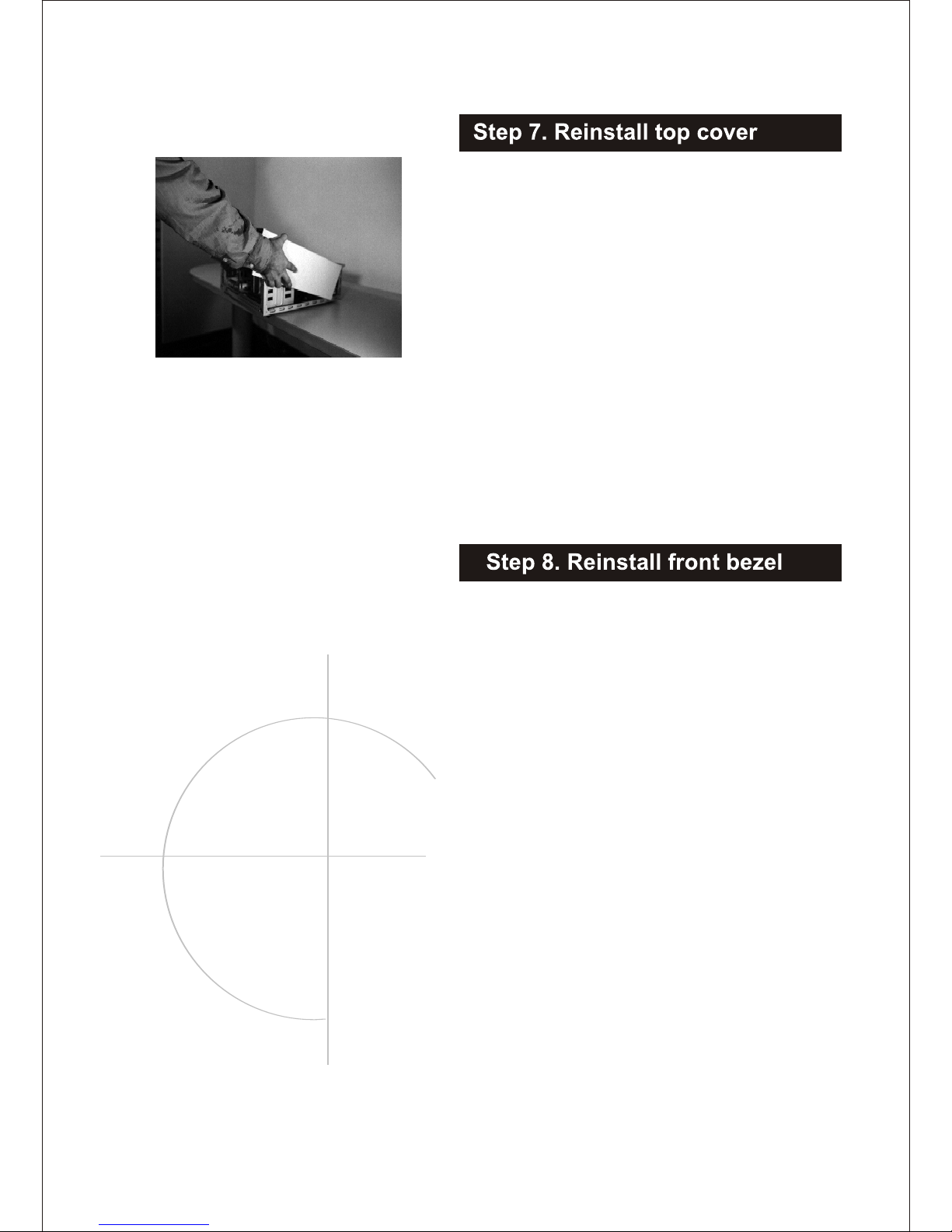
A. Orient top cover and spread sides.
Slide vertically down and make
sure slide fastener guides are
properly set in the rails (Fig11).
once top cover is set properly on the
rails, slide away from you to close the
top Cover.
B. Use Hex Head screws to fasten top
Cover.
Line up snaps with holes on chassis
and snap into place starting with top
snaps.
Fig:11
A. Identify if M/B is ATX or microATX.
B. Remove center bar to allow easy access to
electronic bay (Fig 8).
C. Make sure punch out holes for I/O ports on
the I/O plate are punched out matching
ports on the M/B.
D. Install at an angle, first by lining up the I/O
Ports on the M/B with I/O plate (Fig 9).
E. Once holes are lined up, set M/B on
standoffs, make sure the M/B is seated
properly and fasten M/B using hex head
screws.
(M/B mounting screw holes will vary with
manufacturer. Please refer to M/B user
manual for more details.)
F. Connect wires as directed in M/B user
manual.
G. Reinstall center bar.
Fig:10
Fig:9
Fig:8
Slide in to P/S area and fasten with hex
head screws (Fig 10). Connect wires as
directed in M/B manual.
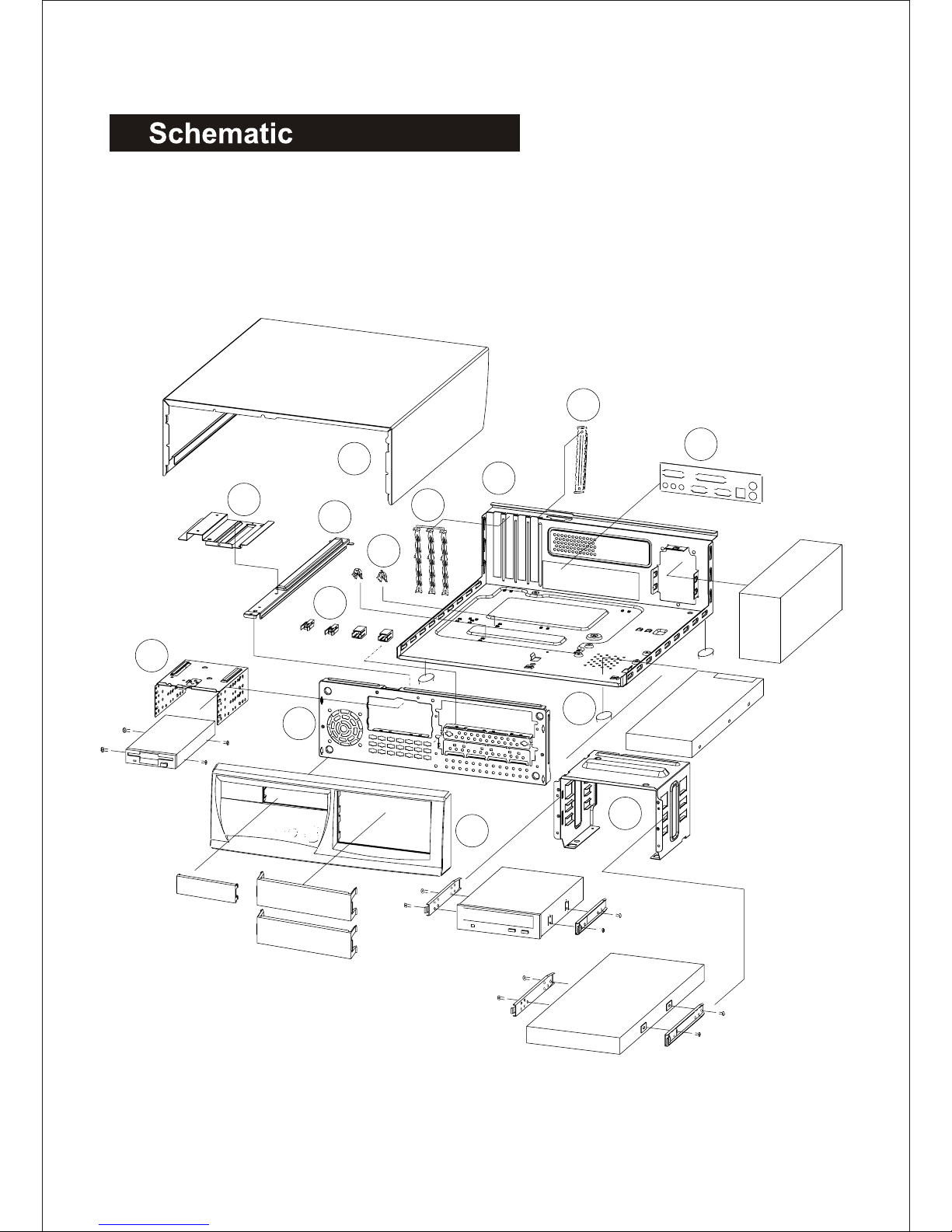
EN-7180 SERIES P/N:3635047
NO P/N PART NAME
13221138 COVER
23221127 CHASSIS
35208455 I/O PLATE
43214577 ADAPTER PLATE
53220443 ADAPTER EMI-SPRING
63221149 LINK
73221162 3.5”HDD BRACKET SUPPORT
83214566 M/B STAKE-1(SCREWED)
93408384 LED HOLDER
10 3132574 RUBBER FOOT
11 3221151 5.25” BRACKET
12 3221116 CHASSIS FRONT
13 5206983 3.5” HDD BRACKET
14 5107387 BEZEL
ACCESSORY PARTS LIST
NO P/N PART NAME
A5208012 SLIDE GUIDE
B3214566 M/B STAKE-1(SCREWED)
C3214602 M/B STAKE-2(HOOKED)
D3500851 SCREW-PAN HEAD #6-32*5
E3501171 SCREW-HEX HEAD #6-32
F3501592 SCREW-PAN HEAD M3*5
G3602055 POLYBAG 8*12
H 3602102 INNER BOX
I3214054 I/O PLATE
Big-foot HDD
3.5"HDD
P/S
1
765
4
3
10
12
9
8
11
14
13
2
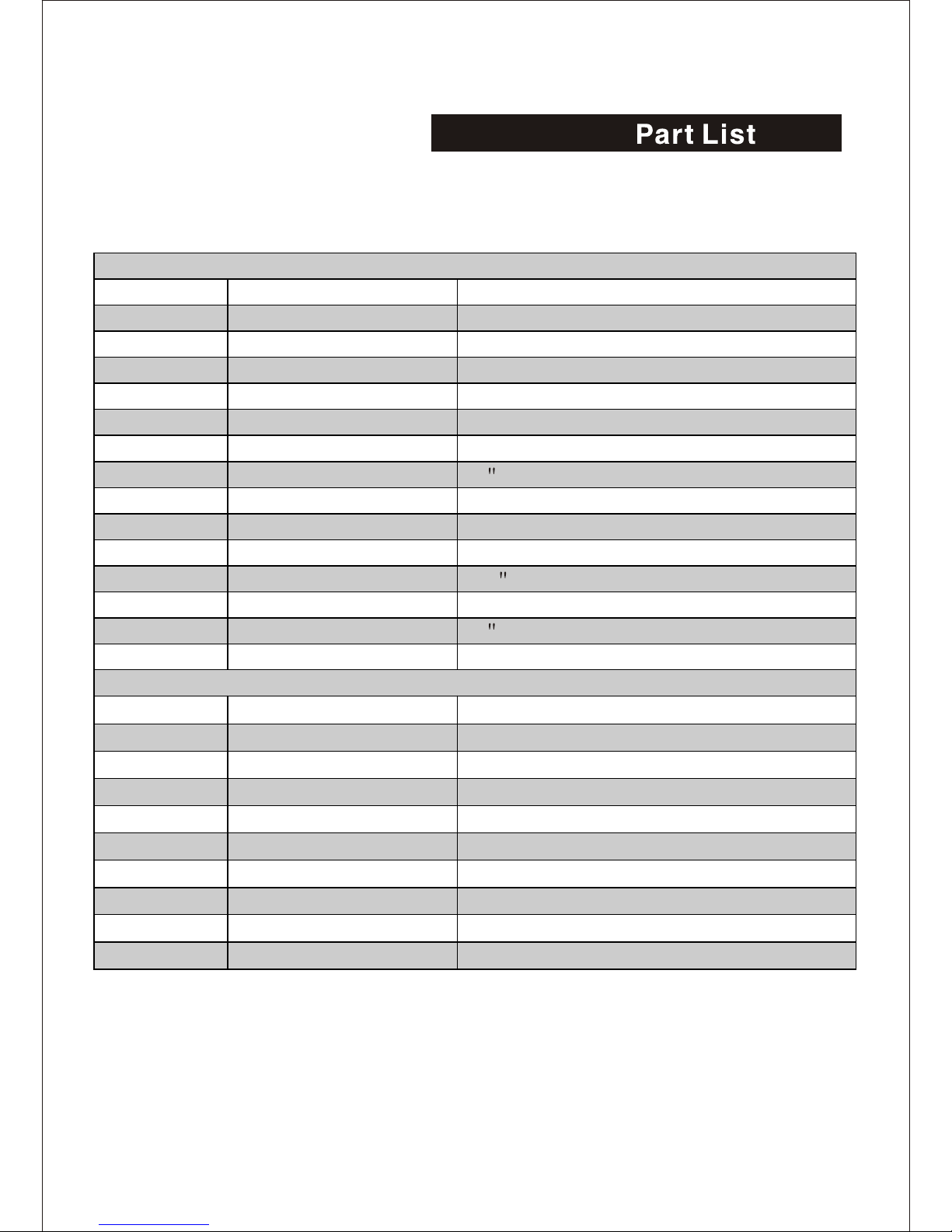
EN-7180 SERIES P/N:3635047
NO P/N PART NAME
13221138 COVER
23221127 CHASSIS
35208455 I/O PLATE
43214577 ADAPTER PLATE
53220443 ADAPTER EMI-SPRING
63221149 LINK
73221162 3.5”HDD BRACKET SUPPORT
83214566 M/B STAKE-1(SCREWED)
93408384 LED HOLDER
10 3132574 RUBBER FOOT
11 3221151 5.25” BRACKET
12 3221116 CHASSIS FRONT
13 5206983 3.5” HDD BRACKET
14 5107387 BEZEL
ACCESSORY PARTS LIST
NO P/N PART NAME
A5208012 SLIDE GUIDE
B3214566 M/B STAKE-1(SCREWED)
C3214602 M/B STAKE-2(HOOKED)
D3500851 SCREW-PAN HEAD #6-32*5
E3501171 SCREW-HEX HEAD #6-32
F3501592 SCREW-PAN HEAD M3*5
G3602055 POLYBAG 8*12
H 3602102 INNER BOX
I3214054 I/O PLATE
Big-foot HDD
3.5"HDD
P/S
1
765
4
3
10
12
9
8
11
14
13
2
Tabla de contenidos
Otros manuales de De oficina de Enlight


