Elan EL-NVR-8CH Manual de usuario

10024106 REV-A_EL-NVR-8CH
EL-NVR-8CH
Reference Guide

REFERENCE GUIDE EL-NVR-8CH
10024106_REV-A_EL-NVR-8CH
2www.elanhomesystems.com
CONTENTS
ABOUT THIS DOCUMENT ................................................................................................... 4
ELECTROMAGNETIC COMPATIBILITY (EMC) .................................................................. 4
Compliance .......................................................................................................................................4
Features ............................................................................................................................................5
Caution ..............................................................................................................................................5
INSTALLING THE NVR IN THE STRUCTURED WIRING CAN ........................................... 6
HARD DRIVE - REMOVAL AND INSTALLATION INSTRUCTIONS .................................... 7
Removing the Hard Drive ..................................................................................................................7
Installing the Hard Drive ....................................................................................................................8
PRODUCT OVERVIEW ...................................................................................................... 10
EL-NVR-8CH ..................................................................................................................................10
BEFORE USING THE NVR ................................................................................................ 11
Important! ........................................................................................................................................11
LOCATING NVR IP ADDRESS ........................................................................................... 12
LANGUAGE SETUP/SWITCH USERS .............................................................................. 13
NVR System ....................................................................................................................... 14
NVR System > General ...................................................................................................................14
NVR System > Time ........................................................................................................................15
NVR System > User ........................................................................................................................16
NVR System > Storage ...................................................................................................................17
NVR System > Event ......................................................................................................................19
Network setup .................................................................................................................... 21
Network Setup > Advance ...............................................................................................................22
Network Setup > FTP ......................................................................................................................26
Network Setup > DDNS ..................................................................................................................27
Network Setup > Other ...................................................................................................................28
Camera Setup .................................................................................................................... 29
Camera Setup > General ................................................................................................................29
Camera Setup > Video ....................................................................................................................31
Record Setup ..................................................................................................................... 32
Record Setup > General .................................................................................................................32
Record Setup > Schedule ...............................................................................................................33
Record Setup > Advanced ..............................................................................................................33
Alarm Setup ....................................................................................................................... 34
Alarm Setup > General ...................................................................................................................34
Alarm Setup > Motion Area .............................................................................................................35
Alarm Setup > Output .....................................................................................................................36
Display Setup ..................................................................................................................... 39
Display Setup > General .................................................................................................................39
Display Setup > Advanced ..............................................................................................................40
Display Setup > Sequence ..............................................................................................................41

REFERENCE GUIDE EL-NVR-8CH
10024106_REV-A_EL-NVR-8CH
3
www.elanhomesystems.com
PTZ Setup ...........................................................................................................................42
PTZ Setup > General ..................................................................................................................... 42
PTZ Setup > NVR Cascade ........................................................................................................... 43
Meta data Setup .................................................................................................................44
Meta Data Setup > General ........................................................................................................... 44
Other Setup ........................................................................................................................47
Other Setup > Smart Phone ........................................................................................................... 47
Other Setup > IVS .......................................................................................................................... 47
Stream Setup .....................................................................................................................48
Stream Setup > Live ...................................................................................................................... 49
Stream Setup > Play ...................................................................................................................... 49
Stream Setup > Backup ................................................................................................................. 50
Stream Setup > Saving Backup File .............................................................................................. 53
Appendix ............................................................................................................................54
Hard Reset ..................................................................................................................................... 54
Specifi cations ................................................................................................................................. 54

REFERENCE GUIDE EL-NVR-8CH
10024106_REV-A_EL-NVR-8CH
ABOUT THIS DOCUMENT
This document includes instructions for basic operation of the EL-NVR-8CH Network Video Recorder.
ELECTROMAGNETIC COMPATIBILITY (EMC)
This equipment generates, uses and can radiate radio frequency energy and, if not installed and used in
accordance with the instructions, may cause harmful interference to radio communications. However, there
is no guarantee that interference will not occur in a particular installation.
If this equipment does cause harmful interference to radio or television reception, which can be determined
by turning the equipment off and on, the user is encouraged to attempt correcting the interference by one or
more of the following measures:
• Re-orient or relocate the receiving antenna
• Increase the separation between the equipment and receiver
• Connect the equipment to an outlet on a different circuit to the receiver
• Consult your dealer or an experienced radio/TV technician for assistance
• Shielded (STP) network cables must be used with this unit to ensure compliance with EMC standards
Note: Changes or modifications not expressly approved by the party responsible for compliance could void
the user’s authority to operate the equipment.
Compliance
This equipment has been tested and found to comply with the limits for a Class B digital device, pursuant
to part 15 of the FCC Rules. These limits are designed to provide reasonable protection against harmful
interference in a residential installation. This equipment generates, uses and can radiate radio frequency
energy and, if not installed and used in accordance with the instructions, may cause harmful interference
to radio communications. However, there is no guarantee that interference will not occur in a particular
installation.
4www.elanhomesystems.com

REFERENCE GUIDE EL-NVR-8CH
10024106_REV-A_EL-NVR-8CH
Features
• Standalone NVR
• Supports 4K, 5-megapixel, and 1080p 60 FPS H.264 IP cameras
• Up to 48 Mbps incoming network throughput
• Full HD 4K HDMI and 1080p VGA output
• Compatible with iOS and Android devices via the ELAN mobile app
Caution
• Do not drop or strike the equipment
• Do not install the equipment near open flames or heat sources
• Do not expose this unit to rain, moisture, smoke or dusty environments
• Do not cover the opening of the unit with cloth or plastic or install this unit in a poorly
ventilated place
Note: Allow 10 cm between this unit and its surroundings.
• Do not continue to operate the unit under abnormal conditions such as detection of smoke,
strange smell, or malfunctioning screen while power is turned on
• Do not touch the power connection with wet hands
• Do not damage the power cord or leave it under pressure
• To avoid unnecessary magnetic interference, do not operate this unit near magnets,speaker
systems, etc.
• All connection cables must be grounded properly
CAUTION
Risk of explosion if battery is replaced with an incorrect type.
Dispose of batteries according to the instructions.
5
www.elanhomesystems.com

REFERENCE GUIDE EL-NVR-8CH
10024106_REV-A_EL-NVR-8CH
INSTALLING THE NVR IN THE STRUCTURED WIRING CAN
1. Align the bracket holes (x4) with the holes in the wiring can.
2. Insert the snap rivets (x4) through each bracket hole (x4) and then into the wiring can holes.
3. Push on the head of each snap rivet to secure it in the wiring can hole.
WIRING CAN
MOUNTING HOLES
SNAP
RIVETS (x4)
(x4)
1
2
6www.elanhomesystems.com

REFERENCE GUIDE EL-NVR-8CH
10024106_REV-A_EL-NVR-8CH
HARD DRIVE - REMOVAL AND INSTALLATION INSTRUCTIONS
Removing the Hard Drive
1. Remove screws (x4) located in top corners of upper casing, carefully lifting it upwards.
Note: The connector cable is attached to the hard drive located in the upper casing.
2. Disconnect the cable connector from the hard drive.
7
www.elanhomesystems.com

REFERENCE GUIDE EL-NVR-8CH
10024106_REV-A_EL-NVR-8CH
3. Remove the screws (x4) from the brackets located on both sides of the hard drive.
4. Remove hard drive.
3
3
4
Installing the Hard Drive
Note: Only Western Digital Purple Surveillance Drives are supported, up to 8TB.
1. Insert the hard drive between the brackets, aligning the hard drive screw holes (x4) with the
holes in the brackets.
2. Insert and tighten screws (x4).
2
2
1
8www.elanhomesystems.com

REFERENCE GUIDE EL-NVR-8CH
10024106_REV-A_EL-NVR-8CH
3. Reinsert SATA and power cable into hard drive.
4. Slide cover over NVR.
5. Insert and tighten the screws (x4).
(x4)
4
5
Note: The new hard drive must be formatted using the NVR before it can be recorded to.
Please refer to the NVR System > Storage section on Page 17.
9
www.elanhomesystems.com

REFERENCE GUIDE EL-NVR-8CH
10024106_REV-A_EL-NVR-8CH
10 www.elanhomesystems.com
PRODUCT OVERVIEW
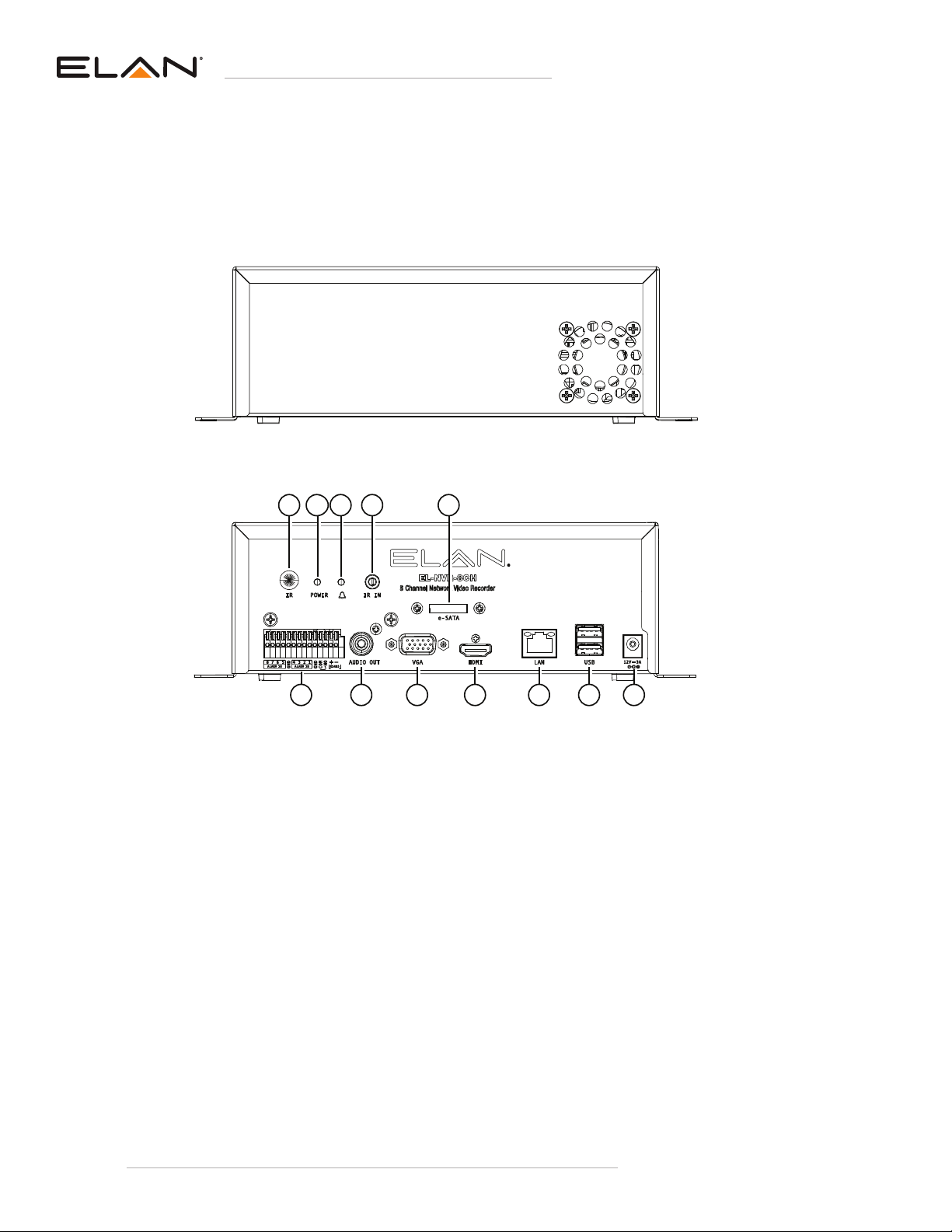
EL-NVR-8CH
Rear View
Front View
5
6 7 8 9 10 11 12
1 2 3 4
1. IR
2. Power Indicator
3. ALARM Indicator
4. IR In
5. e-SATA
6. RJ-45 Gigabit connector
7. Audio Out
8. VGA output
9. HDMI output
10. LAN
11. USB / Keyboard
12. Power socket (DC 12V-3A)
Tabla de contenidos
Otros manuales de Hardware de red de Elan

Elan
Elan HWRTR100 Manual de usuario

Elan
Elan Elan EM78P259N/260N Manual del propietario

Elan
Elan HC4 Manual de usuario

Elan
Elan EL-NVR Manual de usuario

Elan
Elan WRITER Manual de usuario

Elan
Elan EL-4KPM-V88-A2416 Manual de usuario

Elan
Elan 8840 Guía de inicio rápido

Elan
Elan EL-NVR series Manual de usuario
Manuales populares de Hardware de red de otras marcas

Matrix Switch Corporation
Matrix Switch Corporation MSC-HD161DEL Manual de usuario

B&B Electronics
B&B Electronics ZXT9-IO-222R2 Manual de usuario

Yudor
Yudor YDS-16 Manual de usuario

D-Link
D-Link ShareCenter DNS-320L Manual de usuario

Samsung
Samsung ES1642dc Instrucciones de uso

Honeywell Home
Honeywell Home LTEM-PV Instrucciones de montaje