
EJEAS Q7 Manual de usuario

Q7
Top Quality Hi-Fi
Motorcycle Bluetooth Intercom
User manual
www.ejeas.com

Q7 is a cost-effective Bluetooth communication system
for motorcycle helmets. Qualcomm 5.0 chip is adopted
to quickly pair in one second. The maximum communi-
cation distance is 800 meters. It can realize seven
people switching and talking with each other. Standard
FM, it can automatically answer the phone, more conve-
nient and safe to use; Good waterproof performance,
can be used with confidence in rainy days; Optional
controller makes it easier for you to operate in cycling;
Specially designed stereoscopic sound effect allows you
to enjoy the fun of riding anytime and anywhere.
FM radio
Type-C Volume - Earphone
interface
A/C/E Switch Key
Volume +AntennaIndicator
B/D/F
Switch Key
Power/
Phone key
01
1. About Q7
English
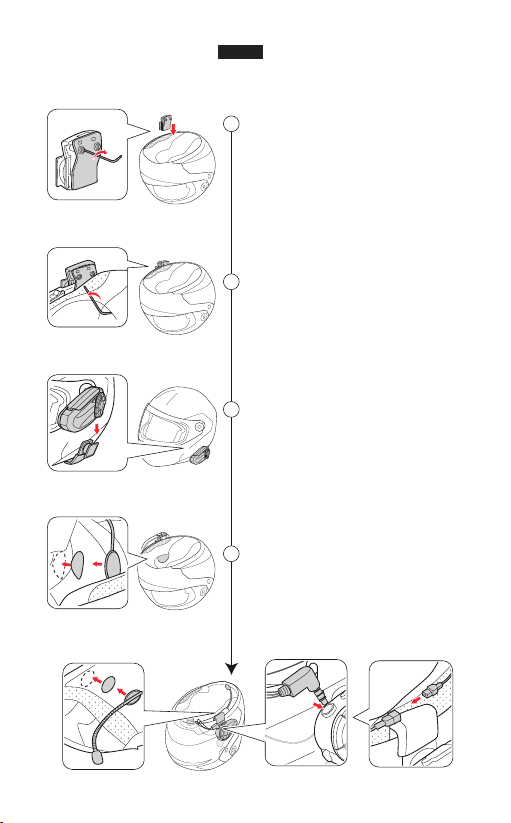
Unscrew the screws of
the clamp & install it on
your helmet for fixed.
Install the Q7 model on
the slot of the clamp.
Use the Velcroto stick
inside of your helmet,
and choose the stick
mic/soft mic for your need.
Organize the inside
tangled cables & try to put
them in your inside helmet
foam for easy wearing.
1
2
3
4
2. Product Installation
02
English

3. Packing list
Host
Manual
Earphone EUC Handle
controller
Microphone Cable
Soft microphone
UNIVERSALCONTROLLER
Adapter:5V1A
SIN:EUC19070000
EJEASTechnologies.Inc
MabeinChina
Model
EUC
A/D
+
B/E
C/F
FM
Optional
Type-C
charging cable
Mounting clip
Q7
TopQuality Hi-Fi
Motorcycle Bluetooth Intercom
User manual
www.ejeas.com
Basic operation diagram
Single-click Double-click Triple-click
Long press for 5s Simultaneous click
5s
4. Operating instructions
03
EnglishEnglish

Pairing steps
2 models pairing
Auto searching & connecting
Pairing successful
"Intercom pairing successful"
"Intercom A connected"
Flashing blue at the same rate
Red & blue lights flash fast
alternately
"Intercom A pairing"
Blue light flashes
"Ding~Ding~Ding~Ding~"
Long press the A button for 5s
to enter pairing mode
Power on
2
3
4
1
All the following voice prompts are from the main device
5s
1s
04
ON
OFF
Blue light flashes
"Ding~Ding~Ding~Ding~"
Standby
Blue light flashes slowly
ON/OFF Please charge before use
1s
EnglishEnglish

05
main
main & sub-A
sub-B
sub-A
sub-Dsub-C
sub-Fsub-E
A button B button
Regard one Q7 as the main
device, the extra two models
as sub-machine
Power on
Red & blue lights flash fast
alternately
"Intercom A pairing"
Use the main device's "A" button
to pair with the sub-A's "A"
2
1
The main device allows to pair
with extra 6 intercoms. It's A-key
and B-key all could pair with 3 s
ub-machines. Use it's A-key to
pair the A sub-machine, C
sub-machine, & E sub-machine.
It's B-key to pair the B/D/F
sub-machine.
Auto searching & connecting
Pairing successful
"Intercom pairing successful"
"Intercom A connected"
3
4
5s
3 models pairing
Red & blue lights flash fast
alternately
"Intercom B pairing"
Use the main device's "B" button
to pair with the sub-B's "B"
5
Auto searching & connecting
Pairing successful
"Intercom pairing successful"
"Intercom B connected"
6
7
main & sub-A
5s
English

06
main & sub-C
Red & blue lights flash fast
alternately
"Intercom C pairing"
Use the main device's "A" button
to pair with the sub-C's "A"
8
Auto searching & connecting
Pairing successful
"Intercom pairing successful"
"Intercom C connected"
9
10
5s
4 models pairing
5 models pairing
main & sub-D
Red & blue lights flash fast
alternately
"Intercom D pairing"
Use the main device's "B" button
to pair with the sub-D's "B"
11
Auto searching & connecting
Pairing successful
"Intercom pairing successful"
"Intercom D connected"
12
13
6 models pairing
Use the main device's "A" button
to pair with the sub-E's "A"
14
Auto searching & connecting
Pairing successful
15
16
7 models pairing
Use the main device's "B" button
to pair with the sub-F's "B"
17
Auto searching & connecting
Pairing successful
18
19
5s
English

07
Blue light flash fast
"connecting Intercom B"
Flashing blue at the same rate
"Intercom B connected"
Talk to the sub-B
2
main
Each time intercom switching, you must disconnect the currently
pairing sub-machine
Blue light flash fast
"connecting Intercom F"
Flashing blue at the same rate
"Intercom F connected"
Talk to the sub-F
6
main
Blue light flash fast
"connecting Intercom D"
Flashing blue at the same rate
"Intercom D connected"
Talk to the sub-D
4
main
Blue light flash fast
"connecting Intercom E"
Flashing blue at the same rate
"Intercom E connected"
Talk to the sub-E
5
main
main
Blue light flash fast
"connecting Intercom C"
Flashing blue at the same rate
Talk to the sub-C
3
"Intercom C connected"
Switch the intercom connection
Talk to the sub-A
1
Blue light flash fast
"connecting Intercom A"
Flashing blue at the same rate
"Intercom A connected"
main
English

08
Open the phone connection
Turn on the Bluetooth on mobile,
click the "Q7"
Disconnect
"Pairing successful, connected"
"Phone pairing"
Pairing the phone/Disconnect with phone
Red & blue lights flash
Bluetooth
Q7
If there is no pairing connection, exit the pairing state after 2 minutes
1
2
3
5s
5s
Compatible with all EJEAS models
"Intercom A searching"
When pairing with other Bluetooth intercom or headset, you can
use intercom search for pairing connection
Click the A to search and pair
Regard Q7 as the main device,
the extra models as sub-machine
Power on
Pairing successful
"Intercom pairing successful"
"Intercom A connected"
Red & blue lights flash fast
alternately
Each device can become a host
"Intercom A pairing"
Use the two device's "A"
button to enter pairing mode
2
1
3
4
Blue light flashes quickly
Flashing blue at the same rate
main sub
5s
English

09
Disconnected Reset default setting
"Intercom Disconnected"
or
"Restore default setting"
1s1s 5s
or
Telephone answering
Automatic answer
when there is no
operation within
8 seconds
Hang up the call
Cancel the redial
Last Num Redial Call rejection
1s
or
Bluetoothback connection
Automatically
connect back to
the last phone
after switching on
English
Otros manuales para Q7
2
Tabla de contenidos
Otros manuales de Auriculares de EJEAS


