eeese Hugo Manual de usuario

User manual
Dehumidier Hugo
Art. 2556 & 2557
Thank you for choosing this product.
Please read this instruction manual before using it.

MV-2556-2557-08-2022 eeese-aircare.com © All rights eeese air care aps 85
UK
Table of Contents
1. Safety Instructions............................................................................................................................ 86
2. Parts List ................................................................................................................................................. 88
3. Continuous Drainage ........................................................................................................................ 89
4. Prior to Operation................................................................................................................................ 90
5. Operation Instructions ..................................................................................................................... 90
6. Cleaning the dehumidier .............................................................................................................. 95
7. Cleaning the Air Pre-Filter Frame................................................................................................ 95
8 Storage..................................................................................................................................................... 96
9. Trouble Shooting................................................................................................................................. 96
10. Technical Specications ................................................................................................................. 98
11. Service...................................................................................................................................................... 98
12. Warranty .................................................................................................................................................. 99
13. Responsible Disposal........................................................................................................................ 100
14. Warning on Refrigerant R290...................................................................................................... 100
15. Connection to WIFI............................................................................................................................. 101
Please read the user manual before any use, refer to the
corresponding section in this user manual. Save it for future
reference. We reserve the right for any error in text or images
and any necessary changes made to technical data.
Recycle unwanted materials instead of disposing of them.
All appliances and packaging should be sorted and tendered
at a regional recycling centre and be processed in an
ecological manner.
The product conforms to the applicable European and
other directives.

86 MV-2556-2557-08-2022 eeese-aircare.com © All rights eeese air care aps
UK
1. Safety Instructions
Warning
This appliance is intended for use in a domestic environment only. Any other use
is not recommended by the manufacturer and may cause re, electrical shocks
or other person injury and property damage. Never try to dismantle or repair the
machine yourself. The appliance shall be installed in accordance with national
wiring regulations. The machine is designed A-weighted sound pressure level below
70dB. Check the voltage and make sure it meets the technical specication of the
machine. This machine can be used by children aged from 8 years and above and
persons with reduced physical, sensory or mental capabilities or lack of experience
and knowledge if they have been given supervision or instruction concerning use of
the appliance in a safe way and understand the hazards involved.
Cautions Wet hands not allowed Warning
Power Cord
Do not pull the
power cord in
order to unplug
the device from
the socket.
Do not use
the appliance
in overloaded
extension cord.
Do not put any
heavy objects
on the power
cord in order
to avoid safety
hazard.
Do not use the
appliance if its
socket holes
cannot rmly
hold a plug.
Do not attempt
to change the
power cord,
contact the
authorized
service center
for repair.
Do not touch
the plug with
wet hands in
order to avoid
electric shock.

MV-2556-2557-08-2022 eeese-aircare.com © All rights eeese air care aps 87
UK
Unplug the
product im-
mediately if it
emits strange
noises, odours
or smoke. Please
pull out the plug
during lightning
storms. Unplug
the product
when it is not
in use.
The socket has
to be earthed
and appropriate-
ly secured.
Placement
Do not put am-
mable and ex-
plosive objects
around the appli-
ance in order to
avoid re.
Do not use
the appliance
in swimming
pool or similar
facilities in order
to avoid safety
hazard.
Do not use the
appliance in a
draughty place
or next to a radi-
ator or heating
appliance.
Place the appli-
ance on a stable,
at surface. The
machine must
always stand
upright.
During Use
Before moving
the dehumidier
please turn o
the power,
unplug the
power cord and
make sure that
the water tank
is empty
Do not pour
water into the
appliance in
order to avoid
malfunction.
Children shall
not play with
the machine.
Never insert for-
eign objects into
the machine.
Do not put any
heavy objects
on the appliance
in order to avoid
malfunction.
Never sit on the
product.

88 MV-2556-2557-08-2022 eeese-aircare.com © All rights eeese air care aps
UK
Do not push
the appliance
over or let the
appliance suer
strong impact
in order to avoid
malfunction.
The appliance
must not be
covered when
being used.
Do not put
hands on the air
outlet in order
to avoid injury or
malfunction.
Please install
the air lter and
make sure it
is clean before
using it.
2. Parts List
Components
1. Front casing
2. Control panel
3. Air outlet
4. Handle
5. Pre-lter
6. Continuous drainage outlet
7. Water tank
8. Power cord
9. HEPA lter
10. Drain hose
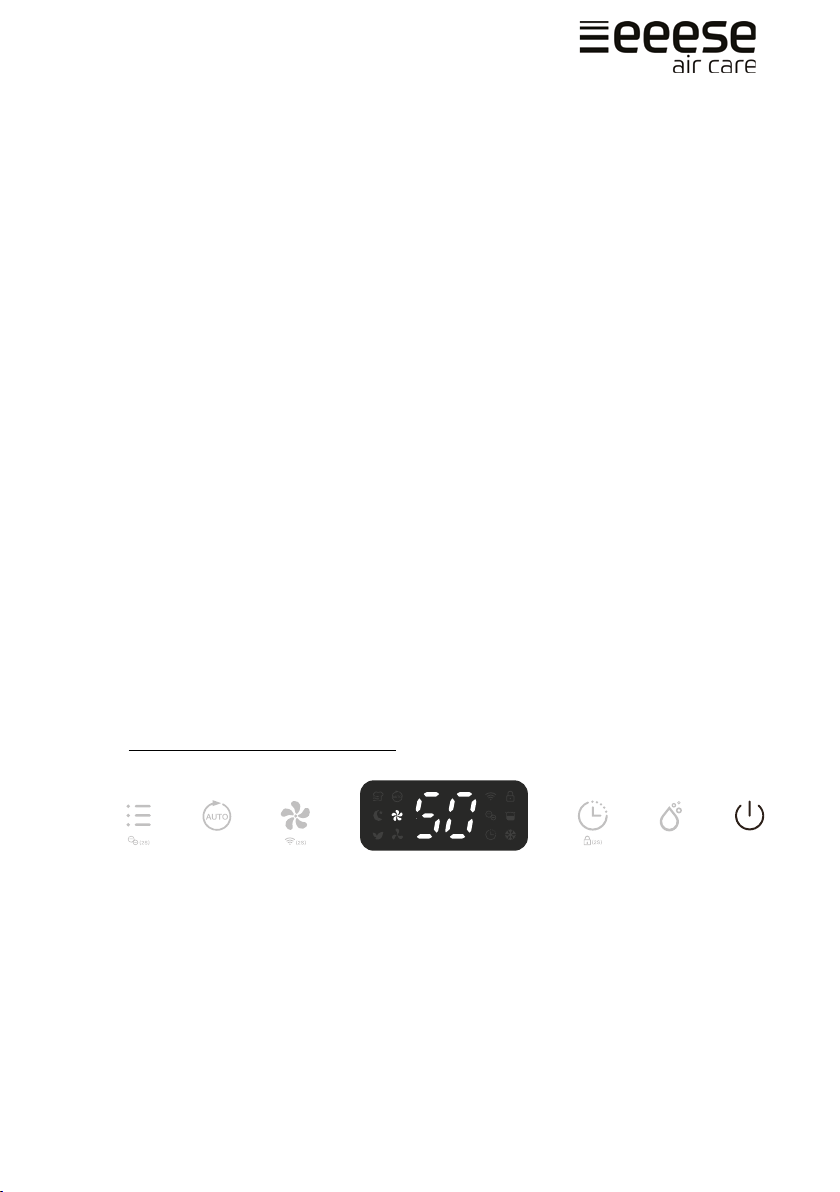
Control panel
11. Mode & Ionizer Button
12. Auto Button
13. Fan Speed & WiFi Button
14. Timer & Child Lock Button
15. Humidity Setting Button
16. Power Button
2
1
34
5
6
7
8
9
10
1211 1413 15 16

MV-2556-2557-08-2022 eeese-aircare.com © All rights eeese air care aps 89
UK
Drainage
3. Continuous Drainage
Continuous drainage option allows easy removal of collected water instead of manually
emptying from the water tank when the environment is very high humidity.
1. Remove the rubber plug covering the drain hose connection.
2. Connect a suitable drain hose (14mm inner diameter) through the drainage outlet.
Ensure that the hose is secure and tight to prevent leakage.
3. Always make sure the drainage hose is not blocked or obstructed to maintain
a smooth ow.
Please always make sure the pipe is going downhill, and is not blocked or kinked.
Timer Indicator
Ionizer Indicator
Air Purifying Indicator
Sleep Indicator
Laundry Drying Indicator
Auto Indicator
Low Fan Speed Indicator
High Fan Speed Indicator
WiFi Indicator
Childlock Indicator
Defrosting Indicator
Tank Full Indicator
Rubber Plug Drain Hose

90 MV-2556-2557-08-2022 eeese-aircare.com © All rights eeese air care aps
UK
4. Prior to Operation
• Check the dehumidier for any transport damage. In case of damage, you should
contact our eeese service line immediately.
• Place the dehumidier in an upright position on a stable, at surface.
• Make sure that the mains lead is easily accessible and is not damaged by sharp
edges or is crushed in any way during use.
• Ensure the dehumidier is at a safe distance at least 50 cm away from a wall
or furniture and has air space on all sides.
• The machine must stand upright for at least 1 hour before it is used for the rst time
• If any part of your house suers from severe humidity, the dehumidier can be
placed there rst and then moved to another part of the house later.
• Ensure the supply power is in correspondence with the value on the nameplate
and power outlet needs to be grounded.
• Ensure the water tank is correctly tted before the dehumidier can be switched on.
• If the dehumidier is turned o and then turned back on again immediately, it will
take approximately 3 minutes to reach full power (compressor back to work).
• If the dehumidier is switched o by a power cut, it will automatically switch back
on once the power is restored.
• The dehumidier works best at normal room temperature, its eiciency is reduced
if the ambient temperature falls to below 15°C.
• Turn on the power and run the machine as per instructions below.
5. Operation Instructions
Switch On / Switch O The Unit
1. Connect the mains lead to socket.
2. Press Power button (A) once to turn on the unit. By default, it runs
on Manual Dehumidifying Mode.
3. Press Power button once again to turn o the unit.
A

MV-2556-2557-08-2022 eeese-aircare.com © All rights eeese air care aps 91
UK
Humidity Setting Control
Press the Humidity setting button (A) to select the desired maximum level of humidity
between the following CO-30%-35%-40%-45%-50%-55%-60%-65%-70%-75%-80%-CO. CO
stands for continuous non-stop dehumidication. If you select one of the percentages,
then the unit will run until that level is reached. And if the humidity is below the selected
percentage, the unit will not run.
If the ambient humidity is lower than 30% the display will show LO
If the ambient humidity is higher than 90% the display will show HI
Timer Setting
When the unit is turned on, press the Timer button (A) and select between 1-24hr to
select your preferred timer duration before automatic shuto setting. The timer indicator
will be activated on the display.
Fan speed
During normal dehumidication, you can select high or low fan speed (A). This will aect
how quickly dehumidies.
A
A
A

92 MV-2556-2557-08-2022 eeese-aircare.com © All rights eeese air care aps
UK
WIFI Function
Press the Fan Speed button (A) for 2 seconds to activate the WIFI function and enter into
the distribution network mode. During the network conguration, the WIFI indicator (B)
ashes and after the WIFI is connected, the icon is on.
See below section Connection to WIFI for detalied settings.
Press the Fan Speed button for 2 seconds and you can disconnect to the WIFI.
Auto Dehumidication
Press the Auto button (A) to enter into the Auto Dehumidifying Mode, the unit runs auto-
matically accordance to the ambient humidity detected below.
Ambient RH% detected Compressor Fan Speed Level
RH%>65% Working High
55%≤RH%≤65% Working Low
RH%<55% Stops Working Low
RH = Relative humidity
Sleep Mode
Press the Mode button (A) until the Sleep mode indicator (B) shows on the display. 10
seconds later, all indicators will be o. At Sleep mode, it operates on low fan speed.
A
B
A
AB

MV-2556-2557-08-2022 eeese-aircare.com © All rights eeese air care aps 93
UK
At Sleep mode, press any button to wake up the unit and then you can operate
the unit as usual.
Air Purifying Mode
Press the Mode Button (A) until the Air Purier and Ionizer indicator (B) shows on the
display (B). The unit works with high fan speed without dehumidifying, it will only purify
the air.
The ionizer function can be turned o by pressing the Mode button for 2 seconds.
Built in Ionizer
The ionizer creates negative ions that attach to positive charged molecules such as dust,
bacteria, pollen, smoke, and other allergens. These molecules attach to each other into
bigger molecules that cannot oat in the air and falls to the ground.
Press the Mode button (A) for 2 seconds to activate the ionizer function. The ionizer
indicator will show on the display once activated (B). Inactivate it by pressing the Mode
button for 2 seconds again. Note that the ionizer indicator disappears.
If the fan stops working, the ionizer function will automatically be deactivated.
AB B
AB
Este manual sirve para los siguientes modelos
2
Tabla de contenidos
Otros manuales de Deshumidificador de eeese

eeese
eeese Emma 2567 Manual de usuario

eeese
eeese Adam Manual de usuario

eeese
eeese Emma Manual de usuario

eeese
eeese Axel Manual de usuario

eeese
eeese Otto Manual de usuario

eeese
eeese Mark Manual de usuario

eeese
eeese Adam Manual de usuario

eeese
eeese Emma 2568 Manual de usuario

eeese
eeese Danny Manual de usuario

eeese
eeese Carl Manual de usuario